
1. บทนำ
Thank you for choosing the UNITOPSCI 10.1 Inch Single Din Adjustable Car Stereo. This advanced car multimedia player is designed to enhance your driving experience with its versatile features, including Wireless CarPlay, Android Auto, Bluetooth 5.2, and a large IPS floating touchscreen. This manual provides detailed instructions for installation, operation, maintenance, and troubleshooting to ensure optimal performance and user satisfaction.

Figure 1.1: UNITOPSCI 10.1 Inch Single Din Adjustable Car Stereo with its main components.
2. คุณสมบัติของผลิตภัณฑ์
The UNITOPSCI Car Stereo is equipped with a range of features designed for convenience and entertainment:
- 10.1 Inch Touchscreen MP5 Car Radio, Detachable Screen & Touch Button Design: Features a floating and adjustable design, allowing for 30° front/rear tilt, 30° left/right tilt, and 5cm vertical movement for optimal viewing. The touch button design simplifies volume, mute, and power control.
- Wireless CarPlay & Android Auto, Mirror Link: Seamlessly connect your smartphone via wireless/wired BT/WIFI or USB for access to navigation, contacts, and media. The Mirror Link function allows screen mirroring from your phone to the car radio display.
- Bluetooth 5.2, EQ Sound: Advanced Bluetooth 5.2 ensures faster and more stable connections for hands-free calls and music streaming. Multi-band EQ mode allows for personalized audio customization.
- You-tube Online Video, Lossless Sound Quality: Supports online video streaming via phone hotspot. Enjoy pure, uncompressed sound with FLAC mode support.
- FM/AM Radio, USB & TF & AUX-IN: Digital stereo FM/AM radio with 30 preset stations (18 FM, 12 AM) and memory function. Dual USB ports for playback and 5V_2A phone charging, plus TF card and AUX-IN support.
- หลัง View Camera, SWC: Automatic display of reversing video when in reverse gear. Includes a 12-LED backup camera with 170° wide angle for safer parking. Steering Wheel Control (SWC) compatibility for convenient function access.

Figure 2.1: Wireless CarPlay, Android Auto, and Mirrorlink capabilities.
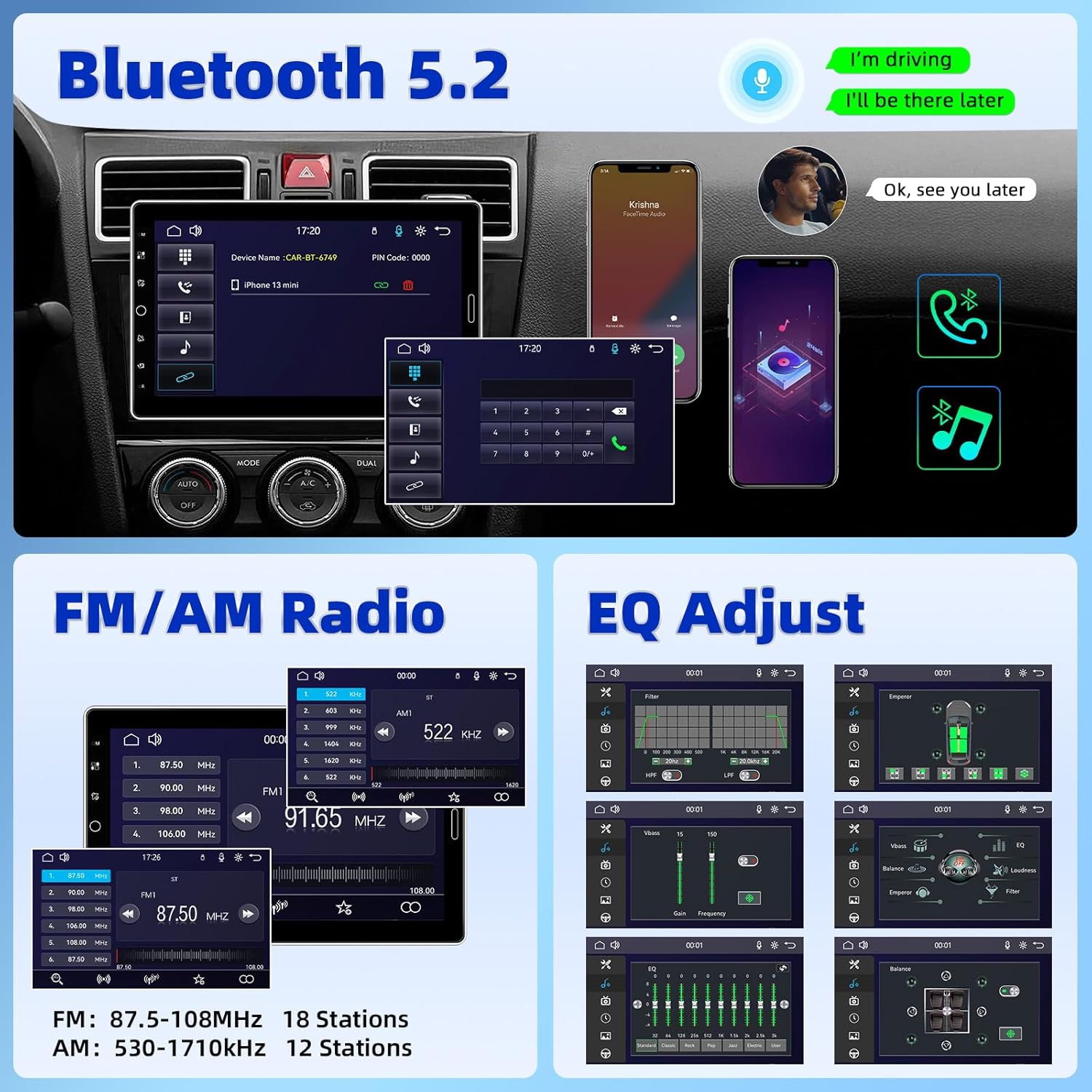
Figure 2.2: Bluetooth 5.2, FM/AM Radio, and EQ Adjustment options.

Figure 2.3: Support for YouTube Online Video playback.

Figure 2.4: Detachable and adjustable 10.1 Inch IPS Touchscreen.
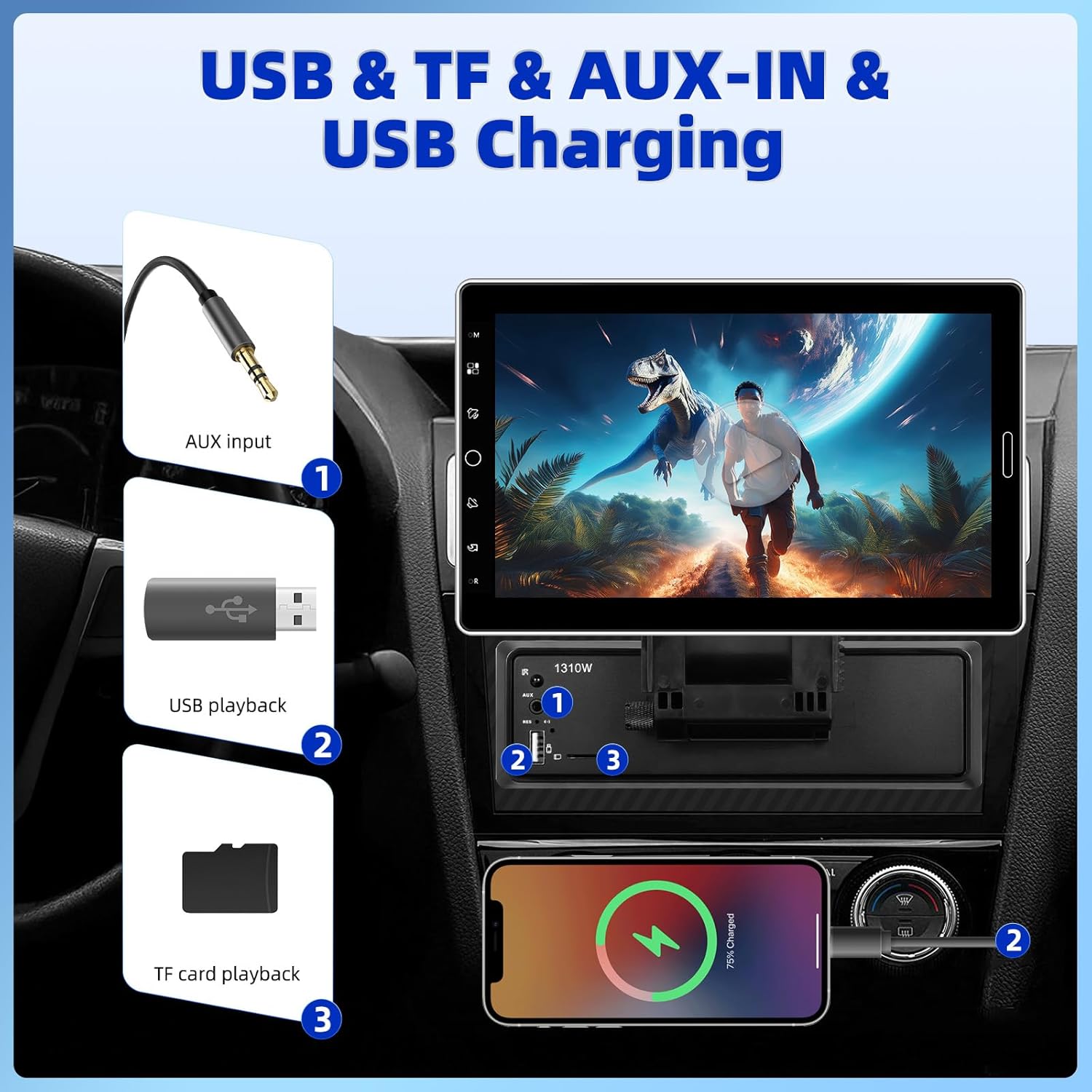
Figure 2.5: USB, TF, AUX-IN, and USB Charging ports.
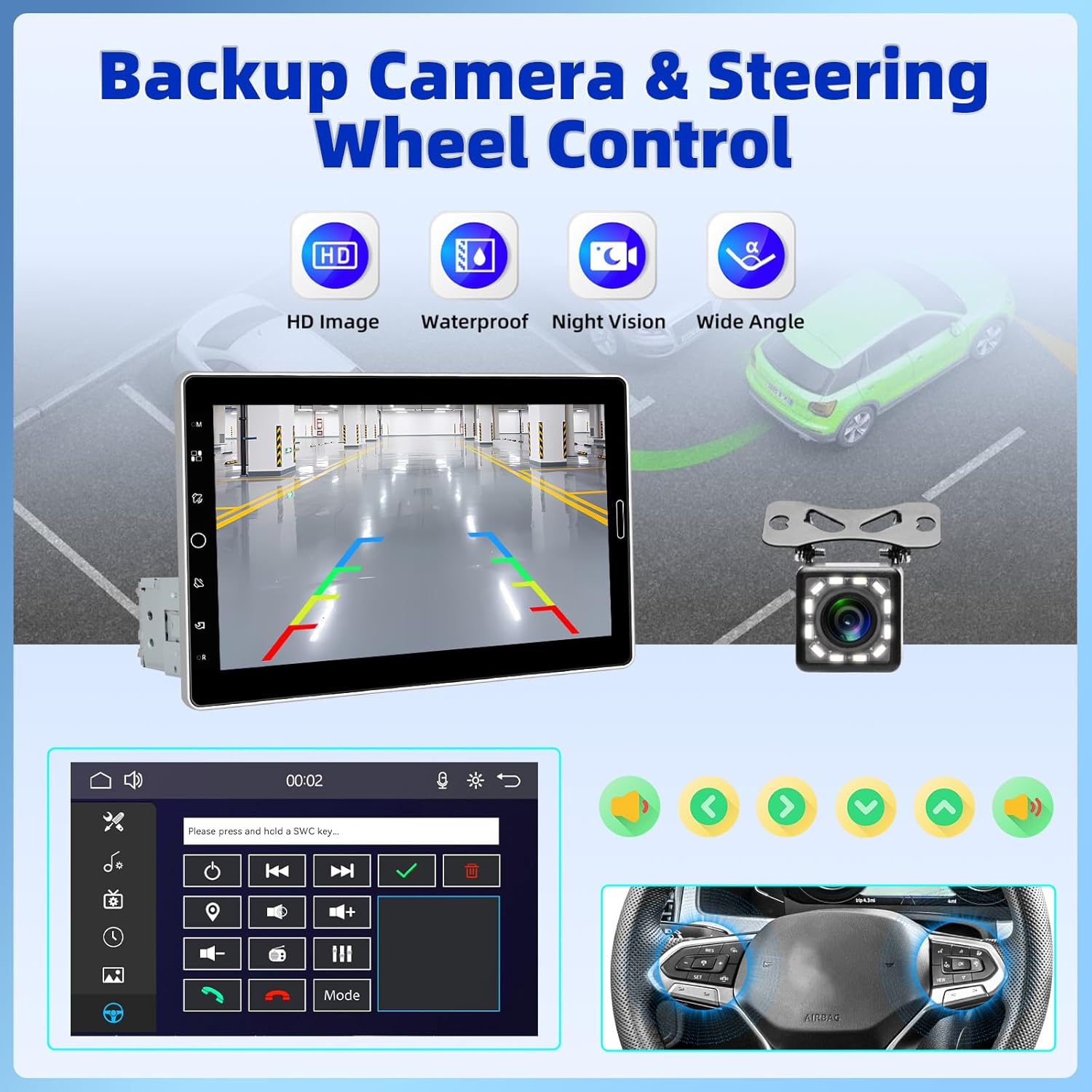
Figure 2.6: Backup Camera and Steering Wheel Control (SWC) functionality.
3. อะไรอยู่ในกล่อง
เมื่อเปิดบรรจุภัณฑ์สินค้า โปรดตรวจสอบว่ามีสินค้าครบถ้วนดังต่อไปนี้:
- เครื่องเล่น MP5 ในรถยนต์ 1 เครื่อง (ตัวเครื่องหลัก)
- สายไฟ 1 เส้น
- สายฮอร์น 1 เส้น
- ไมโครโฟน 1 ตัว
- 1 x วงเล็บยึด
- 1 x คู่มือผู้ใช้
- 1 x 12 LEDs Backup Camera

Figure 3.1: Product Size and Packing List overview.
4. การตั้งค่าและการติดตั้ง
Installing the UNITOPSCI Car Stereo requires careful wiring and mounting. Due to the complexity of car audio systems and varying vehicle models, professional installation is highly recommended to ensure proper functionality and avoid damage to your vehicle or the stereo unit. If you choose to install it yourself, please refer to the detailed wiring diagrams and instructions provided in the included user manual.
Note: Some users have reported that wiring instructions may require prior experience with car radios. Pay close attention to wire colors and functions.
4.1 การติดตั้งเครื่อง
- Ensure the single DIN slot in your vehicle is compatible with the stereo's dimensions.
- Use the provided mounting bracket to secure the main unit firmly into the dashboard.
- Attach the 10.1-inch display to the main unit, ensuring it clicks securely into place. Adjust the screen angle for optimal viewการไอเอ็นจี
4.2 การเชื่อมต่อสายไฟ
Connect the power cable, horn cable, microphone, and backup camera according to the wiring diagram in the dedicated user manual section. Ensure all connections are secure and properly insulated to prevent short circuits.
5. คู่มือการใช้งาน
This section outlines the basic operation of your UNITOPSCI Car Stereo.
5.1 การเปิด/ปิดเครื่องและการควบคุมพื้นฐาน
- กดปุ่มเปิด/ปิดบนตัวเครื่องเพื่อเปิดหรือปิด
- Adjust volume using the touch buttons or steering wheel controls (if connected).
- The screen dimming option or screen-off feature can be accessed through the settings menu.
5.2 CarPlay ไร้สายและ Android Auto
- สำหรับการเชื่อมต่อไร้สาย: Enable Bluetooth and Wi-Fi on your smartphone. On the car stereo, navigate to the CarPlay or Android Auto icon. Follow the on-screen prompts to pair your device.
- สำหรับการเชื่อมต่อแบบมีสาย: Connect your smartphone to the stereo's USB port using a compatible USB cable. The system should automatically detect and launch CarPlay or Android Auto.
- Once connected, you can access navigation, make calls, send messages, and play music directly from the stereo's interface.
5.3 การเชื่อมต่อบลูทูธ
- เข้าไปที่การตั้งค่าบลูทูธในเครื่องเสียงรถยนต์
- Enable Bluetooth on your phone and search for available devices. Select "UNITOPSCI" (or similar name) from the list.
- Confirm the pairing code on both devices. Once paired, you can make hands-free calls and stream audio.
5.4 วิทยุเอฟเอ็ม/เอเอ็ม
- Select the FM/AM radio application from the main menu.
- ใช้ฟังก์ชั่นสแกนเพื่อค้นหาและบันทึกสถานีที่มีอยู่โดยอัตโนมัติ
- ปรับคลื่นความถี่ด้วยตนเอง หรือเลือกจากสถานีที่ตั้งไว้ล่วงหน้า
5.5 Media Playback (USB, TF, AUX-IN, Online Video)
- ยูเอสบี/ทีเอฟ: Insert your USB drive or TF card into the respective slot. The system will automatically detect and allow you to browse and play media files (เสียง วิดีโอ ภาพ)
- ช่องต่อสัญญาณเข้า: Connect an external audio device to the AUX-IN port using a 3.5mm audio cable. Select the AUX input source on the stereo.
- Online Video (YouTube): Connect the stereo to your phone's hotspot. Open the YouTube application on the stereo to browse and stream videos.
5.6 การตั้งค่า EQ
- เข้าถึงการตั้งค่า EQ จากเมนูเสียง
- Adjust various frequency bands to customize your sound profile. Preset EQ modes are also available.

Figure 5.1: User Interface Display and Media Playback exampเลส.
6. การบำรุงรักษา
การบำรุงรักษาอย่างถูกต้องจะช่วยให้เครื่องเสียงในรถยนต์ของคุณมีอายุการใช้งานยาวนานและมีประสิทธิภาพเหมาะสมที่สุด
- การทำความสะอาดหน้าจอ: ใช้ผ้านุ่มไม่เป็นขุยเช็ดหน้าจอสัมผัสเบาๆ สำหรับรอยเปื้อนฝังแน่น ให้เช็ดเบาๆampชุบผ้าด้วยน้ำหรือน้ำยาทำความสะอาดที่ปลอดภัยต่อหน้าจอ หลีกเลี่ยงวัสดุที่มีฤทธิ์กัดกร่อนหรือสารเคมีรุนแรง
- การทำความสะอาดทั่วไป: เก็บตัวเครื่องให้สะอาดปราศจากฝุ่นและเศษผง ใช้แปรงขนนุ่มหรือลมอัดทำความสะอาดช่องระบายอากาศและพอร์ตต่างๆ
- อุณหภูมิ: ควรหลีกเลี่ยงการวางเครื่องไว้ในที่ที่มีอุณหภูมิสูงหรือต่ำเกินไป การสัมผัสกับแสงแดดโดยตรงหรือสภาพอากาศหนาวจัดเป็นเวลานานอาจส่งผลต่อประสิทธิภาพและอายุการใช้งาน
- การเชื่อมต่อ: ตรวจสอบการเชื่อมต่อสายไฟทั้งหมดเป็นระยะๆ เพื่อให้แน่ใจว่ามีความปลอดภัยและไม่มีการกัดกร่อน
7 การแก้ไขปัญหา
If you encounter issues with your UNITOPSCI Car Stereo, refer to the following common problems and solutions:
| ปัญหา | สาเหตุที่เป็นไปได้ | สารละลาย |
|---|---|---|
| เครื่องไม่เปิด | ไม่มีไฟเลี้ยง; ฟิวส์ขาด; การเดินสายไฟไม่ถูกต้อง | Check power cable connections. Inspect vehicle's fuse box and the unit's fuse. Verify wiring against the manual. |
| ไม่มีเสียงหรือเสียงผิดเพี้ยน | สายลำโพงหลุดออก; ปริมาณเสียงต่ำเกินไป; แหล่งเสียงไม่ถูกต้อง | Check speaker connections. Increase volume. Ensure correct audio input (Radio, USB, Bluetooth, AUX). Adjust EQ settings. |
| CarPlay/Android Auto ไม่สามารถเชื่อมต่อได้ | Bluetooth/Wi-Fi off; Incorrect USB cable; Phone software issue. | Ensure phone's Bluetooth/Wi-Fi is on. Use original or certified USB cable. Restart phone and stereo. |
| กล้องสำรองไม่แสดงผล | Camera not connected; Reverse trigger wire not connected. | Verify camera cable connection to the stereo. Ensure the reverse trigger wire is correctly connected to the vehicle's reverse light circuit. |
| การควบคุมพวงมาลัยไม่ทำงาน | SWC wires not connected; SWC not configured. | Ensure SWC wires are correctly connected. Access the stereo's settings to configure steering wheel controls. |
If the problem persists after attempting these solutions, please contact UNITOPSCI customer support for further assistance.
8. ข้อมูลจำเพาะ
Detailed technical specifications for the UNITOPSCI 10.1 Inch Single Din Adjustable Car Stereo:
- ขนาดสินค้า : 5.44 x 7.01 x 6.34 นิ้ว (13.82 x 17.81 x 16.10 ซม.)
- น้ำหนักสินค้า: 2.2 ปอนด์ (1 กิโลกรัม)
- หมายเลขรุ่น: A4061A3
- เทคโนโลยีการเชื่อมต่อ: อุปกรณ์เสริม, บลูทูธ, USB
- ประเภทตัวควบคุม: การควบคุมด้วยมือ
- อุปกรณ์ที่รองรับ: สมาร์ทโฟน ลำโพง
- ประเภทตัวเชื่อมต่อ: USB ประเภทเอ
- โหมดเอาต์พุตเสียง: โมโน
- กำลังขับ: 180 วัตต์
- ขนาดหน้าจอ: หน้าจอสัมผัส IPS ขนาด 10.1 นิ้ว
- เวอร์ชันบลูทูธ: 5.2
- ความถี่วิทยุ: FM: 87.5-108MHz (18 Stations), AM: 530-1710KHz (12 Stations)
9. การรับประกันและการสนับสนุน
UNITOPSCI is committed to providing high-quality products and excellent customer service. Your car stereo comes with comprehensive support and warranty coverage:
- Replacement Availability: Replacements are available within 24 months of purchase.
- ตอบสนองอย่างรวดเร็ว: เราจะตอบข้อซักถามของคุณภายใน 16 ชั่วโมง
- การสนับสนุนหลังการขายตลอดอายุการใช้งาน: Benefit from lifetime consultation and technical support.
- นโยบายการคืนสินค้า: Enjoy a 60-day no-worry return period.
For any technical issues, questions, or support needs, please contact us directly:
อีเมล: UNITOPSCI@126.com

Figure 9.1: UNITOPSCI Customer Support Information.