
UNITOPSCI A4034A3
UNITOPSCI 10.4 Inch Single Din Adjustable Vertical Car Stereo
คู่มือการใช้งาน
Model: A4034A3 | Brand: UNITOPSCI
1. บทนำ
This manual provides detailed instructions for the installation, operation, and maintenance of your UNITOPSCI 10.4 Inch Single Din Adjustable Vertical Car Stereo. Please read this manual thoroughly before using the product to ensure proper function and safety.
คุณสมบัติหลัก:
- 10.4 Inch IPS 1280*480 Vertical Touchscreen with Detachable & Adjustable Design
- รองรับ Wireless CarPlay และ Android Auto
- Bluetooth 5.2 สำหรับการโทรแบบแฮนด์ฟรีและการสตรีมเสียง
- FM/AM/RDS Radio with EQ Adjustments
- USB & TF Card Playback and Charging
- ฟังก์ชันการเชื่อมโยงกระจก
- Support for Rear View Camera and Steering Wheel Control (SWC)
- Seven Color Backlight Options

รูปที่ 1.1: เกินview of the UNITOPSCI 10.4 Inch Car Stereo with included backup camera and smartphone integration icons.
2. อะไรอยู่ในกล่อง
โปรดตรวจสอบเนื้อหาในแพ็คเกจของคุณตามรายการด้านล่าง:
- เครื่องเล่น MP5 ในรถยนต์ 1 เครื่อง
- สายไฟ 1 เส้น
- สายฮอร์น 1 เส้น
- 1 x ไมโครโฟน
- 1 x วงเล็บยึด
- 1 x คู่มือผู้ใช้
- 1 x D-BUS Cable
- 1 x 12 LEDs Backup Camera
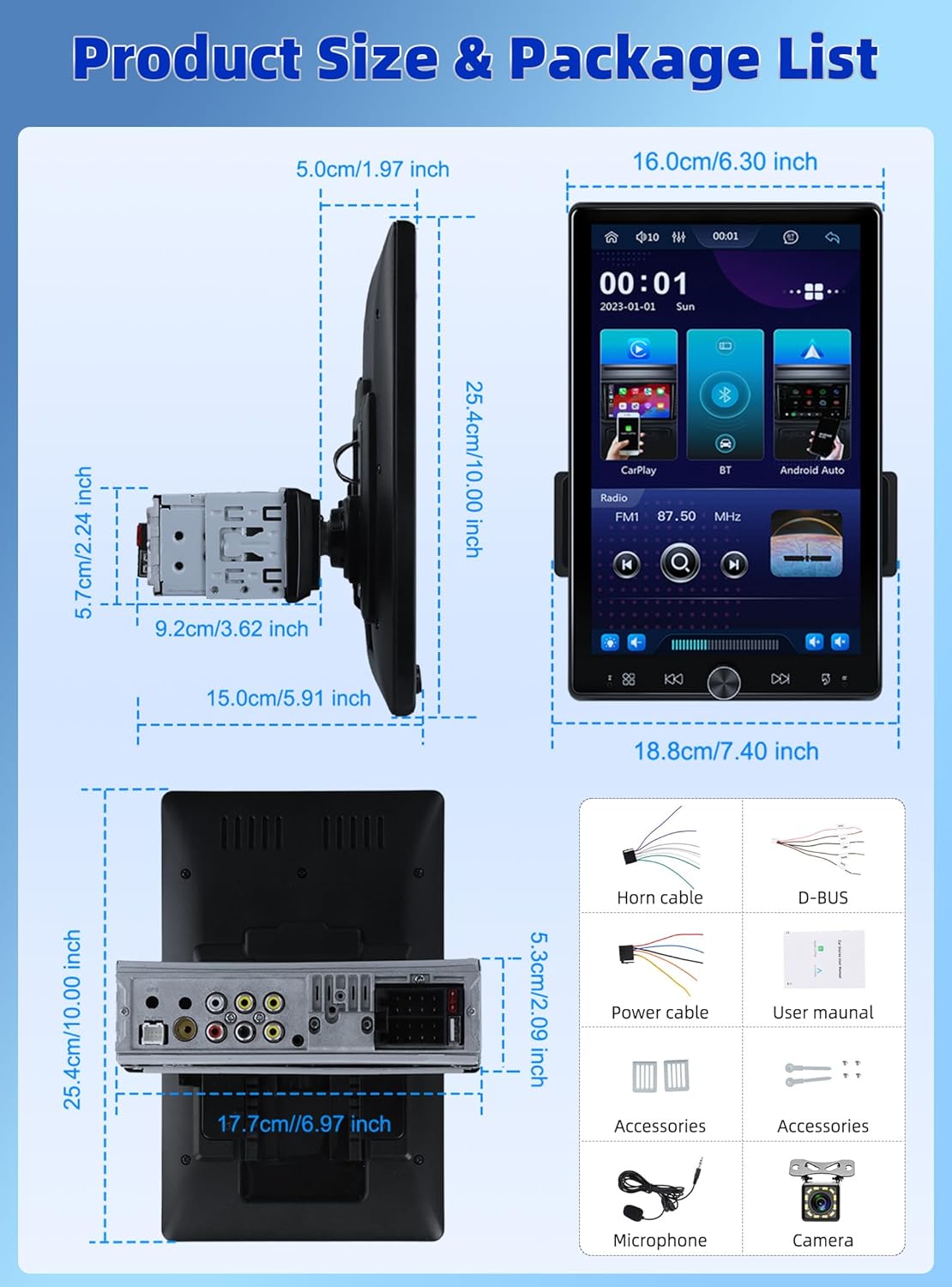
Figure 2.1: Diagram showing the dimensions of the car stereo and a visual representation of the included package contents.
3. การตั้งค่าและการติดตั้ง
Proper installation is crucial for optimal performance. It is recommended to have this unit installed by a professional.
3.1 การปรับหน้าจอ
The 10.4-inch floating touchscreen is designed for adjustability to provide the best viewing angle. It can be adjusted in three directions:
- Approximately 30° front/rear tilt
- Approximately 30° left/right tilt
- Approximately 5cm vertical movement

Figure 3.1: Illustration of the adjustable and floating design of the 10.4-inch touchscreen, highlighting tilt and vertical movement capabilities.
3.2 ด้านหลัง View การเดินสายไฟกล้อง
To enable the automatic display of the reversing video, connect the included rear view camera according to the diagram below. Ensure the trigger wire (labeled "back" or "reverse" on the power cable) is connected to the reversing light positive.
- The rear camera features 12 LED lights for clear images in various conditions.
- A 170° horizontal wide angle provides a comprehensive view.

Figure 3.2: Detailed wiring diagram for connecting the rear view camera to the car stereo system.
4. คู่มือการใช้งาน
4.1 CarPlay ไร้สายและ Android Auto
Connect your smartphone wirelessly or via USB to access CarPlay or Android Auto. This allows seamless integration of your phone's contacts, GPS navigation, music, and other applications directly on the car stereo screen.

Figure 4.1: Display showing the Wireless CarPlay and Android Auto interfaces, including voice assistant prompts.
4.2 การเชื่อมต่อบลูทูธ 5.2
The unit features advanced Bluetooth 5.2 technology for faster and more stable connections. Use Bluetooth for hands-free calling and streaming music with lossless sound quality.

Figure 4.2: Screenshots illustrating the Bluetooth 5.2 interface for hands-free calls and music playback.
4.3 FM/RDS Radio and EQ
Enjoy digital stereo FM radio with 18 preset stations. The RDS function provides real-time road conditions, news, and weather. Customize your audio experience using the multi-band EQ mode.

Figure 4.3: Visuals of the FM/RDS radio interface and the adjustable equalizer settings.
4.4 USB & TF Card Functionality
The unit supports USB for media playback and phone charging. The TF card slot allows for playing various audio formats.
4.5 Knob Control and Backlight
A physical knob provides easy adjustment for volume, mute, and power on/off. The unit also features seven customizable backlight colors to match your car's interior.

Figure 4.4: Depiction of the various interfaces, USB charging capability, the adjustable knob, and the seven-color backlight feature.
4.6 ระบบควบคุมพวงมาลัย (SWC)
If your vehicle supports it, connect the SWC wires to control various functions (e.g., switch songs, adjust volume) directly from your steering wheel for convenience and safety.
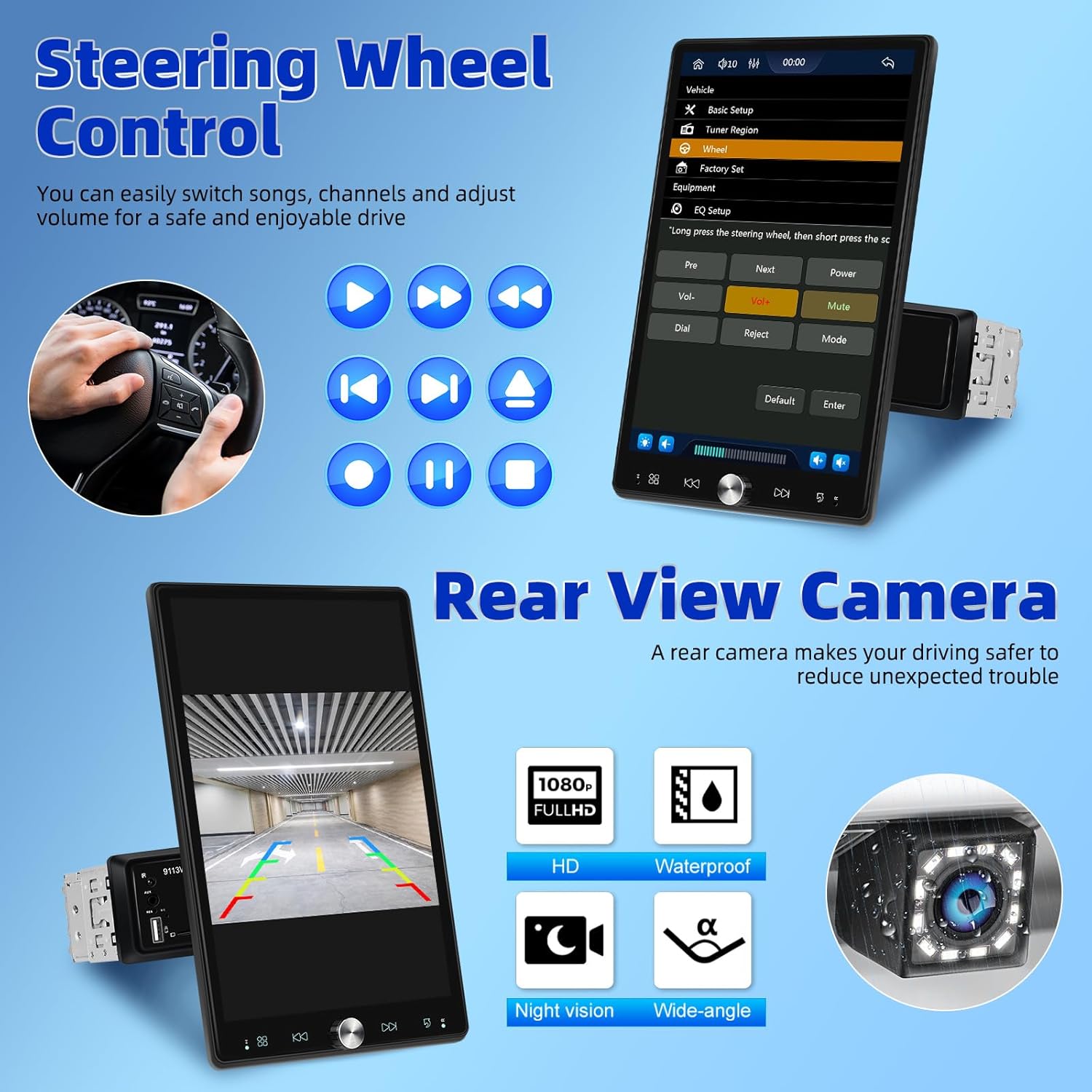
Figure 4.5: Illustration of steering wheel control functionality and the display of the rear view ฟีดกล้อง
4.7 การเชื่อมโยงมิเรอร์
The mirror link function allows you to display your smartphone's screen directly onto the car stereo's display.
5. การบำรุงรักษา
เพื่อให้เครื่องเสียงในรถยนต์ของคุณมีอายุการใช้งานยาวนานและมีประสิทธิภาพเหมาะสมที่สุด โปรดปฏิบัติตามคำแนะนำในการบำรุงรักษาดังต่อไปนี้:
- การทำความสะอาด: ใช้ผ้านุ่มและแห้งเช็ดทำความสะอาดหน้าจอและภายนอก สำหรับคราบฝังแน่น ให้เช็ดเบาๆampชุบผ้าด้วยน้ำ หลีกเลี่ยงน้ำยาทำความสะอาดหรือตัวทำละลายที่มีฤทธิ์กัดกร่อน
- อุณหภูมิ: ห้ามให้เครื่องสัมผัสกับอุณหภูมิที่สูงหรือต่ำเกินไป แสงแดดโดยตรงเป็นเวลานาน หรือความชื้นสูง
- การระบายอากาศ : ตรวจสอบให้แน่ใจว่าช่องระบายอากาศไม่ถูกปิดกั้นเพื่อป้องกันไม่ให้เกิดความร้อนมากเกินไป
- พลัง: Disconnect power before performing any cleaning or maintenance.
6 การแก้ไขปัญหา
หากคุณประสบปัญหาเกี่ยวกับเครื่องเสียงในรถยนต์ โปรดดูปัญหาทั่วไปและวิธีแก้ไขต่อไปนี้:
| ปัญหา | สาเหตุที่เป็นไปได้ | สารละลาย |
|---|---|---|
| ไม่มีไฟฟ้า | การเชื่อมต่อไฟฟ้าหลวม ฟิวส์ขาด | Check power cables and connections; Inspect and replace fuse if necessary. |
| ไม่มีเสียง | ระดับเสียงต่ำเกินไป ปิดเสียงแล้ว ปัญหาสายลำโพง | เพิ่มระดับเสียง, ปิดเสียง, ตรวจสอบการเชื่อมต่อลำโพง |
| บลูทูธไม่เชื่อมต่อ | Bluetooth off on device/stereo; Pairing mode not active | Ensure Bluetooth is enabled on both devices; Put stereo into pairing mode; Delete previous pairings and re-pair. |
| CarPlay/Android Auto ใช้งานไม่ได้ | Incorrect USB cable; Software glitch; Phone compatibility | Use original or certified USB cable; Restart phone and stereo; Check phone's compatibility with CarPlay/Android Auto. |
| กล้องหลังไม่แสดงผล | Incorrect wiring; Camera malfunction | Verify all camera wiring, especially the trigger wire; Test camera with another display if possible. |
If the problem persists after trying these solutions, please contact UNITOPSCI customer support.
7. ข้อมูลจำเพาะ
| คุณสมบัติ | ข้อมูลจำเพาะ |
|---|---|
| ขนาดสินค้า | 5.91 x 7.4 x 10 นิ้ว (15.0 x 18.8 x 25.4 ซม.) |
| น้ำหนักสินค้า | 2.2 ปอนด์ (1 กิโลกรัม) |
| หมายเลขรุ่น | A4034A3 |
| เทคโนโลยีการเชื่อมต่อ | อุปกรณ์เสริม, บลูทูธ, USB |
| ประเภทตัวควบคุม | การควบคุมด้วยมือ |
| อุปกรณ์ที่รองรับ | สมาร์ทโฟน ลำโพง |
| ประเภทขั้วต่อ | USB ประเภทเอ |
| โหมดเอาต์พุตเสียง | โมโน |
| กำลังขับ | 180 วัตต์ |
| ขนาดหน้าจอ | 10.4 นิ้ว |
| ความละเอียดหน้าจอ | 1280*480P |
8. การรับประกันและการสนับสนุน
UNITOPSCI is committed to providing high-quality products and satisfactory services. Your product comes with the following support:
- Replacement Available: Within 24 Months of purchase.
- ตอบสนองอย่างรวดเร็ว: ฝ่ายบริการลูกค้าตั้งเป้าที่จะตอบกลับภายใน 16 ชั่วโมง
- Lifetime After-Sales: Consult and Technical Support.
- นโยบายการคืนสินค้า: 60-days No Worry to Return.
For online support, please contact us at: UNITOPSCI@126.com


Figure 8.1: Information regarding UNITOPSCI's customer support, warranty, and contact details.
Ask a question about this manual
Ask about setup, troubleshooting, compatibility, parts, safety, or missing instructions. Manuals+ will review the question and use this page’s manual context to help answer it.