
1. บทนำ
Thank you for choosing the bjlysk 1080P Thumb Camera. This compact and versatile action camera is designed to capture your life's moments in high definition with ease. Featuring a 180° rotatable lens, magnetic design, and Wi-Fi connectivity, it offers a unique and convenient way to record your adventures from a first-person perspective. Please read this manual carefully to understand the camera's functions and ensure optimal performance.
2. เนื้อหาบรรจุภัณฑ์
Upon unpacking your bjlysk Thumb Camera, please verify that all the following items are included:
- D70 Device (Thumb Camera)
- Recharging Cable (USB-C)
- คู่มือการใช้งาน
- Magnetic Halterneck
- สายคล้องคอ

รูปที่ 2.1: Contents of the bjlysk Thumb Camera package. This image displays the camera unit, charging cable, user manual, magnetic halterneck, and lanyard, which are all included in the gift box.

รูปที่ 2.2: The bjlysk Thumb Camera, often bundled with a 128GB MicroSD card and a USB card reader for data transfer. Note that the MicroSD card and card reader may be sold separately or included depending on the specific product variant.
3. สินค้าหมดview และคุณสมบัติ
The bjlysk Thumb Camera (Model S70) is a lightweight and portable device designed for capturing high-quality video and images. Key features include:
- เลนส์หมุนได้ 180°: Capture multi-angle perspectives with ease.
- บันทึกวิดีโอ 2.7K HD: Ensures clear and detailed footage.
- 1.47" IPS HD Display: เรียลไทม์ล่วงหน้าview และการเล่น
- การออกแบบน้ำหนักเบามาก: Weighing only 35g for maximum portability.
- การยึดติดด้วยแม่เหล็กที่แข็งแรง: สำหรับตัวเลือกการติดตั้งที่หลากหลาย
- Mobile APP Connectivity (Wi-Fi): Remote control, live view, and sharing.
- Hands-Free First-Person Perspective: Ideal for sports, travel, and daily activities.
- แบตเตอรี่ใช้งานได้ยาวนาน: Up to 60 minutes of continuous recording.
- Loop Recording & Interval Recording: Advanced recording modes.

รูปที่ 3.1: เกินview of the bjlysk Thumb Camera's main features, including its video resolution, lens rotation capability, magnetic design, screen size, app connectivity, and lightweight nature.
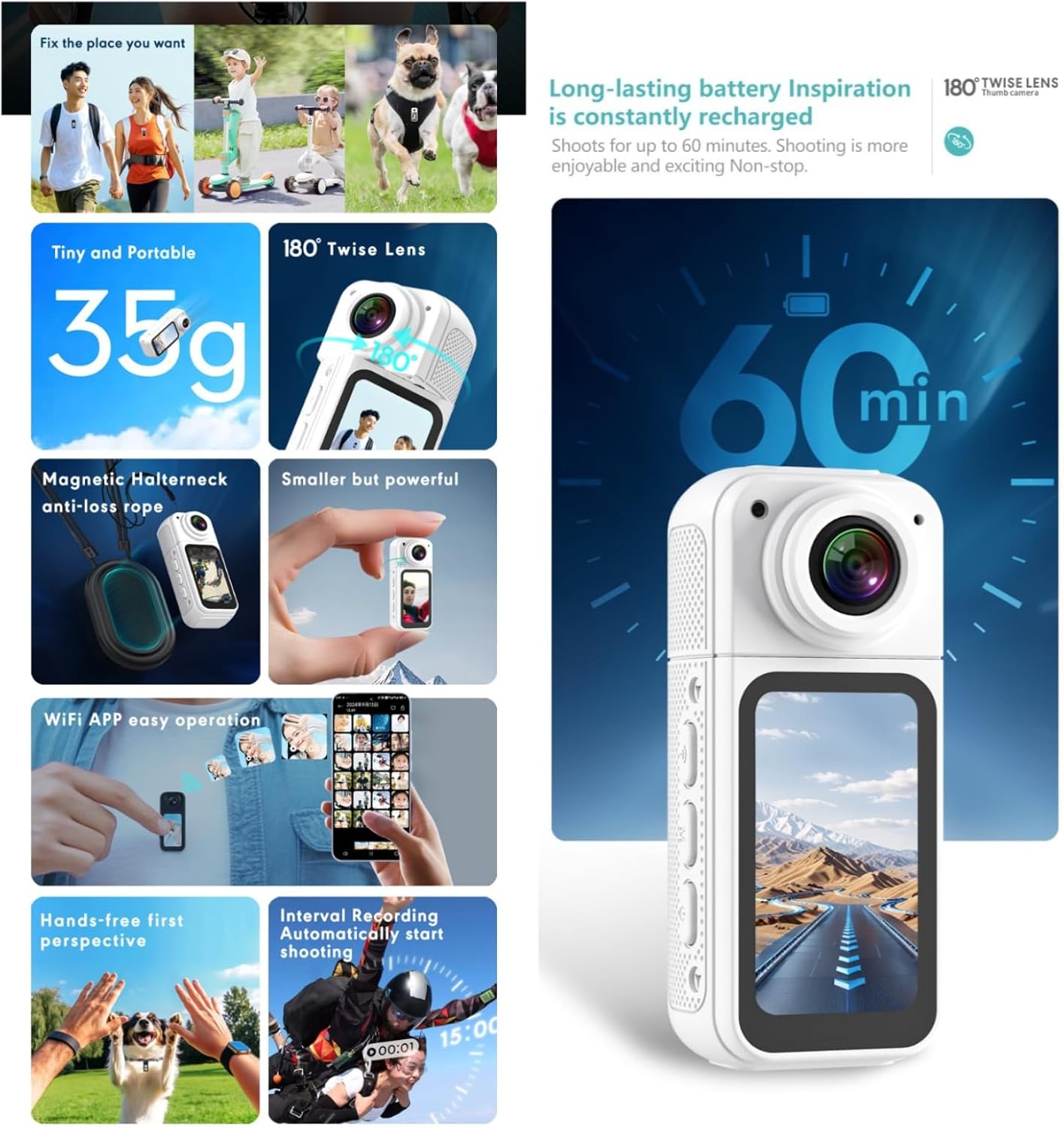
รูปที่ 3.2: A visual summary of the camera's practical benefits, such as its portability, rotating lens, secure magnetic attachment, easy app control, hands-free operation, advanced recording modes, and battery endurance.
4. การเริ่มต้น
4.1 การชาร์จกล้อง
Before first use, fully charge the camera. Connect the provided USB-C cable to the camera's charging port and the other end to a USB power adapter (not included) or a computer's USB port. The charging indicator light will show the charging status and turn off when fully charged.
4.2 Inserting/Removing MicroSD Card
The camera requires a MicroSD card (up to 128GB, U1 recommended) for storing recordings. Locate the MicroSD card slot on the side of the camera. Gently insert the card with the gold contacts facing down until it clicks into place. To remove, push the card in slightly until it springs out.
4.3 การเปิด/ปิดเครื่อง
To power on the camera, press and hold the Power button for a few seconds until the screen lights up. To power off, press and hold the Power button again until the screen turns off.
5. การทำงานพื้นฐาน
5.1 การบันทึกวิดีโอ
Once the camera is powered on, press the Record button once to start video recording. The recording indicator will flash. Press the Record button again to stop recording. Videos are saved automatically to the MicroSD card.
5.2 การถ่ายภาพ
While in standby mode, a short press of the Mode button may switch to photo mode (if available). Press the Shutter button to take a photo.
5.3 การใช้จอแสดงผล
The 1.47" IPS HD display provides a real-time preview of your footage. You can also use it to navigate menus and review recorded content. Use the navigation buttons (if present) to browse through options.
5.4 Rotating the Lens
The camera features a 180° rotatable lens. Gently twist the lens module to adjust the shooting angle, allowing for front-facing, rear-facing, or any angle in between. This flexibility is ideal for capturing selfies or diverse perspectives.

รูปที่ 5.1: The 180° degree twist lens allows for free rotation to discover the perfect angle for precise composition.
6. คุณสมบัติขั้นสูง
6.1 Connecting to the Mobile App (Wi-Fi)
The bjlysk Thumb Camera can connect to a dedicated mobile application via Wi-Fi for enhanced control and sharing. Download the app from your smartphone's app store. Enable Wi-Fi on the camera and connect your phone to the camera's Wi-Fi network. The app allows for remote control of recording, live view, playback, and direct sharing of content.
6.2 Magnetic Design & Hands-Free Use
The camera's magnetic design allows it to be easily attached to metallic surfaces. For hands-free recording, use the included magnetic halterneck or lanyard to wear the camera, capturing a first-person perspective during various activities like cycling, hiking, or daily commutes.

รูปที่ 6.1: Examples of hands-free usage and the magnetic halterneck accessory. The sturdy rope design with magnetic and wearable double insurance helps avoid dropping and losing the camera.
6.3 Loop Recording & Interval Recording
The camera supports advanced recording functions:
- การบันทึกแบบวนซ้ำ: Records video in segments (e.g., 1, 3, or 5 minutes). When the MicroSD card is full, the camera automatically overwrites the oldest files.
- การบันทึกช่วงเวลา: Allows the camera to automatically start recording at set intervals, useful for time-lapse or monitoring.
7. การบำรุงรักษา
7.1 การทำความสะอาด
ใช้ผ้าแห้งนุ่มเช็ดทำความสะอาดตัวกล้อง สำหรับเลนส์ ให้ใช้ผ้าและน้ำยาทำความสะอาดเลนส์โดยเฉพาะ หลีกเลี่ยงการใช้สารเคมีรุนแรงหรือวัสดุที่มีฤทธิ์กัดกร่อน
7.2 พื้นที่จัดเก็บ
Store the camera in a cool, dry place away from direct sunlight and extreme temperatures. If storing for an extended period, ensure the battery is partially charged (around 50%) to prolong its lifespan.
8 การแก้ไขปัญหา
- กล้องไม่เปิด: ตรวจสอบให้แน่ใจว่าแบตเตอรี่ชาร์จเต็มแล้ว เสียบปลั๊กเข้ากับแหล่งจ่ายไฟแล้วลองอีกครั้ง
- ไม่สามารถบันทึกได้: ตรวจสอบว่าได้ใส่การ์ด MicroSD และฟอร์แมตอย่างถูกต้องแล้วหรือไม่ ตรวจสอบให้แน่ใจว่ามีพื้นที่เก็บข้อมูลเพียงพอ
- คุณภาพวิดีโอไม่ดี: ตรวจสอบให้แน่ใจว่าเลนส์สะอาด ตรวจสอบการตั้งค่าความละเอียดในการบันทึก
- ปัญหาการเชื่อมต่อ Wi-Fi: Ensure the camera's Wi-Fi is enabled. Restart both the camera and your smartphone.
- กล้องหยุดนิ่ง: Use a thin object (like a paperclip) to press the reset button (if available) or hold the power button for an extended period to force a shutdown and restart.
9. ข้อมูลจำเพาะ
Below are the technical specifications for the bjlysk Thumb Camera (Model S70):
| พารามิเตอร์ | ค่า |
|---|---|
| แบบอย่าง | S70 |
| เซ็นเซอร์ | จีซี2083 |
| ความละเอียดวิดีโอ | 2.7K (2720x1520/15fps), 1080P (1920*1080/30fps) |
| การบันทึกแบบวนซ้ำ | 1min / 3min / 5min |
| รูปแบบวิดีโอ | เอ็มพี 4 |
| Compressure Format | เอช.264 |
| มุมเลนส์ | 180° |
| แสดง | หน้าจอ IPS ขนาด 1.47 นิ้ว |
| แบตเตอรี่ | 350mAh Li-ion battery built-in |
| ไมค์ | MIC Support, MIC-2X4MM,42+-3dB |
| การจัดเก็บข้อมูลภายนอก | MAX 128G, U1 |
| Shoot image | ใช่ |
| ความละเอียดของภาพ | 12M (4032x3024) / 10M (3648x2736) / 8M (3264x2448) / 5M (2592x1944) / 3M (2048x1536) |
| รูปแบบภาพ | JPG |
| สาย USB | USB Type-C |
| WIFI APP | ใช่ |
| น้ำหนักสุทธิ | 35กรัม |
รูปที่ 9.1: Detailed technical specifications of the bjlysk Thumb Camera, including its dimensions, video capabilities, and other hardware parameters.
10. การรับประกันและการสนับสนุน
The bjlysk Thumb Camera comes with a standard manufacturer's warranty. Please refer to the warranty card included in your package for specific terms and conditions. For technical support, troubleshooting assistance, or warranty claims, please contact the retailer or manufacturer directly through their official support channels. Keep your purchase receipt as proof of purchase.