
1. บทนำ
Thank you for choosing the AIR3 Wireless TWS Earbuds. This manual provides essential information for setting up, operating, and maintaining your earbuds to ensure optimal performance and longevity. Please read this manual thoroughly before using the product.
สิ่งที่รวมอยู่:
- AIR3 Wireless Earbuds
- เคสชาร์จไฟ
- คู่มือการใช้งาน
2. สินค้าหมดview
The AIR3 Wireless TWS Earbuds are designed to deliver an immersive audio experience with powerful bass and clear sound. The compact charging case features a digital display for convenient battery monitoring.

Figure 2.1: AIR3 Wireless Earbuds in their charging case, showing the digital battery display. The earbuds are white and fit snugly into the clear charging case.

Figure 2.2: The AIR3 Wireless Earbuds charging case in a closed position, showcasing its compact and sleek design. The case is clear with white internal components.
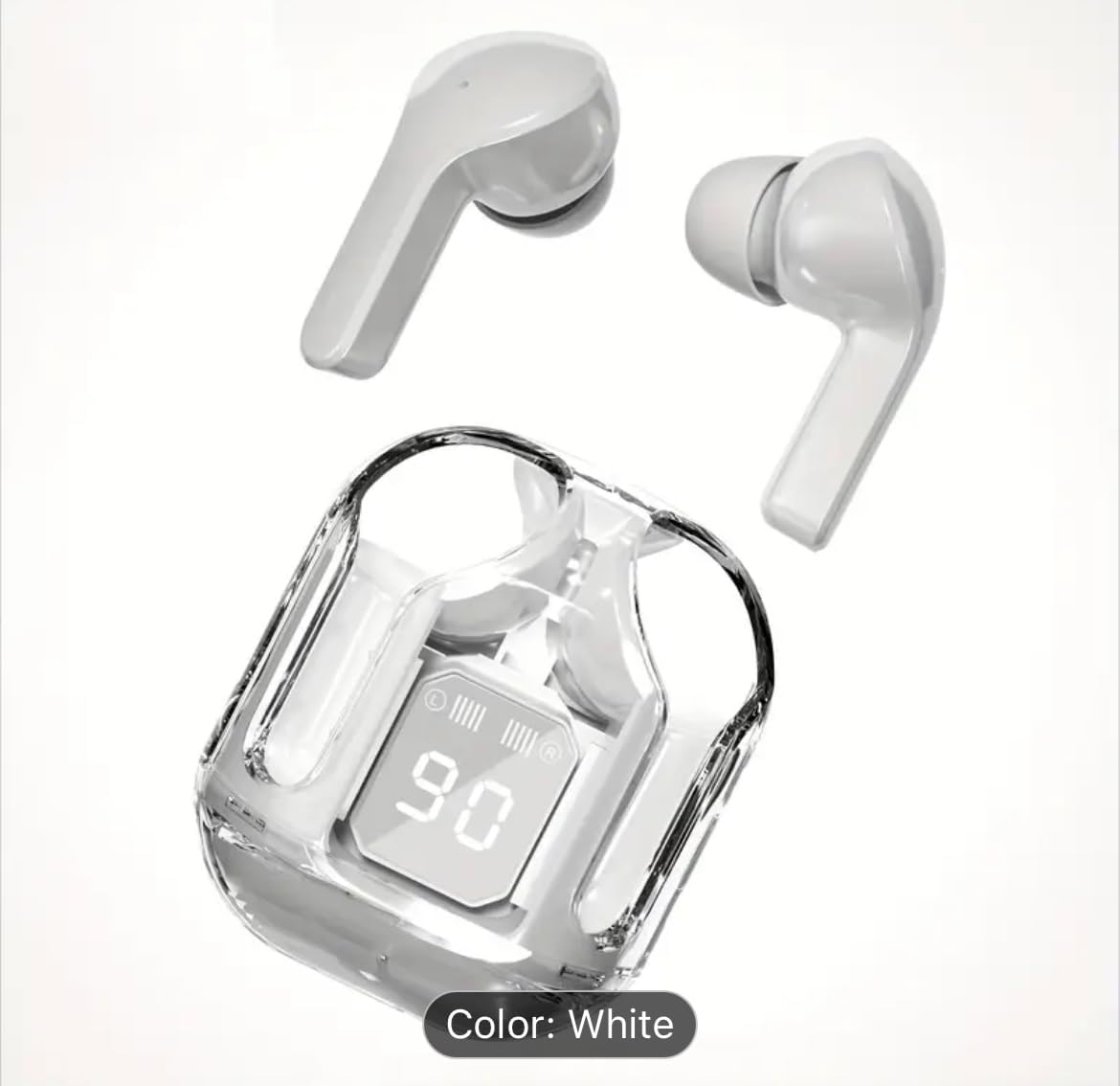
Figure 2.3: The AIR3 Wireless Earbuds displayed outside their open charging case. Both the left and right earbuds are visible, highlighting their ergonomic design.
คุณสมบัติหลัก:
- เสียงพรีเมียม: Expertly tuned acoustics deliver immersive audio with powerful bass response as low as 16Hz, perfectly balanced with mids and trebles.
- แบตเตอรี่เสริม: Up to 8 hours of continuous playback on a single charge, with total 35 hours including charging case.
- การออกแบบไร้สาย: Sleek and portable true wireless earbuds with convenient charging case featuring LED display.
- เบสทุ้มลึก: OrigX technology enhances low-frequency performance while maintaining audio clarity across all ranges.
- จอแสดงผลอัจฉริยะ: Digital LED screen shows precise battery level and charging status for both earbuds and case.
3. การตั้งค่า
3.1 การชาร์จหูฟังและเคส
Before first use, fully charge the charging case and earbuds. The digital display on the case will indicate the battery level.
- วางหูฟังลงในกล่องชาร์จ โดยให้แน่ใจว่าใส่เข้าที่อย่างถูกต้อง
- เชื่อมต่อเคสชาร์จเข้ากับแหล่งจ่ายไฟ USB โดยใช้สายชาร์จที่ใช้งานร่วมกันได้
- The digital display on the case will show the charging progress. Once fully charged, the display will indicate 100%.
A full charge for the earbuds provides up to 8 hours of playback, and the charging case provides multiple additional charges for a total of up to 35 hours of playtime.
3.2 การจับคู่กับอุปกรณ์
The earbuds use Bluetooth technology for wireless connection.
- การจับคู่เริ่มต้น: เปิดกล่องชาร์จ หูฟังจะเข้าสู่โหมดจับคู่โดยอัตโนมัติ (โดยไฟ LED บนหูฟังจะกะพริบ)
- บนอุปกรณ์ของคุณ (สมาร์ทโฟน แท็บเล็ต คอมพิวเตอร์) ไปที่การตั้งค่าบลูทูธ และตรวจสอบให้แน่ใจว่าได้เปิดใช้งานบลูทูธแล้ว
- ค้นหา available devices. Select "AIR3" from the list.
- เมื่อเชื่อมต่อแล้ว ไฟ LED บนหูฟังจะหยุดกะพริบ และอุปกรณ์ของคุณจะยืนยันการเชื่อมต่อ
- จับคู่ใหม่: หลังจากจับคู่ครั้งแรกแล้ว หูฟังจะเชื่อมต่อกับอุปกรณ์ที่จับคู่ล่าสุดโดยอัตโนมัติเมื่อนำออกจากเคส โดยมีเงื่อนไขว่าอุปกรณ์นั้นต้องเปิดใช้งานบลูทูธไว้
4. คู่มือการใช้งาน
The AIR3 earbuds feature touch controls for easy management of audio playback and calls.
4.1 เปิด/ปิดเครื่อง
- เปิดเครื่อง: เปิดกล่องชาร์จ หูฟังจะเปิดใช้งานโดยอัตโนมัติ หรืออีกวิธีหนึ่งคือ กดค้างที่บริเวณจุดสัมผัสบนหูฟังทั้งสองข้างเป็นเวลา 3 วินาที
- หมดแรง: Place the earbuds back into the charging case and close the lid. They will automatically power off and begin charging. Alternatively, press and hold the touch area on both earbuds for 5 seconds.
4.2 ระบบควบคุมแบบสัมผัส
| การทำงาน | การกระทำ |
|---|---|
| เล่น/หยุดชั่วคราว | แตะที่หูฟังข้างใดข้างหนึ่งเพียงครั้งเดียว |
| เพลงถัดไป | แตะสองครั้งที่หูฟังด้านขวา |
| เพลงก่อนหน้า | แตะสองครั้งที่หูฟังด้านซ้าย |
| เพิ่มระดับเสียง | แตะสามครั้งที่หูฟังด้านขวา |
| ลดระดับเสียง | แตะสามครั้งที่หูฟังด้านซ้าย |
| รับสาย/วางสาย | แตะเพียงครั้งเดียวที่หูฟังข้างใดข้างหนึ่งในระหว่างที่มีสายเรียกเข้า |
| ปฏิเสธการรับสาย | กดและค้างไว้ที่หูฟังข้างใดข้างหนึ่งเป็นเวลา 2 วินาทีในระหว่างที่มีสายเรียกเข้า |
| เปิดใช้งานผู้ช่วยเสียง | กดปุ่มที่หูฟังข้างใดข้างหนึ่งค้างไว้ 3 วินาที (เมื่อไม่ได้อยู่ในระหว่างการสนทนา) |
4.3 โหมดหูฟังเดี่ยว
You can use either the left or right earbud independently. Simply take one earbud out of the charging case, and it will automatically connect to your device. The other earbud can remain in the case or be powered off.
5. การบำรุงรักษา
5.1 การทำความสะอาด
- ใช้ผ้าแห้งนุ่มและไม่ขุยในการทำความสะอาดหูฟังและกล่องชาร์จ
- ห้ามใช้สารทำความสะอาดที่มีฤทธิ์กัดกร่อน แอลกอฮอล์ หรือตัวทำละลายเคมี
- ควรทำความสะอาดขั้วชาร์จทั้งบนหูฟังและเคสเป็นประจำ เพื่อให้มั่นใจได้ว่าการชาร์จเป็นไปอย่างถูกต้อง
5.2 พื้นที่จัดเก็บ
- เมื่อไม่ได้ใช้งาน ให้เก็บหูฟังไว้ในกล่องชาร์จเพื่อปกป้องหูฟังและชาร์จไฟให้หูฟังอยู่เสมอ
- เก็บผลิตภัณฑ์ไว้ในที่แห้งและเย็น หลีกเลี่ยงอุณหภูมิที่สูงและแสงแดดโดยตรง
6 การแก้ไขปัญหา
If you encounter issues with your AIR3 Wireless TWS Earbuds, refer to the following common problems and solutions:
- หูฟังไม่จับคู่กับอุปกรณ์:
- ตรวจสอบให้แน่ใจว่าได้เปิดใช้งานบลูทูธบนอุปกรณ์ของคุณแล้ว
- ตรวจสอบให้แน่ใจว่าหูฟังชาร์จแล้วและไม่ได้นำออกจากกล่องชาร์จ
- ปิดบลูทูธบนอุปกรณ์ของคุณ จากนั้นเปิดใหม่อีกครั้ง
- Forget "AIR3" from your device's Bluetooth list and try pairing again.
- รีสตาร์ทอุปกรณ์ของคุณ
- มีหูฟังเพียงข้างเดียวที่ใช้งานได้:
- ใส่หูฟังทั้งสองข้างกลับเข้าไปในกล่องชาร์จ ปิดฝา รอสักครู่ แล้วเปิดฝาและหยิบหูฟังออกมาพร้อมกัน
- ตรวจสอบให้แน่ใจว่าได้ชาร์จหูฟังเอียร์บัดทั้งสองข้างแล้ว
- Try resetting the earbuds (e.g., by placing them in the case and holding the touch area for 10 seconds, if applicable).
- ระดับเสียงต่ำหรือคุณภาพเสียงไม่ดี:
- ปรับระดับเสียงทั้งบนอุปกรณ์และหูฟังของคุณ
- ตรวจสอบให้แน่ใจว่าหูฟังสะอาดและไม่มีสิ่งสกปรก
- ตรวจสอบสัญญาณรบกวนจากอุปกรณ์ไร้สายอื่นๆ
- ตรวจสอบให้แน่ใจว่าหูฟังอยู่ในหูของคุณอย่างถูกต้อง
- กล่องชาร์จไม่ชาร์จ:
- ตรวจสอบให้แน่ใจว่าสายชาร์จเชื่อมต่อกับเคสและแหล่งจ่ายไฟอย่างแน่นหนา
- ลองใช้สายชาร์จและ/หรืออะแดปเตอร์แปลงไฟอันอื่นดู
- ทำความสะอาดพอร์ตชาร์จบนเคส
7. ข้อมูลจำเพาะ
| คุณสมบัติ | รายละเอียด |
|---|---|
| ชื่อรุ่น | แอร์3 |
| หมายเลขรุ่นสินค้า | 2411 |
| เทคโนโลยีการเชื่อมต่อ | ไร้สายบลูทู ธ |
| เทคโนโลยีการสื่อสารไร้สาย | บลูทูธ |
| การตอบสนองความถี่ | 16 เฮิรตซ์ |
| การควบคุมเสียงรบกวน | ไม่มี |
| ระยะเวลาการใช้งานหูฟัง (ต่อการชาร์จหนึ่งครั้ง) | นานถึง 8 ชั่วโมง |
| เวลาเล่นทั้งหมด (รวมเคสชาร์จ) | นานถึง 35 ชั่วโมง |
| เวลาในการชาร์จ | 8 ชั่วโมง |
| วัสดุ | พลาสติก |
| ประเภทการควบคุม | การควบคุมแบบสัมผัส |
| ระดับความต้านทานต่อน้ำ | ทนน้ำ |
| ประเภทไดร์เวอร์เสียง | ไดร์เวอร์แบบไดนามิก |
| รูปทรงของหูฟัง | หูครึ่งเดียว |
| สี | สีขาว |
| น้ำหนักสินค้า | 1.5 ออนซ์ |
| ผู้ผลิต | Banzi Trading |
8. ข้อมูลด้านความปลอดภัย
โปรดอ่านและปฏิบัติตามคำแนะนำด้านความปลอดภัยเหล่านี้เพื่อป้องกันความเสียหายต่ออุปกรณ์ของคุณหรือการบาดเจ็บต่อตัวคุณเอง:
- ห้ามถอดประกอบ ซ่อมแซม หรือดัดแปลงผลิตภัณฑ์
- ควรเก็บผลิตภัณฑ์ให้ห่างจากอุณหภูมิที่สูงหรือต่ำเกินไป ความชื้น และของเหลว
- หลีกเลี่ยงการทำผลิตภัณฑ์หล่นหรือกระแทกอย่างรุนแรง
- Do not expose the product to fire or dispose of it in fire, as batteries may explode.
- ใช้เฉพาะสายชาร์จและอะแดปเตอร์ที่เข้ากันได้เท่านั้น
- การฟังเสียงดังเป็นเวลานานอาจทำให้เกิดความเสียหายต่อการได้ยิน โปรดปรับระดับเสียงให้อยู่ในระดับที่ปลอดภัย
- เก็บให้พ้นจากมือเด็กและสัตว์เลี้ยง
9. การรับประกันและการสนับสนุน
This product is covered by a standard manufacturer's warranty. For specific warranty terms and conditions, please refer to the documentation provided at the time of purchase or contact the seller directly.
For technical support or customer service inquiries, please contact your retailer or the manufacturer using the contact information provided with your purchase.