1. บทนำ
Thank you for choosing the Generic GTS-1191 Wireless HD Sound Speaker. This portable speaker is designed to deliver clear, high-definition audio with versatile playback options, including Bluetooth, USB, Micro SD card, and FM radio. Its compact design and dynamic LED lighting make it suitable for various environments. This manual provides essential information for setting up, operating, and maintaining your speaker to ensure optimal performance.
2. ข้อมูลด้านความปลอดภัย
- อย่าให้ลำโพงโดนน้ำ ความชื้น หรืออุณหภูมิที่สูงหรือต่ำเกินไป
- หลีกเลี่ยงการทำตกหรือให้ลำโพงได้รับแรงกระแทกรุนแรง
- อย่าพยายามถอดประกอบ ซ่อมแซม หรือดัดแปลงลำโพงด้วยตนเอง โปรดติดต่อช่างผู้ชำนาญการ
- ควรวางลำโพงให้ห่างจากแหล่งความร้อนและแสงแดดโดยตรง
- ใช้เฉพาะสายชาร์จที่ให้มาหรือที่เทียบเท่าที่ได้รับการรับรองเท่านั้น
- กำจัดผลิตภัณฑ์และแบตเตอรี่อย่างมีความรับผิดชอบตามกฎระเบียบท้องถิ่น
3. เนื้อหาบรรจุภัณฑ์
กรุณาตรวจสอบแพ็คเกจสำหรับรายการต่อไปนี้:
- GTS-1191 Wireless HD Sound Speaker
- สายชาร์จ
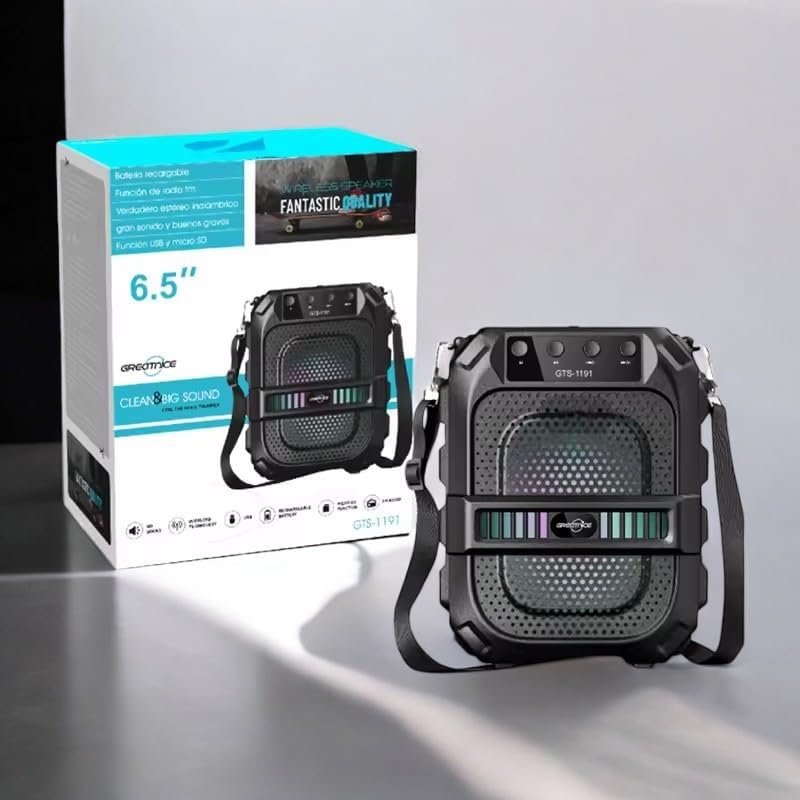
Image: The GTS-1191 speaker shown alongside its retail packaging, highlighting the included shoulder strap for portability.
4. สินค้าหมดview
โปรดทำความคุ้นเคยกับปุ่มควบคุมและพอร์ตต่างๆ ของลำโพง:
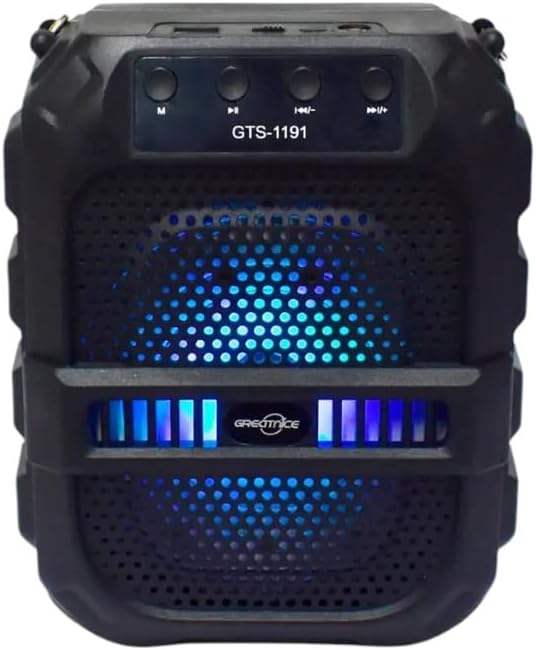
ภาพ: ด้านหน้า view of the GTS-1191 speaker, displaying the control panel at the top, the speaker grille, and active blue LED lighting.
แผงควบคุม (ด้านบน)
- ปุ่ม M (โหมด): Press to switch between Bluetooth, USB, Micro SD, and FM radio modes.
- ปุ่มเล่นเพลงก่อนหน้า / ปุ่มลดระดับเสียง: Short press for previous track (in music modes), long press to decrease volume.
- ปุ่มเล่น/หยุดชั่วคราว: กดเพื่อเล่นหรือหยุดเสียงชั่วคราว ในโหมด FM ให้กดค้างไว้เพื่อสแกนหาสถานีอัตโนมัติและบันทึกสถานี
- ปุ่มเล่นเพลงถัดไป / ปุ่มเพิ่มระดับเสียง: Short press for next track (in music modes), long press to increase volume.
Ports (Top/Rear)
- พอร์ต USB: สำหรับการเล่นแฟลชไดรฟ์ USB
- ช่องเสียบการ์ด Micro SD: สำหรับการเล่นการ์ด Micro SD
- พอร์ตชาร์จ: สำหรับเชื่อมต่อสายชาร์จ
5. การตั้งค่า
5.1 การชาร์จลำโพง
- Connect the small end of the charging cable to the charging port on the speaker.
- Connect the large end of the charging cable to a USB power adapter (not included) or a computer's USB port.
- ไฟแสดงสถานะการชาร์จจะสว่างขึ้น โดยปกติจะเป็นสีแดง ในระหว่างการชาร์จ
- Once fully charged, the indicator light may change color or turn off. A full charge provides up to 12 hours of playtime.
5.2 เปิด/ปิดเครื่อง
- To power on, locate the power switch (usually on the back or side) and slide it to the 'ON' position. You will hear an audible prompt.
- หากต้องการปิดเครื่อง ให้เลื่อนสวิตช์เปิด/ปิดไปที่ตำแหน่ง 'ปิด'
6. คู่มือการใช้งาน
6.1 การจับคู่บลูทูธ
- Ensure the speaker is powered on and in Bluetooth mode. If not, press the 'M' (Mode) button until you hear a Bluetooth pairing prompt. The LED lights may flash to indicate pairing mode.
- บนอุปกรณ์เคลื่อนที่ของคุณ (สมาร์ทโฟน แท็บเล็ต ฯลฯ) เปิดใช้งานบลูทูธและค้นหาอุปกรณ์ที่มีอยู่
- Select 'GTS-1191' from the list of devices.
- Once paired, you will hear a confirmation sound, and the LED lights may change their pattern.
- ตอนนี้คุณสามารถเล่นเสียงจากอุปกรณ์ของคุณผ่านลำโพงได้
6.2 การเล่น USB
- ใส่แฟลชไดรฟ์ USB ที่มีไฟล์เสียง MP3 fileลงในพอร์ต USB
- Press the 'M' (Mode) button to switch to USB mode. The speaker will automatically begin playing audio fileจากไดรฟ์ USB
- Use the 'Previous Track' and 'Next Track' buttons to navigate through songs.
6.3 การเล่นการ์ด Micro SD
- ใส่การ์ด Micro SD ที่มีไฟล์เสียง MP3 ลงไป fileเข้าไปในช่องเสียบการ์ด Micro SD
- Press the 'M' (Mode) button to switch to Micro SD card mode. The speaker will automatically begin playing audio fileจากการ์ด
- Use the 'Previous Track' and 'Next Track' buttons to navigate through songs.
6.4 วิทยุ FM
- Press the 'M' (Mode) button to switch to FM radio mode.
- Long press the 'Play/Pause' button to initiate an automatic scan for FM stations. The speaker will scan and save available stations.
- Once scanning is complete, use the 'Previous Track' and 'Next Track' buttons to switch between saved FM stations.
6.5 การควบคุมระดับเสียง
- To increase volume, long press the 'Next Track / Volume Up' button.
- To decrease volume, long press the 'Previous Track / Volume Down' button.
6.6 Dynamic LED Light Display
The GTS-1191 speaker features dynamic LED lights that enhance the listening experience. These lights typically activate automatically when the speaker is powered on and may change patterns based on the audio playback. There is no specific control button for the LED lights; they operate as an integrated visual feature.

Image: The GTS-1191 speaker positioned next to its retail box, showcasing its active red LED light display.
7. การบำรุงรักษา
- การทำความสะอาด: ใช้ผ้าแห้งนุ่มเช็ดทำความสะอาดภายนอกลำโพง ห้ามใช้สารทำความสะอาดที่มีฤทธิ์กัดกร่อนหรือตัวทำละลาย
- พื้นที่จัดเก็บ: เมื่อไม่ได้ใช้งานเป็นเวลานาน ควรเก็บลำโพงไว้ในที่แห้งและเย็น หลีกเลี่ยงแสงแดดโดยตรงและอุณหภูมิที่สูงหรือต่ำเกินไป
- การดูแลแบตเตอรี่ เพื่อยืดอายุการใช้งานแบตเตอรี่ ควรหลีกเลี่ยงการปล่อยประจุแบตเตอรี่จนหมดบ่อยๆ ควรชาร์จลำโพงเป็นประจำ แม้จะไม่ได้ใช้งานบ่อยก็ตาม
8 การแก้ไขปัญหา
| ปัญหา | สาเหตุที่เป็นไปได้ | สารละลาย |
|---|---|---|
| ลําโพงไม่เปิดขึ้น | แบตเตอรี่หมด | ชาร์จลำโพงอย่างน้อย 2-3 ชั่วโมง |
| ไม่มีเสียงจากลำโพง | Volume is too low or muted. Device not paired. Incorrect mode. | Increase volume. Ensure Bluetooth device is paired. Switch to correct mode (Bluetooth, USB, SD, FM). |
| การจับคู่บลูทูธล้มเหลว | ลำโพงไม่อยู่ในโหมดจับคู่ อุปกรณ์อยู่ไกลเกินไป มีสัญญาณรบกวน | Ensure speaker is in Bluetooth mode and discoverable. Move device closer. Turn off other Bluetooth devices. |
| การเล่นไฟล์ผ่าน USB/Micro SD ไม่ทำงาน | ไม่ถูกต้อง file format. Drive/card not inserted correctly. | ทำให้มั่นใจ files are MP3 format. Reinsert USB drive/Micro SD card. Press 'M' to select correct mode. |
9. ข้อมูลจำเพาะ
| คุณสมบัติ | รายละเอียด |
|---|---|
| ชื่อรุ่น | จีทีเอส-1191 |
| ประเภทลำโพง | ลำโพงแบบพกพา |
| การเชื่อมต่อ | บลูทูธ, USB, ไมโคร SD, วิทยุ FM |
| สี | สีดำ |
| อายุการใช้งานแบตเตอรี่ | เล่นต่อเนื่องได้นานสูงสุด 12 ชั่วโมง |
| ขนาดสินค้า | 10D x 8W x 20H เซนติเมตร |
| ขนาดแพ็คเกจ | 23.6 x 19.2 x 12.4 ซม. |
| น้ำหนักแพ็คเกจ | 920 กรัม |
| ส่วนประกอบที่รวมอยู่ | Speaker, Charging Cable |
10. การรับประกันและการสนับสนุน
The Generic GTS-1191 Wireless HD Sound Speaker comes with a manufacturer's warranty of 6 เดือน นับจากวันที่ซื้อสินค้า การรับประกันนี้ครอบคลุมข้อบกพร่องจากการผลิตภายใต้การใช้งานปกติ ไม่ครอบคลุมความเสียหายที่เกิดจากการใช้งานผิดวิธี อุบัติเหตุ การดัดแปลงโดยไม่ได้รับอนุญาต หรือการสึกหรอตามปกติ
For warranty claims or technical support, please contact your retailer or the point of purchase with your proof of purchase.


