
การแนะนำ
Thank you for choosing the LEPOTEC 4 Pcs RGB LED Wall Lights. These versatile lights are designed to enhance your living space with customizable RGB lighting, app control, music synchronization, and motion sensing capabilities. This manual provides detailed instructions for setup, operation, maintenance, and troubleshooting to ensure optimal performance and longevity of your product.

Image: The LEPOTEC RGB LED Wall Lights demonstrating their color-changing capabilities, including warm white and vibrant RGB, alongside a smartphone displaying the control app interface.
ข้อมูลด้านความปลอดภัย
- Do not expose the lights to water or excessive moisture.
- โปรดหลีกเลี่ยงการถอดประกอบหรือดัดแปลงผลิตภัณฑ์ เนื่องจากอาจทำให้การรับประกันเป็นโมฆะและก่อให้เกิดความเสี่ยงด้านความปลอดภัย
- ใช้เฉพาะสาย USB ที่ให้มาในการชาร์จ
- เก็บให้พ้นจากมือเด็ก
- Ensure proper ventilation around the lights during operation.
เนื้อหาแพ็คเกจ
กรุณาตรวจสอบแพ็คเกจเพื่อให้แน่ใจว่ามีสินค้าครบทั้งหมด:
- 4 x LEPOTEC RGB LED Wall Lights
- สายชาร์จ USB
- Adhesive Tapes with Iron Sheets (for non-iron surfaces)
- คู่มือการใช้งาน (เอกสารนี้)
การตั้งค่า
1. การชาร์จไฟ
The lights have a built-in 2200mAh rechargeable battery. Before first use, fully charge the lights using the provided USB cable.
- Connect the USB charging cable to the Type-C port on the light.
- ต่อปลายอีกด้านของสายเคเบิลเข้ากับอะแดปเตอร์แปลงไฟ USB (ไม่ได้รวมอยู่ในชุด) หรือพอร์ต USB ของคอมพิวเตอร์
- The charging indicator will show a red light during charging. It will turn green when fully charged.

Image: A detailed diagram illustrating the dimensions of the LEPOTEC light, including the Type-C charging port, switch, and charging indicator light. It highlights the 2000mAh high-capacity battery.
2. การติดตั้ง
The lights feature a strong built-in magnet for easy attachment.
- On Iron Surfaces: Simply attach the light directly to any iron surface.
- On Non-Iron Surfaces: Use the included adhesive tape with the iron sheet.
- Peel off the protective film from one side of the adhesive tape and stick it onto the iron sheet.
- Peel off the protective film from the other side of the adhesive tape and firmly press the iron sheet onto your desired clean, dry surface.
- Attach the light magnetically to the installed iron sheet.
3. การเชื่อมต่อกับแอพ
For full control and advanced features, connect your lights to the "HappyLighting" app.
- ขั้นตอนที่ 1: Download the 'HappyLighting' app from Google Play Store or Apple App Store.
- ขั้นตอนที่ 2: เปิดใช้งานบลูทูธบนสมาร์ทโฟนของคุณ
- ขั้นตอนที่ 3: Turn the switch on the light to the 'ON' position.
- ขั้นตอนที่ 4: Open the 'HappyLighting' app. The app should automatically detect and connect to the lights.
- ขั้นตอนที่ 5: Once connected, you can control the lights via the app interface.
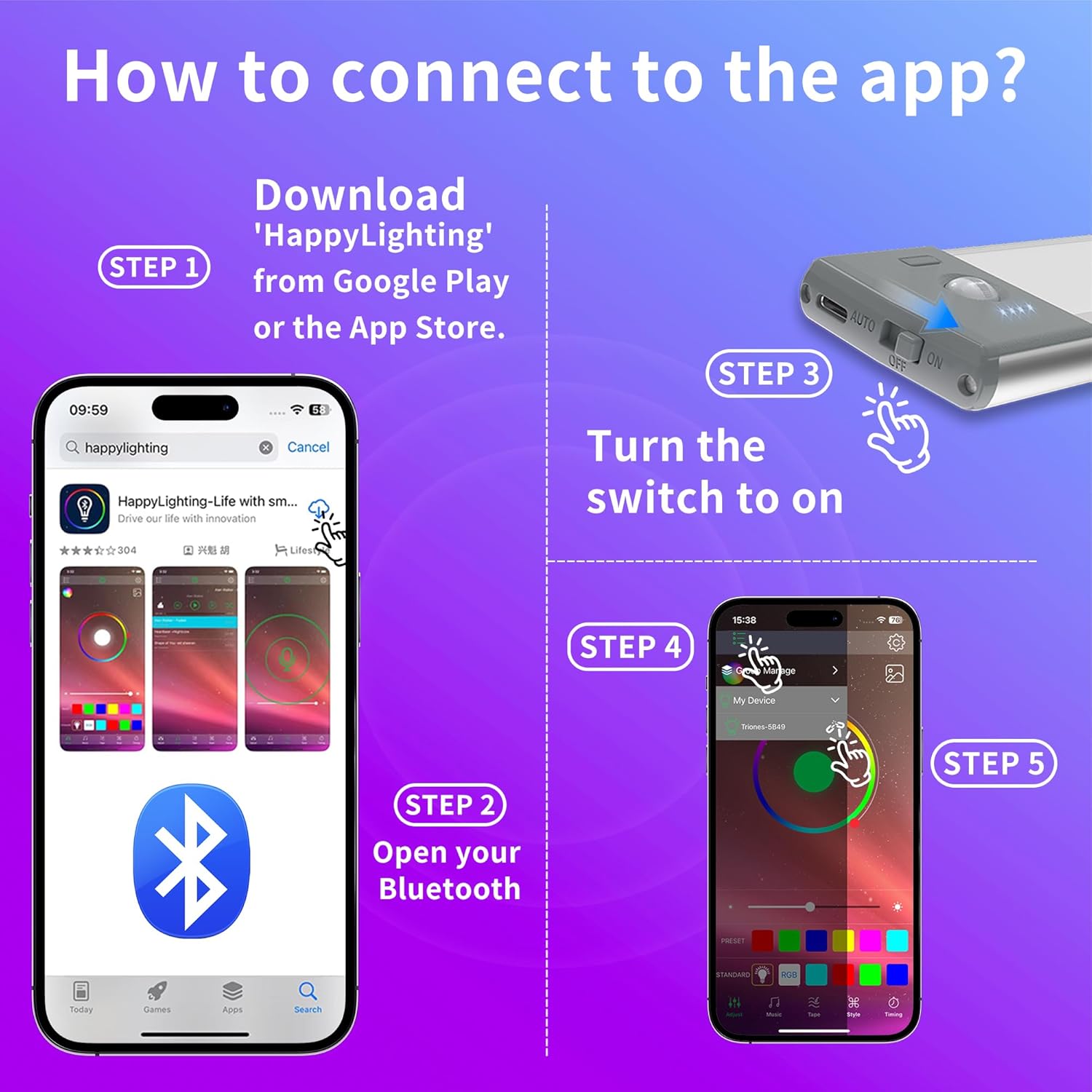
Image: A visual guide detailing the five steps to connect the LEPOTEC lights to the 'HappyLighting' mobile application, from downloading the app to controlling the lights.
คำแนะนำการใช้งาน
1. Light Modes (On-Off-AUTO)
The lights feature a physical switch with three modes:
- บน: ไฟจะสว่างต่อเนื่องตลอดเวลา
- ปิด: ไฟถูกปิด
- อัตโนมัติ: Activates motion sensor mode. In a dark environment, the light will automatically turn on when motion is detected and turn off after approximately 20 seconds of no movement.

Image: A visual representation of the intelligent induction feature, showing a person walking and the light detecting motion within a 3-5m range, then automatically turning off after 30 seconds of no activity.
2. คุณสมบัติการควบคุมแอป
Once connected to the 'HappyLighting' app, you can access various functions:
- การปรับความสว่าง: Remotely control the brightness level of the lights.
- การเปลี่ยนสี: Select from a wide spectrum of RGB colors.
- ฟังก์ชั่นจับเวลา: Set fixed on/off schedules daily for automated lighting.
- Music & Mic Synchronization: The light color can change with the sound of your microphone or the beat of music. Ensure the app has microphone access. This creates an immersive atmosphere for parties or gaming.

Image: A vibrant scene depicting people enjoying themselves in a room where the LEPOTEC lights are changing colors in sync with music, creating a dynamic party ambiance.

ภาพ: ภาพตัดปะแสดงasing different uses of the LEPOTEC lights, such as backlighting a TV for an enhanced viewing experience and adding ambient lighting to a gaming setup.
การซ่อมบำรุง
- การทำความสะอาด: Wipe the lights with a soft, dry cloth. Do not use abrasive cleaners or solvents.
- การดูแลแบตเตอรี่ To prolong battery life, avoid fully discharging the battery frequently. Recharge when the light indicates low power. If storing for a long period, charge the battery every 3-6 months.
- พื้นที่จัดเก็บ: เก็บไฟประดับไว้ในที่แห้งและเย็น หลีกเลี่ยงแสงแดดโดยตรงและอุณหภูมิที่สูงหรือต่ำเกินไป
การแก้ไขปัญหา
| ปัญหา | สาเหตุที่เป็นไปได้ | สารละลาย |
|---|---|---|
| ไฟไม่เปิด | แบตเตอรี่หมด สวิตช์อยู่ในตำแหน่งปิด | ชาร์จแบตเตอรี่ให้เต็ม Ensure the switch is set to ON or AUTO. |
| แอปไม่สามารถเชื่อมต่อกับไฟได้ | บลูทู ธ ปิดอยู่ Light is not in ON mode. ไม่ได้รับอนุญาตการเข้าถึงแอป | ตรวจสอบให้แน่ใจว่าเปิดใช้งาน Bluetooth บนโทรศัพท์ของคุณแล้ว Set the light switch to ON. Grant necessary permissions (e.g., location, microphone) to the HappyLighting app. Restart the app. |
| เซ็นเซอร์ตรวจจับการเคลื่อนไหวไม่ทำงาน | ไฟไม่ได้อยู่ในโหมดอัตโนมัติ สภาพแวดล้อมสว่างเกินไป Obstruction in sensing range. | ตรวจสอบให้แน่ใจว่าได้ตั้งค่าสวิตช์เป็น AUTO แล้ว Motion sensor only activates in dark environments. โปรดนำสิ่งกีดขวางใดๆ ออกจากเซ็นเซอร์ |
| อายุการใช้งานแบตเตอรี่สั้นกว่าที่คาดไว้ | Frequent use in ON mode. Frequent motion sensor activations. แบตเตอรี่เสื่อมสภาพลงตามกาลเวลา | Battery life is approximately 7 hours in ON mode and 3-5 weeks in AUTO mode (10 activations/day). Adjust usage accordingly. Ensure full charges. |
ข้อมูลจำเพาะ
| ยี่ห้อ | เลโปเทค |
| แบบอย่าง | B0DSHVGX46 |
| สี | หลายสี (RGB) |
| วัสดุ | อลูมิเนียม |
| แหล่งพลังงาน | ใช้พลังงานจากแบตเตอรี่ (ชาร์จใหม่ได้) |
| ความจุของแบตเตอรี่ | 2200mAh |
| ประเภทแหล่งกำเนิดแสง | LED (30 LED) |
| วิธีการควบคุม | Phone App (HappyLighting), Physical Switch |
| ช่วงเซนเซอร์จับความเคลื่อนไหว | 3-5 meters (16.4 ft effective control range via app) |
| ปิดเครื่องอัตโนมัติ | 20 seconds (in AUTO mode, no movement) |
| ขนาด | Approx. 8.06 inches (length) x 1.70 inches (width) x 0.55 inches (height) |
| ประเภทการติดตั้ง | Wall Mount (Magnetic / Adhesive) |
การรับประกันและการสนับสนุน
LEPOTEC products are manufactured with high-quality standards. For any product-related inquiries, technical support, or warranty claims, please contact the seller or refer to your purchase platform for specific warranty terms and customer service contact information.
You can visit the official LEPOTEC store on Amazon for more information: LEPOTEC Store