
การแนะนำ
This manual provides essential information for the safe and effective use of your Minolta MNB5Z 56MP Dual Lens Point & Shoot Digital Camera. Please read this manual thoroughly before using the camera and keep it for future reference. The Minolta MNB5Z is designed to capture high-quality photos at 56MP and record videos in 5K Ultra HD, featuring a 5x optical zoom and a user-friendly 2.8-inch IPS touchscreen.
ข้อมูลด้านความปลอดภัย
- Do not expose the camera to water or moisture. This camera is not water resistant.
- หลีกเลี่ยงการทำกล้องตกหรือได้รับแรงกระแทกรุนแรง
- Keep the camera away from direct sunlight, high temperatures, and dusty environments.
- ใช้เฉพาะแบตเตอรี่และอุปกรณ์เสริมที่ระบุไว้เท่านั้น
- อย่าพยายามถอดประกอบหรือดัดแปลงกล้อง โปรดติดต่อช่างผู้ชำนาญเพื่อขอรับบริการทั้งหมด
- เก็บให้พ้นจากมือเด็ก
เนื้อหาแพ็คเกจ
ตรวจสอบว่ามีรายการทั้งหมดอยู่ในแพ็คเกจของคุณ:
- Minolta MNB5Z 56MP Digital Camera
- สายชาร์จ USB
- แบตเตอรี่ลิเธียมไอออนแบบชาร์จไฟได้
- MicroSDHC Ultra 64GB Memory Card
- ขาตั้งกล้อง Vlog แบบยืดหยุ่น
- กระเป๋าใส่การ์ดหน่วยความจำ
- เครื่องอ่านการ์ด USB (SD/microSD)
- กระเป๋ากล้อง
- ชุดทำความสะอาด
- Corel Photo, Video, & Art Suite Deluxe Software (Download information may be included)
การตั้งค่า
1. การติดตั้งแบตเตอรี่
- ค้นหาฝาปิดช่องใส่แบตเตอรี่ที่ด้านล่างของกล้อง
- เลื่อนตัวล็อคฝาครอบเพื่อเปิดช่อง
- Insert the Lithium-Ion battery according to the polarity indicators (+/-).
- ปิดฝาช่องใส่แบตเตอรี่ให้แน่นจนกระทั่งล็อคเข้าที่
2. การติดตั้งการ์ดหน่วยความจำ
The Minolta MNB5Z supports microSD and microSDHC cards up to 256GB.
- Open the battery compartment cover. The microSD card slot is usually located near the battery.
- Insert the microSD card with the gold contacts facing down, gently pushing until it clicks into place.
- ในการถอดออก ให้ดันการ์ดเข้าไปอีกครั้งจนกระทั่งการ์ดเด้งออกมา
- ปิดฝาช่องใส่แบตเตอรี่
3. การชาร์จแบตเตอรี่
- เสียบปลายสายชาร์จ USB ด้านเล็กเข้ากับพอร์ต USB ของกล้อง
- เชื่อมต่อปลายอีกด้านหนึ่งของสาย USB เข้ากับอะแดปเตอร์ไฟ USB (ไม่รวมอยู่ด้วย) หรือพอร์ต USB ของคอมพิวเตอร์
- The charging indicator light (CHG) will illuminate during charging and turn off when fully charged.
4. เปิดเครื่องครั้งแรก
- กดปุ่มค้างไว้ เปิด/ปิด ปุ่มที่อยู่ด้านบนของกล้อง
- The camera will power on, and the display screen will activate.
- ทำตามคำแนะนำบนหน้าจอสำหรับการตั้งค่าเริ่มต้น เช่น การตั้งค่าวันที่และเวลา
การใช้งานกล้อง
1. การจัดวางและปุ่มควบคุมกล้อง
Familiarize yourself with the camera's buttons and touchscreen interface.

ภาพ: ด้านหลัง view of the Minolta MNB5Z camera, highlighting the touchscreen display and physical control buttons for navigation and function selection.
- ปุ่มเปิด/ปิด: ฟังก์ชันนี้ใช้สำหรับเปิดหรือปิดกล้อง
- ปุ่มชัตเตอร์: Press halfway to focus, fully to take a photo.
- คันโยกซูม: Controls the 5x optical zoom.
- ปุ่มโหมด: Switches between different shooting modes (Photo, Video, Playback, etc.).
- Directional Pad (DISP/OK): นำทางเมนูและยืนยันการเลือก
- ปุ่มเล่น: เข้าสู่โหมดการเล่นเพื่อ view ภาพถ่ายและวีดีโอ
- ปุ่มเมนู: เข้าถึงการตั้งค่าและตัวเลือกของกล้อง
- หน้าจอสัมผัส IPS ขนาด 2.8 นิ้ว: For intuitive navigation and reviewเนื้อหา
2.การถ่ายภาพ
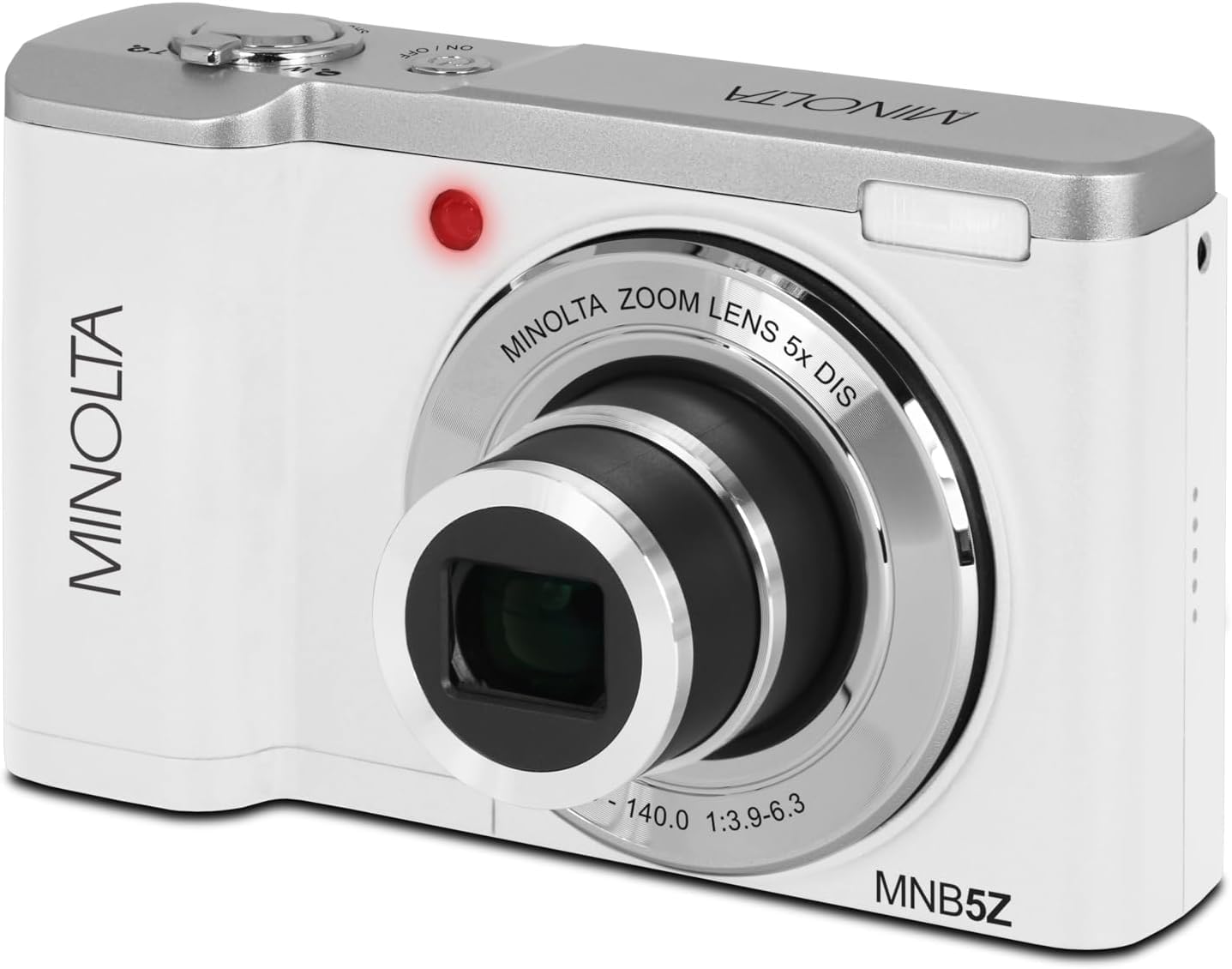
ภาพ: ด้านหน้า view of the Minolta MNB5Z camera, showing the lens extended for capturing images, with the Minolta branding visible.
- Turn on the camera and ensure it is in Photo mode.
- Frame your shot using the 2.8-inch IPS touchscreen.
- Use the zoom lever to adjust the 5x optical zoom.
- กดปุ่มชัตเตอร์ลงครึ่งหนึ่งเพื่อให้กล้องทำการโฟกัส ตัวบ่งชี้การโฟกัสจะยืนยันการโฟกัส
- Press the shutter button fully to capture the photo.
- แฟลช: The built-in flash can be set to Auto, On/Fill, or Off via the menu.
- โหมดการถ่ายภาพ: Access various modes like Photo Burst, Time-Lapse, and Slow Motion via the Mode button or touchscreen menu.
3. บันทึกวิดีโอ
- Turn on the camera and switch to Video mode using the Mode button.
- Frame your subject on the touchscreen.
- Press the shutter button to start recording. A recording indicator will appear on the screen.
- กดปุ่มชัตเตอร์อีกครั้งเพื่อหยุดการบันทึก
- The camera records in 5K Ultra HD resolution and includes a built-in microphone for audio capture.
4. การเล่น
- กดปุ่มเล่นเพื่อเข้าสู่โหมดเล่น
- Use the directional pad or swipe on the touchscreen to browse through your photos and videos.
- กดปุ่ม OK เพื่อ view a video or zoom into a photo.
- กดปุ่มเล่นอีกครั้งเพื่อออกจากโหมดเล่น
5. การตั้งค่ากล้อง
- Press the Menu button to access camera settings.
- Use the directional pad or touchscreen to navigate through options such as resolution, white balance, ISO, exposure compensation, and color filters.
- Select an option and press OK to confirm or adjust.
- กดปุ่มเมนูอีกครั้งเพื่อออกจากเมนู
6. การเชื่อมต่อกับคอมพิวเตอร์ (USB)
- ตรวจสอบให้แน่ใจว่ากล้องปิดอยู่
- เชื่อมต่อกล้องเข้ากับคอมพิวเตอร์ของคุณโดยใช้สาย USB ที่ให้มา
- Turn on the camera. It should be recognized as a removable disk or media device.
- ตอนนี้คุณสามารถโอนรูปภาพและวิดีโอไปยังคอมพิวเตอร์ของคุณได้แล้ว
7. การเชื่อมต่อ Wi-Fi
The Minolta MNB5Z features Wi-Fi connectivity for wireless transfer of images and remote control via a compatible smartphone application (if available). Refer to the camera's on-screen menu for Wi-Fi setup instructions and pairing with your device.
การซ่อมบำรุง
1. การทำความสะอาดกล้อง
- ใช้ผ้านุ่มที่ไม่เป็นขุยในการทำความสะอาดตัวกล้อง
- For the lens and screen, use a specialized lens cleaning cloth and solution. Avoid harsh chemicals.
- Gently blow away dust from the lens surface before wiping.
2. การจัดเก็บ

ภาพ: ด้านหน้า view of the Minolta MNB5Z camera with its lens retracted, demonstrating its compact form factor for easy storage in the included camera bag.
- When not in use, store the camera in the provided camera bag to protect it from dust and scratches.
- ถอดแบตเตอรี่ออกหากจะไม่ได้ใช้งานกล้องเป็นเวลานาน
- Store in a cool, dry place, away from extreme temperatures and humidity.
การแก้ไขปัญหา
| ปัญหา | สารละลาย |
|---|---|
| กล้องไม่สามารถเปิดได้ | Ensure the battery is correctly inserted and fully charged. Try charging the battery for at least 2 hours. |
| ไม่สามารถถ่ายภาพ/วิดีโอได้ | Check if the memory card is inserted correctly and has sufficient free space. Ensure the camera is in the correct mode (Photo/Video). |
| ภาพมีความเบลอ | Ensure the lens is clean. Press the shutter button halfway to allow the camera to focus before fully pressing. Use digital image stabilization in shaky conditions. |
| แฟลชไม่ทำงาน | Check flash settings in the menu to ensure it is not set to 'Off'. |
| กล้องหยุดนิ่งหรือไม่ตอบสนอง | Remove the battery, wait a few seconds, and reinsert it to reset the camera. |
ข้อมูลจำเพาะ
| คุณสมบัติ | รายละเอียด |
|---|---|
| ชื่อรุ่น | เอ็มเอ็นบี5ซี |
| ความละเอียดของภาพ | 56 ล้านพิกเซล |
| ความละเอียดวิดีโอ | 5K อัลตร้า HD (30 เฟรมต่อวินาที) |
| ซูมออปติคอล | 5x |
| ระบบป้องกันภาพสั่นไหว | ดิจิตอล |
| ขนาดหน้าจอ | หน้าจอสัมผัส IPS ขนาด 2.8 นิ้ว |
| การรองรับการ์ดหน่วยความจำ | microSD, microSDHC (up to 256GB) |
| การเชื่อมต่อ | ยูเอสบี, ไวไฟ |
| ประเภทแบตเตอรี่ | ลิเธียมไอออน |
| แฟลช | Built-In (Auto, On/Fill) |
| ประเภทเซนเซอร์ | ซีมอส |
| ความเร็วชัตเตอร์ขั้นต่ำ | 1/4000 วินาที |
| รองรับ File รูปแบบ | JPEG (ภาพถ่าย), MP4 (วิดีโอ) |
| น้ำหนักสินค้า | 2.37 ปอนด์ |
การรับประกันและการสนับสนุน
Minolta products are manufactured to the highest quality standards. For information regarding your product's warranty, please refer to the warranty card included in your package or visit the official Minolta support website. For technical assistance, troubleshooting, or service inquiries, please contact Minolta customer support.
การสนับสนุนทางออนไลน์: Visit the official Minolta webเว็บไซต์สำหรับคำถามที่พบบ่อย ดาวน์โหลดไดรเวอร์ และข้อมูลการติดต่อ
บริการลูกค้า: Refer to your product packaging or the Minolta webเว็บไซต์สำหรับรายละเอียดการติดต่อฝ่ายบริการลูกค้า