
1. บทนำ
The BEBANG PM1000 Handheld Digital Microscope is designed for exploring the microscopic world with ease. Featuring a 200x-1000x magnification range and a 2.0-inch screen, this portable device allows users to observe various specimens, capture images, and record videos. It is equipped with a rechargeable battery for extended use and comes with a set of prepared slides for immediate exploration.
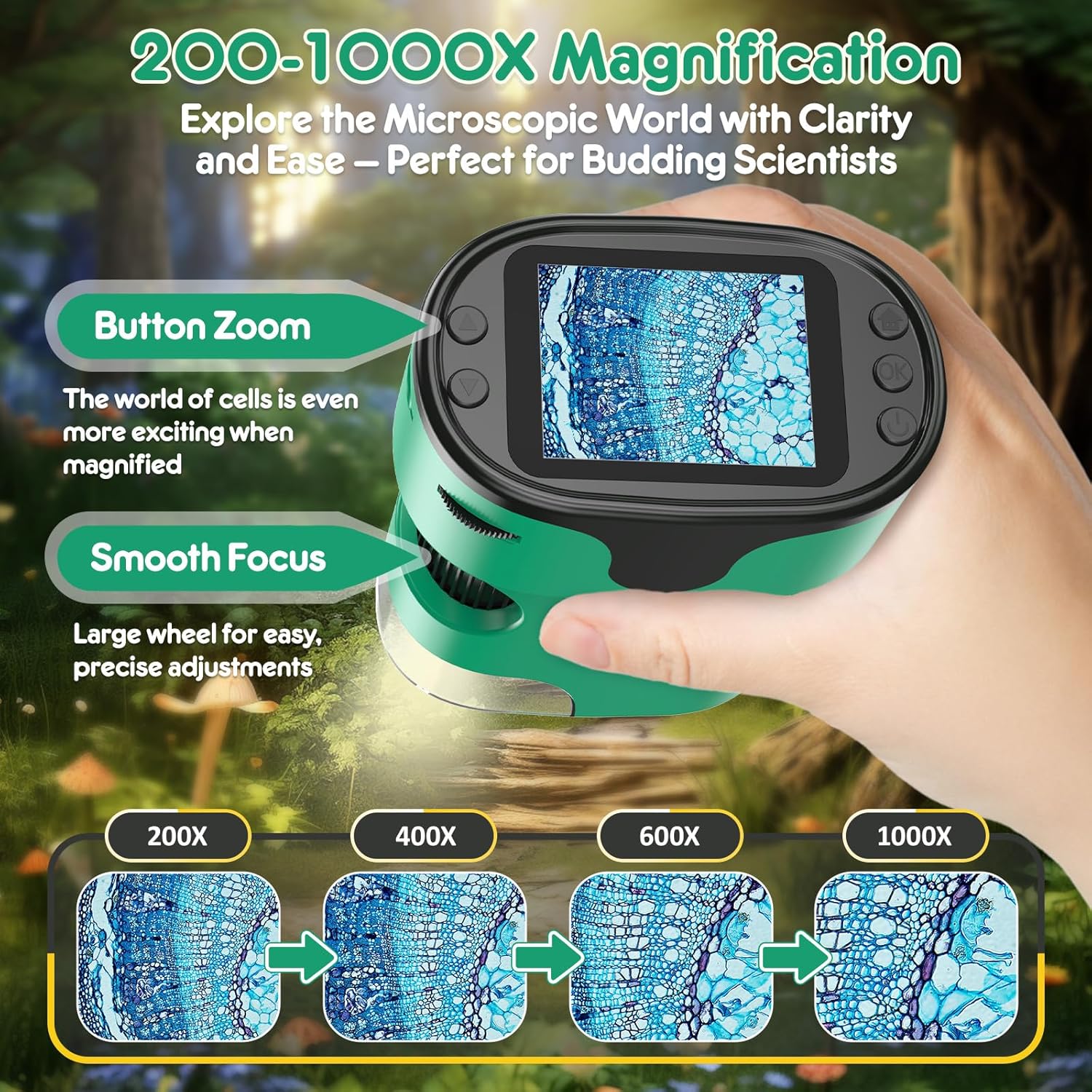
Image: The BEBANG PM1000 Handheld Digital Microscope displaying a magnified view ของตัวอย่าง
2. เนื้อหาบรรจุภัณฑ์
ตรวจสอบว่ารายการทั้งหมดที่ระบุไว้ด้านล่างนี้รวมอยู่ในแพ็คเกจของคุณ:
- BEBANG PM1000 Handheld Digital Microscope
- การ์ด SD 32G
- สายชาร์จ
- คู่มือการใช้งาน
- EVA Hard Case
- กล่องสี
- กล่องของขวัญ
- สายคล้องคอ
- Slides Set with Case (5 lab-grade glass slides)

ภาพ: เหนือview of the BEBANG PM1000 microscope and its complete set of accessories.
3. การตั้งค่า
3.1 การชาร์จอุปกรณ์
Before first use, fully charge the microscope. Connect the provided charging cable to the device's charging port and a compatible USB power source (e.g., USB adapter, power bank, laptop, or car charger). The charging indicator will show the charging status. A full charge provides approximately 2.5 hours of continuous use.

Image: The microscope can be charged via various USB power sources and connected to a PC.
3.2 การใส่การ์ด SD
Locate the SD card slot on the side of the microscope. Gently insert the provided 32G SD card until it clicks into place. This card is essential for saving photos and videos.
3.3 Attaching the Neckstrap
Attach the neckstrap to the designated loop on the microscope. This allows for convenient and secure carrying, freeing your hands during outdoor exploration.

Image: The microscope with the attached neckstrap for portable use.
4. คู่มือการใช้งาน
4.1 เปิด/ปิดเครื่อง
To turn the device on or off, press and hold the Power button for 3 seconds.
4.2 Focusing Guide
The microscope features a smooth focusing wheel for precise adjustments and button zoom for magnification changes.
- Initial Focus Setting: Rotate the focus wheel counter-clockwise to its end to ensure the focus wheel is at its initial position.
- Low Magnification Focusing: Slowly turn the focus wheel clockwise until the image comes into clear view at a lower magnification. Choose the area of the object you wish to observe.
- High Magnification Focusing: Continue turning the focus wheel clockwise until the image enlarges and becomes clearer, achieving the desired high magnification view.

Image: Visual guide to magnification and focusing controls.

Image: Detailed guide on adjusting the focusing wheel for different magnification levels.
4.3 Photography and Video Guide
The microscope allows you to capture high-resolution photos and videos of your observations.
- วิธีการถ่ายภาพ:
- Press the Home button, select "Photo" mode, and press the Confirm button to enter photo mode.
- Press the Confirm button again to capture a photo.
- How to Record Videos:
- Press the Home button, use the Up/Down buttons to switch to "Video" mode, and press the Confirm button to enter video mode.
- Press the Confirm button to start recording, and press it again to stop recording.
- วิธี View การเล่นซ้ำ:
- Press the Home button, use the Up/Down buttons to switch to "Playback" mode, and press the Confirm button.
- Use the Up/Down buttons to scroll through different photos and videos.

Image: Controls and steps for capturing and reviewสื่อต่างๆ
4.4 Using Prepared Slides
The included set of prepared slides allows for immediate scientific observation. Place a slide under the microscope lens and adjust the focus to view ตัวอย่าง

ภาพ: อดีตamples of prepared slides for observation.
4.5 Exploring Other Objects
The microscope is versatile and can be used to examine a wide range of everyday objects. Simply place the microscope over the object you wish to observe and adjust the focus. For larger objects, the bottom cover can be removed to allow direct contact with the specimen.

ภาพ: อดีตamples of diverse objects that can be viewed with the microscope.
5. การบำรุงรักษา
- การทำความสะอาด: Use a soft, dry cloth to clean the microscope's body. For the lens and screen, use a specialized lens cleaning cloth. Avoid using abrasive cleaners or solvents.
- พื้นที่จัดเก็บ: When not in use, store the microscope and its accessories in the provided EVA hard case to protect them from dust, moisture, and physical damage. Store in a cool, dry place.
- การดูแลแบตเตอรี่ เพื่อยืดอายุการใช้งานแบตเตอรี่ ควรหลีกเลี่ยงการคายประจุแบตเตอรี่จนหมดบ่อยๆ ควรชาร์จอุปกรณ์เป็นประจำ แม้ว่าจะไม่ได้ใช้งานเป็นเวลานานก็ตาม
6 การแก้ไขปัญหา
- อุปกรณ์ไม่เปิดเครื่อง: ตรวจสอบให้แน่ใจว่าแบตเตอรี่ชาร์จเต็มแล้ว เสียบสายชาร์จแล้วลองใหม่อีกครั้ง
- ภาพเบลอ: Adjust the focusing wheel slowly until the image becomes clear. Ensure the microscope lens is close enough to the specimen.
- ไม่สามารถบันทึกรูปภาพ/วิดีโอ: Check if the SD card is properly inserted. Ensure the SD card has sufficient free space.
- หน้าจอว่างเปล่าหรือค้าง: Try restarting the device by holding the Power button for 3 seconds to turn it off, then turn it back on.
7. ข้อมูลจำเพาะ
| คุณสมบัติ | รายละเอียด |
|---|---|
| ชื่อรุ่น | พีเอ็ม1000 |
| ยี่ห้อ | เบบัง |
| ช่วงการขยาย | 200x - 1000x |
| ขนาดหน้าจอ | 2.0 นิ้ว |
| ประเภทแหล่งกำเนิดแสง | นำ |
| วัสดุ | พลาสติก |
| ขนาดสินค้า | ยาว 3 นิ้ว x กว้าง 1.8 นิ้ว x สูง 4 นิ้ว |
| น้ำหนักสินค้า | 0.42 กิโลกรัม |
| แหล่งพลังงาน | ใช้พลังงานจากแบตเตอรี่ (ชาร์จใหม่ได้) |
| เล่มที่tage | 3.7 โวลต์ |
| อุปกรณ์ที่รองรับ | Laptop, Smartphone (for viewing saved media) |
| คำอธิบายเลนส์วัตถุ | ไม่มีสี |
8. การรับประกันและการสนับสนุน
The BEBANG PM1000 Handheld Digital Microscope comes with a รับประกัน 1 ปี from the date of purchase. This warranty covers manufacturing defects and malfunctions under normal use. For warranty claims, technical support, or any inquiries, please contact BEBANG customer service through the retailer where the product was purchased or visit the official BEBANG webเว็บไซต์.
โปรดเก็บหลักฐานการซื้อไว้เพื่อใช้ยืนยันการรับประกัน