
1. สินค้าหมดview
The TAZATA FUN 300 is a portable Bluetooth speaker designed for versatile outdoor and indoor use. It features 30W RMS / 45W Peak stereo sound with 360° surround audio, IPX7 waterproof rating, and multiple connectivity options.
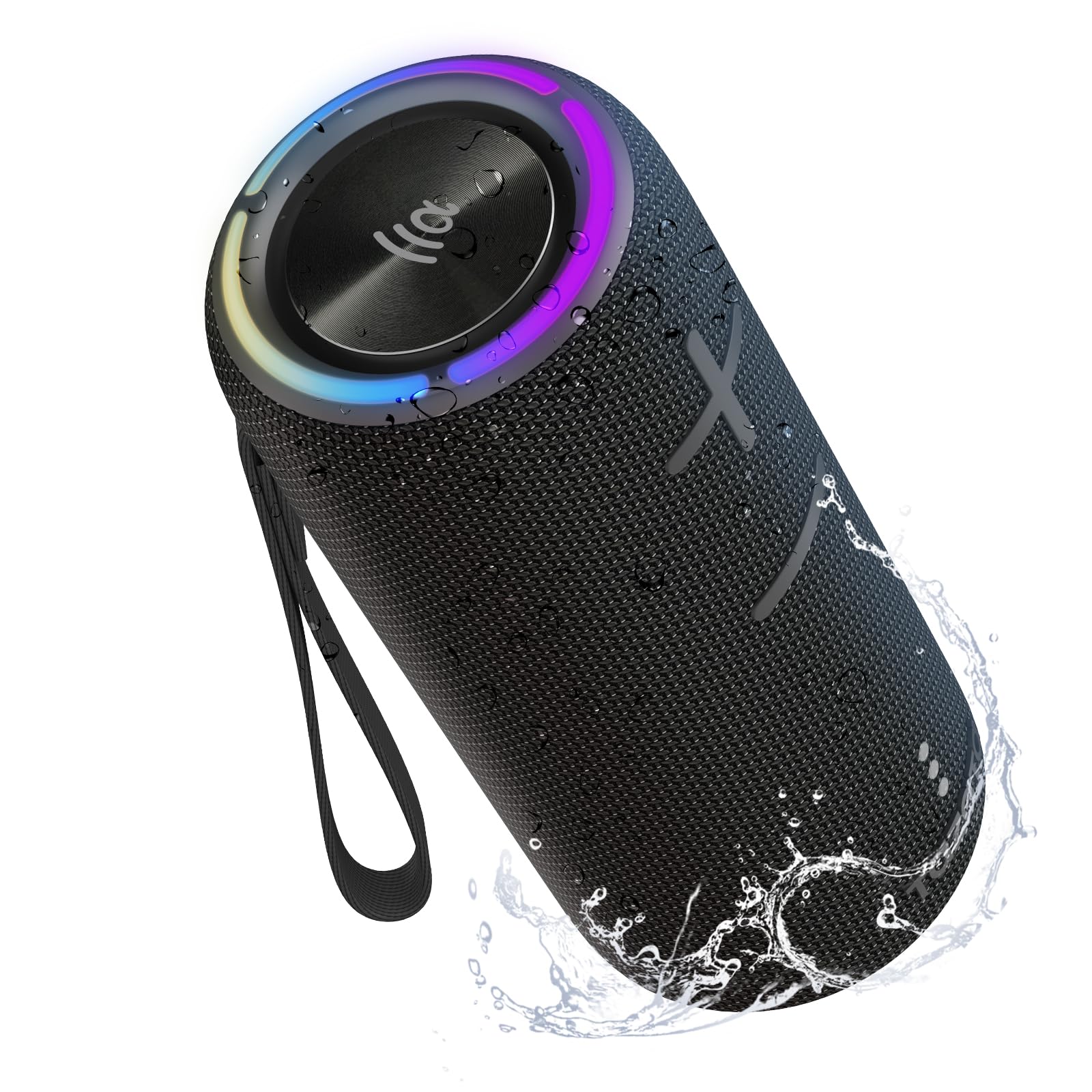
Image: TAZATA FUN 300 Portable Bluetooth Speaker in black.
คุณสมบัติหลัก:
- Powerful 30W Stereo Sound: Dual drivers with advanced bass boost for crisp, room-filling audio.
- ระบบเสียงรอบทิศทาง 360°: Delivers immersive audio from all directions.
- IPX7 Waterproof & Floating Design: Protected against water immersion up to 1 meter for 30 minutes, ideal for pool or beach use.
- Bluetooth 5.3: Stable and skip-free audio connection up to 100ft.
- โหมดปรับ EQ หลายแบบ: Switch between Standard, 3D Surround, and Bass Boost.
- เวลาเล่นนาน: Up to 8 hours of music playback at 60% volume with a built-in 2500mAh battery.
- การเชื่อมต่อที่หลากหลาย: Supports Bluetooth, TF/Micro SD card, and AUX/Type-C inputs.
- ไมโครโฟนในตัว: สำหรับการโทรแบบแฮนด์ฟรี
- แสงไฟสร้างอารมณ์ RGB: Enhances the listening experience.
- การออกแบบพกพา: Includes a portable strap for easy carrying and mounting.
2. อะไรอยู่ในกล่อง
- 1 x TAZATA Wireless Speaker (FUN 300)
- 1 x Type-C Charging Cable (charger head not included)
- สายคล้องพกพา 1 เส้น
- คู่มือเริ่มต้นอย่างรวดเร็ว 1 ชุด

Image: Diagram showing the TAZATA FUN 300 speaker, Type-C charging cable, portable strap, and user manual included in the package.
3. การตั้งค่า
3.1 การชาร์จลำโพง
- Locate the rubber flap on the side of the speaker.
- Gently open the flap to reveal the charging port (Type-C).
- เชื่อมต่อสายชาร์จ Type-C ที่ให้มากับลำโพง และอะแดปเตอร์แปลงไฟ USB ที่ใช้งานร่วมกันได้ (ไม่ได้รวมอยู่ในชุด)
- ไฟแสดงสถานะการชาร์จจะสว่างขึ้น การชาร์จจนเต็มใช้เวลาประมาณ 2 ชั่วโมง
- Once fully charged, ensure the rubber flap is securely closed to maintain the IPX7 waterproof rating.

Image: Close-up of the speaker's connectivity ports (Type-C, Micro SD, AUX) protected by a rubber cover.
3.2 การจับคู่บลูทูธ
- กดปุ่มเปิดปิดค้างไว้ () on the speaker to turn it on. The Bluetooth indicator light will flash, indicating it's in pairing mode.
- บนอุปกรณ์ของคุณ (สมาร์ทโฟน แท็บเล็ต คอมพิวเตอร์) เปิดใช้งาน Bluetooth และค้นหาอุปกรณ์ที่มีอยู่
- Select "TAZATA FUN 300" from the list of devices.
- เมื่อเชื่อมต่อแล้ว ไฟแสดงสถานะบลูทูธจะติดสว่างตลอดเวลา
การจับคู่ 3.3 TWS (True Wireless Stereo)
To achieve a more immersive stereo sound experience, you can pair two TAZATA FUN 300 speakers together:
- ตรวจสอบให้แน่ใจว่าลำโพงทั้งสองเปิดอยู่และไม่ได้เชื่อมต่อกับอุปกรณ์ Bluetooth อื่นใด
- On one speaker (this will be your primary speaker), press the TWS button (). It will search for another speaker.
- On the second speaker, press the TWS button. The speakers will automatically connect to each other.
- Once paired, the primary speaker's Bluetooth indicator will flash, and the secondary speaker's indicator will be solid.
- ทีนี้ ให้เชื่อมต่ออุปกรณ์ของคุณกับลำโพงหลักผ่านบลูทูธ ตามที่อธิบายไว้ในหัวข้อ 3.2

Image: Two TAZATA FUN 300 speakers demonstrating TWS stereo pairing for enhanced sound.
4. คู่มือการใช้งาน
4.1 ฟังก์ชันปุ่ม
Image: Detailed diagram illustrating the location and function of each button on the TAZATA FUN 300 speaker.
| ปุ่ม | การทำงาน |
|---|---|
| ปุ่มเปิดปิด () | Long press: Turn on/off. Short press: Switch 3 modes of RGB light and turn off. |
| ปุ่มเล่น/หยุดชั่วคราว () | Short press: Play and pause. Double press: Answer and hang up calls. |
| เพิ่มระดับเสียง (+) | Short press: Increase volume. Long press: Next song. |
| ลดเสียงลง (-) | Short press: Decrease volume. Long press: Previous song. |
| ปุ่มบลูทูธ () | Short press: Switch input mode (Bluetooth, AUX, Micro SD). Double press: Switch EQ mode (Bass, 3D, Standard). Long press: Disconnect/reconnect Bluetooth. |
4.2 โหมดการเชื่อมต่อ
- โหมดบลูทู ธ : เชื่อมต่อแบบไร้สายกับอุปกรณ์ของคุณ (ดูหัวข้อ 3.2)
- โหมดการ์ด Micro SD: ใส่การ์ด Micro SD ที่มีไฟล์เสียง files into the dedicated slot (under the rubber flap). The speaker will automatically switch to Micro SD mode and begin playback.
- โหมด AUX: Connect an audio device using a 3.5mm AUX cable to the AUX port (under the rubber flap). The speaker will automatically switch to AUX mode.
โหมดอีควอไลเซอร์ 4.3 โหมด
Double press the Bluetooth button to cycle through the following EQ modes:
- โหมดมาตรฐาน: ผู้เชี่ยวชาญด้านเสียงสมดุลfile.
- 3D Surround Mode: Enhanced spatial audio experience.
- โหมดเพิ่มเบส: Emphasizes low frequencies for deeper bass.
4.4 แสง RGB
Short press the Power button to cycle through different RGB light modes or turn the lights off.
5. การบำรุงรักษา
The TAZATA FUN 300 speaker is designed for durability and outdoor use. To ensure its longevity:
- การป้องกันน้ำ: Always ensure the rubber flap covering the charging and input ports is securely closed when not in use, especially near water. This maintains the IPX7 waterproof rating.
- การทำความสะอาด: ใช้แบบนุ่มๆamp cloth to clean the speaker. Avoid using harsh chemicals or abrasive materials.
- พื้นที่จัดเก็บ: เก็บลำโพงไว้ในที่แห้งและเย็น หลีกเลี่ยงแสงแดดโดยตรงและอุณหภูมิที่สูงหรือต่ำเกินไป
- การดูแลแบตเตอรี่ For optimal battery life, avoid fully discharging the speaker frequently. Charge it regularly, even if not in constant use.

Image: A person holding the TAZATA FUN 300 speaker partially submerged in water, highlighting its IPX7 waterproof capability.
6 การแก้ไขปัญหา
- ไม่มีไฟฟ้า: ตรวจสอบให้แน่ใจว่าลำโพงชาร์จแบตเตอรี่เต็มแล้ว เชื่อมต่อกับแหล่งจ่ายไฟโดยใช้สาย Type-C
- ไม่สามารถจับคู่ผ่านบลูทูธ:
- ตรวจสอบให้แน่ใจว่าลำโพงอยู่ในโหมดจับคู่ (ไฟแสดงสถานะบลูทูธกะพริบ)
- ตรวจสอบให้แน่ใจว่าอุปกรณ์ของคุณเปิดใช้งานบลูทูธแล้วและอยู่ในระยะ (สูงสุด 10 เมตร)
- Forget "TAZATA FUN 300" from your device's Bluetooth list and try pairing again.
- If TWS mode was previously used, ensure both speakers are disconnected from each other before attempting to pair a single speaker to your device.
- ไม่มีเสียง:
- ตรวจสอบระดับเสียงทั้งบนลำโพงและอุปกรณ์ที่เชื่อมต่อของคุณ
- Ensure the correct input mode (Bluetooth, AUX, Micro SD) is selected.
- If using AUX or Micro SD, ensure the cables are properly connected or the card is inserted correctly.
- คุณภาพเสียงไม่ดี:
- เลื่อนลำโพงให้ใกล้กับอุปกรณ์บลูทูธของคุณมากขึ้นเพื่อลดสัญญาณรบกวน
- Try switching between different EQ modes.
- Ensure the speaker is placed on a stable surface for optimal bass response.
7. ข้อมูลจำเพาะ
| คุณสมบัติ | รายละเอียด |
|---|---|
| ยี่ห้อ | ทาซาตะ |
| ชื่อรุ่น | สนุก 300 |
| กำลังขับสูงสุดของลำโพง | 30 Watts (RMS) / 45 Watts (Peak) |
| การตอบสนองความถี่ | ความถี่ 20 กิโลเฮิรตซ์ |
| เทคโนโลยีการเชื่อมต่อ | อุปกรณ์เสริม, บลูทูธ |
| โหมดเอาต์พุตเสียง | สเตอริโอ |
| ประเภทการติดตั้ง | ที่วางบนโต๊ะ |
| วัสดุของตู้หุ้ม | Plastic, Thermoplastic Polyurethane (TPU) |
| คุณสมบัติเพิ่มเติม | Bass Boost, 360° Surround Sound, LED Light, Built-in Mic, TWS Pairing |
| เส้นผ่านศูนย์กลางซับวูฟเฟอร์ | 3 นิ้ว |
| เส้นผ่านศูนย์กลางทวีตเตอร์ | 48 มิลลิเมตร |
| ประเภทตัวควบคุม | ปุ่ม |
| สี | สีดำ |
| อายุการใช้งานแบตเตอรี่โดยเฉลี่ย | 8 ชั่วโมง (ที่ระดับเสียง 60%) |
| กันน้ำได้ | YES (IPX7) |
| ช่วงบลูทูธสูงสุด | 10 Meters / 100ft |
| จำนวนไมโครโฟน | 1 |
| แหล่งพลังงาน | ใช้พลังงานจากแบตเตอรี่ |
| ความจุของแบตเตอรี่ | 2500 Amp ชั่วโมง |
| เวลาในการชาร์จแบตเตอรี่ | 2 ชั่วโมง |
| ขนาดสินค้า (ลึก x กว้าง x สูง) | ลึก 8.94 นิ้ว x กว้าง 3.76 นิ้ว x สูง 3.7 นิ้ว |

ภาพ: ระเบิด view of the speaker's internal components, detailing the woofer and tweeter for 45W peak stereo sound.

Image: The TAZATA FUN 300 speaker highlighting its 8-hour playtime and 2500mAh built-in battery.
8. การรับประกันและการสนับสนุน
The TAZATA FUN 300 Portable Bluetooth Speaker comes with a การรับประกันแบบจำกัด. For specific details regarding warranty coverage, duration, and how to claim support, please refer to the official TAZATA webเว็บไซต์หรือติดต่อฝ่ายบริการลูกค้าโดยตรง
For further assistance, technical support, or inquiries, please visit the TAZATA Store on Amazon หรือดูข้อมูลการติดต่อที่ระบุไว้ในคู่มือเริ่มต้นใช้งานฉบับย่อของคุณ
9. วิดีโอผลิตภัณฑ์อย่างเป็นทางการ
Video: Official TAZATA video showcasing the 30W Surround Sound Wireless Portable Bluetooth Speaker, demonstrating its features and waterproof capabilities.