
การแนะนำ
ขอบคุณสำหรับการซื้อasing the Fisher Portable Bluetooth Speaker, Model SBT950GRN. This speaker is designed to provide high-quality audio with features such as IPX5 water resistance, Bluetooth 5.3 connectivity, LED lights, and True Wireless Stereo (TWS) pairing. Please read this manual carefully before using the product to ensure proper operation and to maximize its lifespan.
เนื้อหาแพ็คเกจ
- Fisher Portable Bluetooth Speaker (Model SBT950GRN)
- สายไฟ (USB-C)
- คู่มือเริ่มต้นอย่างรวดเร็ว
- บัตรรับประกัน
สินค้าเกินview
The Fisher Portable Bluetooth Speaker features a robust design with intuitive controls and dynamic audio capabilities. Key components include:
- แผงควบคุม: Located on the top surface, includes buttons for power, volume, play/pause, mode selection, and LED light control.
- ตะแกรงลำโพง: Covers the dual 2.75-inch speakers.
- LED Light Rings: Located on both ends of the speaker, providing visual effects.
- พอร์ตชาร์จ USB-C: สำหรับชาร์จแบตเตอรี่ภายใน
- พอร์ต USB: สำหรับการเล่นสื่อ
- ไมโครโฟน: สำหรับการโทรแบบแฮนด์ฟรี
- ที่จับ: เพื่อความสะดวกในการพกพา

Image: Fisher Portable Bluetooth Speaker with its carrying strap attached.

Image: Internal diagram illustrating the speaker's 2-way audio system and dynamic rhythm lights.
การตั้งค่า
1. ชาร์จลำโพง
Before first use, fully charge the speaker. Connect the provided USB-C power cable to the speaker's USB-C charging port and the other end to a compatible USB power adapter (not included). The charging indicator will illuminate. A full charge takes approximately 4 hours and provides up to 7 hours of playback time.
2. เปิด/ปิดเครื่อง
- หากต้องการเปิดเครื่อง ให้กดค้างไว้ ปุ่มเปิดปิด for a few seconds until the LED lights activate.
- ในการปิดเครื่องให้กดปุ่ม ปุ่มเปิดปิด again until the LED lights turn off.
3. การจับคู่บลูทู ธ
- ตรวจสอบให้แน่ใจว่าลำโพงเปิดอยู่และอยู่ในโหมดจับคู่บลูทูธ (ระบุด้วยไฟ LED กะพริบ)
- บนอุปกรณ์ของคุณ (สมาร์ทโฟน แท็บเล็ต แล็ปท็อป) เปิดใช้งาน Bluetooth และค้นหาอุปกรณ์ที่มีอยู่
- Select "Fisher SBT950GRN" from the list.
- เมื่อจับคู่สำเร็จแล้ว ลำโพงจะส่งเสียงยืนยัน และไฟ LED จะหยุดกะพริบ
- ลำโพงจะพยายามเชื่อมต่อกับอุปกรณ์ที่จับคู่ไว้ครั้งสุดท้ายโดยอัตโนมัติเมื่อเปิดเครื่อง

ภาพ: ด้านบน view of the speaker showing the control panel with buttons for power, volume, and mode.
4. การจับคู่ True Wireless Stereo (TWS)
TWS allows you to connect two Fisher SBT950GRN speakers for a stereo sound experience.
- ตรวจสอบให้แน่ใจว่าลำโพงทั้งสองเปิดอยู่และไม่ได้เชื่อมต่อกับอุปกรณ์ Bluetooth ใดๆ
- ในลำโพงตัวหนึ่ง (ซึ่งจะเป็นลำโพงหลัก) ให้กดปุ่มค้างไว้ ปุ่ม TWS (often combined with the Mode button or a dedicated button). The speaker will enter TWS pairing mode.
- ลำโพงหลักจะค้นหาลำโพงรอง เมื่อเชื่อมต่อแล้ว ลำโพงทั้งสองจะส่งเสียงยืนยัน
- ทีนี้ ให้เชื่อมต่ออุปกรณ์ของคุณกับลำโพงหลักผ่านบลูทูธตามที่อธิบายไว้ในขั้นตอนที่ 3 ลำโพงทั้งสองตัวจะเล่นเสียงในระบบสเตอริโอ

Image: Two speakers demonstrating True Wireless Stereo pairing for an immersive audio experience.
คำแนะนำการใช้งาน
การควบคุมพื้นฐาน
- ปุ่มเปิด/ปิด: กดค้างไว้เพื่อเปิด/ปิด
- ปุ่มเล่น/หยุดชั่วคราว: กดหนึ่งครั้งเพื่อเล่นหรือหยุดเสียงชั่วคราว
- เพิ่มระดับเสียง (+): กดหนึ่งครั้งเพื่อเพิ่มระดับเสียง กดค้างไว้เพื่อเล่นเพลงถัดไป
- ลดเสียงลง (-): กดหนึ่งครั้งเพื่อลดระดับเสียง กดค้างไว้เพื่อเล่นเพลงก่อนหน้า
- ปุ่มโหมด (M): Press to switch between Bluetooth, FM Radio, and USB playback modes.

Image: A user interacting with the speaker's control panel.
โหมดไฟ LED
The speaker features dynamic RGB LED lights. Press the ปุ่มไฟ (often combined with another function or a dedicated button) to cycle through different light modes or to turn the lights off. There are 3 vibrant color FX modes available.

ภาพ: ลำโพงโชว์asing its colorful RGB LED light effects.
วิทยุเอฟเอ็ม
- กดปุ่ม ปุ่มโหมด (M) เพื่อเปลี่ยนไปใช้โหมดวิทยุ FM
- กดปุ่ม ปุ่มเล่น/หยุดชั่วคราว เพื่อสแกนและบันทึกสถานีวิทยุ FM ที่ใช้งานได้โดยอัตโนมัติ
- ใช้ เพิ่มระดับเสียง (+) และ ลดเสียงลง (-) ปุ่มสำหรับนำทางระหว่างสถานีที่บันทึกไว้
การโทรแบบแฮนด์ฟรี
When connected to your smartphone via Bluetooth, the speaker can be used for hands-free calls.
- ในการรับสายเรียกเข้าให้กดปุ่ม ปุ่มเล่น/หยุดชั่วคราว ครั้งหนึ่ง.
- หากต้องการวางสาย ให้กด ปุ่มเล่น/หยุดชั่วคราว ครั้งหนึ่ง.
- ในการปฏิเสธสายเรียกเข้า ให้กด . ค้างไว้ ปุ่มเล่น/หยุดชั่วคราว.
การซ่อมบำรุง
- การทำความสะอาด: ใช้ผ้าแห้งนุ่มเช็ดทำความสะอาดภายนอกลำโพง ห้ามใช้สารทำความสะอาดที่มีฤทธิ์กัดกร่อนหรือตัวทำละลาย
- พื้นที่จัดเก็บ: เก็บลำโพงไว้ในที่แห้งและเย็น หลีกเลี่ยงแสงแดดโดยตรงและอุณหภูมิที่สูงหรือต่ำเกินไป
- การกันน้ำ (IPX5): The speaker is IPX5 water-resistant, meaning it can withstand splashes and light rain. Do not submerge the speaker in water. Ensure the USB-C port cover is securely closed when exposed to water.

Image: The speaker positioned near water, illustrating its IPX5 water-resistant design.
การแก้ไขปัญหา
| ปัญหา | วิธีแก้ปัญหาที่เป็นไปได้ |
|---|---|
| ลำโพงไม่เปิดเครื่อง | ตรวจสอบให้แน่ใจว่าแบตเตอรี่ชาร์จเต็มแล้ว เชื่อมต่อลำโพงเข้ากับแหล่งจ่ายไฟโดยใช้สาย USB-C |
| ไม่สามารถจับคู่ผ่านบลูทูธได้ |
|
| ไม่มีเสียงหรือเสียงเบา |
|
| การจับคู่ TWS ล้มเหลว |
|
| การรับสัญญาณวิทยุ FM ไม่ดี |
|
ข้อมูลจำเพาะ
| คุณสมบัติ | รายละเอียด |
|---|---|
| หมายเลขรุ่น | SBT950GRN |
| เวอร์ชันบลูทูธ | 5.3 |
| ช่วงสาย | สูงถึง 32.8 ฟุต (10 เมตร) |
| กำลังขับของลำโพง | 26W Peak (13W RMS) |
| ขนาดลำโพง | 2 x 2.75 inches (69.85 mm) |
| การตอบสนองความถี่ | 80เฮิรตซ์ - 16กิโลเฮิรตซ์ |
| อิมพีแดนซ์ | 4 โอห์ม |
| อัตราส่วนสัญญาณต่อเสียงรบกวน | 80 เดซิเบล |
| ความจุของแบตเตอรี่ | 3000 มิลลิแอมป์ |
| เวลาการเล่น | ใช้งานได้นานสูงสุด 7 ชั่วโมง (ที่ระดับเสียงปานกลาง) |
| เวลาในการชาร์จ | ประมาณ 4 ชั่วโมง |
| พอร์ตชาร์จ | ยูเอสบี-ซี |
| ความต้านทานต่อน้ำ | IPX5 |
| ขนาดสินค้า (กว้าง x ลึก x สูง) | 11.26" x 4.88" x 4.72" (28.6 ซม. x 12.4 ซม. x 12 ซม.) |
| น้ำหนักสินค้า | 3.63 ปอนด์ (1.65 กก.) |
| วัสดุ | พลาสติก |
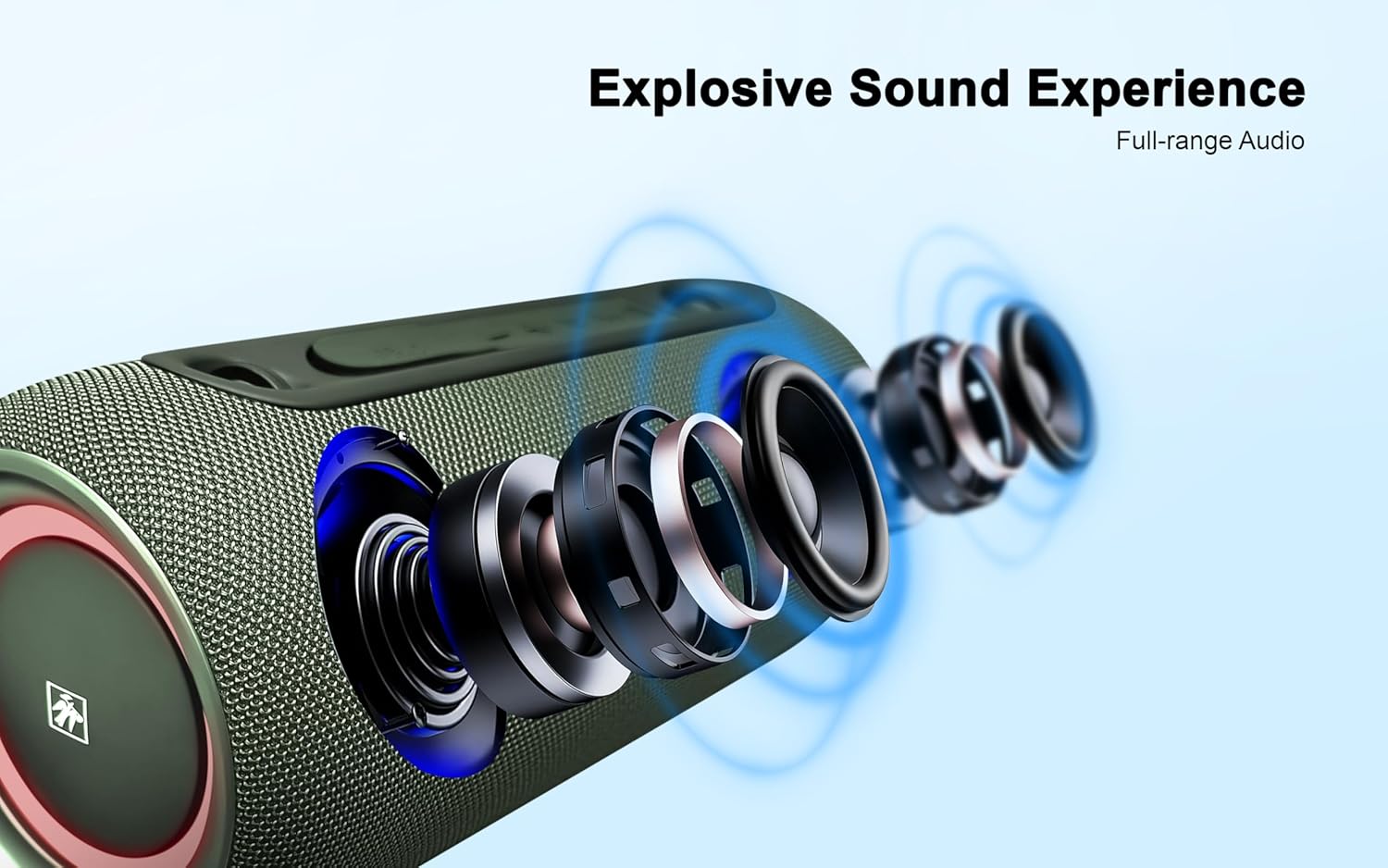
Image: Dimensional drawing of the speaker, indicating its width, depth, and height.
ข้อมูลการรับประกัน
This Fisher Portable Bluetooth Speaker comes with a การรับประกันแบบจำกัด. Please refer to the included Warranty Card for detailed terms, conditions, and registration information. Keep your purchase receipt as proof of purchase for warranty claims.
การสนับสนุนลูกค้า
For further assistance, technical support, or warranty inquiries, please refer to the contact information provided on your Warranty Card or visit the official Fisher webนอกจากนี้ คุณยังสามารถติดต่อร้านค้าที่คุณซื้อสินค้ามาได้อีกด้วย