
Kalobee SK38
Kalobee Watch 4 PRO+ Smart Watch User Manual
รุ่น : SK38
Brand: Kalobee
การแนะนำ
Welcome to the user manual for your new Kalobee Watch 4 PRO+ Smart Watch. This guide provides essential information on setting up, operating, maintaining, and troubleshooting your device. Please read this manual thoroughly to ensure optimal performance and longevity of your smartwatch.
The Kalobee Watch 4 PRO+ features a vibrant AMOLED display, versatile interchangeable straps, and convenient wireless charging, designed to seamlessly integrate into your daily life.
เนื้อหาแพ็คเกจ
Upon opening your Kalobee Watch 4 PRO+ package, please verify that all the following items are included:
- Kalobee Watch 4 PRO+ Smart Watch (Model SK38)
- Three (3) Interchangeable Straps (e.g., leather, silicone, metal)
- แท่นชาร์จแบบไร้สาย
- คู่มือการใช้งาน (เอกสารนี้)

Image: The Kalobee Watch 4 PRO+ packaging, displaying the smartwatch alongside its three distinct interchangeable straps, highlighting the complete package contents.
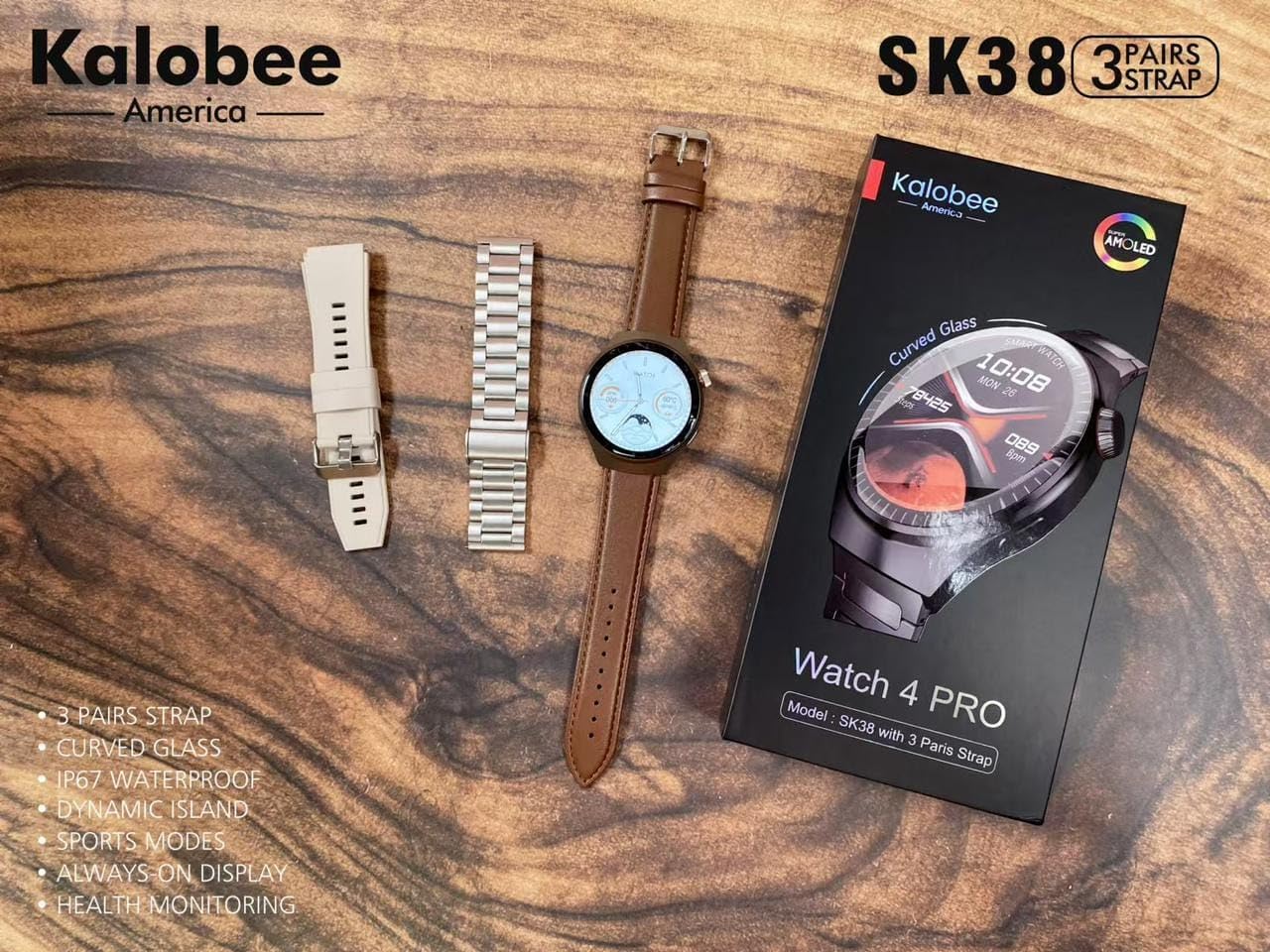
Image: A flat lay of the Kalobee Watch 4 PRO+ components, including the smartwatch, its retail box, and the three different strap options (leather, silicone, and metal), ready for assembly.
การตั้งค่า
1. การชาร์จครั้งแรก
Before first use, fully charge your Kalobee Watch 4 PRO+. This ensures optimal battery calibration and performance.
- Connect the wireless charging dock to a USB power adapter (not included) and plug it into a power outlet.
- Place your Kalobee Watch 4 PRO+ onto the charging dock. Ensure the watch is properly aligned for charging to begin.
- หน้าจอของนาฬิกาจะแสดงสถานะการชาร์จ โดยปกติการชาร์จเต็มจะใช้เวลาประมาณ 2-3 ชั่วโมง
2. การติดตั้งสายรัด
The Kalobee Watch 4 PRO+ comes with interchangeable straps, allowing you to customize its appearance. To install or change a strap:
- Locate the quick-release pins on the back of each strap.
- Slide the pin inwards to detach or attach the strap to the watch lugs.
- Ensure the pin clicks securely into place, indicating the strap is properly fastened.

ภาพ: ด้านหนึ่ง view of the Kalobee Watch 4 PRO+ featuring a sleek metal strap, demonstrating one of the interchangeable strap options.
3. การจับคู่กับอุปกรณ์ของคุณ (บลูทูธ)
To unlock the full smart features of your watch, pair it with your smartphone via Bluetooth.
- Download the official Kalobee companion app from your smartphone's app store (iOS App Store or Google Play Store).
- ตรวจสอบให้แน่ใจว่าได้เปิดใช้งาน Bluetooth บนสมาร์ทโฟนของคุณแล้ว
- Open the Kalobee app and follow the on-screen instructions to add a new device.
- On your watch, navigate to the Bluetooth settings (refer to "Basic Navigation" section if needed).
- Select your watch from the list of available devices in the app. Confirm the pairing request on both your phone and watch.
- เมื่อจับคู่แล้ว นาฬิกาจะซิงโครไนซ์ข้อมูลและการแจ้งเตือนกับสมาร์ทโฟนของคุณ
คำแนะนำการใช้งาน
1. การนำทางพื้นฐาน
The Kalobee Watch 4 PRO+ features an intuitive touch screen and physical buttons for navigation.
- หน้าจอสัมผัส: Swipe left/right, up/down to navigate through menus and widgets. Tap to select an item.
- ปุ่มมงกุฎ: Typically used to return to the home screen, scroll through lists, or zoom in/out. Press and hold for power options.
- ปุ่มด้านข้าง: Often customizable, it can be set to quickly access a specific app or feature.

Image: The Kalobee Watch 4 PRO+ displaying its main watch face, showing time, date, steps, and calories, illustrating the primary user interface.
2. การปรับแต่งหน้าปัดนาฬิกา
Personalize your watch by changing the watch face:
- จากหน้าจอหลัก ให้กดค้างที่หน้าปัดนาฬิกา
- ปัดไปทางซ้ายหรือขวาเพื่อดูหน้าปัดนาฬิกาที่มีให้เลือก
- Tap on a watch face to select it. Some watch faces may offer further customization options (e.g., complications, colors) which can be adjusted by tapping the "Customize" option.
- Additional watch faces can be downloaded and managed via the Kalobee companion app.
3. คุณสมบัติการตรวจสอบสุขภาพ
Your Kalobee Watch 4 PRO+ is equipped with various health monitoring capabilities:
- การตรวจสอบอัตราการเต้นของหัวใจ: Access the heart rate app on your watch to measure your current heart rate. Continuous monitoring can be enabled in the app settings.
- การติดตามกิจกรรม: แอปนี้จะบันทึกจำนวนก้าว ระยะทาง และปริมาณแคลอรี่ที่เผาผลาญไปตลอดทั้งวัน View daily summaries on the watch or in the companion app.
- การติดตามการนอนหลับ: Wears the watch to bed to monitor sleep patterns, including deep sleep, light sleep, and awake times. Data is available in the app.
- โหมดกีฬา: Select from various sports modes (e.g., running, cycling) to track specific workout data.
4. การแจ้งเตือน
Receive notifications from your paired smartphone directly on your watch:
- Ensure notifications are enabled in the Kalobee companion app for desired applications.
- When a notification arrives, the watch will vibrate and display the content.
- ปัดลงจากด้านบนของหน้าปัดนาฬิกาเพื่อ view ประวัติการแจ้งเตือนของคุณ
การซ่อมบำรุง
1. การทำความสะอาดนาฬิกาของคุณ
การทำความสะอาดเป็นประจำจะช่วยรักษารูปลักษณ์และฟังก์ชันการทำงานของนาฬิกาของคุณ
- ตัวเรือนนาฬิกา: Wipe the watch body with a soft, lint-free cloth. If necessary, slightly dampชุบผ้าด้วยน้ำ หลีกเลี่ยงการใช้สารเคมีรุนแรงหรือวัสดุที่มีฤทธิ์กัดกร่อน
- สายรัด: Clean silicone straps with mild soap and water. Leather straps should be wiped with a dry or slightly damp cloth and allowed to air dry. Metal straps can be cleaned with a soft brush and mild soapy water, then rinsed and dried thoroughly.
- ตรวจสอบให้แน่ใจว่านาฬิกาแห้งสนิทก่อนชาร์จหรือสวมใส่
2. การดูแลแบตเตอรี่
เพื่อยืดอายุแบตเตอรี่:
- หลีกเลี่ยงการปล่อยแบตเตอรี่จนหมดบ่อยครั้ง
- ควรชาร์จนาฬิกาเป็นประจำ โดยควรชาร์จก่อนที่ระดับแบตเตอรี่จะลดลงต่ำกว่า 20%
- Do not expose the watch to extreme temperatures (hot or cold) for extended periods.
3. การจัดเก็บ
When not in use for an extended period, store your watch in a cool, dry place. It is recommended to charge the watch to about 50% before long-term storage.
การแก้ไขปัญหา
If you encounter issues with your Kalobee Watch 4 PRO+, refer to the following common solutions:
| ปัญหา | วิธีแก้ปัญหาที่เป็นไปได้ |
|---|---|
| นาฬิกาเปิดไม่ติด | Ensure the watch is fully charged. Connect it to the charging dock for at least 30 minutes. If still unresponsive, perform a forced restart (refer to "Basic Navigation" for button functions). |
| ไม่สามารถจับคู่กับสมาร์ทโฟนได้ | Ensure Bluetooth is enabled on both devices. Make sure the watch is in pairing mode. Restart both the watch and smartphone. Clear previous Bluetooth connections on your phone if necessary. |
| ข้อมูลสุขภาพที่ไม่ถูกต้อง | Ensure the watch is worn snugly on your wrist, not too loose or too tight. Clean the sensors on the back of the watch. Update the watch firmware via the companion app. |
| การแจ้งเตือนไม่ปรากฏ | Check notification settings in the Kalobee companion app and your smartphone's system settings. Ensure the watch is connected via Bluetooth. |
| อายุการใช้งานแบตเตอรี่สั้น | Reduce screen brightness, disable always-on display, limit background app refresh, and turn off unnecessary features like continuous heart rate monitoring if not needed. |
ข้อมูลจำเพาะ
- แบบอย่าง: สก38
- แสดง: หน้าจอ AMOLED
- ระบบปฏิบัติการ: แอสโตรโดรมิโนโอเอส
- การเชื่อมต่อ: บลูทูธ
- ความจุแบตเตอรี่: 449 Amp ชั่วโมง
- การชาร์จ: การชาร์จแบบไร้สาย
- ส่วนประกอบที่รวมอยู่: Watch Band (3 pairs), Wireless Charging Dock
- ผู้ผลิต: HUAYING COMMUNICATION CO.,LTD
- ประเทศต้นกำเนิด: จีน
การรับประกันและการสนับสนุน
Information regarding product warranty and customer support is not available in this manual. Please refer to the product packaging or the official Kalobee webเว็บไซต์สำหรับรายละเอียดเกี่ยวกับการรับประกันและวิธีติดต่อฝ่ายสนับสนุนลูกค้าสำหรับการบริการหรือการสอบถาม
Ask a question about this manual
Ask about setup, troubleshooting, compatibility, parts, safety, or missing instructions. Manuals+ will review the question and use this page’s manual context to help answer it.