
1. บทนำ
This manual provides essential instructions for the safe and efficient operation of your EPEVER Tracer4210ANG3 MPPT Solar Charge Controller. This device is designed to manage power flow from your solar panels to your battery bank, ensuring optimal charging and extending battery life. Please read this manual thoroughly before installation and use.
2. ข้อมูลด้านความปลอดภัย
โปรดปฏิบัติตามข้อควรระวังด้านความปลอดภัยต่อไปนี้ในระหว่างการติดตั้งและการใช้งาน:
- ตรวจสอบให้แน่ใจว่าสายไฟทั้งหมดต่อขั้วถูกต้องและแน่นหนา เพื่อป้องกันความเสียหายต่อตัวควบคุมหรือส่วนประกอบอื่นๆ
- ควรต่อแบตเตอรี่ก่อนเสมอ จากนั้นจึงต่อแผงโซลาร์เซลล์ และสุดท้ายจึงต่ออุปกรณ์ไฟฟ้าที่ต้องการใช้งาน ส่วนการถอดควรทำในลำดับย้อนกลับ
- อย่าพยายามถอดประกอบหรือซ่อมแซมตัวควบคุมด้วยตนเอง โปรดติดต่อช่างผู้ชำนาญการเพื่อขอรับบริการ
- ติดตั้งตัวควบคุมในบริเวณที่มีอากาศถ่ายเทสะดวก ห่างจากวัสดุไวไฟและแสงแดดโดยตรง
- ควรใช้เบรกเกอร์หรือฟิวส์ที่เหมาะสมสำหรับการเชื่อมต่อทั้งหมดเพื่อป้องกันกระแสไฟเกิน
- ควรสวมแว่นตาป้องกันเมื่อทำงานกับแบตเตอรี่
3. สินค้าหมดview
The EPEVER Tracer4210ANG3 is an advanced Maximum Power Point Tracking (MPPT) solar charge controller designed for off-grid solar systems. It automatically identifies 12V or 24V system voltages and supports various battery types, including Lithium. Key features include high tracking and conversion efficiency, and comprehensive electronic protections.
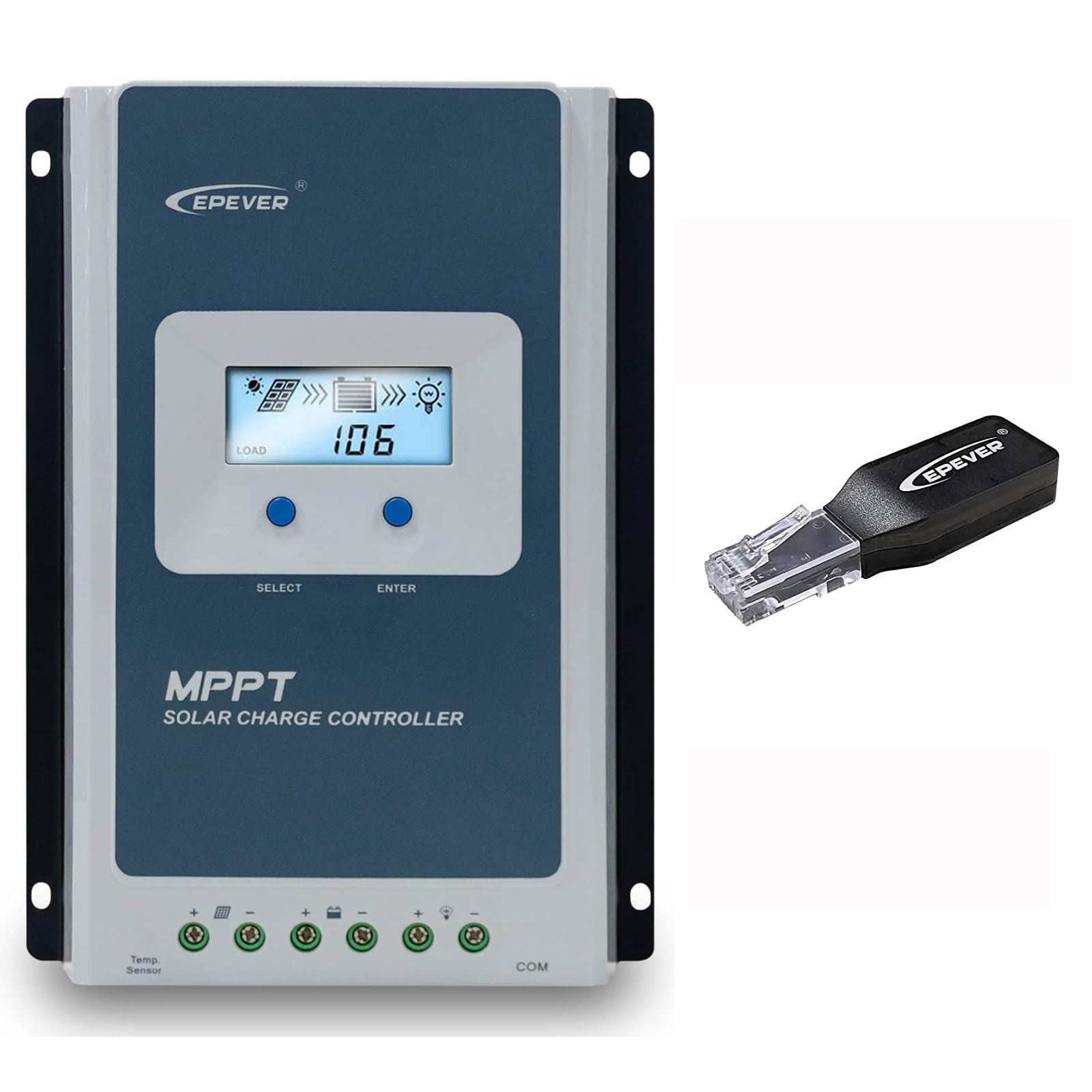
Figure 3.1: EPEVER Tracer4210ANG3 MPPT Solar Charge Controller with LCD display and connection terminals.
3.1 คุณสมบัติหลัก
- ระบบปรับระดับเสียงอัตโนมัติ 12V/24Vtagอี บัตรประจำตัว
- Advanced MPPT technology with tracking efficiency above 99.5% and conversion efficiency up to 98%.
- โฟร์เอสtage charging (Bulk, Boost, Float, Equalization) to optimize battery health and lifespan.
- Supports various battery types including Sealed, Gel, Flooded, and Lithium.
- Comprehensive electronic protection functions: PV over current, short-circuit, reverse polarity, night reverse charging, battery reverse, over voltage, over-discharging, overheating, Lithium battery low temperature, load short circuit/overload, device overheating, and TVS high voltage transients protection.
- Remote control and monitoring capabilities via BLE (Bluetooth Low Energy) module (included with this model).

Figure 3.2: The Tracer4210ANG3 controller is compatible with multiple battery types, including Lithium (LI), Sealed (SLD), Flooded (FLD), Gel, and AGM, automatically identifying 12V/24V battery voltage.

Figure 3.3: System diagram illustrating the high tracking efficiency (above 99.5%) and conversion efficiency (98%) of the MPPT solar charge controller within a typical solar power setup for a home.

Figure 3.4: The controller offers real-time monitoring via a mobile application using BLE (Bluetooth Low Energy) or an optional MT50 remote meter. Note: BLE module is included with this model, while MT50 or WiFi modules are sold separately.
4. การตั้งค่าและการติดตั้ง
4.1 การติดตั้งคอนโทรลเลอร์
- Choose a dry, well-ventilated location, protected from direct sunlight, high temperatures, and moisture.
- ตรวจสอบให้แน่ใจว่ามีพื้นที่ว่างรอบๆ ตัวควบคุมเพียงพอสำหรับการระบายความร้อน
- Mount the controller vertically on a wall or suitable surface using appropriate fasteners.
4.2 การเชื่อมต่อสายไฟ
สำคัญ: Always connect in the following order: Battery → Solar Panel → Load. Disconnect in the reverse order.
- เชื่อมต่อแบตเตอรี่: เชื่อมต่อขั้วบวกและขั้วลบของแบตเตอรี่เข้ากับขั้วแบตเตอรี่ที่ตรงกันบนตัวควบคุม ตรวจสอบให้แน่ใจว่าขั้วถูกต้อง ตัวควบคุมจะตรวจจับแรงดันไฟฟ้าของระบบโดยอัตโนมัติtagอี (12V หรือ 24V)
- เชื่อมต่อแผงโซล่าเซลล์: Connect the positive and negative terminals of the solar panel array to the corresponding PV terminals on the controller. Ensure correct polarity.
- เชื่อมต่อโหลด: Connect the positive and negative terminals of the DC load to the corresponding load terminals on the controller.
After all connections are made, the controller's LCD display should illuminate, indicating proper power-up.
5. คู่มือการใช้งาน
จอแสดงผล LCD 5.1 และปุ่มต่างๆ
The controller features an LCD display for real-time system status and parameters, along with buttons for navigation and settings adjustment.
- ปุ่มเลือก: Used to cycle through display screens and menu options.
- ปุ่ม ENTER: Used to confirm selections or enter parameter editing mode.
Refer to the detailed user manual (available for download from the manufacturer's website) for a complete guide on LCD navigation and parameter settings.
5.2 การเลือกประเภทแบตเตอรี่
It is crucial to select the correct battery type in the controller's settings to ensure proper charging algorithms and prevent battery damage. The Tracer4210ANG3 supports various battery types, including:
- ปิดผนึก (SLD)
- เจล
- น้ำท่วม (FLD)
- ลิเธียม (LI)
- User-defined (for custom parameters)
Access the battery settings via the LCD menu and select the type that matches your connected battery bank. For Lithium batteries, ensure the correct voltage and charging parameters are set, especially if using user-defined settings.
5.3 Remote Monitoring (BLE)
This model includes a Bluetooth Low Energy (BLE) module, allowing you to monitor and configure the controller wirelessly via a smartphone application. Download the official EPEVER app from your device's app store, connect to the controller via Bluetooth, and follow the in-app instructions for monitoring system data and adjusting parameters.
6. การบำรุงรักษา
การบำรุงรักษาอย่างสม่ำเสมอจะช่วยให้ตัวควบคุมการชาร์จพลังงานแสงอาทิตย์ของคุณทำงานได้อย่างมีประสิทธิภาพสูงสุดและมีอายุการใช้งานยาวนาน:
- ตรวจสอบการเชื่อมต่อ: ตรวจสอบความแน่นหนาและการกัดกร่อนของจุดเชื่อมต่อสายไฟทั้งหมดเป็นระยะ ขันจุดเชื่อมต่อที่หลวมให้แน่น
- ทำความสะอาดตัวควบคุม: Keep the controller clean and free of dust and debris. Use a dry cloth for cleaning. Do not use liquids.
- การระบายอากาศ : ตรวจสอบให้แน่ใจว่าช่องระบายอากาศไม่ถูกปิดกั้น เพื่อให้ความร้อนระบายออกได้อย่างเหมาะสม
- การตรวจสอบแบตเตอรี่: Regularly check your battery bank for signs of damage, corrosion, or electrolyte levels (for flooded batteries).
7 การแก้ไขปัญหา
If you encounter issues with your Tracer4210ANG3 controller, refer to the following common problems and solutions:
| ปัญหา | สาเหตุที่เป็นไปได้ | สารละลาย |
|---|---|---|
| จอแสดงผลคอนโทรลเลอร์ปิดอยู่ | No power from battery or solar panel; reversed battery polarity. | ตรวจสอบการเชื่อมต่อแบตเตอรี่และปริมาตรtage. Ensure solar panels are receiving sunlight. Verify battery polarity. |
| แบตเตอรี่ไม่ชาร์จ | Solar panel not connected; low solar input; incorrect battery type setting; faulty wiring. | Check solar panel connections and ensure sufficient sunlight. Verify battery type setting. Inspect all wiring. |
| การโหลดไม่ทำงาน | Load disconnected; battery voltage too low; load overcurrent protection activated. | Check load connections. Allow battery to charge. Reduce load or check for short circuits. |
| คำเตือนเรื่องความร้อนสูงเกินไป | การระบายอากาศไม่ดี อุณหภูมิแวดล้อมสูงเกินไป ระบบทำงานหนักเกินไป | Ensure adequate airflow around the controller. Reduce load if possible. Relocate to a cooler environment. |
For more complex issues, please contact EPEVER customer support.
8. ข้อมูลจำเพาะ
| พารามิเตอร์ | ค่า |
|---|---|
| ปริมาตรที่กำหนดของระบบtage | 12V / 24V Auto Identify |
| กระแสไฟชาร์จที่กำหนด | 40เอ |
| แม็กซ์ PV อินพุต Voltage | 100โวลต์ |
| กำลังไฟฟ้าเข้า PV สูงสุด | 520 วัตต์ (ระบบ 12 โวลต์) / 1040 วัตต์ (ระบบ 24 โวลต์) |
| ประสิทธิภาพการติดตาม MPPT | มากกว่า 99.5% |
| Charge Conversion Efficiency | สูงสุดถึง 98% |
| รองรับประเภทแบตเตอรี่ | Sealed, Gel, Flooded, Lithium, User-defined |
| การชาร์จ Stages | Bulk, Boost, Float, Equalization |
| พอร์ตการสื่อสาร | RS485 (for BLE module, MT50, or PC connection) |
| ส่วนประกอบที่รวมอยู่ | MPPT Solar Controller, BLE Module |
9. การรับประกันและการสนับสนุน
ผลิตภัณฑ์ของ EPEVER ได้รับการออกแบบมาเพื่อความน่าเชื่อถือและประสิทธิภาพ สำหรับข้อมูลการรับประกัน โปรดดูบัตรรับประกันที่แนบมากับผลิตภัณฑ์ของคุณ หรือเยี่ยมชมเว็บไซต์อย่างเป็นทางการของ EPEVER website. If you have any questions, require technical assistance, or need to report an issue, please contact EPEVER customer support directly. Contact details can typically be found on the manufacturer's webเว็บไซต์หรือในบรรจุภัณฑ์ของผลิตภัณฑ์
คุณยังสามารถเยี่ยมชม ร้าน EPEVER บน Amazon สำหรับข้อมูลผลิตภัณฑ์เพิ่มเติมและทรัพยากรสนับสนุน