การแนะนำ
This manual provides essential instructions for setting up, operating, and maintaining your AOLON Tetra R4 Smart Watch. Please read it carefully to ensure proper use and to maximize the device's features.
การเริ่มต้น
1. แกะกล่อง
Your AOLON Tetra R4 Smart Watch package includes the following items:
- AOLON Tetra R4 Smart Watch
- สายชาร์จ
- คู่มือการใช้งาน
- วงนาฬิกา

Image: Product Size And Packaging List
2. การชาร์จอุปกรณ์
Before first use, fully charge your smart watch. The device features a 350 mAh battery, providing up to 7 days of typical use and up to 30 days of standby time. A full charge takes approximately 2.5 hours.
- เสียบสายชาร์จแม่เหล็กเข้ากับจุดชาร์จที่ด้านหลังของนาฬิกา
- เสียบปลายสาย USB เข้ากับอะแดปเตอร์ไฟ USB มาตรฐาน (ไม่รวมอยู่ด้วย) หรือพอร์ต USB ของคอมพิวเตอร์
- หน้าจอแสดงผลของนาฬิกาจะแสดงสถานะการชาร์จ
Video: This video demonstrates the unboxing and initial setup of the Tetra R4 Smart Watch, including charging and basic UI navigation.
3. การติดตั้งและการจับคู่แอป
เพื่อปลดล็อกศักยภาพสูงสุดของสมาร์ทวอทช์ของคุณ โปรดดาวน์โหลดและติดตั้งแอปพลิเคชัน กลอรีฟิตโปร แอพบนสมาร์ทโฟนของคุณ
- Scan the QR code in the included user manual or search for "GloryFitPro" in your smartphone's app store (App Store for iOS, Google Play for Android).
- เปิดใช้งานบลูทูธบนสมาร์ทโฟนของคุณ
- Open the GloryFitPro app and follow the on-screen instructions to add your device.
- Select "Aolon Tetra R4" from the list of available devices to connect.

Image: Connect the Smart Watch Via APP GloryFitPro "Aolon Tetra R4"
การใช้งานสมาร์ทวอทช์ของคุณ
1. การนำทางพื้นฐาน
The AOLON Tetra R4 features a 1.43-inch AMOLED full touch screen, a rotating crown, and two physical buttons for intuitive control.
- หน้าจอสัมผัส: ปัดไปทางซ้าย ขวา ขึ้น หรือลง เพื่อเลื่อนดูเมนูและฟังก์ชันต่างๆ แตะเพื่อเลือก
- มงกุฎหมุน: Rotate to scroll through lists or adjust settings. Press to confirm or return to the watch face.
- ปุ่มทางกายภาพ: Use for quick access to specific functions or to power on/off the device.
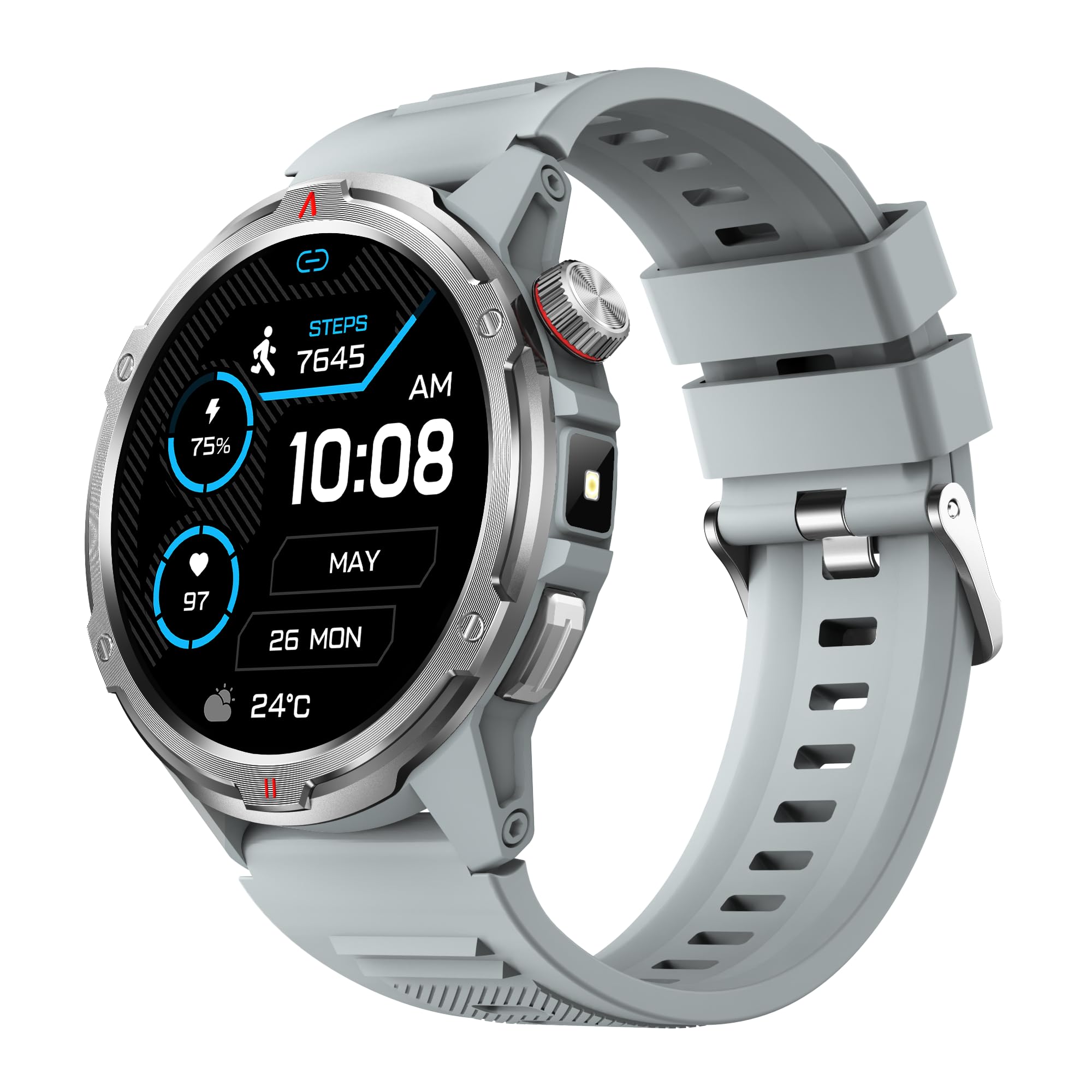
ภาพ: ผลิตภัณฑ์หลัก view showing the 1.43" AMOLED HD Full Touch Screen and physical buttons.
2. คุณสมบัติการสื่อสาร
Stay connected directly from your wrist with Bluetooth calling and smart notifications.
- การโทรด้วยบลูทูธ: With the latest Bluetooth 5.2 chip, a high-quality speaker, and microphone, you can make and receive calls directly from your watch. You can also add up to 100 contacts and view บันทึกการโทร
- การแจ้งเตือนอัจฉริยะ: Receive message alerts, alarms, and other daily essentials from your paired smartphone. (Note: Message reply is not supported).

Image: BT Call & Message Sync Watch
Video: This video highlights the stylish design and various features of the smartwatch, including communication capabilities.
3. การติดตามสุขภาพ
The AOLON Tetra R4 utilizes Cywee Professional Algorithms for accurate health tracking, providing insights into your well-being.
- การตรวจสอบอัตราการเต้นของหัวใจ: Real-time heart rate monitoring throughout the day, whether at rest or during high-intensity exercise.
- เครื่องตรวจวัดออกซิเจนในเลือด (SpO2): Measure your blood oxygen level anytime to regulate your body.
- การติดตามระดับความเครียด: Built-in PPG, SAR, AFE sensors and advanced algorithms monitor stress levels and provide alerts.
- การติดตามการนอนหลับ: Combined with advanced algorithm analysis, it tracks deep sleep, light sleep, awake time, and REM sleep to help you understand and improve your sleep quality.
- การติดตามรอบเดือน: Provides intelligent management and thoughtful reminders for women's health.
- การวัดด้วยการแตะเพียงครั้งเดียว: Check your heart rate, blood oxygen, and stress level simultaneously with a single tap.

Image: Heart Rate Monitoring
Video: This video demonstrates the heart rate and SpO2 monitoring features of the smartwatch.
4. โหมดกีฬาและการติดตามกิจกรรม
Track your fitness journey with over 100 sports modes and comprehensive activity tracking.
- โหมดกีฬามากกว่า 100 แบบ: Supports a wide range of activities, from running and cycling to swimming and mountaineering.
- ตัวติดตามกิจกรรม: Records steps, calories burned, and distance covered.
- AGPS Function: Built-in AGPS provides accurate positioning and trajectory tracking for outdoor activities.

Image: 100+ More Sport Modes
Video: This video showcases the smart health features and the variety of over 100 sports modes available on the watch.
5. Outdoor Tools
Designed for outdoor enthusiasts, the Tetra R4 includes practical tools for navigation and convenience.
- เข็มทิศ: Built-in compass for navigation.
- ไฟฉาย: A convenient flashlight function for low-light situations.
- AGPS, Altimeter, Barometer: Auxiliary functions to assist with outdoor exploration.

Image: Built-in AGPS Movement
Video: This video demonstrates the IP68 waterproof rating and suitability for daily activities, including outdoor use.
6. การปรับแต่ง
Personalize your watch to match your style and preferences.
- หน้าปัดนาฬิกา: Choose from over 150 pre-designed dials in the app, or customize your watch face with your own photos.

Image: Choose from a variety of watch faces
7. ฟังก์ชันการใช้งานอื่นๆ
The Tetra R4 offers a range of additional features to enhance your daily life.
- อัพเดตสภาพอากาศ
- นาฬิกาปลุก
- นาฬิกาจับเวลาและตัวจับเวลา
- การควบคุมเพลง
- Remote Shutter for camera control
- Find Mobile Phone function
- เครื่องคิดเลข
- นาฬิกาโลก
- โทรฉุกเฉิน
- ผู้ช่วยเสียง

Image: Multiple Practical Functions
Video: This video demonstrates various multi-functional aspects of the Aolon Tetra R4 Smart Watch.
การซ่อมบำรุง
1. ระดับการกันน้ำ
The AOLON Tetra R4 Smart Watch has an ระดับการกันน้ำ IP68. This means it is resistant to dust and can withstand immersion in water up to 1.5 meters for up to 30 minutes. It is suitable for daily use, including hand washing, rain, and shallow swimming. However, it is not recommended for hot showers, saunas, or diving, as steam and high water pressure can compromise the seals.

Image: IP68 Level Waterproof
2. การทำความสะอาดและการดูแลรักษา
เพื่อรักษาประสิทธิภาพและรูปลักษณ์ของนาฬิกาของคุณ:
- เช็ดนาฬิกาและสายเป็นประจำด้วยผ้านุ่มๆamp ผ้า.
- หลีกเลี่ยงการใช้สารเคมีรุนแรงหรือน้ำยาทำความสะอาดที่มีฤทธิ์กัดกร่อน
- ตรวจสอบให้แน่ใจว่าหน้าสัมผัสการชาร์จสะอาดและแห้งก่อนชาร์จ
3. การเพิ่มประสิทธิภาพอายุการใช้งานแบตเตอรี่
เพื่อยืดอายุแบตเตอรี่:
- Adjust screen brightness to a lower level.
- Disable the Always-On Display (AOD) feature if not needed.
- จำกัดการรีเฟรชแอปและการแจ้งเตือนในพื้นหลัง
- Turn off continuous heart rate monitoring if not required for extended periods.
การแก้ไขปัญหา
If you encounter issues with your AOLON Tetra R4 Smart Watch, try the following solutions:
- นาฬิกาไม่เปิด/ไม่ชาร์จ: Ensure the charging cable is securely connected to both the watch and a power source. Try a different USB port or power adapter.
- ปัญหาการเชื่อมต่อ (บลูทูธ): Make sure Bluetooth is enabled on your smartphone and the watch is within range. Restart both the watch and your phone, then attempt to re-pair via the GloryFitPro app.
- Time synchronization incorrect: Ensure the watch is properly connected to the GloryFitPro app, as time is usually synced automatically from your phone. Reinstalling the app might resolve persistent issues.
- Inaccurate step count or health data: Ensure the watch is worn snugly on your wrist. Calibrate the device through the app if available.
- หน้าจอไม่ตอบสนอง: Restart the watch by pressing and holding the power button. If unresponsive, allow the battery to fully drain and then recharge.
ข้อมูลจำเพาะ
| คุณสมบัติ | ข้อมูลจำเพาะ |
|---|---|
| หมายเลขรุ่น | เตตร้า อาร์4 |
| แสดง | 1.43-inch AMOLED, 466x466 resolution |
| ความจุของแบตเตอรี่ | 350 มิลลิแอมป์ |
| อายุการใช้งานแบตเตอรี่ตามการใช้งานทั่วไป | นานถึง 7 วัน |
| เวลาสแตนด์บาย | นานถึง 30 วัน |
| เวลาในการชาร์จ | ประมาณ 2.5 ชั่วโมง |
| ระดับการกันน้ำ | IP68 |
| การเชื่อมต่อ | บลูทูธ 5.2 |
| ความเข้ากันได้ของระบบปฏิบัติการ | Android 4.4 +, iOS 9.0 + |
| การติดตามสุขภาพ | Heart Rate, SpO2, Stress, Sleep, Menstrual Cycle |
| โหมดกีฬา | 100 ปีขึ้นไป |
| Outdoor Features | Compass, Flashlight, AGPS, Altimeter, Barometer |
| น้ำหนัก | 52 กรัม |
การรับประกันและการสนับสนุน
AOLON ให้บริการ รับประกัน 12 เดือน for the Tetra R4 Smart Watch. For any questions or issues, please contact AOLON Customer Support through Amazon. Our support team aims to provide a responsive resolution within 24 hours.