
การแนะนำ
This instruction manual provides essential information for the safe and effective use of your WORKPRO 60-in-1 Precision Screwdriver Set. This comprehensive kit is designed for intricate repair tasks on various electronic devices and small items, offering a wide range of CR-V bits, an ergonomic screwdriver handle, tweezers, and a pry bar, all organized within a magnetic pop-up case.

Image: The WORKPRO 60-in-1 Precision Screwdriver Set, highlighting its components and compact design.
ข้อมูลด้านความปลอดภัย
Please read and understand all safety instructions before using this product. Failure to follow these instructions may result in injury or damage to the product or device being repaired.
- Always wear appropriate eye protection when using tools to prevent eye injury from flying debris.
- Keep this tool set out of reach of children and pets.
- Use the correct bit size and type for each screw to prevent stripping the screw head or damaging the bit.
- Do not apply excessive force to the screwdriver or bits, as this can cause breakage or damage.
- Ensure that any electronic device being repaired is powered off and disconnected from all power sources before beginning work.
- Handle sharp tools, such as tweezers and pry bars, with care to avoid cuts or punctures.
เนื้อหาแพ็คเกจ
Your WORKPRO 60-in-1 Precision Screwdriver Set includes the following items:
- 1 x Precision Screwdriver Handle (Aluminum Alloy)
- 56 x CR-V Precision Screwdriver Bits (various types and sizes, including Flat, Phillips, Torx, Hex, Pentalobe, Tri-wing, Y-type, U-type, Square, and more)
- 1 x แหนบ
- 1 x Pry Bar
- 1 x Pop-up Magnetic Storage Case

ภาพ: รายละเอียด view of all 60 components included in the precision screwdriver set, neatly arranged.
การตั้งค่า
Follow these steps to prepare your precision screwdriver set for use:
- เปิดเคส: Place the magnetic storage case on a flat surface. Locate the designated button or latch on the side of the case. Press it firmly to activate the pop-up mechanism, which will reveal the organized trays of screwdriver bits and tools.
- เลือกบิต: Identify the specific type and size of screwdriver bit required for your task. The bits are clearly marked and arranged for easy selection.
- ใส่บิต: Take the precision screwdriver handle. Insert the chosen CR-V bit into the magnetic socket at the tip of the handle. Push until you feel a secure click, indicating the bit is firmly held in place by the internal magnet.
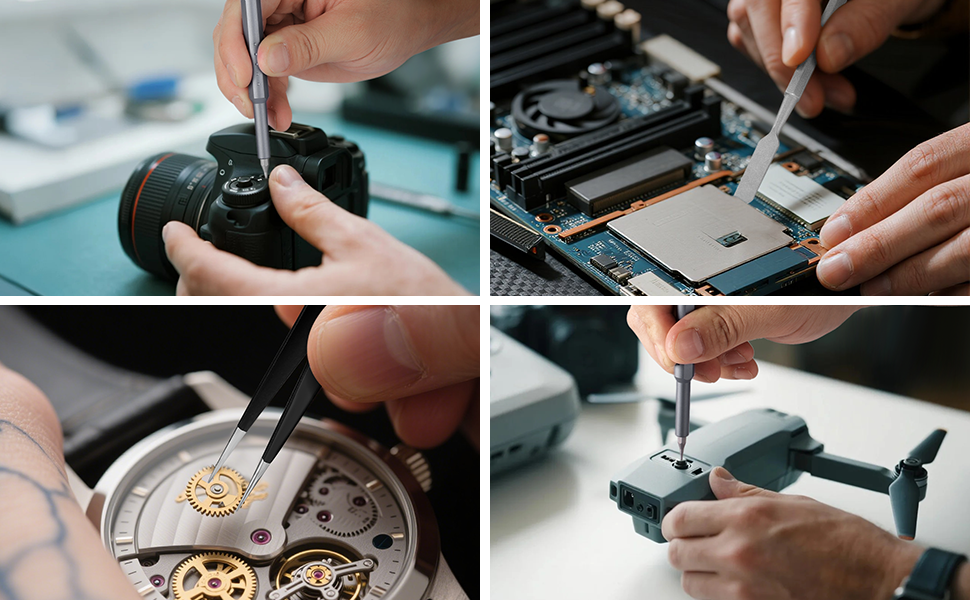
Image: A hand demonstrating how to press the button to open the pop-up magnetic storage case.

ภาพ: ภาพระยะใกล้ view showing a screwdriver bit being securely inserted into the magnetic holder of the handle.
คำแนะนำการใช้งาน
This section details how to effectively use the WORKPRO 60-in-1 Precision Screwdriver Set for various repair tasks.
- Identify Fastener Type: Before starting, carefully examine the screw or fastener you need to work with. Select the corresponding bit from the set. The set includes common types such as Phillips, Flathead, Torx, Hex, Pentalobe, and more.
- รักษาความปลอดภัยบิต: Ensure the selected bit is fully inserted and magnetically secured in the screwdriver handle.
- Position the Screwdriver: Place the tip of the bit squarely onto the head of the screw. Apply gentle, consistent downward pressure to prevent the bit from slipping.
- Rotate the Handle: Use the 360° rotating cap at the top of the handle to maintain steady downward pressure with one hand while rotating the handle with the other. This design reduces fatigue and allows for precise control.
- Using Auxiliary Tools:
- แหนบ: Use the included tweezers for handling small components, wires, or screws that are difficult to pick up with fingers.
- Pry Bar: The pry bar is designed to carefully open device casings or separate components without causing damage. Insert the thin edge into seams and gently pry.

ภาพ: รายละเอียด views illustrating the screwdriver's 360° rotating cap, aluminum alloy construction, magnetic bit holder, and anti-skid grip.

ภาพ: อดีตamples of the wide application of the screwdriver set, including repairs on phones, cameras, watches, and laptops.
Demonstration Video: WORKPRO 60-in-1 Precision Screwdriver Set
Video: An official demonstration of the WORKPRO 60-in-1 Precision Screwdriver Set, showcasing its features and ease of use. (Source: UE Direct)
การซ่อมบำรุง
Proper maintenance will extend the life and performance of your WORKPRO Precision Screwdriver Set.
- การทำความสะอาด: After each use, wipe the screwdriver handle, bits, tweezers, and pry bar with a clean, dry cloth to remove any dirt, oil, or debris. Do not use harsh chemicals or abrasive cleaners, as these can damage the materials.
- พื้นที่จัดเก็บ: Always store all components back in the magnetic pop-up case. The magnetic holders ensure bits remain secure and organized, preventing loss. Keep the case in a dry, cool environment, away from direct sunlight and excessive humidity.
- การตรวจสอบบิต: Periodically inspect the CR-V bits for signs of wear, bending, or damage. Replace any worn or damaged bits to maintain precision and prevent damage to fasteners.
การแก้ไขปัญหา
If you encounter any issues while using your WORKPRO Precision Screwdriver Set, refer to the following common problems and solutions:
- ปัญหา: The screwdriver bit is not holding securely in the handle.
สารละลาย: Ensure the bit is fully inserted into the magnetic socket until it clicks into place. Check the socket for any debris that might be obstructing the bit. - ปัญหา: Screws are stripping or the bit is slipping.
สารละลาย: Verify that you are using the correct bit type and size for the screw. Apply adequate downward pressure while turning the screwdriver slowly and steadily. Avoid using worn bits. - ปัญหา: The pop-up case is difficult to open or close.
สารละลาย: Check for any obstructions around the pop-up mechanism or the bit trays. Ensure the button is pressed firmly and the case is not forced. - ปัญหา: Bits appear to be soft or bending.
สารละลาย: Ensure you are not applying excessive torque beyond the bit's intended use. Always use the correct bit for the fastener. While CR-V steel is durable, extreme force or incorrect usage can cause damage.
ข้อมูลจำเพาะ
| คุณสมบัติ | รายละเอียด |
|---|---|
| ยี่ห้อ | เวิร์คโปร |
| หมายเลขรุ่น | W021846A |
| จำนวนรายการ | 60 |
| สไตล์หัว | Flat, Phillips, Torx, Hex, Pentalobe, Tri-wing, Y-type, U-type, Square, and more |
| Material (Bits) | เหล็กกล้าโครมวานาเดียม (CR-V) |
| วัสดุ (ด้ามจับ) | โลหะผสมอลูมิเนียม |
| สี | สีเทา |
| ขนาดรายการ (ยาว x กว้าง x สูง) | 1.42 x 1.42 x 5.91 นิ้ว |
| การใช้ที่แนะนำ | Electronics, Eyewear, Watch, Phone, Computer, PC, Ring Doorbell, Game Console, Laptop, Camera, Smart Devices |
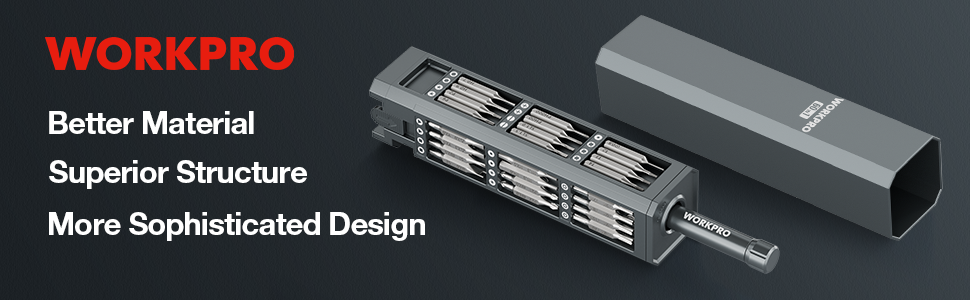
Image: An illustration highlighting the durability and strength of the CR-V steel bits.
ข้อมูลการรับประกัน
WORKPRO products are manufactured to high-quality standards and undergo rigorous inspection. For specific warranty details regarding your 60-in-1 Precision Screwdriver Set, please refer to the warranty card included with your product packaging. If no specific card is present, general warranty information may be available on the official WORKPRO webเว็บไซต์หรือติดต่อฝ่ายสนับสนุนลูกค้า
สนับสนุน
For further assistance, product information, or to report any issues with your WORKPRO 60-in-1 Precision Screwdriver Set, please utilize the following resources:
- Official WORKPRO Webเว็บไซต์: Visit the official WORKPRO webเว็บไซต์นี้รวบรวมคำถามที่พบบ่อย การลงทะเบียนผลิตภัณฑ์ และแหล่งข้อมูลสนับสนุนเพิ่มเติม
- บริการลูกค้า: Contact WORKPRO customer service directly. Contact details (phone number, email) can typically be found on the product packaging or on the WORKPRO store page on Amazon.
- การสนับสนุนผู้ค้าปลีกออนไลน์: If purchased through an online retailer, their customer service may also be able to assist with returns or exchanges.