
1. บทนำ
Thank you for choosing the Fydeamer Gas Spring Monitor Arm. This monitor arm is designed to provide an ergonomic and adjustable solution for your display, supporting screens from 17 to 35 inches and weighing up to 11 kg. It features full-range adjustability including tilt, swivel, and rotation, along with a robust gas spring mechanism for smooth height adjustments. This manual provides detailed instructions for safe installation, operation, and maintenance.
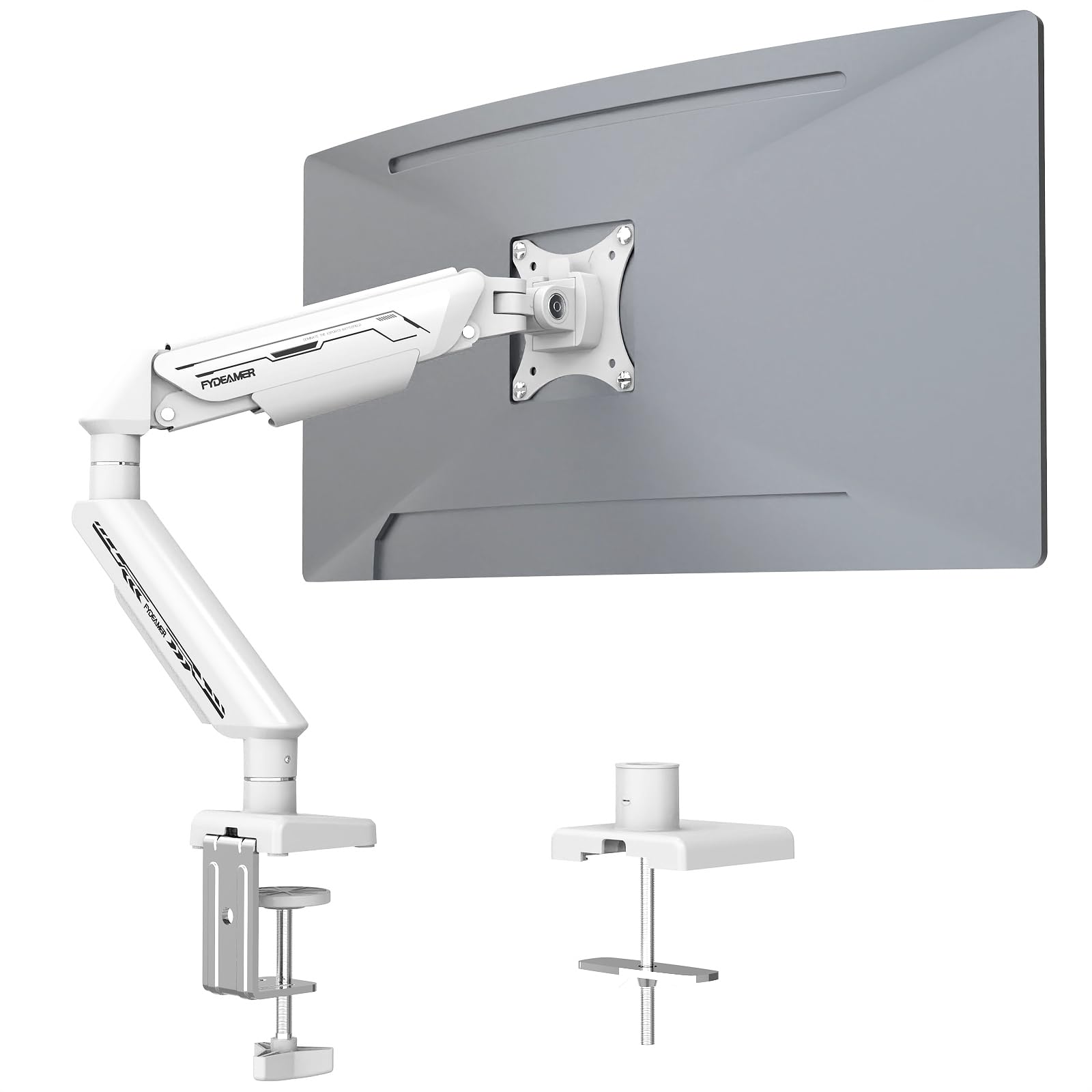
Image 1.1: The Fydeamer Gas Spring Monitor Arm installed in a typical workspace, showcasinก. การออกแบบและฟังก์ชันการใช้งาน

Image 1.2: The monitor arm demonstrating compatibility with screens up to 35 inches and a load capacity of 4.4-24.3 lbs (2-11 kg).
2. ข้อมูลด้านความปลอดภัย
- Read all instructions carefully before installation. Incorrect assembly or use may result in damage or injury.
- ตรวจสอบให้แน่ใจว่าพื้นโต๊ะของคุณแข็งแรงพอที่จะรองรับน้ำหนักรวมของแขนยึดจอภาพและจอภาพได้
- ไม่เกินความสามารถในการรับน้ำหนักสูงสุด 11 กก. (24.3 ปอนด์)
- Ensure the VESA mounting pattern of your monitor is 75x75mm or 100x100mm.
- เก็บให้ห่างจากเด็กและสัตว์เลี้ยงในระหว่างการติดตั้ง
- Use only the provided hardware. Do not use power tools for assembly unless specified.
- Adjust the gas spring tension only after the monitor is mounted to prevent the arm from springing up unexpectedly.
3. การตั้งค่า
3.1. Choose Your Mounting Option
The Fydeamer Monitor Arm offers two installation methods: C-Clamp or Grommet Base. Select the method best suited for your desk.
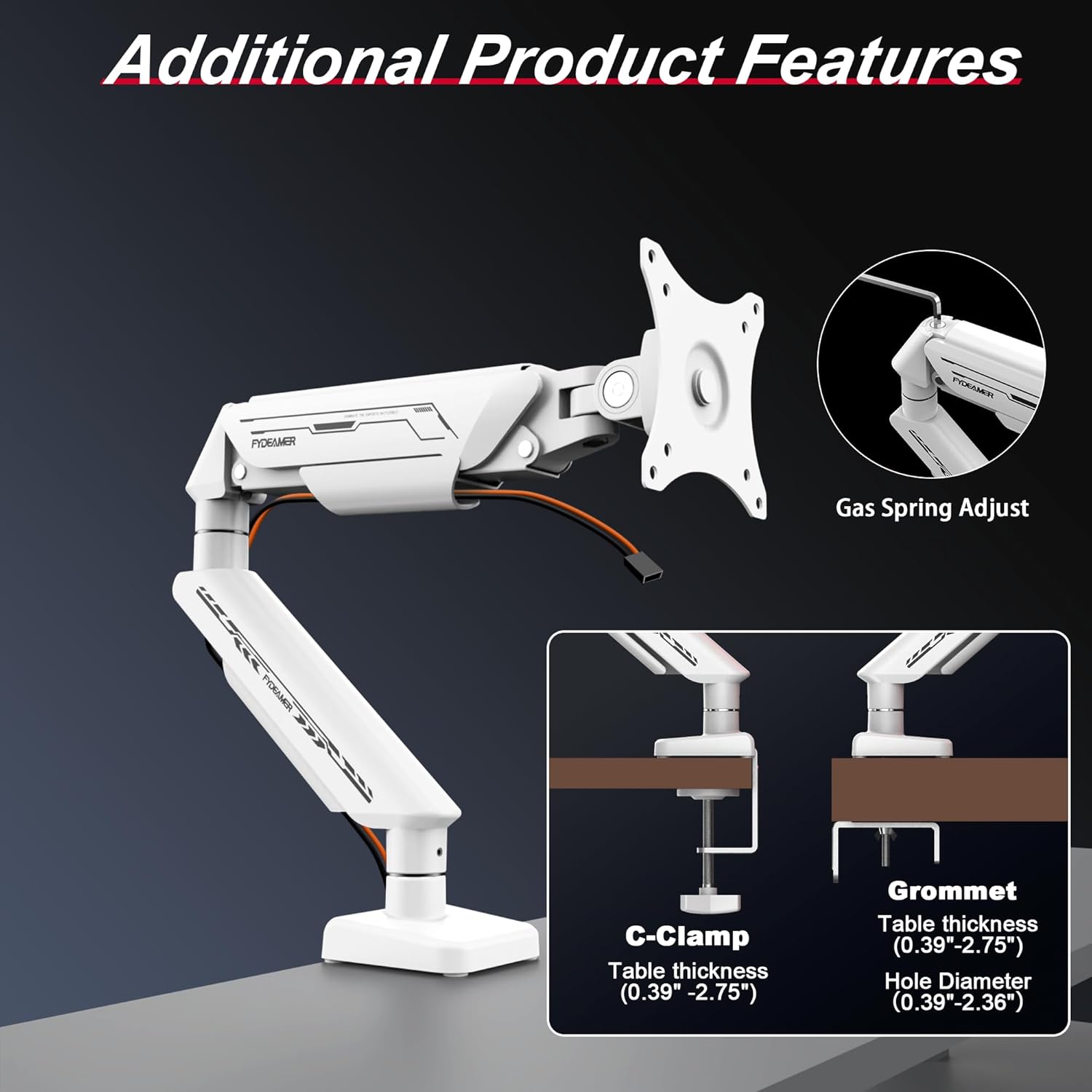
Image 3.1: Illustration of the C-Clamp and Grommet mounting options, detailing compatible table thicknesses and hole diameters.
3.1.1. ซี-คลอamp การติดตั้ง
- ติด C-clamp to the base of the monitor arm.
- จัดตำแหน่ง C-clamp on the edge of your desk (compatible with desk thickness 10-70mm).
- ขันสกรูให้แน่นamp securely using the provided knob until the arm is stable.

ภาพที่ 3.2: รายละเอียด view ของ C-Clamp mounting method, showing how it attaches to the desk edge.
3.1.2. Grommet Base Installation
- If your desk has a grommet hole (compatible with desk thickness 10-70mm and hole diameter 10-60mm), disassemble the C-clamp and attach the grommet base components.
- Insert the grommet bolt through the desk hole and secure it from underneath with the provided plate and nut.
- Ensure the base is firmly tightened to prevent movement.

ภาพที่ 3.3: รายละเอียด view of the Grommet mounting method, illustrating installation through a desk cable hole.
3.2. Attaching the VESA Plate to Your Monitor
- Locate the VESA mounting holes on the back of your monitor.
- Attach the VESA plate from the monitor arm to the back of your monitor using the appropriate screws (M4x12 or M5x12) and washers. Ensure a secure fit.
3.3. Mounting the Monitor to the Arm
- Carefully slide the monitor (with the attached VESA plate) onto the VESA head of the monitor arm.
- Ensure the monitor is fully seated and secured.
3.4. การจัดการสายเคเบิล
Route your monitor cables through the integrated cable management channels on the arm to maintain a tidy workspace.

Image 3.4: The monitor arm with cables neatly organized through its integrated cable management system.
4. การใช้งานและการปรับแต่ง
The Fydeamer Monitor Arm offers extensive adjustability for optimal viewความสะดวกสบาย

Image 4.1: The monitor arm showcasing its full motion articulating capabilities, including 360° rotation, ±90° swivel, and -45° to +90° tilt.

Image 4.2: Visual representation of the monitor arm's swivel (±90°), tilt (-45° to +90°), and rotation (360°) ranges.
4.1. การปรับความตึงของสปริงแก๊ส
The gas spring mechanism allows for smooth, one-handed height adjustment. The tension needs to be calibrated to the weight of your monitor.
- Once your monitor is mounted, if the arm sags or springs up too easily, adjust the gas spring tension.
- Locate the adjustment screw on the arm (often covered by a cap).
- Use the provided Allen key: turn ตามเข็มนาฬิกา to increase tension (for heavier monitors) or ทวนเข็มนาฬิกา to decrease tension (for lighter monitors).
- Adjust gradually until the monitor stays at the desired height when released.

Image 4.3: The high-quality gas spring mechanism, tested for over 25,000 fatigue cycles, ensuring durability and smooth operation.

Image 4.4: Illustration of the rigorous testing undergone by the gas spring, highlighting its force value of 800NM and over 25,000 fatigue tests.
4.2. Tilt, Swivel, and Rotation
- เอียง: Gently push or pull the top or bottom of your monitor to adjust the vertical viewing angle (-45° to +90°).
- หมุน: Rotate the monitor horizontally around the arm's pivot point (±90°).
- การหมุน: หมุนจอภาพ 360° จากแนวนอนเป็นแนวตั้ง
5. การบำรุงรักษา
- การทำความสะอาด: เช็ดขาตั้งจอภาพด้วยผ้าเนื้อนุ่มและแห้งamp ผ้า หลีกเลี่ยงน้ำยาทำความสะอาดหรือตัวทำละลายที่มีฤทธิ์กัดกร่อน
- การตรวจสอบตามระยะเวลา: ตรวจสอบสกรูและข้อต่อทั้งหมดเป็นระยะเพื่อให้แน่ใจว่าขันแน่นและแน่นหนาดี ขันให้แน่นอีกครั้งหากจำเป็น
- สปริงแก๊ส: The gas spring is maintenance-free. Do not attempt to disassemble it.
6 การแก้ไขปัญหา
- สังเกตว่าเสื้อหย่อนคล้อยหรือตั้งไม่อยู่หรือไม่: The gas spring tension is too low for your monitor's weight. Increase tension by turning the adjustment screw clockwise.
- Monitor Springs Up Too Easily or Won't Go Down: แรงดันสปริงแก๊สสูงเกินไป ลดแรงดันโดยหมุนสกรูปรับทวนเข็มนาฬิกา
- Arm is Loose on the Desk: ขัน C-cl ให้แน่นอีกครั้งamp หรือสกรูฐานแหวนยาง
- จอภาพสั่น: Ensure all VESA plate screws are tight and the monitor is securely attached to the arm. Check desk stability.
- ความยากในการปรับมุมเอียง/การหมุน: Some joints may have adjustable tightness screws. Refer to the assembly diagrams for specific locations and adjust as needed.
7. ข้อมูลจำเพาะ

Image 7.1: Technical diagram showing key dimensions, VESA compatibility, monitor size, and weight capacity.
| คุณสมบัติ | ข้อมูลจำเพาะ |
|---|---|
| ยี่ห้อ | Fydeamer |
| แบบอย่าง | Single Arm White |
| ขนาดจอภาพที่เข้ากันได้ | 17-35 นิ้ว |
| ความจุในการรับน้ำหนักสูงสุด | 11 กก. (24.3 ปอนด์) |
| ความเข้ากันได้ของ VESA | 75x75มม., 100x100มม. |
| ช่วงความเอียง | -45° ถึง +90° |
| ช่วงหมุน | ±90° |
| การหมุน | 360° |
| การปรับความสูง | Up to 430 mm from desk surface |
| ตัวเลือกการติดตั้ง | ซี-ซีแอลamp (10-70mm desk thickness), Grommet Base (10-70mm desk thickness, 10-60mm hole diameter) |
| วัสดุ | โลหะ |
| ขนาดสินค้า | 24.69 x 9.78 x 39.12 ซม. |
| น้ำหนักสินค้า | 2.49 กก. |
8. การรับประกันและการสนับสนุน
For warranty information or technical support, please refer to the product packaging or contact Fydeamer customer service. Keep your purchase receipt for warranty claims.