
1. บทนำ
Welcome to the user manual for your new XIAOMI Redmi Note 14 Pro+ 5G Smartphone. This guide provides essential information on setting up, operating, and maintaining your device. Please read it carefully to ensure optimal performance and longevity of your smartphone.
2. เนื้อหาบรรจุภัณฑ์
ตรวจสอบว่าแพ็คเกจของคุณมีรายการต่อไปนี้:
- สมาร์ทโฟน XIAOMI Redmi Note 14 Pro+ 5G
- สาย USB
- คู่มือเริ่มต้นใช้งานฉบับย่อ (อาจแตกต่างกันไปตามแต่ละภูมิภาค)
- เครื่องมือถอดซิม (อาจแตกต่างกันไปตามภูมิภาค)
Note: A charger is not included in the package. Please use a compatible 120W HyperCharge adapter for optimal charging.
3. อุปกรณ์โอเวอร์view
Familiarize yourself with the physical components of your Redmi Note 14 Pro+ 5G.
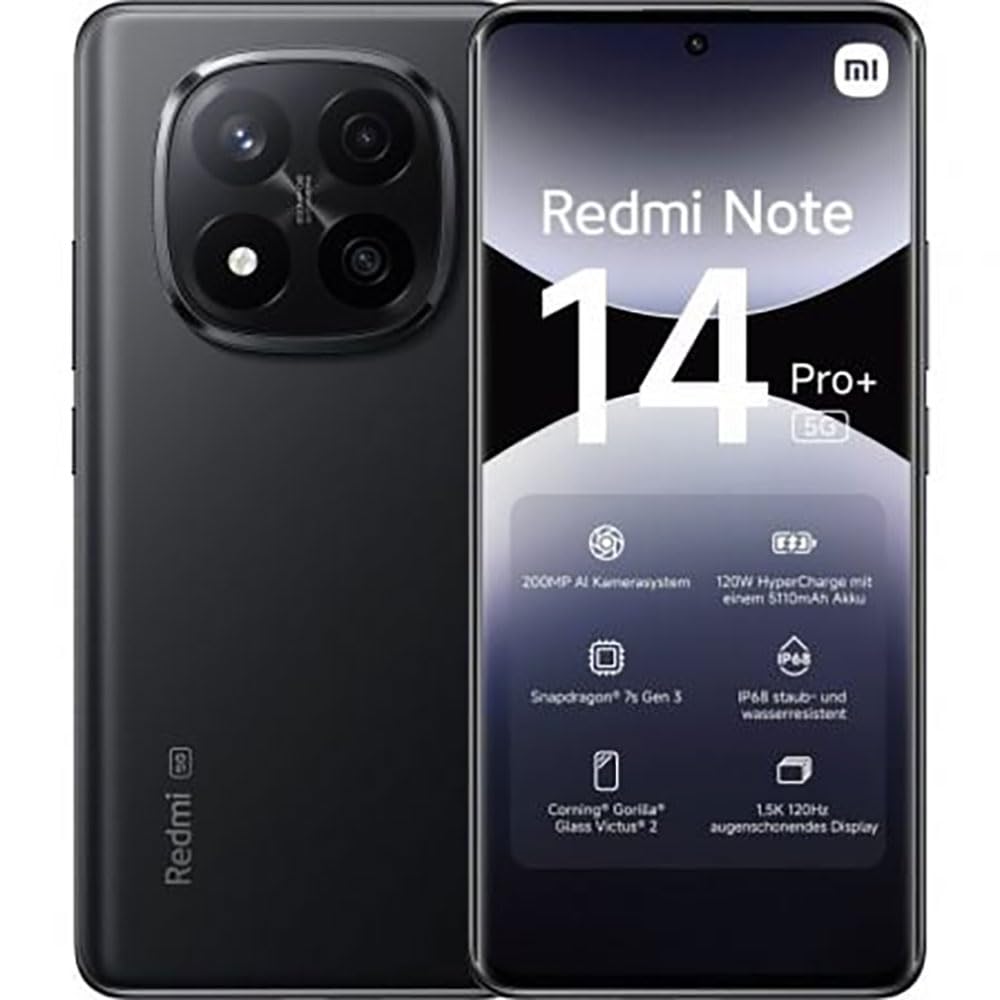
The image displays the front and back of the XIAOMI Redmi Note 14 Pro+ 5G smartphone. The front shows the display with 'Redmi Note 14 Pro+ 5G', '200 Megapixels', and '256 GB' text. The back features a prominent camera module with multiple lenses and the 'Redmi 5G' branding.
ส่วนประกอบหลัก:
- จอแสดงผลด้านหน้า: 6.67-inch 1.5K 120Hz AMOLED display with Corning Gorilla Glass Victus 2.
- โมดูลกล้องหลัง: Houses the 200MP Pro-Grade AI Camera system.
- ปุ่มเปิด/ปิด: ปุ่มนี้อยู่ด้านข้าง ใช้สำหรับเปิด/ปิด และปลุก/พักเครื่อง
- ปุ่มปรับระดับเสียง: อยู่ด้านข้าง ใช้สำหรับปรับระดับเสียงสื่อและระดับเสียงสนทนา
- พอร์ต USB Type-C: สำหรับการชาร์จและถ่ายโอนข้อมูล
- ช่องใส่ซิมการ์ด: Supports Dual SIM Nano SIM cards.
- วิทยากร: ลำโพงสเตอริโอเพื่อเอาท์พุตเสียง
4. การตั้งค่า
4.1. การใส่ซิมการ์ด
- ค้นหาถาดใส่การ์ด SIM ที่ด้านข้างอุปกรณ์ของคุณ
- ใส่เครื่องมือถอดซิมเข้าไปในรูเล็ก ๆ ข้างถาดแล้วกดให้แน่นจนกว่าถาดจะดีดออกมา
- ใส่ซิมการ์ด Nano SIM ลงในถาดโดยให้ด้านขั้วสีทองคว่ำลง ตรวจสอบให้แน่ใจว่าใส่ถูกต้องแล้ว
- ค่อยๆ ดันถาดกลับเข้าไปในช่องจนกระทั่งล็อคเข้าที่
4.2. การเปิดอุปกรณ์ของคุณ
กดปุ่มค้างไว้ ปุ่มเปิดปิด on the side of the phone until the XIAOMI logo appears on the screen. Follow the on-screen instructions to complete the initial setup, including connecting to Wi-Fi, setting up your Google account, and configuring security features like fingerprint recognition.
4.3. ค่าธรรมเนียมเริ่มต้น
It is recommended to fully charge your device before first use. Connect the USB Type-C cable to the phone and a compatible 120W HyperCharge adapter (not included) to a power outlet.
5. การใช้งานสมาร์ทโฟนของคุณ
5.1. การนำทางพื้นฐาน
- หน้าจอสัมผัส: แตะเพื่อเลือก ปัดเพื่อเลื่อน บีบเพื่อซูม
- หน้าจอหลัก: ศูนย์กลางสำหรับแอปและวิดเจ็ตของคุณ
- แผงการแจ้งเตือน: ปัดลงจากด้านบนของหน้าจอเพื่อเข้าถึงการแจ้งเตือนและการตั้งค่าด่วน
- ลิ้นชักแอป: Swipe up from the bottom of the screen (or tap the app drawer icon) to view แอปพลิเคชันที่ติดตั้งทั้งหมด
5.2. เปิด/ปิดเครื่องและรีสตาร์ท
- ถึง หมดแรง: Press and hold the Power Button until the power menu appears, then select "Power off."
- ถึง เริ่มต้นใหม่อีกครั้ง: Press and hold the Power Button until the power menu appears, then select "Restart."
5.3. คุณสมบัติด้านความปลอดภัย
Your device supports various security options:
- การจดจำลายนิ้วมือ: ลงทะเบียนลายนิ้วมือของคุณเพื่อการปลดล็อคที่รวดเร็วและปลอดภัย
- ปลดล็อคด้วยใบหน้า: ใช้ใบหน้าของคุณเพื่อปลดล็อคอุปกรณ์
- PIN/รูปแบบ/รหัสผ่าน: Standard security methods.
เข้าถึงการตั้งค่าเหล่านี้ผ่านทาง การตั้งค่า > ความปลอดภัยและความเป็นส่วนตัว.
6. คุณสมบัติของกล้อง
The Redmi Note 14 Pro+ 5G features a powerful 200MP Pro-Grade AI Camera system designed to enhance your photography experience.
- กล้องหลัก 200MP: Capture highly detailed images with optical image stabilization (OIS).
- โหมดกล้องหลายตัว: Includes automatic, scene, portrait, and manual modes for versatile shooting.
- Dual LED Flash: Provides enhanced lighting in low-light conditions.
- กล้องหน้า: A 20MP front sensor for high-quality selfies and video calls.
- การบันทึกวิดีโอ: Supports up to 8K video capture at 120 fps.
7. คุณสมบัติ AI
Leverage the integrated AI functionalities for a smarter user experience:
- AI Erase Pro: Intelligently remove unwanted objects or people from your photos.
- การขยายภาพด้วย AI: Expand the boundaries of your images using AI.
- หมายเหตุจาก AI: Smart note-taking capabilities.
- คำบรรยาย AI: Generate subtitles for videos or audio in real-time.
- เครื่องบันทึก AI: Enhanced voice recording with AI features.
- ล่าม AI: การแปลภาษาแบบเรียลไทม์
- ราศีเมถุน: Integrated AI assistant.
- วงกลมสำหรับค้นหาโดย Google: ค้นหาข้อมูลอย่างรวดเร็วโดยการวงกลมวัตถุบนหน้าจอของคุณ
8. การชาร์จไฟ
Your Redmi Note 14 Pro+ 5G supports 120W HyperCharge technology for rapid charging.
- ความจุแบตเตอรี่: 5110mAh Lithium-polymer battery.
- การชาร์จ: Use the provided USB Type-C cable with a compatible 120W power adapter (sold separately) for optimal charging speeds.
- อายุการใช้งานแบตเตอรี่: Expect up to 20 hours of talk time. Actual battery life may vary based on usage.
Always use certified charging accessories to prevent damage to your device.
9. การบำรุงรักษา
9.1. ความทนทานต่อน้ำและฝุ่นละออง
อุปกรณ์นี้มีคุณสมบัติเด่นดังนี้ ระดับการป้องกันน้ำและฝุ่น IP68 for dust and water resistance. This means it is protected against dust ingress and can withstand immersion in water up to 1.5 meters for 30 minutes. However, this resistance is not permanent and may decrease over time with normal wear. Avoid exposing the device to hot water, saltwater, or other liquids.
9.2. การทำความสะอาดอุปกรณ์ของคุณ
- ใช้ผ้านุ่มไม่เป็นขุยทำความสะอาดหน้าจอและตัวเครื่อง
- หลีกเลี่ยงการใช้น้ำยาทำความสะอาดที่มีฤทธิ์กัดกร่อน ตัวทำละลาย หรือสเปรย์แอโรซอล
- If the device gets wet, wipe it thoroughly with a clean, dry cloth before charging or using ports.
9.3. การอัปเดตซอฟต์แวร์
ตรวจสอบและติดตั้งการอัปเดตซอฟต์แวร์เป็นประจำเพื่อให้แน่ใจว่าอุปกรณ์ของคุณมีฟีเจอร์ แพตช์ความปลอดภัย และการปรับปรุงประสิทธิภาพล่าสุด ไปที่ การตั้งค่า > เกี่ยวกับโทรศัพท์ > เวอร์ชัน MIUI เพื่อตรวจสอบการอัปเดต
10 การแก้ไขปัญหา
หากคุณพบปัญหาเกี่ยวกับอุปกรณ์ของคุณ ให้ลองวิธีแก้ปัญหาทั่วไปต่อไปนี้:
- อุปกรณ์ไม่เปิด: ตรวจสอบให้แน่ใจว่าแบตเตอรี่ชาร์จเต็มแล้ว เสียบอุปกรณ์ชาร์จไว้อย่างน้อย 15 นาที แล้วลองเปิดเครื่องอีกครั้ง
- แอปขัดข้องหรือค้าง: ปิดแอปที่มีปัญหาแล้วเปิดใหม่ หากปัญหายังคงอยู่ ให้รีสตาร์ทโทรศัพท์ของคุณ
- การเชื่อมต่อเครือข่ายไม่ดี: Check your SIM card is correctly inserted. Try toggling Airplane Mode on and off. If the issue persists, contact your network provider.
- แบตเตอรี่หมดเร็ว: ลดความสว่างของหน้าจอ ปิดแอปที่ไม่ได้ใช้งาน และปิดใช้งานฟีเจอร์ที่ไม่จำเป็น เช่น GPS หรือ Bluetooth เมื่อไม่ได้ใช้งาน
- หน้าจอไม่ตอบสนอง: Force restart your device by holding the Power Button for approximately 10-15 seconds.
สำหรับปัญหาที่ซับซ้อนกว่านี้ โปรดติดต่อฝ่ายสนับสนุนอย่างเป็นทางการของ XIAOMI webเว็บไซต์หรือติดต่อฝ่ายบริการลูกค้า
11. ข้อมูลจำเพาะ
| คุณสมบัติ | ข้อมูลจำเพาะ |
|---|---|
| ยี่ห้อ | เสี่ยวหมี่ |
| ชื่อรุ่น | เรดหมี่ โน้ต 14 โปร+ 5G |
| ระบบปฏิบัติการ | แอนดรอยด์ 14 |
| รุ่นซีพียู | สแนปดราก้อน 7 เจเนอเรชั่น 3 |
| แรม | 8GB |
| ความจุในการเก็บข้อมูล | 256GB |
| ขนาดหน้าจอ | 6.67 นิ้ว |
| ความละเอียดการแสดงผล | 2712 x 1220 พิกเซล |
| อัตราการรีเฟรช | 120 เฮิรตซ์ |
| ความละเอียดกล้องหลัง | 200 Megapixels (with OIS) |
| ความละเอียดของกล้องหน้า | 20 ล้านพิกเซล |
| ความจุของแบตเตอรี่ | 5110 มิลลิแอมป์ |
| เทคโนโลยีการชาร์จ | ไฮเปอร์ชาร์จ 120W |
| ความต้านทานต่อน้ำ | IP68 |
| เทคโนโลยีเซลลูล่าร์ | 5G |
| ประเภทซิมการ์ด | นาโนซิม (ใช้งานได้สองซิม) |
| การเชื่อมต่อ | ยูเอสบี ไทป์ ซี |
12. การรับประกันและการสนับสนุน
12.1. การรับประกันของผู้ผลิต
Your XIAOMI Redmi Note 14 Pro+ 5G Smartphone comes with a การรับประกันจากผู้ผลิต 2 ปีการรับประกันนี้ครอบคลุมข้อบกพร่องด้านวัสดุและฝีมือการผลิตภายใต้การใช้งานปกติ โปรดเก็บหลักฐานการซื้อไว้เพื่อขอรับสิทธิ์การรับประกัน
The warranty does not cover damage caused by accidents, misuse, unauthorized modifications, or normal wear and tear.
12.2. การสนับสนุนลูกค้า
For technical assistance, warranty claims, or further information, please visit the official XIAOMI support website or contact their customer service department. Contact details can typically be found on the XIAOMI webไซต์หรือในบัตรรับประกันที่รวมอยู่ในผลิตภัณฑ์ของคุณ