
S190
User Manual for S10 Bone Conduction Wireless Sports Headphones
รุ่น : S190
1. สินค้าหมดview
This manual provides detailed instructions for the New S10 Bone Conduction Swimming in-Ear Bluetooth 5.4 Wireless Sports Headphones. Designed for active lifestyles, these headphones feature advanced bone conduction technology, a digital display, and a high waterproof rating, making them suitable for various sports and water activities.
คุณสมบัติหลัก:
- การเชื่อมต่อไร้สาย: Equipped with Bluetooth 5.4 technology for seamless and stable wireless connectivity.
- Bone Conduction Design: Innovative bone conduction technology transmits sound waves through the cheekbones directly to the inner ear, allowing you to enjoy music without blocking your ears.
- ทนน้ำ: With an IPX8 waterproof rating, these headphones can withstand water immersion up to 3.28 feet (1 meter), making them perfect for swimming and other water activities.
- จอแสดงผลดิจิตอล: Features a digital display that shows battery life, Bluetooth connectivity status, and other useful information.
- การลดเสียงรบกวน: Utilizes two-way sound wave noise reduction technology to minimize external noise interference, ensuring clear audio quality.

รูปที่ 1.1: เกินview of the S10 Bone Conduction Headphones. These headphones feature an ergonomic design with a flexible neckband and ear hooks, suitable for sports activities.
2. การเริ่มต้น
2.1 อะไรอยู่ในกล่อง
- Earbuds (S10 Bone Conduction Headphones)
- Charging Cable (Magnetic Charger)
- คู่มือการใช้งาน (เอกสารนี้)
2.2 การชาร์จเริ่มต้น
Before first use, fully charge the headphones. Connect the magnetic charging cable to the charging port on the headphones and plug the other end into a USB power source. The digital display will indicate the charging status. A full charge takes approximately 2 hours.
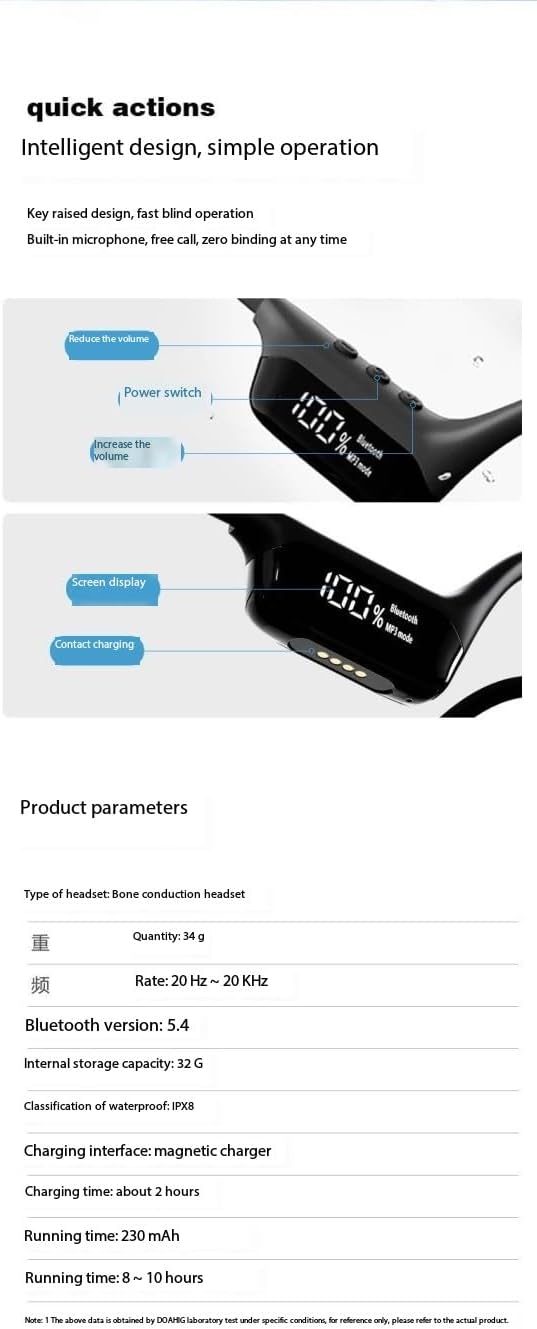
Figure 2.1: Detail of the headphone's digital display and magnetic charging contact points. The display shows battery percentage and mode, along with power and volume controls.
2.3 การเปิด/ปิดเครื่อง
- เปิดเครื่อง: Press and hold the Power button (refer to Figure 2.1 for location) for approximately 3 seconds until the digital display illuminates.
- หมดแรง: Press and hold the Power button for approximately 5 seconds until the digital display turns off.
2.4 การจับคู่บลูทูธ
- ตรวจสอบให้แน่ใจว่าหูฟังปิดอยู่
- Press and hold the Power button for about 5-7 seconds until the digital display shows "Bluetooth" and the indicator light flashes, indicating pairing mode.
- บนอุปกรณ์ของคุณ (สมาร์ทโฟน แท็บเล็ต แล็ปท็อป) เปิดใช้งาน Bluetooth และค้นหาอุปกรณ์ที่มีอยู่
- Select "S10 Headphones" (or similar name) from the list of found devices.
- Once connected, the digital display will show a stable Bluetooth icon.
3. คู่มือการใช้งาน
3.1 การควบคุมระดับเสียง
The headphones feature dedicated volume buttons. Refer to Figure 2.1 for button locations.
- เพิ่มปริมาณ: กดปุ่ม '+'
- ลดระดับเสียง: กดปุ่ม '-'
3.2 Playback Modes (Bluetooth / MP3)
The S10 headphones support both Bluetooth streaming and local MP3 playback via built-in 32GB memory.
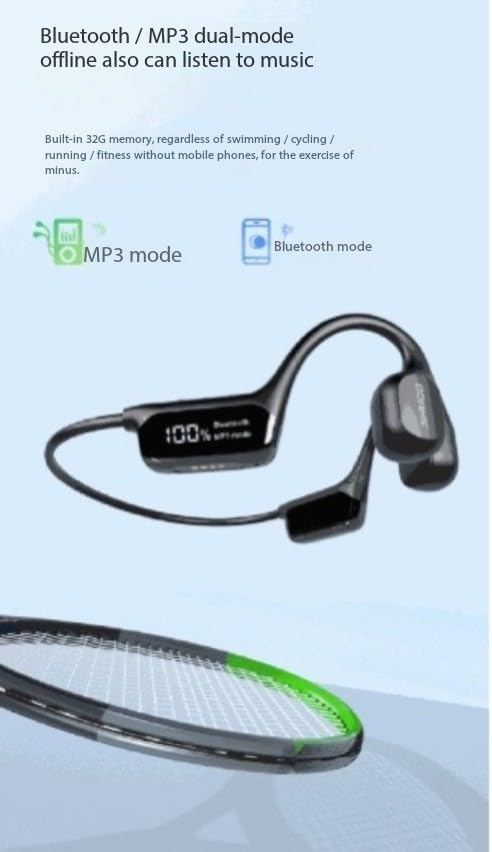
Figure 3.1: The digital display indicating the active playback mode, either MP3 or Bluetooth. The headphones have 32GB of internal storage for offline music.
- โหมดการสลับ: Use the dedicated mode button (refer to Figure 2.1) to toggle between Bluetooth mode and MP3 mode.
- การเล่น MP3: When in MP3 mode, the headphones will play music stored on their internal 32GB memory. This is ideal for activities like swimming where a phone might not be present.
- การเล่นบลูทูธ: When in Bluetooth mode, the headphones will stream audio from your paired device.
3.3 Noise Reduction Technology
The headphones incorporate two-way sound wave noise reduction technology to minimize ambient noise, providing clearer audio. This feature operates automatically to enhance your listening experience.

Figure 3.2: Visual representation of the bidirectional acoustic wave technology used for noise reduction, improving communication clarity.
3.4 ความต้านทานน้ำ (IPX8)
With an IPX8 waterproof rating, these headphones are designed for use in water. They can withstand immersion up to 1 meter (3.28 feet) for extended periods, making them suitable for swimming, surfing, and other water sports.

Figure 3.3: The headphones shown in water, highlighting their IPX8 waterproof capability, allowing for use during swimming and other water activities.
For optimal performance and longevity, ensure the charging port is dry before connecting the charging cable after water exposure.
3.5 สถานการณ์การใช้งาน
The S10 headphones are versatile and suitable for a wide range of activities:
- Running & Walking: Lightweight and secure fit for outdoor exercise.
- Hiking & Climbing: Durable design for rugged environments.
- ว่ายน้ำและดำน้ำ: IPX8 waterproof rating allows for underwater use.
- กีฬาประเภทอื่นๆ: Ideal for tennis, badminton, and general outdoor sports.
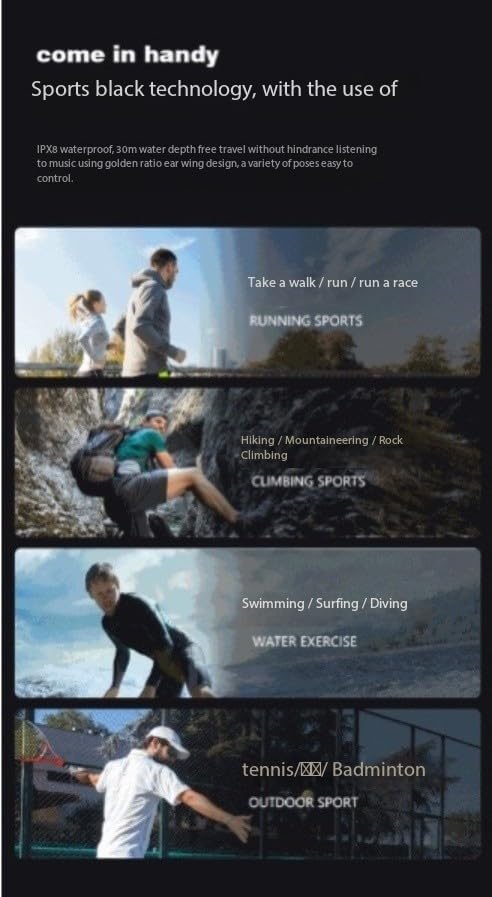
รูปที่ 3.4: อดีตamples of sports activities where the S10 headphones can be used, including running, climbing, swimming, and racket sports.
4. การบำรุงรักษาและการดูแล
- การทำความสะอาด: เช็ดหูฟังด้วยผ้านุ่มdamp cloth. Do not use harsh chemicals or abrasive cleaners. Ensure the headphones are dry before charging.
- พื้นที่จัดเก็บ: เก็บหูฟังไว้ในที่แห้งและเย็น หลีกเลี่ยงแสงแดดโดยตรงและอุณหภูมิที่สูงหรือต่ำเกินไป
- การดูแลแบตเตอรี่ เพื่อยืดอายุการใช้งานแบตเตอรี่ ควรหลีกเลี่ยงการใช้แบตเตอรี่จนหมดบ่อยๆ ควรชาร์จหูฟังเป็นประจำ แม้จะไม่ได้ใช้งานเป็นเวลานานก็ตาม
- การสัมผัสน้ำ: After using in water, rinse with fresh water and allow to air dry completely before charging or storing.
5 การแก้ไขปัญหา
| ปัญหา | สาเหตุที่เป็นไปได้ | สารละลาย |
|---|---|---|
| หูฟังไม่สามารถเปิดเครื่องได้ | แบตเตอรี่อ่อน | ชาร์จหูฟังให้เต็ม |
| ไม่สามารถจับคู่กับอุปกรณ์ได้ | หูฟังไม่ได้อยู่ในโหมดจับคู่, Bluetooth ปิดอยู่ในอุปกรณ์, อุปกรณ์อยู่ไกลเกินไป | Ensure headphones are in pairing mode. Turn Bluetooth on/off on device. Move device closer to headphones. |
| ไม่มีเสียง. | Volume too low; wrong mode selected; not connected. | Increase volume. Switch to correct playback mode (Bluetooth/MP3). Reconnect headphones. |
| ระบบชาร์จไฟไม่ทำงาน | Cable not connected properly; charging port wet; faulty cable/adapter. | Ensure cable is securely connected. Dry charging port completely. Try a different USB port or adapter. |
6. ข้อมูลจำเพาะ
| คุณสมบัติ | รายละเอียด |
|---|---|
| ชื่อรุ่น | S190 |
| ยี่ห้อ | ทั่วไป |
| เทคโนโลยีการเชื่อมต่อ | บลูทูธ 5.4 |
| ระดับความต้านทานต่อน้ำ | IPX8 (กันน้ำ) |
| การจัดเก็บข้อมูลภายใน | 32GB (สำหรับโหมด MP3) |
| การควบคุมเสียงรบกวน | Active Noise Cancellation / Two-Way Sound Wave Noise Reduction |
| เวลาในการชาร์จ | ประมาณ 2 ชั่วโมง |
| ระยะเวลาการทำงาน | 8-10 ชั่วโมง |
| วัสดุ | พลาสติก |
| ประเภทการควบคุม | การควบคุมแบบสัมผัส |
| น้ำหนัก | 34กรัม |
| อัตราความถี่ | 20 เฮิร์ต ~ 20 กิโลเฮิร์ตซ์ |
หมายเหตุ: ข้อมูลจำเพาะอาจเปลี่ยนแปลงได้โดยไม่ต้องแจ้งให้ทราบล่วงหน้า
7. การรับประกันและการสนับสนุน
Specific warranty information for this product is not provided in the available documentation. For details regarding warranty coverage, returns, or technical support, please contact the manufacturer or your point of purchase directly.
Manufacturer: Guangzhou Changhong Huixin Technology Co., Ltd.
Ask a question about this manual
Ask about setup, troubleshooting, compatibility, parts, safety, or missing instructions. Manuals+ will review the question and use this page’s manual context to help answer it.