
1. บทนำ
The FiiO/Snowsky Retro Nano is a versatile portable Bluetooth USB DAC (Digital-to-Analog Converter) and AMP (Amplifier) designed to deliver high-fidelity audio on the go. It combines a nostalgic retro aesthetic with modern audio technologies, offering a unique and high-quality listening experience. This manual provides detailed instructions for setting up, operating, and maintaining your Retro Nano device.

รูปที่ 1 : ด้านหน้า view of the FiiO/Snowsky Retro Nano in blue.
2. คุณสมบัติหลัก
- Dynamic Retro UI: Features interactive UIs and a design replicating a classic cassette player for a nostalgic user experience.
- เปลี่ยนแบตเตอรี่: Utilizes a detachable, rechargeable 3.7V lithium battery, providing up to 7.5 hours of continuous playback. Easily replaceable for extended lifespan.
- เอฟเฟกต์เสียงแบบกำหนดเอง: Includes 8 custom-tuned retro-inspired sound effects. Supports DIY tuning via app and web interface for personalized audio.
- การเชื่อมต่อที่หลากหลาย: Connects to smartphones, tablets, and computers via Bluetooth and Type-C data cable. Supports 96kHz high-definition audio quality in both Bluetooth and wired modes.
- Advanced Bluetooth Codecs: Bluetooth connectivity supports LDAC, aptX Adaptive, and aptX LL for enhanced listening.
- DAC ประสิทธิภาพสูง: Equipped with two high-performance DACs, delivering a balanced output power of up to 220mW for superior audio performance.

Figure 2: FiiO Retro Nano in blue and white, showcasinจีดีไซน์
3. เนื้อหาบรรจุภัณฑ์
กรุณาตรวจสอบแพ็คเกจเพื่อให้แน่ใจว่ามีสินค้าครบทั้งหมด:
- FiiO/Snowsky Retro Nano Unit
- Type-C to Type-C Data Cable
- 3.7V 450mAh Lithium Battery (pre-installed or included separately)
- Battery Storage Case
- สายคล้องคอ
- คู่มือเริ่มต้นอย่างรวดเร็ว
- บัตรรับประกัน
- สติ๊กเกอร์
- การ์ดคำเตือน

Figure 3: Contents of the FiiO Retro Nano package.
4. การตั้งค่า
4.1 การติดตั้งและการชาร์จแบตเตอรี่
- If the battery is not pre-installed, open the battery compartment cover on the back of the device.
- Insert the provided 3.7V 10440 lithium battery, ensuring correct polarity. The battery should have a flat terminal for proper fit.
- ปิดฝาช่องใส่แบตเตอรี่ให้แน่น
- Connect the Retro Nano to a power source (e.g., computer USB port, USB wall adapter) using the supplied Type-C data cable. The device will begin charging. The screen will indicate charging status.
- A full charge provides up to 7.5 hours of playback. The device can also be used while connected to a USB power source, even without a battery installed.

Figure 4: Battery compartment and USB charging connection.
5. คู่มือการใช้งาน
5.1 เปิด/ปิดเครื่อง
- To power on, slide the dedicated power switch to the ON position.
- To power off, slide the dedicated power switch to the OFF position.
5.2 Connectivity Modes (Bluetooth / Wired)
The Retro Nano supports both Bluetooth wireless and USB wired connections.
- โหมดบลูทู ธ : For wireless audio streaming from smartphones, tablets, or other Bluetooth-enabled devices.
- Wired Mode (PC/Phone): Connects via the Type-C data cable to computers (PC mode) or smartphones/tablets (Phone mode) to function as an external DAC/AMP.
5.3 การสลับโหมด
Double-press the multi-function button (usually the play/pause button) to cycle between Bluetooth (BT), Computer (PC), and Phone (PH) modes. The current mode will be displayed on the screen.

Figure 5: Mode selection screen.
5.4 การจับคู่บลูทูธ
- Ensure the Retro Nano is in Bluetooth (BT) mode. If not, double-press the multi-function button to switch.
- The device will automatically enter pairing mode when first powered on in BT mode or if no device is connected. You can also manually enter pairing mode by pressing and holding the Bluetooth button (refer to the quick start guide for exact button location).
- On your source device (smartphone, tablet), go to Bluetooth settings and search for available devices.
- Select "FiiO Retro Nano" from the list to connect.
- Once paired, the screen will indicate the connected status and the active Bluetooth codec (e.g., LDAC, aptX Adaptive).
5.5 Sound Effects and Equalizer (EQ)
The Retro Nano includes 8 pre-tuned retro sound presets. Additionally, it supports DIY tuning via a companion app or web อินเทอร์เฟซ
- To access and switch between the built-in sound presets, use the designated controls on the device (refer to the quick start guide).
- For advanced EQ customization, download the official FiiO control app or access the web interface. Ensure the EQ switch on the device is in the ON position to allow app/web ควบคุม.

Figure 6: Sound preset selection on screen.
5.6 การควบคุมระดับเสียง
Use the volume up (+) and volume down (-) buttons on the device to adjust the output volume. The volume level will be displayed on the screen.
6. การบำรุงรักษา
- รักษาความสะอาดของอุปกรณ์ด้วยการเช็ดด้วยผ้านุ่มและแห้ง หลีกเลี่ยงการใช้สารเคมีรุนแรงหรือวัสดุที่มีฤทธิ์กัดกร่อน
- เก็บอุปกรณ์ไว้ในที่แห้งและเย็น หลีกเลี่ยงแสงแดดโดยตรงและอุณหภูมิที่สูงหรือต่ำเกินไป
- When not in use for extended periods, fully charge the battery before storage and recharge it every few months to maintain battery health.
- ปกป้องอุปกรณ์จากการตกหล่นและแรงกระแทก
7 การแก้ไขปัญหา
- อุปกรณ์ไม่เปิดเครื่อง: Ensure the battery is charged or the device is connected to a power source via USB. Check the power switch position.
- ไม่สามารถจับคู่ผ่านบลูทูธ: Ensure the device is in Bluetooth mode and pairing mode (indicated by flashing Bluetooth icon). Clear previous pairings on your source device and try again. If issues persist, try resetting the Retro Nano (refer to quick start guide for reset procedure).
- ไม่มีเสียงหรือระดับเสียงต่ำ: Check headphone connections (3.5mm or 4.4mm). Ensure volume is turned up on both the Retro Nano and the source device. Verify the correct input mode (BT/PC/PH) is selected.
- USB Audio Bit Depth (16-bit on PC): While the device supports 32-bit audio over Bluetooth (LDAC), some operating systems (e.g., Windows) may default to 16-bit over USB. This is often a driver or OS limitation rather than a device fault. Check for updated drivers from FiiO's official website or adjust audio settings on your computer.
- EQ feature not working via app/web: Ensure the physical EQ switch on the Retro Nano is in the ON position to enable external control.
8. ข้อมูลจำเพาะ
| คุณสมบัติ | คำอธิบาย |
|---|---|
| ชื่อรุ่น | เรโทรนาโน |
| เทคโนโลยีการเชื่อมต่อ | บลูทูธ, USB Type-C |
| เทคโนโลยีการสื่อสารไร้สาย | Bluetooth 5.0 (LDAC, aptX Adaptive, aptX LL) |
| แจ็คหูฟัง | 3.5 mm Unbalanced, 4.4 mm Balanced |
| ชิปเซ็ต DAC | Dual Cirrus Logic CS43131 |
| บลูทู ธ ชิปเซ็ต | วอลคอมม์ QCC5125 |
| กำลังขับ | Up to 220mW (Balanced Output) |
| อายุการใช้งานแบตเตอรี่ | นานถึง 7.5 ชั่วโมง |
| ประเภทแบตเตอรี่ | Replaceable 3.7V Lithium Ion (10440) |
| ช่วงความถี่ | 20Hz - 20,000Hz |
| อุปกรณ์ที่รองรับ | สมาร์ทโฟน แท็บเล็ต คอมพิวเตอร์ |
| น้ำหนักสินค้า | 3.52 ออนซ์ |
| ขนาด | 4.33 x 3.54 x 1.54 นิ้ว (บรรจุภัณฑ์) |

Figure 7: Dual DAC architecture.
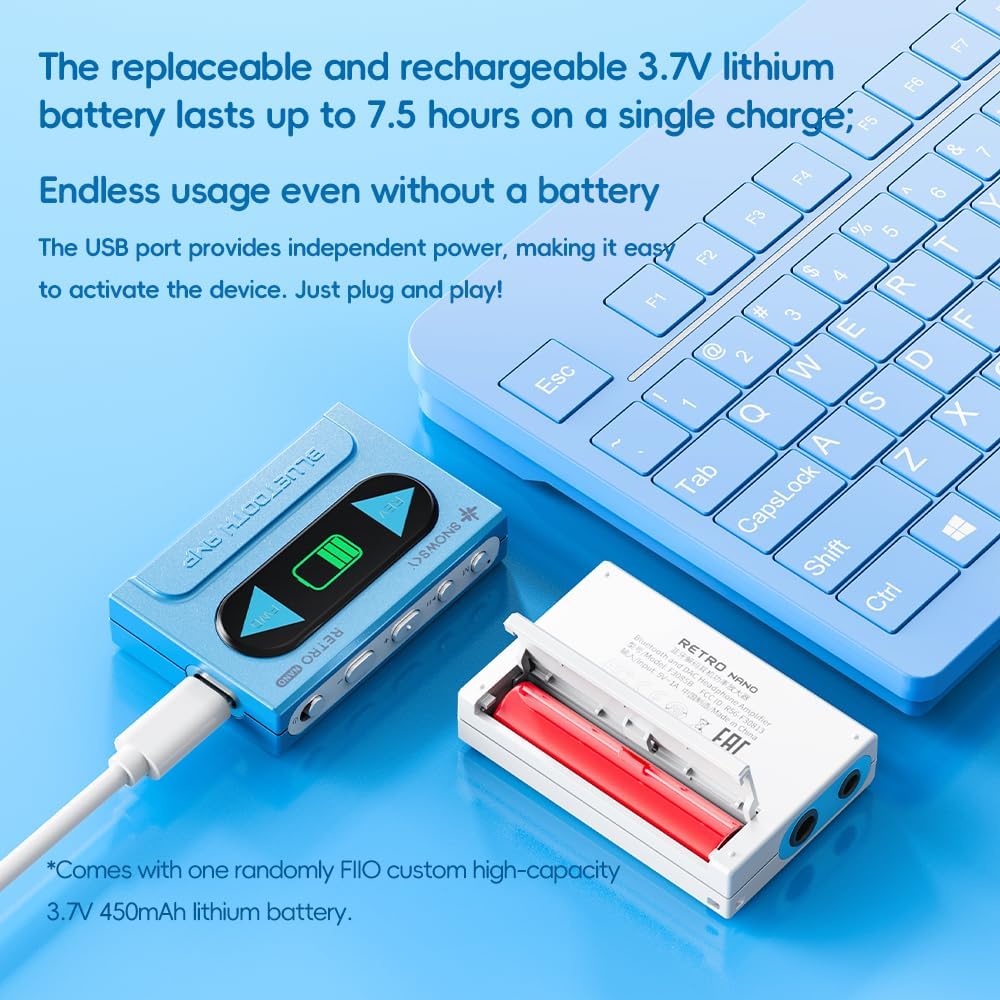
Figure 8: Qualcomm QCC5125 Bluetooth chip.
9. การรับประกันและการสนับสนุน
FiiO provides comprehensive support for its products. For warranty information, technical assistance, or further inquiries, please refer to the warranty card included in your package or visit the official FiiO webเว็บไซต์.
You can also visit the FiiO Store on Amazon for product information and support: ร้านค้า FiiO บน Amazon