
1. บทนำ
This manual provides detailed instructions for the ATTACK SHARK X68 HE 60% Gaming Keyboard. Designed for high-performance gaming, this keyboard features magnetic switches, rapid trigger technology, and extensive customization options. Please read this manual thoroughly to ensure proper use and to maximize your gaming experience.

ภาพที่ 1.1: จบแล้วview of the ATTACK SHARK X68 HE keyboard showcasing its magnetic switches, 0.01mm RT accuracy, adjustable actuation point, 0.125ms latency, Snap Tap, RGB lighting, and PC/Mac compatibility.
2. คุณสมบัติของผลิตภัณฑ์
- Magnetic Switches (Hall Effect Technology): Provides precise and consistent key presses with high durability.
- อัตราการสำรวจ 8000Hz: Delivers an ultra-fast 0.125ms response time for competitive gaming.
- 0.01mm Rapid Trigger (RT) Accuracy: Allows for instant key reset and re-press, enhancing responsiveness.
- จุดปรับการทำงาน: Customize the key press distance from 0.1mm to 3.4mm to suit your playstyle.
- Snap Tap and Dynamic Keystroke: Advanced features for precise control and rapid input.
- แสง RGB เต็มรูปแบบ: Over 20 preset light effects with customizable colors and patterns.
- Web ซอฟต์แวร์ไดรเวอร์: Comprehensive customization available via a web-based driver, compatible with Windows and Mac.
- โครงสร้างทนทาน: Features PBT keycaps, an aluminum alloy plate, and PORON foam for enhanced sound and feel.
- รูปแบบกะทัดรัด 60%: Space-saving design without compromising essential gaming functions.

Image 2.1: Detail showing the 8000Hz polling rate, providing a 0.125ms response time for faster performance.
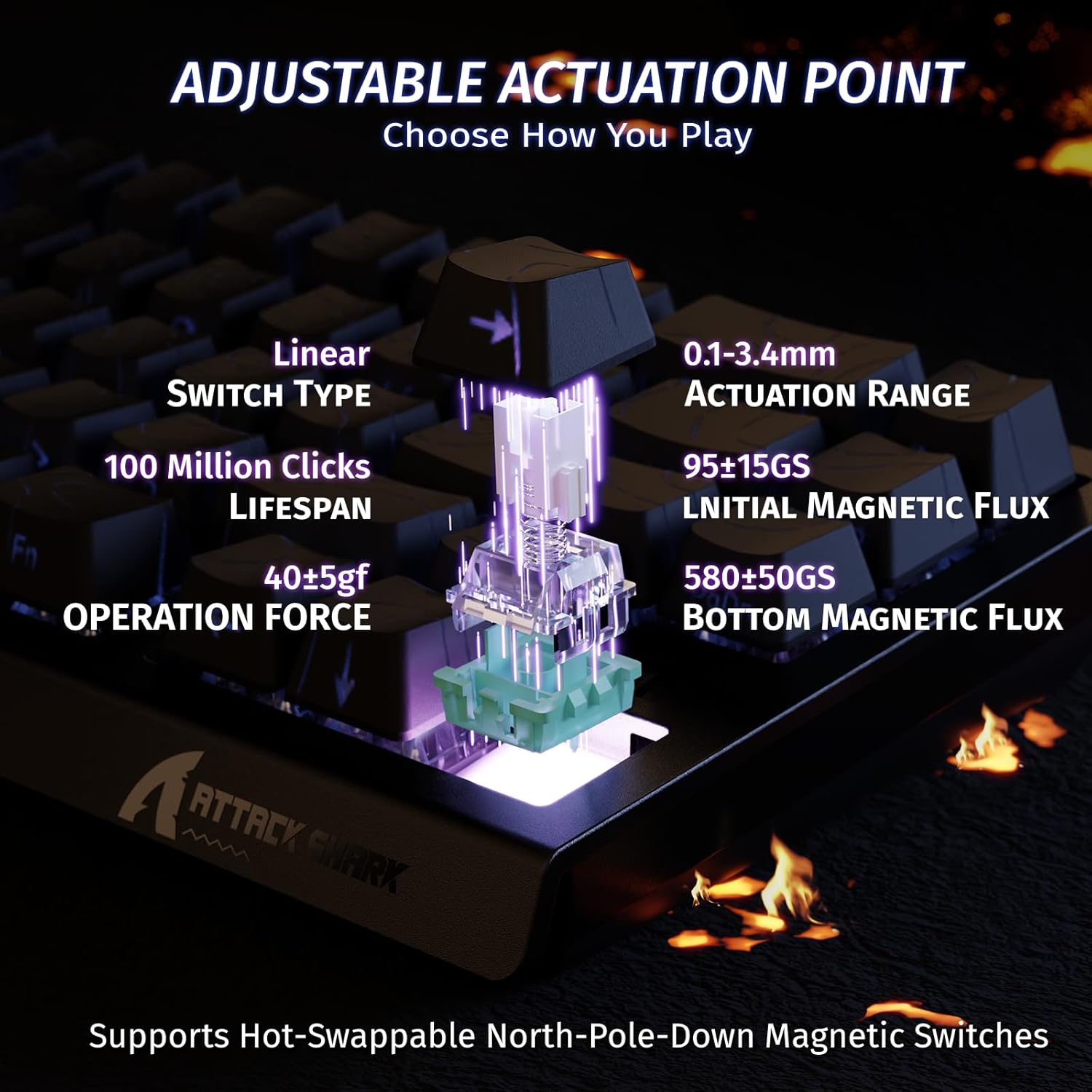
Image 2.2: Visual representation of the adjustable actuation point, allowing users to set the key press distance between 0.1mm and 3.4mm.

Image 2.3: The keyboard illuminated with full RGB light effects, demonstrating the variety of 20+ preset lighting options.

Image 2.4: An exploded diagram of the X68 HE keyboard, showing its internal layers including PBT keycaps, top case, aluminum alloy plate, PCB, PORON foam, ATTACK SHARK magnetic switches, and bottom case.
3. การตั้งค่า
3.1 การเชื่อมต่อคีย์บอร์ด
- หาพอร์ต USB-C ที่ด้านหลังของคีย์บอร์ด
- เชื่อมต่อสาย USB-C ที่ให้มาเข้ากับแป้นพิมพ์
- Plug the other end of the USB-C cable into an available USB port on your computer (PC or Mac).
- แป้นพิมพ์จะถูกจดจำโดยระบบปฏิบัติการของคุณโดยอัตโนมัติ
3.2 ความเข้ากันได้ของระบบ
The ATTACK SHARK X68 HE keyboard is compatible with Windows and Mac operating systems. No additional drivers are required for basic functionality, but the web driver is recommended for full customization.
4. คู่มือการใช้งาน
4.1 ฟังก์ชันหลักพื้นฐาน
The keyboard features a standard QWERTY layout with 61 keys. All keys function as labeled. For secondary functions (e.g., F-keys, media controls), use the Fn key in combination with the corresponding key.
4.2 การควบคุมแสง RGB
The keyboard offers various RGB lighting effects. Use the following key combinations to adjust:
- Fn + ↑: เพิ่มความสว่างของแสงไฟด้านหลัง
- Fn + ↓ลดความสว่างของแสงไฟด้านหลัง
- เอฟเอ็น + ←ลดความเร็วแสงพื้นหลัง
- Fn + →: เพิ่มความเร็วในการส่องสว่างด้านหลัง
- fn+alt: สลับโหมดไฟ
- Fn + ป้อน: เปลี่ยนสีไฟ
- Fn + แบ็คสเปซ: เปิด/ปิดไฟ

Image 4.1: Detail of the pattern shine-through keycaps with side-printed characters, aiding in visibility of secondary functions.
4.3 Web การปรับแต่งไดรเวอร์
For advanced customization, including adjusting actuation points, setting Rapid Trigger sensitivity, configuring Snap Tap, and creating macros, use the ATTACK SHARK web คนขับ เข้าถึง web driver through your internet browser. The web driver allows for:
- Key remapping and combination settings.
- Macro creation and management.
- Dynamic Keystroke (DKS) settings.
- Adjusting Trigger Sensitivity Level (TGL).
- Snap Tap configuration.
- Zero Deadzone settings.
- อัพเดตเฟิร์มแวร์

ภาพที่ 4.2: ภาพหน้าจอของ web driver interface, demonstrating options for key settings, stroke settings, shaft settings, and advanced settings for comprehensive customization.

Image 4.3: Illustration of 0.01mm RT accuracy and 128kHz scan rate, showing the advantage of Rapid Trigger over regular switches in games like Valorant, CSGO, APEX, and osu!.
5. การบำรุงรักษา
5.1 การทำความสะอาดแป้นพิมพ์
- ถอดแป้นพิมพ์ออกจากคอมพิวเตอร์ของคุณก่อนทำความสะอาด
- ใช้ผ้าแห้งนุ่มเช็ดทำความสะอาดปุ่มกดและตัวเครื่อง
- สำหรับสิ่งสกปรกฝังแน่น ให้เช็ดออกเล็กน้อยamp สามารถใช้ผ้าชุบน้ำสบู่ชนิดอ่อนๆ เช็ดได้ โดยให้แน่ใจว่าไม่มีของเหลวเข้าไปในแป้นพิมพ์
- ใช้ลมอัดเพื่อกำจัดฝุ่นและเศษต่างๆ ออกจากระหว่างปุ่มต่างๆ
5.2 การดูแลทั่วไป
- หลีกเลี่ยงการให้แป้นพิมพ์สัมผัสกับอุณหภูมิที่สูงหรือต่ำเกินไป แสงแดดโดยตรง หรือความชื้นสูง
- ห้ามทำของเหลวหกใส่แป้นพิมพ์ หากเกิดของเหลวหกใส่ ให้ถอดปลั๊กออกทันทีและปล่อยให้แห้งสนิทก่อนเสียบปลั๊กกลับเข้าไปใหม่
- ควรหลีกเลี่ยงการทำแป้นพิมพ์ตกหรือกระแทกอย่างแรง
6 การแก้ไขปัญหา
If you encounter any issues with your ATTACK SHARK X68 HE keyboard, please refer to the following common solutions:
- แป้นพิมพ์ไม่ตอบสนอง: ตรวจสอบให้แน่ใจว่าสาย USB-C เชื่อมต่อกับแป้นพิมพ์และคอมพิวเตอร์อย่างแน่นหนาแล้ว ลองใช้พอร์ต USB หรือสายอื่นดู
- แสง RGB ไม่ทำงาน: Check the lighting control key combinations (Fn + Backspace to toggle, Fn + Alt to change mode). Ensure the web driver settings haven't disabled lighting.
- ปุ่มกดไม่ทำงานอย่างถูกต้อง: Ensure the keyboard is clean and free of debris. If using the web driver, check actuation point settings and perform calibration if available.
- ซอฟต์แวร์/Web ปัญหาเกี่ยวกับไดรเวอร์: โปรดตรวจสอบให้แน่ใจว่าการเชื่อมต่ออินเทอร์เน็ตของคุณเสถียรเมื่อเข้าใช้งาน web driver. Try clearing your browser cache or using a different browser. Check the ATTACK SHARK official website for any announcements or updated web driver links.
- พฤติกรรมที่ไม่คาดคิด: Disconnect and reconnect the keyboard. If the issue persists, a factory reset (if available via web driver) might be necessary.
7. ข้อมูลจำเพาะ
| คุณสมบัติ | รายละเอียด |
|---|---|
| ยี่ห้อ | โจมตีฉลาม |
| หมายเลขรุ่น | X68 เขา |
| เทคโนโลยีการเชื่อมต่อ | USB-C (แบบมีสาย) |
| คำอธิบายแป้นพิมพ์ | การเล่นเกม |
| การใช้ที่แนะนำ | Daily Use, Gaming, Programming, Business |
| ประเภทสวิตช์กุญแจ | Linear Magnetic Switches |
| จุดปฏิบัติการ | ปรับได้ (0.1 มม. - 3.4 มม.) |
| ความแม่นยำในการยิงอย่างรวดเร็ว | 0.01มม. |
| อัตราการสแกน | 128กิโลเฮิรตซ์ |
| อัตราการสำรวจความคิดเห็น | 8000 เฮิรตซ์ |
| ไฟแบ็คไลท์ RGB | Yes (20+ preset effects) |
| ภาษา | English (QWERTY Layout) |
| จำนวนคีย์ | 61 |
| ระบบปฏิบัติการที่รองรับ | วินโดวส์, แมค |
| วัสดุ | Polybutylene Terephthalate (PBT Keycaps) |
| ยูพีซี | 752010391158 |
8. การรับประกันและการสนับสนุน
8.1 ข้อมูลการรับประกัน
This product comes with an Importer Guaranteed warranty. Please retain your proof of purchase for any warranty claims. For specific warranty terms and conditions, refer to the documentation provided at the time of purchase or contact your retailer.
8.2 การสนับสนุนด้านเทคนิค
For technical assistance, software updates, or advanced customization, please visit the official ATTACK SHARK website and access their web driver or support resources. The web driver includes integrated memory for saving your settings.