
1. บทนำ
This manual provides instructions for the safe and efficient use of your boogostore PS-618 Solar Charger Power Bank. This device is designed to provide portable power for various electronic devices, featuring multiple charging methods including solar, hand-crank, and traditional wall charging, along with an integrated LED flashlight for outdoor and emergency situations.
2. คุณสมบัติของผลิตภัณฑ์
- ความจุสูง: 63200mAh Li-polymer battery for extended power supply.
- Multiple Charging Inputs: Dual input ports (Type-C and Micro USB) for fast charging the power bank.
- Emergency Charging Options: Integrated solar panel and hand-crank for emergency power generation.
- การชาร์จหลายอุปกรณ์: Dual USB outputs and built-in cables (Lightning, Micro USB, USB-C) for charging various devices simultaneously.
- ไฟฉาย LED ในตัว: 4 LED flashlights with 3 modes (lighting, flashing, SOS) for illumination and signaling.
- การออกแบบที่ทนทาน: Constructed from professional ABS material, offering waterproof (IPX66), dropproof, and dustproof capabilities.
- การป้องกันความปลอดภัย: Automatic output adjustment to prevent overcharging, over-current, over-voltage และไฟฟ้าลัดวงจร
- อายุการใช้งานยาวนาน: Designed for over 1600 charge life cycles.
3. เนื้อหาบรรจุภัณฑ์
ตรวจสอบว่ามีรายการทั้งหมดอยู่ในแพ็คเกจของคุณ:
- 1x boogostore PS-618 Solar Charger Power Bank
- สายชาร์จ USB Type-C 1 เส้น
- 1x สายคล้องคอ
- 1x คู่มือผู้ใช้ (เอกสารนี้)

Image: Contents of the product package, including the power bank, Type-C cable, lanyard, and user manual.
4. สินค้าหมดview
ทำความรู้จักกับส่วนประกอบต่างๆ ของพาวเวอร์แบงค์ของคุณ:
- แผงโซล่าเซลล์: Located on the front surface for passive solar charging.
- ไฟฉาย LED: Four bright LEDs on one end for illumination.
- ปุ่มเปิด/ปิด: Controls power and flashlight modes.
- มือหมุน: Foldable crank on the side for manual power generation.
- Charging Ports (under protective cover):
- 2x USB Type-A Output ports
- 1x USB Type-C Input/Output port
- 1x Micro USB Input port
- สายชาร์จในตัว: Integrated cables for Lightning, Micro USB, and USB-C devices.
- ไฟแสดงสถานะแบตเตอรี่: LEDs indicating remaining battery capacity.

ภาพ: เหนือview of the power bank's multiple charging methods: USB, solar, and hand crank.

ภาพ: รายละเอียด view of the Micro USB and Type-C input ports, solar panel, and hand-crank mechanism.
5. การตั้งค่าเริ่มต้นและการชาร์จพาวเวอร์แบงค์
It is highly recommended to fully charge the power bank via a wall charger before its first use to ensure optimal battery performance.
5.1. Wall Charging (Recommended)
- Open the protective cover on the side of the power bank to reveal the charging ports.
- Connect the provided USB Type-C cable to the Type-C input port on the power bank. Alternatively, use a Micro USB cable with the Micro USB input port.
- Connect the other end of the USB cable to a compatible USB wall adapter (not included) and plug it into a power outlet.
- ไฟแสดงสถานะแบตเตอรี่จะสว่างขึ้นเพื่อแสดงความคืบหน้าการชาร์จ ไฟทุกดวงจะสว่างคงที่เมื่อชาร์จเต็มแล้ว
- Charging time via wall adapter is approximately 9-12 hours.
5.2. Solar Charging (Emergency Use Only)
The solar panel is designed for emergency charging and maintaining battery levels, not as a primary charging source. Direct sunlight is required for effective solar charging.
- วางพาวเวอร์แบงค์โดยให้แผงโซลาร์เซลล์หันเข้าหาแสงแดดโดยตรง
- The solar charging indicator light will illuminate when charging via solar power.
- For best results, ensure no obstructions block the solar panel from sunlight.
5.3. Hand-Crank Charging (Emergency Use Only)
The hand-crank feature provides an alternative emergency charging method when no other power sources are available.
- Locate the foldable hand crank on the side of the power bank.
- Unfold the crank handle.
- Rotate the crank clockwise at a steady pace to generate power. The battery indicator lights will show charging activity.
- Continuous cranking is required to provide a meaningful charge.

Image: Demonstrates hand-crank charging, useful in emergencies without electricity or sunlight.
6. การชาร์จอุปกรณ์ภายนอก
พาวเวอร์แบงค์นี้สามารถชาร์จอุปกรณ์หลายเครื่องพร้อมกันได้ โดยใช้ตัวเลือกเอาต์พุตต่างๆ ที่มีให้
6.1. การใช้สายเคเบิลแบบติดตั้งในตัว
- Pull out the desired built-in charging cable (Lightning, Micro USB, or USB-C) from its storage slot on the back of the power bank.
- Connect the cable to your electronic device.
- พาวเวอร์แบงค์จะเริ่มชาร์จอุปกรณ์ของคุณโดยอัตโนมัติ หากไม่เริ่มชาร์จ ให้กดปุ่มเปิด/ปิดหนึ่งครั้งเพื่อเริ่มการชาร์จ
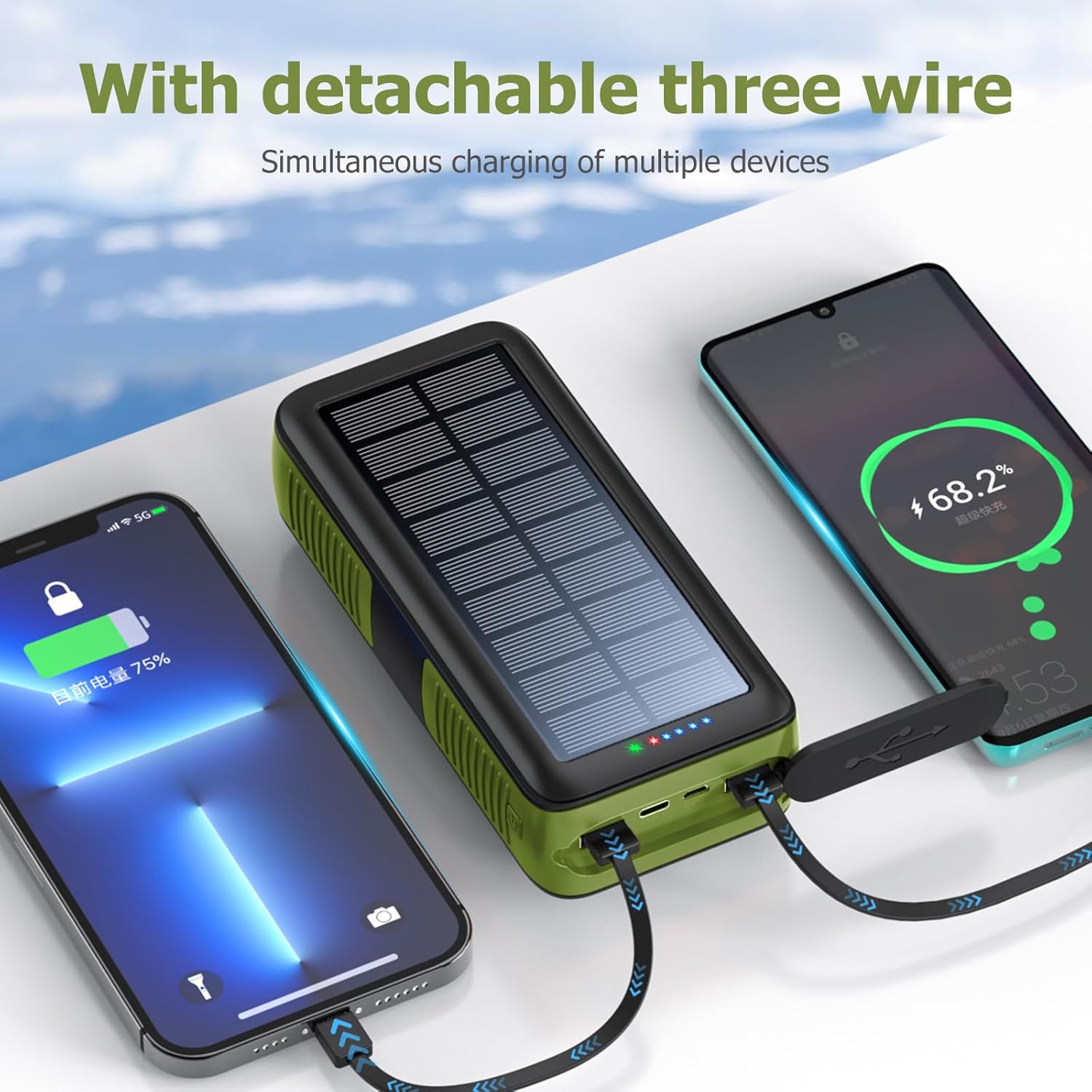
Image: The power bank's built-in cables charging multiple devices simultaneously.
6.2. Using USB Output Ports
- Open the protective cover on the side of the power bank.
- Connect your device's charging cable to one of the USB Type-A output ports or the USB Type-C output port.
- Connect the other end of your cable to your electronic device.
- พาวเวอร์แบงค์จะเริ่มชาร์จอุปกรณ์ของคุณโดยอัตโนมัติ หากไม่เริ่มชาร์จ ให้กดปุ่มเปิด/ปิดหนึ่งครั้งเพื่อเริ่มการชาร์จ

Image: The power bank's built-in cables charging multiple devices simultaneously.
7. การใช้งานไฟฉาย LED
The integrated LED flashlight offers multiple lighting modes for different situations.
- เปิด/ปิด: Double-press the power button on the side of the power bank to turn the flashlight on or off.
- โหมดวงจร: While the flashlight is on, single-press the power button to cycle through the modes:
- แสงสว่าง
- แสงสลัว
- SOS Mode (flashing)
- Warning Light (rapid flashing)

Image: The power bank's LED flashlight demonstrating its various modes for different uses.
8. ข้อมูลจำเพาะ
| คุณสมบัติ | รายละเอียด |
|---|---|
| หมายเลขรุ่น | พีเอส-618 |
| ความจุของแบตเตอรี่ | 63200 มิลลิวินาทีamp Hours (Li-polymer) |
| ขนาดสินค้า | 6.7 x 3 x 2 นิ้ว |
| น้ำหนักสินค้า | 1.74 ปอนด์ |
| พอร์ตอินพุต | Micro USB, USB Type-C, Solar Panel, Hand Crank |
| พอร์ตเอาท์พุต | 2x USB Type-A, 1x USB Type-C, Built-in Cables (Lightning, Micro USB, USB-C) |
| คุณสมบัติพิเศษ | Built-in Cables, Flashlight, Solar Charging, Hand Crank, Waterproof (IPX66), Dropproof, Dustproof |
| ผู้ผลิต | Shenzhen Ente Intelligent Co., Ltd |
9. การบำรุงรักษา
- Keep the power bank away from extreme temperatures, direct heat, and open flames.
- Avoid dropping or subjecting the device to severe impacts, despite its durable design.
- ทำความสะอาดภายนอกด้วยผ้านุ่มและแห้ง ห้ามใช้สารเคมีรุนแรงหรือน้ำยาทำความสะอาดที่มีฤทธิ์กัดกร่อน
- Ensure protective covers for ports are securely closed when not in use to maintain water and dust resistance.
- ควรเก็บพาวเวอร์แบงค์ไว้ในที่แห้งและเย็นเมื่อไม่ได้ใช้งานเป็นเวลานาน
10 การแก้ไขปัญหา
- พาวเวอร์แบงค์ไม่ชาร์จ:
- ตรวจสอบให้แน่ใจว่าสายชาร์จเชื่อมต่อกับพอร์ตอินพุตของพาวเวอร์แบงค์และแหล่งจ่ายไฟอย่างแน่นหนา
- Verify the wall adapter and power outlet are functional.
- For solar charging, ensure the panel is in direct, strong sunlight. Remember solar charging is slow and for emergencies.
- For hand-crank charging, ensure continuous and steady rotation.
- อุปกรณ์ไม่ชาร์จจากพาวเวอร์แบงค์:
- Press the power button once to activate the power bank's output.
- Ensure your device's charging cable is properly connected to an output port or using one of the built-in cables.
- Check if the power bank has sufficient battery charge.
- ลองใช้พอร์ตเอาต์พุตหรือสายเคเบิลอื่นดู
- ไฟฉายไม่ทำงาน:
- กดปุ่มเปิด/ปิดสองครั้งเพื่อเปิดไฟฉาย
- Ensure the power bank has sufficient battery charge.
11. ข้อมูลด้านความปลอดภัย
- ห้ามถอดประกอบ ดัดแปลง หรือซ่อมแซมอุปกรณ์ด้วยตนเอง
- Do not expose the power bank to water or moisture for prolonged periods, or immerse it in water, despite its water-resistant rating.
- Avoid extreme temperatures (above 60°C/140°F or below -10°C/14°F).
- เก็บให้พ้นจากมือเด็ก
- ทิ้งพาวเวอร์แบงค์ตามระเบียบข้อบังคับท้องถิ่นเกี่ยวกับการทิ้งขยะอิเล็กทรอนิกส์
12. การรับประกันและการสนับสนุน
Your boogostore PS-618 Solar Charger Power Bank comes with a user manual and lifetime friendly customer service. If you have any questions or encounter issues after purchasing our products, please feel free to contact us. We are committed to providing you with the most satisfactory solution.
For support, please refer to the contact information provided with your purchase or visit the official boogostore webเว็บไซต์.