
แอทแท็ค ชาร์ค X68 HE
ATTACK SHARK X68 HE Gaming Keyboard User Manual
Model: X68 HE | Brand: ATTACK SHARK
1. บทนำ
The ATTACK SHARK X68 HE is a high-performance 60% mechanical gaming keyboard designed for speed, precision, and customization. Featuring magnetic switches with Hall Effect triggering technology, it offers an 8000Hz polling rate for ultra-low latency and adjustable actuation points from 0.1mm to 3.4mm. Its robust design includes PBT keycaps and full RGB backlighting, making it suitable for both intense gaming and efficient typing across Windows and Mac systems.

Figure 1: Key features of the ATTACK SHARK X68 HE keyboard.
2. เนื้อหาบรรจุภัณฑ์
โปรดตรวจสอบว่าสินค้าทั้งหมดมีอยู่ในแพ็คเกจของคุณ:
- คีย์บอร์ดเกมมิ่ง ATTACK SHARK X68 HE
- USB-C Coiled Cable
- คู่มือการใช้งาน
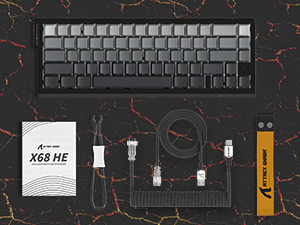
รูปที่ 2: รายการสิ่งของที่บรรจุอยู่ในบรรจุภัณฑ์ของผลิตภัณฑ์
3. การตั้งค่า
To set up your ATTACK SHARK X68 HE keyboard, follow these simple steps:
- เชื่อมต่อสาย USB-C: Locate the USB-C port on the back of the keyboard. Insert the smaller end of the provided coiled USB-C cable into this port.
- เชื่อมต่อกับคอมพิวเตอร์: Insert the standard USB-A end of the cable into an available USB port on your computer (PC or Mac).
- การติดตั้งไดร์เวอร์: The keyboard is plug-and-play for basic functionality. For advanced customization, including DKS, macros, and RGB settings, download the dedicated web driver software from the official ATTACK SHARK webเว็บไซต์.
- การจัดวาง: Place the keyboard on a stable, flat surface. Consider using a wrist rest for ergonomic comfort during extended use.
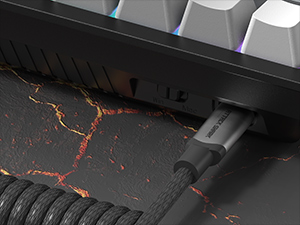
Figure 3: Connecting the USB-C cable to the keyboard.
4. คู่มือการใช้งาน
The ATTACK SHARK X68 HE is a 60% layout keyboard, meaning some functions are accessed via a function (Fn) layer. Familiarize yourself with the key legends and the Fn key combinations for full functionality.
ฟังก์ชั่นปุ่มพื้นฐาน
- การพิมพ์มาตรฐาน: All alphanumeric keys, symbols, and modifiers (Shift, Ctrl, Alt, Win/Cmd) function as standard.
- ปุ่มฟังก์ชัน (Fn): Press and hold the Fn key to access secondary functions printed on the front or side of certain keycaps. For example, arrow keys, F-keys, and multimedia controls are typically accessed this way.
Polling Rate and Latency
The keyboard operates at an 8000Hz polling rate, providing a rapid 0.125ms response time. This ensures minimal input lag for competitive gaming and fast-paced tasks.

Figure 4: 8000Hz Polling Rate for ultra-fast response.
5. การปรับแต่ง
The ATTACK SHARK X68 HE offers extensive customization options through its web driver software and on-board controls.
Adjustable Actuation Points & Rapid Trigger
Utilizing magnetic switches, the keyboard allows you to customize the actuation point of each key from 0.1mm to 3.4mm with 0.01mm precision. This feature, combined with Rapid Trigger technology, enables faster resets and re-presses, providing a significant advantage in gaming by allowing dynamic keystrokes (DKS), Snap Tap, and Mod-Tap functions.

Figure 5: Adjustable Actuation Point mechanism.
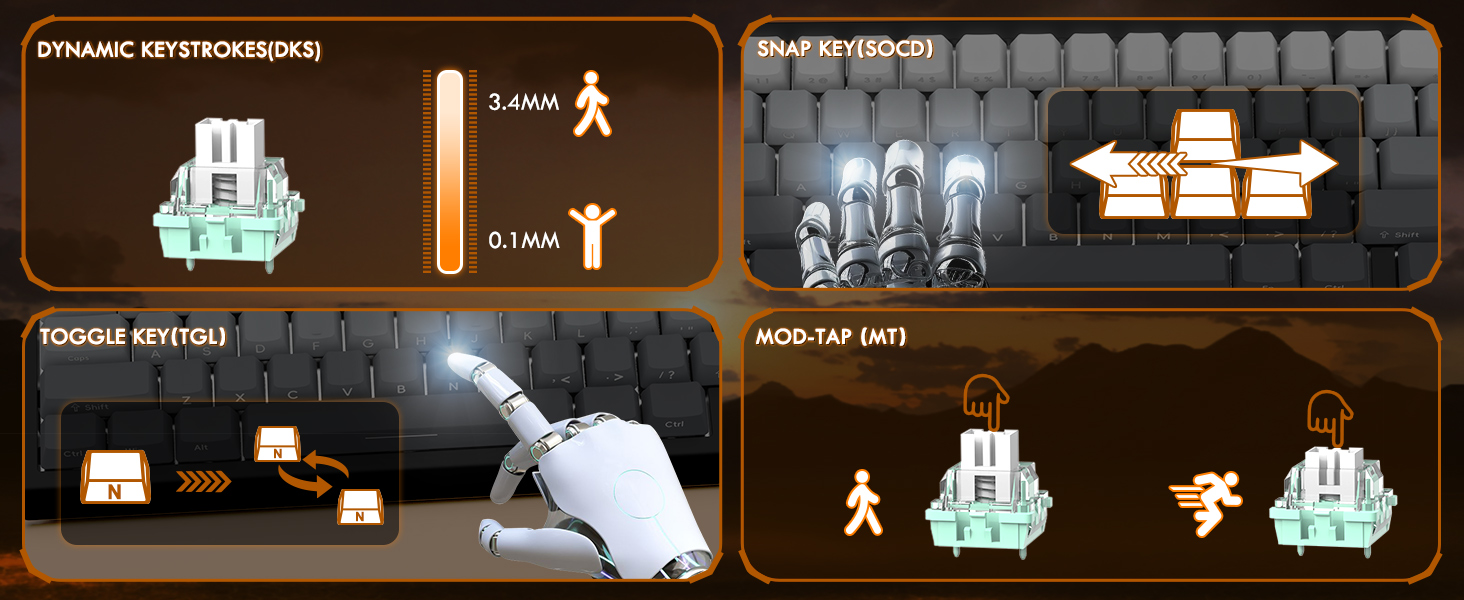
Figure 6: Explanation of DKS, Snap Tap, Toggle Key, and Mod-Tap features.
ไฟแบ็คไลท์ RGB
The keyboard features 16 million-color RGB lighting with over 20 preset light effects and multiple dynamic modes. You can adjust backlight brightness, speed, and switch between different lighting modes and colors using Fn key combinations or the web ซอฟต์แวร์ไดรเวอร์
- Fn + ลูกศรขึ้น/ลง: ปรับความสว่างของไฟแบ็คไลท์
- Fn + ลูกศรซ้าย/ขวา: ปรับความเร็วแสงพื้นหลัง
- ฟน + \|: เปลี่ยนโหมดแสงสว่าง
- กดปุ่ม Fn + Enter: เปลี่ยนสีไฟ
- Fn + แบ็คสเปซ: เปิด/ปิดไฟ

Figure 7: Full RGB light effects.
Web ซอฟต์แวร์ไดรเวอร์
The professional customized web software allows for comprehensive customization on both Windows and Mac. You can easily configure DKS, key combinations, macros, key remapping, and detailed RGB lighting settings. This enables a truly personalized experience for various user needs and gaming styles.

รูปที่ 8: Web driver software interface for customization.
6. การบำรุงรักษา
การบำรุงรักษาอย่างถูกต้องจะช่วยให้แป้นพิมพ์ของคุณมีอายุการใช้งานยาวนานและมีประสิทธิภาพเหมาะสมที่สุด
การทำความสะอาด
- การทำความสะอาดทั่วไป: ใช้ผ้าแห้งนุ่มเช็ดพื้นผิวแป้นพิมพ์เป็นประจำ
- การกำจัดฝุ่น: ใช้ลมอัดเพื่อกำจัดฝุ่นและเศษต่างๆ ออกจากระหว่างปุ่มต่างๆ
- ทำความสะอาดล้ำลึก: For deeper cleaning, you may carefully remove the PBT keycaps using a keycap puller (not included unless specified in package contents). Clean the keycaps with mild soap and water, ensuring they are completely dry before reattaching.
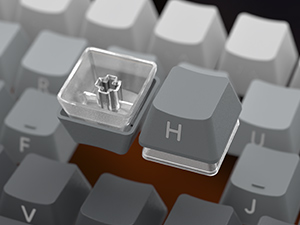
Figure 9: Keycap removal for cleaning.
พื้นที่จัดเก็บ
เมื่อไม่ได้ใช้งานเป็นเวลานาน ควรเก็บแป้นพิมพ์ไว้ในที่แห้งและเย็น หลีกเลี่ยงแสงแดดโดยตรงและอุณหภูมิที่สูงหรือต่ำเกินไป
7 การแก้ไขปัญหา
หากคุณพบปัญหาเกี่ยวกับแป้นพิมพ์ ATTACK SHARK X68 HE โปรดดูวิธีแก้ไขปัญหาทั่วไปต่อไปนี้:
- แป้นพิมพ์ไม่ตอบสนอง:
- ตรวจสอบให้แน่ใจว่าสาย USB-C เชื่อมต่อกับคีย์บอร์ดและคอมพิวเตอร์อย่างแน่นหนา
- ลองเชื่อมต่อคีย์บอร์ดกับพอร์ต USB อื่นบนคอมพิวเตอร์ของคุณ
- ทดสอบแป้นพิมพ์บนคอมพิวเตอร์เครื่องอื่นเพื่อตัดปัญหาเฉพาะระบบ
- ไฟ RGB ไม่ทำงาน:
- Check if the RGB lighting is turned off using the Fn + Backspace shortcut.
- ให้แน่ใจว่า web driver software is installed and updated, and check lighting settings within the software.
- ตรวจสอบให้แน่ใจว่าแป้นพิมพ์ได้รับพลังงานจากพอร์ต USB อย่างเพียงพอ
- คีย์ไม่ลงทะเบียนหรือพิมพ์ซ้ำ:
- ทำความสะอาดใต้ปุ่มกดที่ได้รับผลกระทบเพื่อกำจัดเศษฝุ่นหรือสิ่งสกปรกออกไป
- Adjust the actuation point settings in the web driver software. Sometimes, a very low actuation point can lead to unintended presses or misfires.
- ตรวจสอบให้แน่ใจว่าเฟิร์มแวร์ของคีย์บอร์ดเป็นเวอร์ชันล่าสุดแล้ว ผ่านทาง... web ซอฟต์แวร์ไดรเวอร์
- Software Issues / Customization Not Applying:
- Ensure you are using the correct and latest version of the ATTACK SHARK web driver software for the X68 HE model.
- เรียกใช้โปรแกรมในฐานะผู้ดูแลระบบ (บนระบบปฏิบัติการ Windows)
- Temporarily disable any antivirus or firewall software that might be interfering with the web คนขับรถ
If the problem persists after trying these steps, please contact ATTACK SHARK customer support for further assistance.
8. ข้อมูลจำเพาะ
| คุณสมบัติ | คำอธิบาย |
|---|---|
| แบบอย่าง | X68 เขา |
| ยี่ห้อ | โจมตีฉลาม |
| เทคโนโลยีการเชื่อมต่อ | USB-C (แบบมีสาย) |
| คำอธิบายแป้นพิมพ์ | แป้นพิมพ์สำหรับเล่นเกมแบบเครื่องกล |
| ประเภทสวิตซ์ | สวิตช์แม่เหล็ก (ฮอลล์เอฟเฟกต์) |
| อัตราการสำรวจความคิดเห็น | 8000เฮิรตซ์ |
| เวลาตอบสนอง | 0.125มิลลิวินาที |
| Actuation Point Range | 0.1mm to 3.4mm (0.01mm accuracy) |
| ปุ่มกด | PBT Keycaps (Contour Line 3.0 version) |
| การแบ็คไลท์ | Full RGB (16 million colors, 20+ preset effects) |
| ป้องกันการโดนผีหลอก | ป้องกันการกดซ้ำแบบเต็มปุ่ม |
| อุปกรณ์ที่รองรับ | Laptop, PC, Tablet (Windows/Mac) |
| ขนาดสินค้า | 14.25 x 6.18 x 0.79 นิ้ว |
| น้ำหนักสินค้า | 2.01 ปอนด์ |
| จำนวนคีย์ | 66 |
9. การรับประกันและการสนับสนุน
ATTACK SHARK products are designed for durability and performance. For specific warranty information, please refer to the warranty card included with your product or visit the official ATTACK SHARK website. If you require technical support, have questions about product functionality, or need assistance with troubleshooting, please contact ATTACK SHARK customer service through their official channels.
การสนับสนุนทางออนไลน์: Visit the ATTACK SHARK official webเว็บไซต์นี้รวบรวมคำถามที่พบบ่อย (FAQ) ข้อมูลการดาวน์โหลดไดรเวอร์ และข้อมูลการติดต่อฝ่ายสนับสนุน
การสนับสนุนทางอีเมล์: ดูที่บรรจุภัณฑ์ผลิตภัณฑ์ของคุณหรือที่ทางการ webเว็บไซต์สำหรับที่อยู่อีเมลฝ่ายบริการลูกค้า
Ask a question about this manual
Ask about setup, troubleshooting, compatibility, parts, safety, or missing instructions. Manuals+ will review the question and use this page’s manual context to help answer it.