
1. บทนำ
This manual provides essential information for the assembly, operation, maintenance, and troubleshooting of your Hbada E2 Ergonomic Office Chair. Please read these instructions carefully before use to ensure proper function and longevity of your chair.

Figure 1: Hbada E2 Ergonomic Office Chair, side view.
2. ข้อมูลด้านความปลอดภัย
- ปฏิบัติตามคำแนะนำในการประกอบอย่างระมัดระวังเสมอ
- Keep the chair away from direct heat sources to prevent material damage.
- Do not exceed the maximum weight capacity of the chair. Refer to specifications for details.
- Ensure all screws and connections are tightened securely before use and periodically check for looseness.
- ควรวางเก้าอี้บนพื้นผิวเรียบและมั่นคง
3. การติดตั้งและการประกอบ
Assembly is required for this product. Detailed step-by-step assembly instructions and all necessary tools are included in the product packaging. Please refer to the separate assembly guide for a complete walkthrough. Ensure all components are present before beginning assembly.

Figure 2: Hbada E2 Ergonomic Office Chair, front view ของผลิตภัณฑ์ที่ประกอบไว้
4. คำแนะนำการใช้งาน (การปรับแต่ง)
The Hbada E2 chair offers multiple adjustment features to customize your seating experience for optimal comfort and support.
4.1 การปรับพนักพิงศีรษะ
The 3D adjustable headrest can be positioned to support your neck and head effectively.
- การปรับแนวตั้ง: Adjust the headrest up or down by up to 10 cm.
- Forward and Backward Adjustment: Move the headrest forward or backward by up to 3 cm.
- การหมุน: Rotate the headrest up to 60 degrees to find your preferred angle.

Figure 3: Headrest adjustment capabilities.
4.2. การปรับการรองรับส่วนหลัง
The 6-way adjustable lumbar support provides comprehensive lower back protection.
- Forward and Backward Adjustment: Adjust the lumbar support in 3 levels.
- การปรับแนวตั้ง: Move the lumbar support up or down.
- Left-Right Suspension: The floating structure adapts to your movements.

Figure 4: Lumbar support dynamic adjustment features.
4.3 การปรับที่วางแขน
The 3D armrests can be adjusted to provide optimal elbow support.
- การปรับความสูง: Adjust armrest height by up to 7.5 cm.
- Forward and Backward Adjustment: Move armrests forward or backward by up to 5 cm.
- การหมุน: Rotate armrests 40 degrees left and right.

Figure 5: Armrest adjustment options.
4.4. Recline Function and Locking
The chair features a reclining function with three lockable tilt angles.
- Recline up to 135 degrees.
- Lockable angles for 90° (comfortable office), 115° (leisure and entertainment), and 138° (short nap).

Figure 6: Three-level locking recline positions.
4.5. Wired Control Adjustment
The aluminum alloy wired control allows for easy adjustment without bending down.
- Simply toggle the adjuster for one-touch operation of chair functions.

Figure 7: Wired control for easy adjustments.
5. การบำรุงรักษา
Regular maintenance ensures the longevity and optimal performance of your Hbada E2 chair.
- การทำความสะอาด: For the mesh fabric, gently wipe with a damp cloth and mild soap. Avoid harsh chemicals. For the frame, use a soft, dry cloth.
- การตรวจสอบ: ตรวจสอบสกรูและสลักเกลียวทั้งหมดเป็นระยะเพื่อให้แน่ใจว่าขันแน่นดี ขันให้แน่นอีกครั้งหากจำเป็น
- ล้อ: ควรทำความสะอาดล้อเลื่อนให้ปราศจากเส้นผมและเศษสิ่งสกปรก เพื่อให้การเคลื่อนที่ราบรื่น
- หลีกเลี่ยงการโอเวอร์โหลด: Do not place excessive weight on the chair or armrests beyond the specified capacity.
6 การแก้ไขปัญหา
If you encounter any issues with your Hbada E2 chair, please refer to the following common solutions:
- เสียงเก้าอี้ดังเอี๊ยดอ๊าด: Check and tighten all assembly bolts. A small amount of silicone spray on moving parts may help, but avoid contact with mesh or upholstery.
- Chair Not Adjusting: Ensure no obstructions are blocking the adjustment mechanisms. Verify that the wired control is functioning correctly.
- ล้อไม่หมุนอย่างราบรื่น: Clean any debris from the caster wheels. Ensure they are properly inserted into the chair base.
- Gas Lift Issues: If the chair does not hold its height, the gas lift may need replacement. Contact customer support for assistance.
For persistent issues or concerns not addressed here, please contact Hbada customer support.
7. ข้อมูลจำเพาะ
| คุณสมบัติ | รายละเอียด |
|---|---|
| ยี่ห้อ | ฮบาดา |
| ชื่อรุ่น | E2 |
| สี | สีขาว |
| ขนาดสินค้า (ลึก x กว้าง x สูง) | ลึก 30.51 นิ้ว x กว้าง 22.24 นิ้ว x สูง 18.11 นิ้ว |
| วัสดุ | Alloy Steel (Frame), Mesh (Back, Seat), Foam (Fill) |
| สไตล์ด้านหลัง | ตาข่าย |
| สไตล์แขน | ปรับได้ 3 มิติ |
| จำนวนตำแหน่งการเอน | 3 |
| ส่วนประกอบที่รวมอยู่ | Arm Pad, Cushion |
| คำแนะนำด้านพื้นผิว | พื้นแข็ง, พรม |
| ผู้ผลิต | ฮบาดา |
| วันที่พร้อมใช้งานครั้งแรก | วันที่ 18 ธันวาคม 2024 |
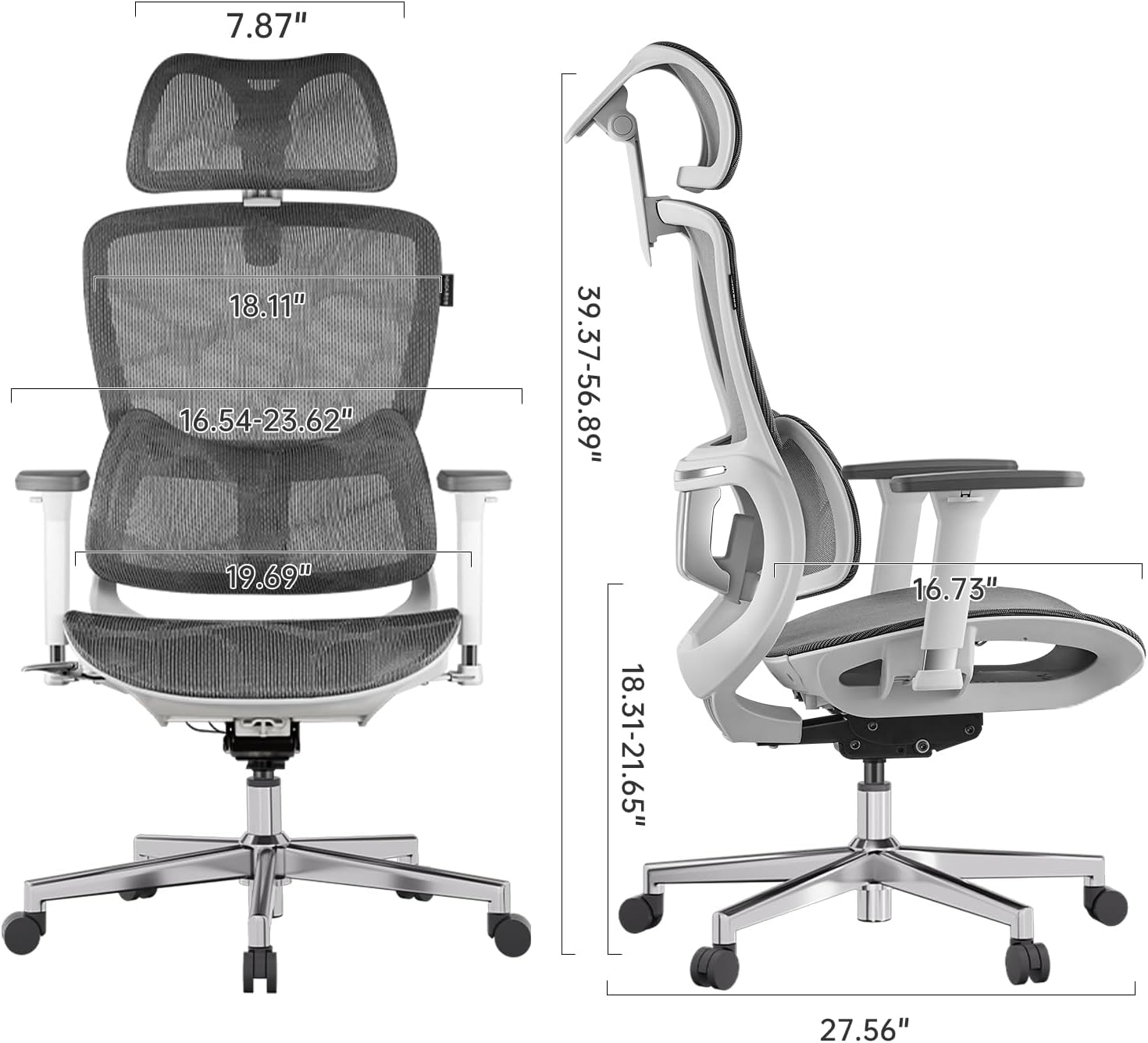
Figure 8: Detailed dimensions of the Hbada E2 Office Chair.
8. การรับประกันและการสนับสนุน
Hbada is committed to providing high-quality products and customer satisfaction.
8.1. นโยบายการคืนสินค้า
สินค้านี้สามารถคืนได้ภายใน 30 วันนับจากวันที่ซื้อ โดยเป็นไปตามนโยบายการคืนสินค้าของร้านค้า
8.2. แผนการคุ้มครอง
สามารถซื้อแผนคุ้มครองเพิ่มเติมเพื่อขยายความคุ้มครองนอกเหนือจากระยะเวลารับประกันมาตรฐานได้:
- แผนคุ้มครอง 2 ปี: ชำระเงินครั้งเดียว 44.99 ดอลลาร์สหรัฐ
- แผนคุ้มครอง 3 ปี: ชำระเงินครั้งเดียว 56.99 ดอลลาร์สหรัฐ
- การปกป้องที่สมบูรณ์: Monthly billing of $16.99, covering eligible past and future purchases.
These plans offer additional coverage and are separate from any manufacturer's warranty.
8.3. การสนับสนุนลูกค้า
For product inquiries, assembly assistance, or warranty claims, please visit the official Hbada store or contact their customer service directly.

Figure 9: Hbada's commitment to customer service.
เยี่ยมชม ร้านฮบาดา สำหรับข้อมูลเพิ่มเติม