1. บทนำ
Thank you for choosing the Generic G1200 Digital Microscope. This device is designed for detailed observation, inspection, and analysis of various objects, offering a 12-megapixel camera and a 7-inch LCD display with 1-1200X continuous magnification. This manual provides essential information for the safe and effective use of your microscope.
2. ข้อมูลด้านความปลอดภัย
- Keep the microscope away from water and other liquids to prevent electric shock or damage.
- ห้ามถอดชิ้นส่วนหรือดัดแปลงอุปกรณ์ การซ่อมแซมควรดำเนินการโดยบุคลากรที่มีคุณสมบัติเหมาะสมเท่านั้น
- หลีกเลี่ยงการให้เครื่องโดนแสงแดดโดยตรงหรืออุณหภูมิสูง
- Handle the lens and screen with care to prevent scratches.
- This product is not a toy; keep it out of reach of children without adult supervision.
3. เนื้อหาบรรจุภัณฑ์
กรุณาตรวจสอบเนื้อหาแพ็คเกจเมื่อแกะกล่อง:
- G1200 Digital Microscope Unit (with 7-inch LCD)
- Adjustable Stand and Base
- สายไฟ USB
- คู่มือการใช้งาน (เอกสารนี้)
- Calibration Ruler (may vary by package)
4. สินค้าหมดview
The G1200 Digital Microscope features a robust design for stable observation and a clear display for detailed viewการไอเอ็นจี

รูปที่ 4.1 : ด้านหน้า view of the G1200 Digital Microscope displaying a circuit board.
The microscope consists of a main unit with an integrated 7-inch LCD screen, a high-resolution lens, and an adjustable stand. The stand allows for precise positioning and stable observation of specimens.

Figure 4.2: The adjustable stand allows for flexible viewมุมการเอียง
The 7-inch LCD provides a large, clear viewing area, enhancing the user experience for prolonged observation and group viewการไอเอ็นจี
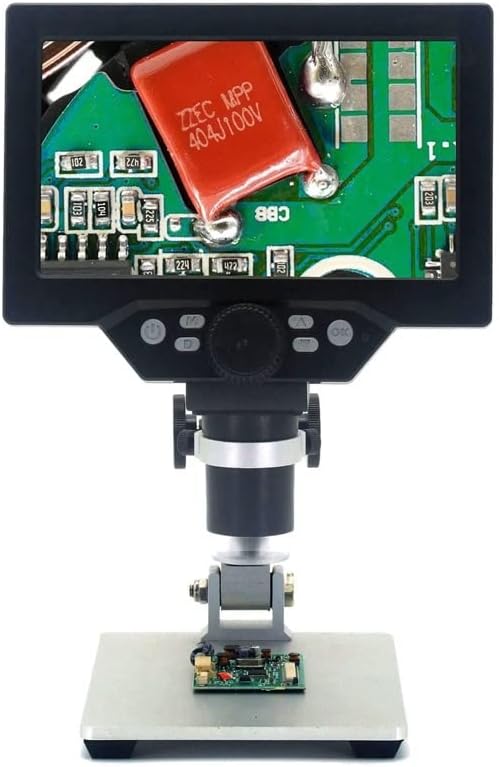
Figure 4.3: The G1200 features a 7-inch display for enhanced viewความชัดเจน.
5. การตั้งค่า
- แกะ: นำส่วนประกอบทั้งหมดออกจากบรรจุภัณฑ์อย่างระมัดระวัง
- ประกอบขาตั้ง: Attach the microscope unit to the adjustable stand. Ensure all screws are tightened securely to prevent wobbling.
- การเชื่อมต่อไฟฟ้า: Connect the USB power cable to the microscope's power input port and then to a suitable USB power adapter (not included) or a powered USB port. For the Bluit Battery Model, ensure the internal battery is charged before first use.
- เปิดเครื่องครั้งแรก: Press and hold the power button located on the microscope unit until the LCD screen illuminates.
6. คู่มือการใช้งาน
6.1 การเปิด/ปิดเครื่อง
- เปิดเครื่อง: กดปุ่มเปิดปิดค้างไว้ประมาณ 3 วินาที
- หมดแรง: Press and hold the power button again for approximately 3 seconds until the screen turns off.
6.2 Placing a Specimen
Place the object you wish to observe directly on the base plate beneath the microscope lens. Ensure it is centered for optimal viewการไอเอ็นจี
6.3 Adjusting Focus and Magnification
- การปรับความสูง: Use the knob on the stand to raise or lower the microscope unit, bringing the lens closer or further from the specimen.
- โฟกัสละเอียด: Rotate the focus wheel on the microscope unit to achieve a clear image.
- กำลังขยาย: The G1200 offers 1-1200X continuous amplification. Adjust the distance between the lens and the object, and then fine-tune the focus to change the magnification level.
6.4 การใช้งานจอแสดงผล LCD และปุ่มควบคุม
The 7-inch LCD displays the live view from the microscope camera. Buttons on the unit typically include:
- ปุ่มเมนู: Accesses settings for image resolution, video resolution, date/time, language, etc.
- ปุ่มโหมด: สลับระหว่างโหมดภาพถ่าย วิดีโอ และการเล่น
- ปุ่มจับภาพ/บันทึก: Takes a photo or starts/stops video recording.
- ปุ่มขึ้น/ลง: Navigate menus or adjust digital zoom (if available).
Refer to the on-screen menu for specific functions and settings.
7. การบำรุงรักษา
- การทำความสะอาดเลนส์: ใช้ผ้าเนื้อนุ่ม ปราศจากขน ที่ออกแบบมาสำหรับเลนส์แว่นตาโดยเฉพาะ ห้ามใช้วัสดุที่มีฤทธิ์กัดกร่อนหรือสารเคมีรุนแรง
- การทำความสะอาดหน้าจอ: Wipe the LCD screen gently with a soft, dry microfiber cloth.
- พื้นที่จัดเก็บ: Store the microscope in a clean, dry, and dust-free environment when not in use.
- Battery Care (Bluit Battery Model): เพื่อให้แบตเตอรี่ใช้งานได้นานที่สุด ควรหลีกเลี่ยงการปล่อยให้แบตเตอรี่หมดจนเกลี้ยงบ่อยๆ ชาร์จอุปกรณ์เป็นประจำ แม้ว่าจะไม่ได้ใช้งานเป็นเวลานานก็ตาม
8 การแก้ไขปัญหา
- ไม่มีไฟฟ้า: Ensure the USB power cable is securely connected and the power source is active. For battery models, check if the battery is charged.
- ภาพเบลอ: Adjust the height of the microscope unit and rotate the focus wheel until the image is clear. Ensure the specimen is flat and well-lit.
- หน้าจอไม่แสดงผล: Check power connection. If the device is on but no image appears, try restarting the microscope.
- ปุ่มไม่ตอบสนอง: Power off the device and restart it. If the issue persists, ensure no debris is obstructing the buttons.
9. ข้อมูลจำเพาะ
| คุณสมบัติ | ข้อมูลจำเพาะ |
|---|---|
| ชื่อรุ่น | G1200 (EENKNDXQA-BLUITBATTERYMODEL-1-1200X) |
| แสดง | จอ LCD ขนาด 7 นิ้ว |
| อัตราส่วนการขยาย | 1-1200X Continuous Ampการทำให้บริสุทธิ์ |
| ความละเอียดของกล้อง | 12 ล้านพิกเซล |
| วัสดุ | พลาสติก |
| น้ำหนักสินค้า | 2.2 ปอนด์ (1000 กรัม) |
| ขนาดแพ็คเกจ | 1.18 x 0.79 x 0.39 นิ้ว |
| แหล่งพลังงาน | USB Powered / Built-in Battery (Bluit Battery Model) |
10. การรับประกันและการสนับสนุน
For warranty information and customer support, please refer to the documentation provided at the time of purchase or contact your retailer. The manufacturer is committed to providing high-quality after-sales service.


