
HETP HX160Q2
HETP Wireless Power Bank User Manual
Model: HX160Q2
การแนะนำ
Thank you for choosing the HETP Wireless Power Bank. This 40800mAh portable charger is designed to provide versatile and efficient power for your electronic devices. Featuring 7-in-1 charging capabilities, including built-in cables, multiple output ports, and wireless charging, it ensures your devices remain powered on the go. Please read this manual carefully before use to ensure proper operation and maintenance.

ภาพ: ด้านหน้า view of the HETP Wireless Power Bank, displaying its LCD screen with 100% charge and the wireless charging pad. The side shows the built-in cables.
คุณสมบัติผลิตภัณฑ์
- ความจุสูง: 40800mAh premium Li-polymer battery for multiple device charges.
- การชาร์จแบบ 7-in-1: Simultaneously charge up to 7 devices.
- สายเคเบิลในตัว: Includes iOS, USB-C, and Micro USB cables for convenience.
- พอร์ตเอาต์พุตหลายพอร์ต: Two USB-A ports and one USB-C port.
- การชาร์จแบบไร้สาย: 15W wireless charging compatible with all wireless-enabled devices.
- ชาร์จเร็ว: 25W PD 3.0 and QC 4.0 fast charging technology.
- จอแสดงผล LCD: Clear digital display showing battery percentage.
- คุณสมบัติด้านความปลอดภัย: Multi-security protection for safe charging.

Image: Diagram illustrating the wide compatibility of the power bank with various electronic devices, including smartphones, tablets, smartwatches, and earbuds.
เนื้อหาแพ็คเกจ
- 1 x HETP Wireless Portable Charger Power Bank (40800mAh)
- 1 x Product Instruction Manual (this document)
ข้อควรระวังเพื่อความปลอดภัย
- อย่าให้พาวเวอร์แบงค์สัมผัสกับอุณหภูมิที่สูงหรือต่ำเกินไป แสงแดดโดยตรง หรือไฟ
- ห้ามถอดประกอบ ดัดแปลง หรือซ่อมแซมอุปกรณ์ด้วยตนเอง
- เก็บให้ห่างจากน้ำและของเหลวอื่นๆ
- หลีกเลี่ยงการทำพาวเวอร์แบงค์ตกหรือกระแทกแรงๆ
- เก็บไว้ในที่แห้งและเย็นเมื่อไม่ได้ใช้งาน
- เก็บให้พ้นจากมือเด็ก
การตั้งค่าและการใช้งานเบื้องต้น
การชาร์จพาวเวอร์แบงค์
Before first use, fully charge the power bank. The LCD display will show the charging progress and battery percentage.
- การใช้สาย USB-C ในตัว: Connect the built-in USB-C cable from the power bank to a USB wall adapter (not included).
- การใช้งานพอร์ตอินพุต USB-C: Connect a USB-C cable (not included) from a USB wall adapter to the USB-C input port on the power bank.
The LCD screen will illuminate and display the charging percentage. Once it reaches 100%, the power bank is fully charged.

Image: Illustration demonstrating two methods to recharge the power bank: via its integrated USB-C cable or by connecting an external USB-C cable to the dedicated input port.
คำแนะนำการใช้งาน
อุปกรณ์ชาร์จไฟ
The HETP Wireless Power Bank offers multiple ways to charge your devices simultaneously.
1. Wired Charging (Using Built-in Cables)
- Pull out the appropriate built-in cable (iOS, USB-C, or Micro USB) from its slot.
- เสียบสายเคเบิลเข้ากับพอร์ตชาร์จของอุปกรณ์ของคุณ
- The power bank will automatically begin charging your device. The LCD display will show "OUT" indicating output.
2. Wired Charging (Using Output Ports)
- Use your device's original charging cable or a compatible cable.
- Connect one end of the cable to one of the power bank's output ports (USB-A1, USB-A2, or USB-C).
- เชื่อมต่อปลายอีกด้านเข้ากับอุปกรณ์ของคุณ
- การชาร์จจะเริ่มโดยอัตโนมัติ
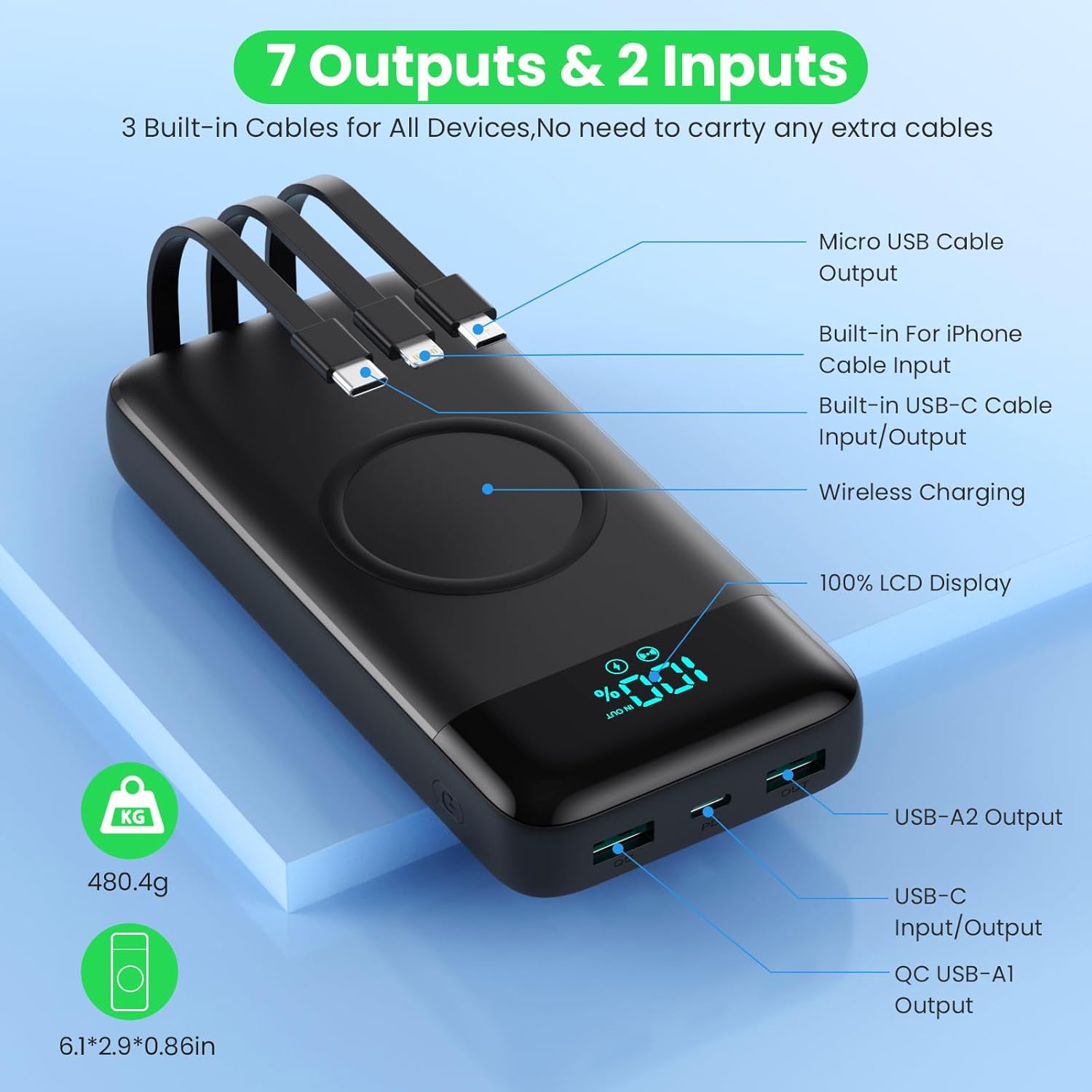
Image: Detailed diagram highlighting all 7 output options (3 built-in cables, 3 USB ports, 1 wireless) and 2 input options (built-in USB-C cable, USB-C port) on the power bank, along with the LCD display.
3. การชาร์จแบบไร้สาย
- ตรวจสอบให้แน่ใจว่าอุปกรณ์ของคุณรองรับการชาร์จแบบไร้สาย
- Place your wireless-enabled device directly onto the wireless charging pad located on the top surface of the power bank.
- วางอุปกรณ์ให้อยู่ตรงกลางแท่นชาร์จเพื่อการชาร์จที่มีประสิทธิภาพสูงสุด
- The power bank will automatically detect and begin wireless charging.

Image: A smartphone being wirelessly charged on the power bank, illustrating the fast wireless charging feature and supported wattagใช่
การชาร์จพร้อมกัน
The HETP Wireless Power Bank is designed to charge multiple devices concurrently using a combination of its built-in cables, output ports, and wireless charging pad.

ภาพ: เหนือศีรษะ view showing the power bank simultaneously charging a tablet, multiple smartphones, and a smartwatch using its various charging methods.
การซ่อมบำรุง
- การทำความสะอาด: Use a soft, dry cloth to clean the surface of the power bank. Do not use abrasive cleaners or solvents.
- พื้นที่จัดเก็บ: If storing for an extended period, charge the power bank to approximately 50-70% capacity. Recharge every 3-6 months to maintain battery health.
- การดูแลสายเคเบิล: When retracting built-in cables, do so gently to avoid damage.
การแก้ไขปัญหา
| ปัญหา | สาเหตุที่เป็นไปได้ | สารละลาย |
|---|---|---|
| พาวเวอร์แบงค์ชาร์จไม่เข้า | สายชาร์จหรืออะแดปเตอร์ชำรุด พาวเวอร์แบงค์หมด พอร์ตอินพุตมีปัญหา | Try a different charging cable and wall adapter. Ensure the power bank is connected correctly. Allow a few minutes for the LCD to activate if fully discharged. |
| อุปกรณ์ไม่ได้ชาร์จจากพาวเวอร์แบงค์ | Power bank low on charge; device cable faulty; device not compatible; incorrect port used; wireless charging misalignment. | Check power bank's charge level. Try a different cable. Ensure device is compatible. For wireless charging, reposition device on the pad. |
| ชาร์จช้า | สายเคเบิลไม่รองรับการชาร์จเร็ว; อุปกรณ์ไม่รองรับการชาร์จเร็ว; กำลังชาร์จอุปกรณ์หลายเครื่องพร้อมกัน | Use a fast-charging compatible cable. Ensure your device supports fast charging. Charging multiple devices may reduce individual charging speeds. |
| จอ LCD ไม่ทำงาน | พาวเวอร์แบงค์ปิดอยู่ ปัญหาภายใน | Press the power button to activate the display. If problem persists, contact customer support. |
ข้อมูลจำเพาะ
| คุณสมบัติ | รายละเอียด |
|---|---|
| หมายเลขรุ่น | HX160Q2 |
| ความจุของแบตเตอรี่ | 40800mAh |
| ประเภทแบตเตอรี่ | ลิเธียมโพลิเมอร์ |
| ขนาดสินค้า | 10.58 x 6.78 x 1.31 ซม. |
| น้ำหนักสินค้า | 100 กรัม |
| อินพุต (USB-C) | ระบบชาร์จเร็ว PD 25W |
| เอาต์พุต (USB-C) | ระบบชาร์จเร็ว PD 25W |
| เอาต์พุต (USB-A) | QC 4.0 Fast Charging |
| เอาท์พุตแบบไร้สาย | 15W (5W, 7.5W, 10W, 15W compatible) |
| สายเคเบิลในตัว | iOS, USB-C, Micro USB |
| แสดง | จอแสดงผล LCD แบบดิจิตอล |
| สี | สีดำ |
การรับประกันและการสนับสนุน
Each HETP product is safety certified. If you encounter any problems or have questions regarding your Wireless Power Bank, please do not hesitate to contact our customer support team. We are committed to providing professional after-sales service and satisfactory solutions within 12 hours.
โปรดดูเอกสารการซื้อของคุณสำหรับเงื่อนไขการรับประกันและข้อมูลการติดต่อที่เฉพาะเจาะจง
Ask a question about this manual
Ask about setup, troubleshooting, compatibility, parts, safety, or missing instructions. Manuals+ will review the question and use this page’s manual context to help answer it.