
DATOUBOSS 2200W Pure Sine Wave Power Inverter
DATOUBOSS 2200W Pure Sine Wave Power Inverter User Manual
รุ่น: เครื่องแปลงไฟแบบคลื่นไซน์บริสุทธิ์ 2200 วัตต์
แบรนด์: DATOUBOSS
1. บทนำ
This user manual provides detailed instructions for the safe and efficient operation of your DATOUBOSS 2200W Pure Sine Wave Power Inverter. This device converts 12V DC power from a battery into stable 120V AC power, suitable for a wide range of electronic devices and appliances. Please read this manual thoroughly before installation and use to ensure proper function and safety.
2. คำแนะนำด้านความปลอดภัย
โปรดปฏิบัติตามข้อควรระวังด้านความปลอดภัยต่อไปนี้เสมอ เพื่อป้องกันการบาดเจ็บหรือความเสียหายต่ออินเวอร์เตอร์และอุปกรณ์ที่เชื่อมต่อ:
- การระบายอากาศ : ตรวจสอบให้แน่ใจว่ามีการระบายอากาศที่เพียงพอรอบๆ อินเวอร์เตอร์ อย่าปิดกั้นช่องระบายความร้อน
- สิ่งแวดล้อม: Install the inverter in a dry, cool, and well-ventilated area, away from direct sunlight, heat sources, and flammable materials. Avoid exposure to water or excessive humidity.
- การเชื่อมต่อ: Ensure all DC and AC connections are secure and correctly polarized. Loose connections can cause overheating and damage.
- การต่อลงดิน: ต้องต่อสายดินอินเวอร์เตอร์อย่างถูกต้อง
- ความจุในการรับน้ำหนัก: Do not exceed the inverter's rated continuous power output (2200W) or peak power (4400W). Overloading can damage the inverter and connected appliances.
- ความเข้ากันได้ของแบตเตอรี่: This inverter is designed for 12V DC input. Ensure your battery system matches this voltage. It is compatible with Lithium (LI), Sealed Lead Acid (SLA), Gel, Flooded (FLD), and Absorbent Glass Mat (AGM) batteries.
- การซ่อมบำรุง: ห้ามเปิดหรือซ่อมแซมอินเวอร์เตอร์ด้วยตนเอง ควรส่งต่อให้ช่างผู้ชำนาญการเป็นผู้ดำเนินการซ่อมแซม
- เด็ก: เก็บอินเวอร์เตอร์ให้พ้นมือเด็ก
- ภาวะฉุกเฉิน: In case of smoke, unusual odors, or abnormal operation, immediately disconnect the inverter from the power source and contact support.
3. เนื้อหาบรรจุภัณฑ์
เมื่อเปิดบรรจุภัณฑ์ โปรดตรวจสอบว่าสินค้าทั้งหมดที่ระบุไว้ด้านล่างครบถ้วนและไม่เสียหาย:
- DATOUBOSS 2200W Pure Sine Wave Power Inverter
- Wired Remote Control (19.58 ft cable)
- Battery Cables (Red for positive, Black for negative)
- คู่มือการใช้งาน

Image: The DATOUBOSS 2200W Pure Sine Wave Power Inverter shown with its included wired remote control and battery connection cables.
Video: An unboxing demonstration of the 1200 Watt Pure Sine Wave Power Inverter, showing the main unit, remote control, and battery cables.
4. สินค้าหมดview
The DATOUBOSS 2200W Pure Sine Wave Power Inverter is designed for reliable power conversion, featuring advanced technology and multiple protection mechanisms.
4.1 คุณสมบัติหลัก
- เอาท์พุตคลื่นไซน์บริสุทธิ์: ให้พลังงานที่สะอาดและเสถียร เหมาะสำหรับอุปกรณ์อิเล็กทรอนิกส์ที่ต้องการพลังงานอย่างเพียงพอ
- กำลังขับสูง: Delivers continuous 2200W and peak 4400W power.
- มีหลายสาขา: Equipped with 2 AC outlets, 1 USB port, and 1 Type-C port.
- ความเข้ากันได้ของแบตเตอรี่ที่กว้าง: Supports Lithium (LI), Sealed Lead Acid (SLA), Gel, Flooded (FLD), and Absorbent Glass Mat (AGM) 12V batteries.
- การป้องกันขั้นสูง: Includes short circuit, input over-voltage/ภายใต้ฉบับtage, output short-circuit, overload, over-current, and over-temperature protection.
- การตรวจสอบแบบเรียลไทม์: LED screen and indicator lights display voltage, กำลังไฟฟ้าขาออก และรหัสข้อผิดพลาด
- รีโมทคอนโทรล: 19.58 ft wired remote for convenient on/off operation.
- โครงสร้างทนทาน: Robust aluminum housing for protection against drops and bumps.
- การระบายความร้อนที่มีประสิทธิภาพ: Built-in cooling fan ensures silent operation and prevents overheating.
4.2 การระบุส่วนประกอบ

ภาพ: รายละเอียด view of the inverter's side panel, highlighting the Negative Terminal, Cooling Fan, Positive Terminal, LCD display, Type-C port, USB interface, Ground terminal, Remote Switch Connection, Frequency Adjustment, and AC Outlets.

Image: Illustration of the inverter's pure sine wave output and various protection features including energy efficient, fast heat dissipation, under-voltagการป้องกัน e, over-voltage protection, overload protection, short-circuit protection, overheating protection, and reverse protection.

Image: The inverter connected to various devices, illustrating its comprehensive protection features such as reverse connection protection, over temperature protection, overload protection, over voltage การป้องกัน vol . ต่ำtagการป้องกัน e และการป้องกันไฟฟ้าลัดวงจร
5. การตั้งค่า
5.1 การเลือกสถานที่
Select a location for the inverter that is:
- แห้งและป้องกันความชื้น
- เย็นสบายและมีอากาศถ่ายเทดี
- ควรเก็บให้ห่างจากแสงแดดโดยตรงและแหล่งความร้อน
- ติดตั้งอย่างแน่นหนาเพื่อป้องกันการเคลื่อนไหว
5.2 การเชื่อมต่ออินเวอร์เตอร์
- เตรียมแบตเตอรี่: Ensure the 12V battery is fully charged and in good condition.
- เชื่อมต่อสายไฟ DC:
- เชื่อมต่อ สีแดง สายแบตเตอรี่ไปยัง บวก (+) terminal of the inverter and then to the positive terminal of the battery.
- เชื่อมต่อ สีดำ สายแบตเตอรี่ไปยัง ลบ (-) terminal of the inverter and then to the negative terminal of the battery.
- ตรวจสอบให้แน่ใจว่าการเชื่อมต่อทั้งหมดแน่นหนาและปลอดภัย เพื่อป้องกันการเกิดประกายไฟและความร้อนสูงเกินไป
- การต่อลงดิน: Connect the inverter's grounding terminal to a proper earth ground.
- รีโมทคอนโทรล (ตัวเลือก): Plug the wired remote control into the designated "REMOTE" port on the inverter for convenient power control.
สำคัญ: Always connect the battery cables to the inverter first, then to the battery. When disconnecting, disconnect from the battery first, then from the inverter.
6. คู่มือการใช้งาน
6.1 การเปิด/ปิดเครื่อง
- การเปิดเครื่อง: Press the "ON" button on the inverter's front panel or the wired remote control. The LED screen will illuminate, and indicator lights will show the status.
- วิธีปิดเครื่อง: Press the "OFF" button on the inverter's front panel or the wired remote control. The LED screen and indicator lights will turn off.
6.2 การเชื่อมต่อเครื่องใช้ไฟฟ้าปรับอากาศ
Once the inverter is powered on, you can connect your AC appliances to the AC outlets. For USB and Type-C devices, use the respective ports.
- ตรวจสอบให้แน่ใจว่าวัตต์รวมtage of all connected appliances does not exceed 2200W.
- For appliances with high starting current (e.g., motors, compressors), ensure their surge wattage is within the inverter's 4400W peak capacity.
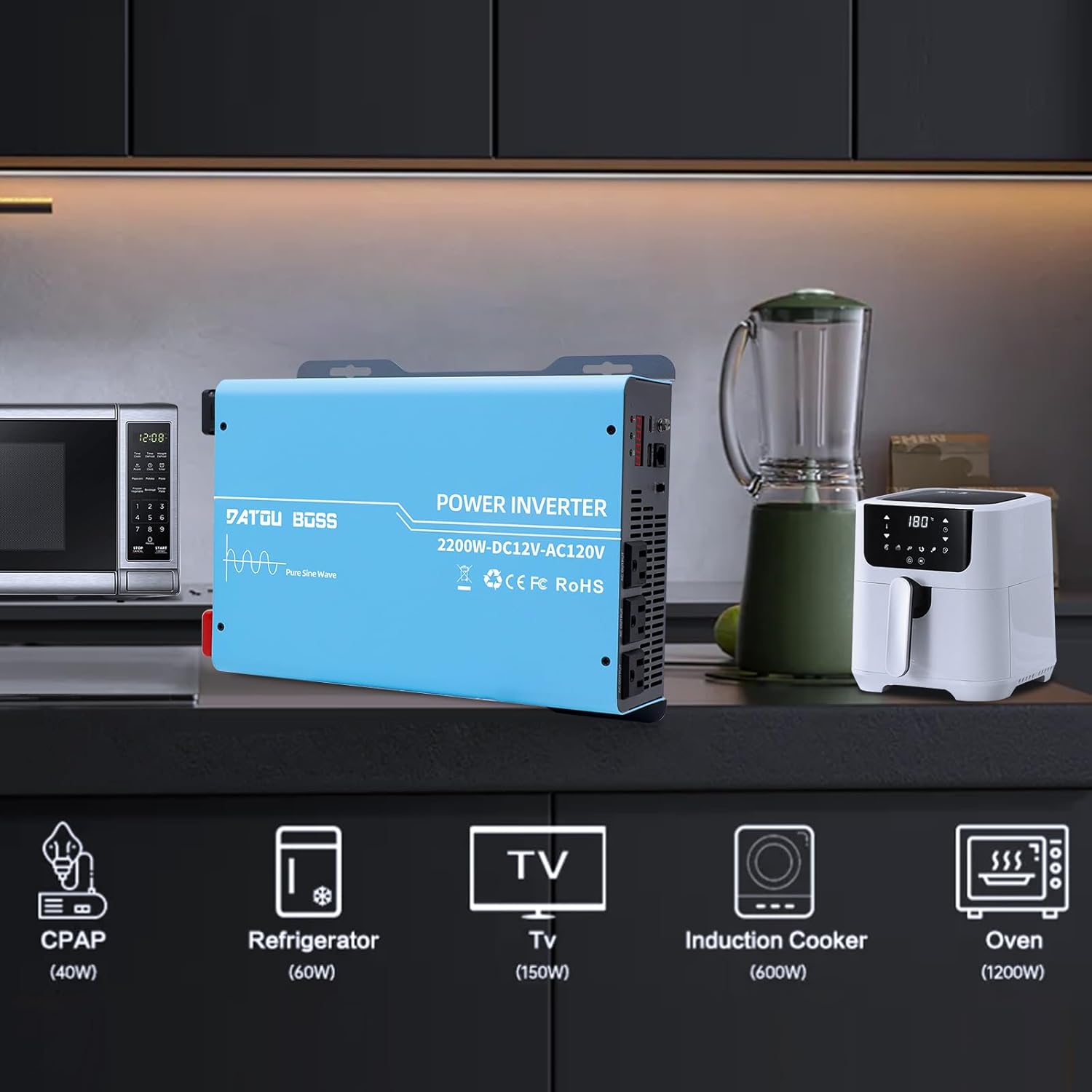
Image: The inverter connected to and powering common household appliances such as a microwave, refrigerator, TV, induction cooker, and oven, with their approximate wattages ระบุไว้
6.3 การตรวจสอบแบบเรียลไทม์
The LED screen provides real-time information:
- เล่มที่tagอี แสดงผล: Shows the input DC voltage จากแบตเตอรี่
- จอแสดงผลกำลังขับ: Indicates the current AC power being drawn by connected devices.
- รหัสความผิดปกติ: Displays specific codes in case of an error or protection activation. Refer to the Troubleshooting section for code meanings.
7. การบำรุงรักษา
- การทำความสะอาด: Regularly clean the exterior of the inverter with a dry, soft cloth. Do not use liquid cleaners or solvents. Ensure cooling vents are free from dust and debris.
- การเชื่อมต่อ: ตรวจสอบการเชื่อมต่อทางไฟฟ้าทั้งหมดเป็นระยะ เพื่อให้แน่ใจว่าแน่นสนิทและปราศจากสนิม
- พื้นที่จัดเก็บ: หากต้องเก็บรักษาอินเวอร์เตอร์เป็นเวลานาน ควรตัดการเชื่อมต่อจากแบตเตอรี่และเก็บไว้ในที่แห้งและเย็น
8 การแก้ไขปัญหา
ส่วนนี้กล่าวถึงปัญหาทั่วไปที่คุณอาจพบเจอเกี่ยวกับอินเวอร์เตอร์ของคุณ สำหรับปัญหาที่ไม่ได้ระบุไว้ในที่นี้ โปรดติดต่อฝ่ายบริการลูกค้า
| ปัญหา | สาเหตุที่เป็นไปได้ | สารละลาย |
|---|---|---|
| เครื่องแปลงไฟไม่ทำงาน | ขั้วต่อแบตเตอรี่หลวม; แรงดันแบตเตอรี่ต่ำtage; Blown fuse; Inverter fault. | Check and tighten battery cables. Ensure battery voltage is above 11V. Check internal fuses (if accessible and safe to do so, otherwise contact support). |
| ไม่มีเอาต์พุต AC | โอเวอร์โหลด; อุณหภูมิสูงเกินไป; แรงดันไฟเข้าต่ำ/สูงเกินไปtage; Short circuit on output. | Reduce connected load. Allow inverter to cool down. Check battery voltage. Disconnect all AC loads and restart. |
| เครื่องแปลงกระแสไฟฟ้าส่งเสียงบี๊บอย่างต่อเนื่อง | ปริมาณแบตเตอรี่ต่ำtage; Overload; Over-temperature. | Recharge or replace battery. Reduce connected load. Allow inverter to cool down. |
| Fan runs frequently/loudly. | อุณหภูมิภายในสูง; การทำงานปกติภายใต้ภาระ | Ensure adequate ventilation. This can be normal, especially under higher loads. If excessive, check for blocked vents. |
| LED screen displays a fault code. | Specific error detected by the inverter's protection system. | Refer to the inverter's display for the specific code. Common codes indicate over-voltage, ต่ำกว่า voltage, overload, or over-temperature. Address the underlying issue (e.g., adjust load, check battery). The inverter has an automatic shutdown feature in case of incorrect power connection or short circuit. |
9. ข้อมูลจำเพาะ
| คุณสมบัติ | รายละเอียด |
|---|---|
| ชื่อรุ่น | 2200W Power Inverter 12V to 110V |
| พลังงานต่อเนื่อง | 2200วัตต์ |
| พลังสูงสุด | 4400วัตต์ |
| อินพุต Voltage | กระแสตรง 12 โวลต์ |
| ปริมาณการส่งออกtage | กระแสไฟสลับ 110V/120V |
| รูปคลื่นเอาท์พุต | เพียวไซน์เวฟ |
| AC Outlets AC | 2 |
| พอร์ต USB | 1 |
| พอร์ต Type-C | 1 |
| Remote Control Cable Length | 19.58 ฟุต |
| ขนาด (แพ็คเกจ) | 17.04 x 10.67 x 7.17 นิ้ว |
| น้ำหนักสินค้า | 10.03 ปอนด์ |
| ผู้ผลิต | ดาทูบอส |
| ประเทศต้นกำเนิด | จีน |

Image: Diagram showing the physical dimensions of the inverter: 32.5cm/12.79in length, 22.8cm/8.97in width, and 7.8cm/3.07in height.
10. การรับประกันและการสนับสนุน
10.1 ข้อมูลการรับประกัน
DATOUBOSS provides a comprehensive 1-year warranty covering quality issues for this product. Please retain your proof of purchase for warranty claims.
10.2 การสนับสนุนลูกค้า
For technical assistance, troubleshooting, or warranty inquiries, please contact DATOUBOSS customer support. Refer to the product packaging or the official DATOUBOSS webเว็บไซต์สำหรับข้อมูลการติดต่อล่าสุด
Our brand is sold in over 200 countries worldwide, offering professional products and precision instruments. We are committed to providing excellent service.

Image: A customer service representative wearing a headset, symbolizing professional after-sales service and 24-hour online support.
Ask a question about this manual
Ask about setup, troubleshooting, compatibility, parts, safety, or missing instructions. Manuals+ will review the question and use this page’s manual context to help answer it.