
การแนะนำ
This manual provides essential instructions for the safe installation, operation, and maintenance of your Durastar DRWHC232XNA1 Window Air Conditioner with Supplemental Heating. Please read this manual thoroughly before using the appliance and retain it for future reference.
ข้อมูลด้านความปลอดภัยที่สำคัญ
คำเตือน: เพื่อลดความเสี่ยงจากไฟไหม้ ไฟฟ้าช็อต หรือการบาดเจ็บ โปรดปฏิบัติตามข้อควรระวังด้านความปลอดภัยดังต่อไปนี้:
- This unit requires a dedicated 30 Amp, 230 Volt circuit breaker for proper operation. Ensure your electrical system can support these requirements.
- The appliance uses an LCDI 6-30P plug. Do not modify the plug or use an adapter. Ensure the wall receptacle matches the plug type.
- ควรตัดการเชื่อมต่อไฟฟ้าทุกครั้งก่อนทำความสะอาดหรือซ่อมบำรุงเครื่อง
- อย่าใช้งานเครื่องด้วยสายไฟหรือปลั๊กที่ชำรุด
- เก็บวัสดุบรรจุภัณฑ์ให้พ้นมือเด็ก
- ห้ามปิดกั้นช่องรับหรือช่องระบายอากาศ
- Ensure the unit is securely installed in a window according to installation instructions to prevent falling.

สินค้าเกินview
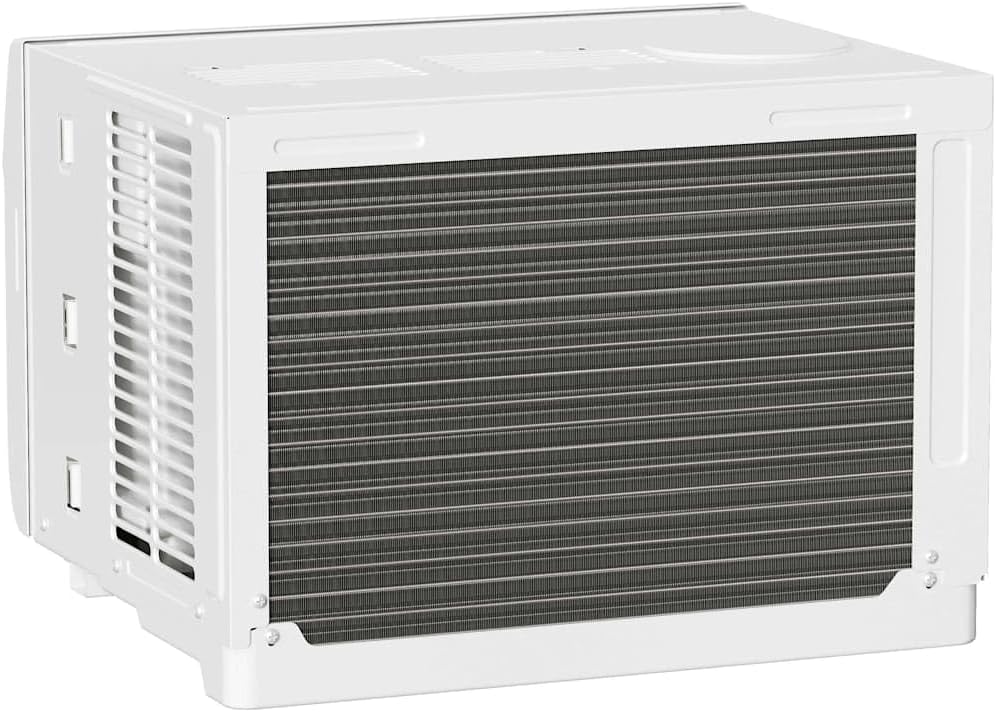
The Durastar DRWHC232XNA1 is a window-mounted air conditioner designed to provide both cooling and supplemental heating for your space. It features multiple operating modes, fan speeds, and a remote control for convenient operation.

การติดตั้งและการตั้งค่า
การแกะกล่องและส่วนประกอบที่รวมอยู่ในกล่อง
Carefully remove the air conditioner from its packaging. Inspect for any shipping damage. The package should contain the following items:
- เครื่องปรับอากาศแบบติดหน้าต่าง
- รีโมทคอนโทรล
- Window Mounting Kit (Side Panels, Foam Seal)
- คู่มือการใช้งาน (เอกสารนี้)

ข้อกำหนดของหน้าต่าง
This unit is designed for installation in standard double-hung windows. Ensure your window meets the following dimensions:
- Minimum Window Width: 28 นิ้ว
- Maximum Window Width: 40.5 นิ้ว
- ความสูงหน้าต่างขั้นต่ำ: 18.5 นิ้ว
Important: The electrical requirements for this unit are 230 Volts and a dedicated 30 Amp circuit. Verify your electrical outlet and circuit breaker are compatible before installation.

ขั้นตอนการติดตั้ง (โดยสรุป)
- Prepare the window by cleaning the sill and frame.
- Attach the side panels to the air conditioner unit.
- Carefully lift and place the unit into the window opening, ensuring it is centered and level or slightly tilted outwards for drainage.
- Extend the side panels to fill the window opening and secure them.
- Install the top and side locking brackets and foam seals to ensure a tight fit and prevent air leakage.
- Plug the unit into the appropriate 230V, 30 Amp เต้าเสียบ
Refer to the detailed installation guide provided with your unit for complete step-by-step instructions and diagrams.
คำแนะนำการใช้งาน
แผงควบคุม
The unit can be operated using the control panel on the front of the unit or the remote control.

- ปุ่มเปิด/ปิด: เปิดหรือปิดเครื่อง
- ปุ่มโหมด: สลับโหมดการทำงาน: อัตโนมัติ, ทำความเย็น, ลดความชื้น, ทำความร้อน, พัดลม
- ปุ่มปรับความเร็วพัดลม: Adjusts fan speed: Low, Medium, High.
- ปุ่มเพิ่ม/ลดอุณหภูมิ: ปรับการตั้งค่าอุณหภูมิที่ต้องการ
- ปุ่มตั้งเวลา: ตั้งเวลาเปิด/ปิด 24 ชั่วโมง
- ประหยัดพลังงาน: เปิดใช้งานหรือปิดใช้งานโหมดประหยัดพลังงาน
- จอแสดงผล LED: Shows the set temperature or timer settings.
รีโมทคอนโทรล
The remote control provides full functionality from a distance.

- อัตโนมัติ: ระบบจะเลือกโหมดทำความเย็นหรือทำความร้อนโดยอัตโนมัติตามอุณหภูมิห้อง
- เย็น: ให้ความเย็นสบาย
- แห้ง: ช่วยลดความชื้นในห้อง
- ความร้อน: ให้ความร้อนเสริม
- แฟน: Operates as a fan only, circulating air.
- อุณหภูมิ ▲/▼: ปรับอุณหภูมิได้ตามต้องการ
- เส้นทาง: สลับไปมาระหว่างโหมดการทำงานต่างๆ
- เปิด/ปิด: เปิดหรือปิดเครื่อง
- ความเร็วของพัดลม: Selects fan speed (High, Med, Low).
- ติดตามฉัน: Activates a feature where the remote control acts as a thermostat, sensing the temperature at its location.
- นอน: ปรับอุณหภูมิและความเร็วพัดลมเพื่อการนอนหลับที่สบาย
- ตั้งเวลาเปิด/ปิด: Programs the unit to turn on or off at a set time.
- °C/°F: สลับการแสดงอุณหภูมิระหว่างองศาเซลเซียสและองศาฟาเรนไฮต์
- จอแสดงผล LED: เปิดหรือปิดจอแสดงผล LED ของเครื่อง
- ประหยัดพลังงาน: เปิดใช้งานหรือปิดใช้งานโหมดประหยัดพลังงาน
ทิศทางลม
The unit features 4-way air directional louvers. Adjust these manually to direct airflow as desired for optimal comfort.
การซ่อมบำรุง
ควรดึงปลั๊กเครื่องออกจากเต้ารับไฟฟ้าทุกครั้งก่อนทำการบำรุงรักษา
การทำความสะอาดตัวกรองอากาศ
The air filter should be cleaned regularly, typically every two weeks, or more often depending on usage and air quality. A dirty filter can reduce efficiency and airflow.
- เปิดแผงด้านหน้าของตัวเครื่อง
- ถอดตัวกรองอากาศออกอย่างระมัดระวัง
- ล้างตัวกรองด้วยน้ำสบู่อุ่นๆ ล้างออกให้สะอาด
- Allow the filter to air dry completely before reinstalling. Do not expose to direct sunlight or high heat.
- ใส่แผ่นกรองแห้งกลับเข้าไป แล้วปิดแผงด้านหน้า
การทำความสะอาดภายนอก
เช็ดด้านนอกของตัวเครื่องด้วยผ้านุ่มdamp ใช้ผ้าเช็ดทำความสะอาดเท่านั้น ห้ามใช้สารเคมีรุนแรง สารขัดถู หรือตัวทำละลาย เพราะอาจทำให้พื้นผิวเสียหายได้
การจัดเก็บตามฤดูกาล
If storing the unit for an extended period, clean the air filter and exterior. Cover the unit to protect it from dust and store it in a dry, safe location.
การแก้ไขปัญหา
ก่อนที่จะติดต่อฝ่ายสนับสนุนลูกค้า โปรดอ่านview ปัญหาและวิธีแก้ไขทั่วไปต่อไปนี้:
| ปัญหา | สาเหตุที่เป็นไปได้ | สารละลาย |
|---|---|---|
| เครื่องไม่เปิด | No power; tripped circuit breaker; faulty plug/outlet. | Check power cord connection. Reset circuit breaker. Ensure 230V/30A outlet is functional. |
| Unit is on but not cooling/heating effectively. | Dirty air filter; blocked air vents; room too large; temperature setting too high/low. | Clean air filter. Ensure vents are clear. Verify room size is within coverage area. Adjust temperature setting. |
| Water dripping from unit (indoors). | Improper installation (not tilted slightly outwards); clogged drain. | Ensure unit is tilted slightly outwards for proper drainage. Check and clear drain pan/hose if accessible. |
| รีโมทคอนโทรลไม่ทำงาน | แบตเตอรี่หมด; มีสิ่งกีดขวางระหว่างรีโมทและตัวเครื่อง | เปลี่ยนแบตเตอรี่รีโมทคอนโทรล และนำสิ่งกีดขวางออกให้หมด |
ข้อมูลจำเพาะ
| คุณสมบัติ | รายละเอียด |
|---|---|
| ยี่ห้อ | ดูราสตาร์ |
| แบบอย่าง | DRWHC232XNA1 |
| ความสามารถในการทำความเย็น | 23,200 บีทียู |
| ความสามารถในการให้ความร้อน | 16,000 BTU (Supplemental) |
| เล่มที่tage | 230 โวลต์ |
| วัดtage | 5060 วัตต์ |
| ประเภทปลั๊ก | LCDI 6-30P (Requires 30 Amp วงจร) |
| Coverage Area (Cooling) | พื้นที่สูงสุดถึง 1,500 ตร.ฟุต |
| Coverage Area (Heating) | พื้นที่สูงสุดถึง 700 ตร.ฟุต |
| การขจัดความชื้น | 137 ไพน์ / วัน |
| ความเร็วพัดลม | 3 (ต่ำ, ปานกลาง, สูง) |
| โหมดการทำงาน | อัตโนมัติ, เย็น, แห้ง, ความร้อน, พัดลม |
| ระดับเสียง | 68 เดซิเบล |
| ขนาดสินค้า (กว้าง x ลึก x สูง) | 25.38 x 25.38 x 17.94 นิ้ว |
| น้ำหนักสินค้า | 121 ปอนด์ |
| ประสิทธิภาพ | ประสิทธิภาพสูง |
| ผู้ทำนาย | 17 |
| การจัดอันดับดาวของ BEE | 4 ดาว |
| คุณสมบัติพิเศษ | Remote Controlled, 24-hour Timer, 4-way Air Directional Louvers |
การรับประกันและการสนับสนุน
ข้อมูลการรับประกัน
For detailed warranty information, please refer to the warranty card included with your product or visit the official Durastar webไซต์ โปรดเก็บใบเสร็จรับเงินไว้เป็นหลักฐานการซื้อสำหรับการเรียกร้องการรับประกัน
การสนับสนุนลูกค้า
If you have questions, require technical assistance, or need to report an issue, please contact Durastar customer support. You can find contact information on the official Durastar webเว็บไซต์หรือผ่านผู้ค้าปลีกของคุณ
Visit the official Durastar Store: ร้าน Durastar บน Amazon