
การแนะนำ
Thank you for choosing the CREATE Speaker Retro. This portable Bluetooth speaker combines a classic retro design with modern audio technology, offering versatile connectivity and powerful sound. This manual will guide you through the setup, operation, and maintenance of your new speaker to ensure optimal performance and longevity.

Image: The CREATE Speaker Retro, highlighting its elegant retro aesthetic and compact form factor.
คำแนะนำด้านความปลอดภัยที่สำคัญ
- อ่านคำแนะนำทั้งหมดอย่างละเอียดก่อนใช้ผลิตภัณฑ์
- เก็บคู่มือนี้ไว้เพื่อใช้อ้างอิงในอนาคต
- Do not expose the speaker to water or excessive moisture. This product is ไม่กันน้ำ.
- ห้ามวางใกล้แหล่งความร้อน เช่น เครื่องทำความร้อน ช่องระบายความร้อน เตา หรืออุปกรณ์อื่นๆ (รวมถึง) ampเครื่องให้ความร้อน) ที่ผลิตความร้อน
- ใช้เฉพาะอุปกรณ์เสริม/สิ่งที่แนบที่ผู้ผลิตกำหนดเท่านั้น
- ถอดปลั๊กอุปกรณ์นี้ในระหว่างพายุฝนฟ้าคะนองหรือเมื่อไม่ได้ใช้งานเป็นเวลานาน
- ส่งต่อการบริการทั้งหมดไปยังบุคลากรบริการที่มีคุณสมบัติเหมาะสม
เนื้อหาแพ็คเกจ
The CREATE Speaker Retro package includes:
- CREATE Speaker Retro Portable Bluetooth Speaker (1 unit)
- สายชาร์จ USB-C
- คู่มือการใช้งาน (เอกสารนี้)
การควบคุมและพอร์ตผ่านview
โปรดทำความคุ้นเคยกับปุ่มควบคุมและพอร์ตเชื่อมต่อของลำโพง:

ภาพ: รายละเอียด view ของแผงควบคุมด้านบนของลำโพง
- ปุ่มปรับระดับเสียง: ปรับระดับเสียงโดยรวม
- ปุ่มเบส: ปรับระดับเสียงเบส
- ปุ่มเสียงแหลม: ปรับระดับเสียงแหลม
- สวิตช์เลือกอินพุต: Toggles between AUX, Bluetooth (BT), and USB input modes.
- สวิตช์ไฟ: เปิด/ปิดลำโพง
- ช่องต่อ AUX (3.5 มม.): สำหรับเชื่อมต่ออุปกรณ์เสียงภายนอกผ่านสายสัญญาณเสียง
- พอร์ต USB: สำหรับการเล่นไดรฟ์ USB
- DC-IN 5V Port: สำหรับชาร์จลำโพง
- ไฟแสดงสถานะ: แสดงสถานะพลังงาน สถานะการชาร์จ และสถานะการจับคู่บลูทูธ
การตั้งค่า
1. ชาร์จลำโพง
Before first use, fully charge the speaker. Connect the provided USB-C charging cable to the DC-IN 5V port on the speaker and the other end to a compatible USB power adapter (not included) or a computer's USB port. The indicator light will show the charging status. A full charge takes approximately 4-5 hours.
- การชาร์จ: Indicator light glows (color may vary).
- ชาร์จเต็มแล้ว: Indicator light turns off or changes color.
2. การเปิด/ปิดเครื่อง
To power on the speaker, flip the สวิตซ์ไฟฟ้า to the "ON" position. To power off, flip the switch to the "OFF" position.
คำแนะนำการใช้งาน
1. โหมดบลูทู ธ
The speaker features Bluetooth 5.2 for wireless audio streaming with a range of up to 10 meters.
- เปิดลำโพง
- ตั้งค่า สวิตช์เลือกอินพุต to "BT/AUX" and then ensure it's in Bluetooth mode (indicator light will blink, indicating pairing mode).
- บนสมาร์ทโฟน แท็บเล็ต หรืออุปกรณ์อื่นๆ ที่เปิดใช้งาน Bluetooth ของคุณ ให้เปิดใช้งาน Bluetooth และค้นหาอุปกรณ์ที่มีอยู่
- Select "CREATE Speaker Retro" from the list.
- Once paired, the indicator light will stop blinking and remain solid. You can now play music wirelessly.
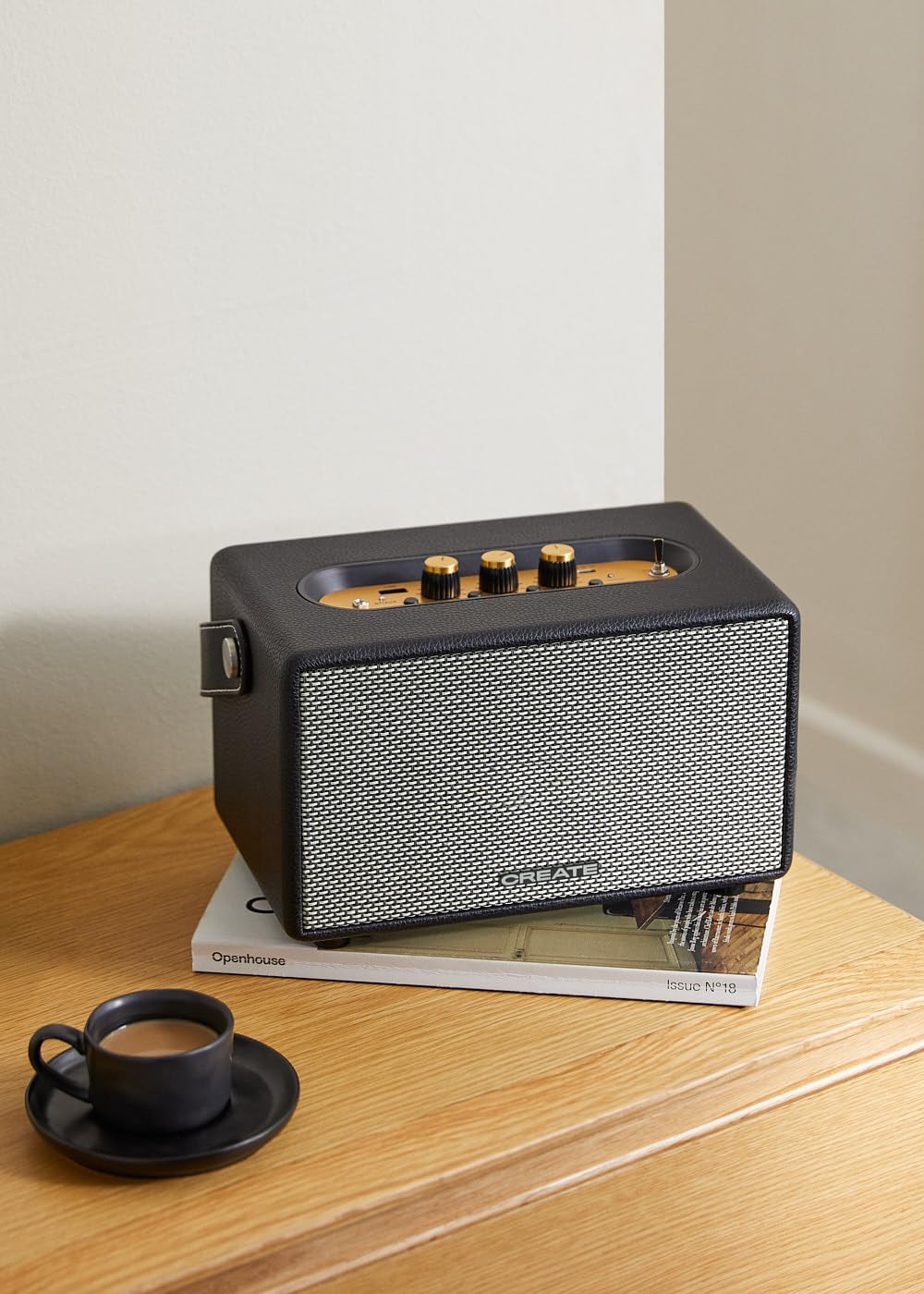
Image: Connecting to the speaker via Bluetooth from a mobile device.
2. USB Playback Mode
เล่นเสียง fileโดยตรงจากแฟลชไดรฟ์ USB
- เปิดลำโพง
- ใส่แฟลชไดรฟ์ USB ที่มีเสียง fileเข้าไปใน พอร์ต USB.
- ตั้งค่า สวิตช์เลือกอินพุต to "USB". The speaker will automatically begin playing music from the USB drive.

Image: Inserting a USB drive for direct audio playback.
3. โหมดอินพุต AUX
เชื่อมต่ออุปกรณ์เสียงภายนอกโดยใช้สายสัญญาณเสียงขนาด 3.5 มม.
- เปิดลำโพง
- เชื่อมต่อปลายด้านหนึ่งของสายสัญญาณเสียงขนาด 3.5 มม. (ไม่ได้รวมอยู่ในชุด) เข้ากับ... อินพุต AUX พอร์ตบนลำโพง
- Connect the other end of the cable to the headphone jack or audio output of your external device (e.g., MP3 player, laptop).
- ตั้งค่า สวิตช์เลือกอินพุต to "AUX". The speaker will now play audio from your connected device.
4. การปรับเสียง
ใช้ปุ่มหมุนเฉพาะบนแผงควบคุมเพื่อปรับแต่งประสบการณ์ด้านเสียงของคุณให้เหมาะสม:
- หมุน ปุ่มปรับระดับเสียง to increase or decrease the overall sound level.
- หมุน ปุ่มเบส to adjust the low-frequency sounds.
- หมุน ปุ่มเสียงแหลม to adjust the high-frequency sounds.
การซ่อมบำรุง
การทำความสะอาด
To clean the speaker, use a soft, dry cloth. Do not use abrasive cleaners, waxes, or solvents as they may damage the finish. Avoid spraying liquids directly onto the speaker.
พื้นที่จัดเก็บ
เมื่อไม่ได้ใช้งานเป็นเวลานาน ควรเก็บลำโพงไว้ในที่แห้งและเย็น หลีกเลี่ยงแสงแดดโดยตรงและอุณหภูมิที่สูงหรือต่ำเกินไป ตรวจสอบให้แน่ใจว่าได้ชาร์จแบตเตอรี่จนเต็มก่อนเก็บ เพื่อรักษาอายุการใช้งานของแบตเตอรี่
การดูแลแบตเตอรี่
The speaker is equipped with a built-in rechargeable battery. To maximize battery life:
- หลีกเลี่ยงการปล่อยแบตเตอรี่จนหมดบ่อยครั้ง
- Recharge the battery regularly, even if the speaker is not used often.
- Do not expose the speaker to temperatures above 45°C (113°F) or below 0°C (32°F).
การแก้ไขปัญหา
If you encounter any issues with your CREATE Speaker Retro, please refer to the following common problems and solutions:
| ปัญหา | สาเหตุที่เป็นไปได้ | สารละลาย |
|---|---|---|
| ลำโพงไม่เปิดเครื่อง | แบตเตอรี่หมด | Charge the speaker for 4-5 hours using the USB-C cable. |
| ไม่มีเสียงจากลำโพง | ระดับเสียงเบาเกินไป; โหมดอินพุตไม่ถูกต้อง; อุปกรณ์ไม่ได้เชื่อมต่ออย่างถูกต้อง | Increase volume. Ensure the correct input mode (BT, USB, AUX) is selected. Reconnect Bluetooth device or AUX cable. |
| การจับคู่บลูทูธล้มเหลว | ลำโพงไม่ได้อยู่ในโหมดจับคู่; อุปกรณ์อยู่นอกระยะ; มีสัญญาณรบกวน | Ensure speaker is in Bluetooth pairing mode (blinking indicator). Move device closer to speaker (within 10m). Turn off other Bluetooth devices. |
| การเล่น USB ไม่ทำงาน | Incorrect input mode; USB drive not formatted correctly or no compatible files. | Ensure "USB" input mode is selected. Check USB drive for compatible audio files (e.g., MP3). Try a different USB drive. |
| Play/Pause button not responding. | Potential hardware issue or software glitch. | Restart the speaker. If the issue persists, contact customer support. (Note: A user review mentioned this issue.) |
ข้อมูลจำเพาะ
| ชื่อรุ่น | SPEAKER RETRO |
| หมายเลขรุ่น | 181643_452174 |
| ขนาด (D x W x H) | 17 x 26 x 15 ซม. |
| น้ำหนัก | 2.5 กก. |
| กำลังขับสูงสุดของลำโพง | 40 วัตต์ |
| โหมดเอาต์พุตเสียง | สเตอริโอ (2.0 ช่อง) |
| เทคโนโลยีการเชื่อมต่อ | Bluetooth 5.2, USB, AUX (3.5mm) |
| ช่วงบลูทูธ | สูงสุด 10 เมตร |
| ความจุของแบตเตอรี่ | 3000 มิลลิแอมป์ |
| อายุการใช้งานแบตเตอรี่ | ใช้งานได้นานสูงสุด 5 ชั่วโมง (ขึ้นอยู่กับการใช้งาน) |
| เวลาในการชาร์จ | ประมาณ 4-5 ชั่วโมง |
| วิธีการควบคุม | Touch (knobs and switches) |
| สี | สีดำ |
| กันน้ำ | เลขที่ |
การรับประกันและการสนับสนุน
ข้อมูลการรับประกัน
The CREATE Speaker Retro comes with a standard manufacturer's warranty. Please retain your proof of purchase for warranty claims. The warranty covers defects in materials and workmanship under normal use. It does not cover damage caused by misuse, accidents, unauthorized modifications, or exposure to water.
For specific warranty terms and conditions, please refer to the warranty card included with your product or contact CREATE customer service.
การสนับสนุนลูกค้า
If you have any questions, require technical assistance, or need to report an issue that cannot be resolved using the troubleshooting guide, please contact CREATE customer support.
You can find more information and contact details on the official CREATE webเว็บไซต์หรือผ่านทางร้านค้าแบรนด์ของพวกเขาบน Amazon: