
1. บทนำ
The BTMETER BT-5000Y is a high-precision portable digital hot wire anemometer designed for accurate measurement of wind speed, air temperature, and airflow (CMM/CFM). Its retractable sensor allows for convenient measurements in confined spaces, making it suitable for a wide range of applications including environmental monitoring, air conditioning system maintenance, and outdoor activities.

Figure 1.1: BTMETER BT-5000Y Anemometer with its main unit and flexible probe.

Figure 1.2: Common applications for the BT-5000Y anemometer, such as drone flight, marine activities, HVAC system checks, and outdoor sports.
2. คุณสมบัติหลัก
- Simultaneous Wind Speed and Temperature Measurement: Equipped with a thermometer for high-precision readings of both wind speed and air temperature.
- Accurate Airflow Detection: Utilizes an advanced hot-wire sensor for reliable measurements.
- หน่วยการวัดหลายหน่วย: Supports 5 wind speed units (m/s, ft/min, Knots, km/h, Mph) and air volume units (CMM/CFM).
- Retractable Sensor: Designed for easy and convenient measurements, especially in narrow or hard-to-reach areas.
- Large Color LCD Display: Simultaneously displays current, maximum, and minimum wind speed, air temperature, and airflow data for clear readability.
- ฟังก์ชั่นอัจฉริยะ: Includes unit conversion, data hold, MAX/MIN/AVG functions, low battery indicator, and configurable automatic shutdown to extend battery life.
- แบตเตอรี่แบบชาร์จไฟได้ยาวนาน: Built-in 600mAh lithium battery with USB Type-C charging for extended operation.
- การออกแบบที่ทนทาน: Features a waterproof and dustproof construction suitable for various environments.
3. การตั้งค่า
3.1 การแกะกล่องและการตรวจสอบเบื้องต้น
Upon receiving your BTMETER BT-5000Y, carefully unpack all components. Verify that the package contains the main anemometer unit, the retractable hot-wire probe, a USB Type-C charging cable, and this user manual. Inspect the device for any visible damage.
3.2 การชาร์จแบตเตอรี่
Before first use, fully charge the internal 600mAh lithium battery. Connect the provided USB Type-C cable to the device's charging port and plug the other end into a standard USB power adapter (not included) or a computer USB port. The charging indicator on the display will show the charging status. A full charge typically takes a few hours.
3.3 การติดตั้งหัววัด
Gently connect the retractable hot-wire probe to the main unit's sensor port. Ensure a secure connection to prevent inaccurate readings. The probe can be extended or retracted as needed for different measurement scenarios.

Figure 3.1: Device diagram illustrating key components and controls.
4. คู่มือการใช้งาน
4.1 เปิด/ปิดเครื่อง
- กดปุ่ม พลัง ปุ่ม (①) เพื่อเปิดอุปกรณ์
- กดปุ่มค้างไว้ พลัง ปุ่ม (①กดค้างไว้สองสามวินาทีเพื่อปิดอุปกรณ์
- The device features a configurable automatic shutdown function to save power. Refer to the settings menu for adjustment.
4.2 การวัดพื้นฐาน
Once powered on, the device will immediately begin measuring wind speed and temperature. Ensure the probe is positioned correctly in the airflow you wish to measure.
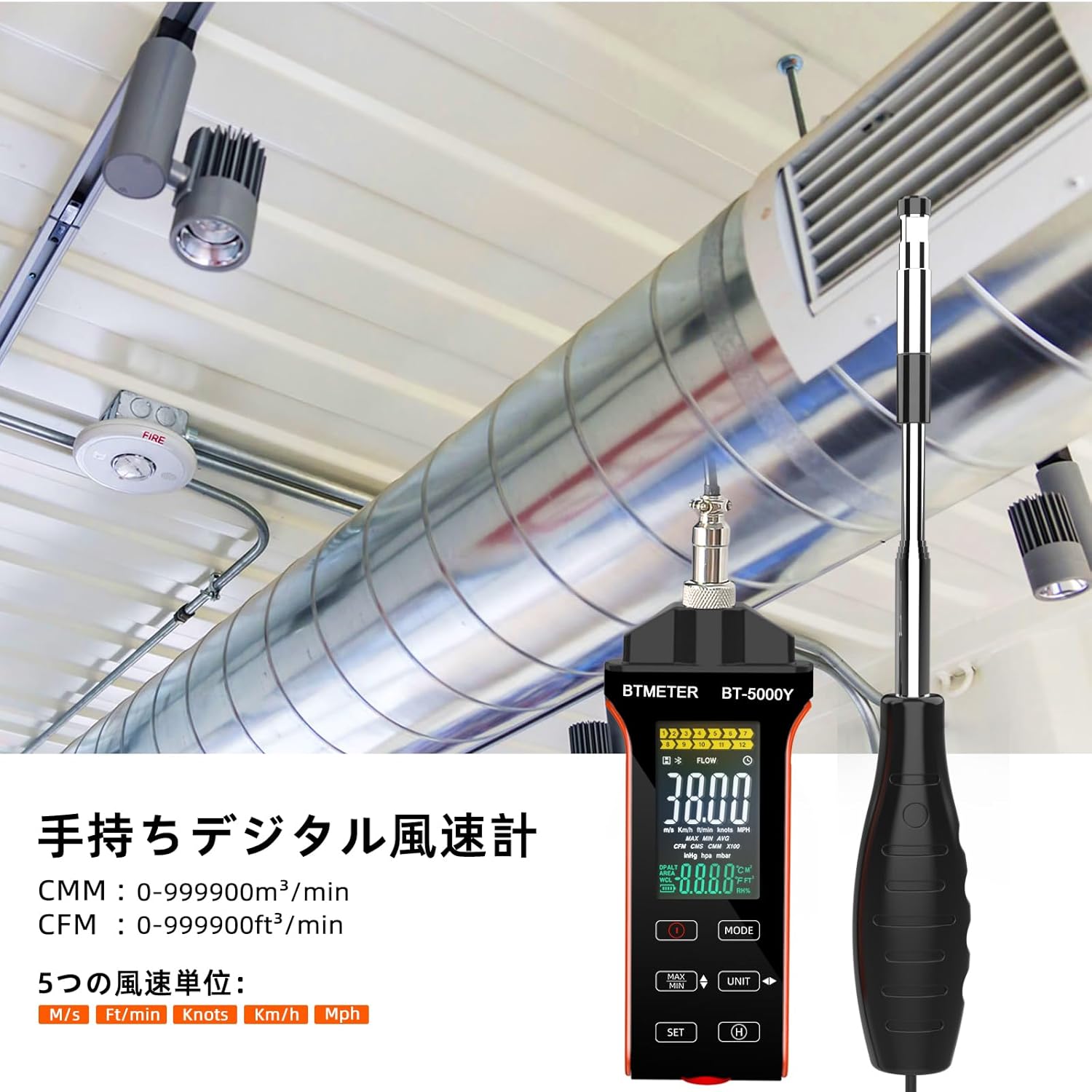
Figure 4.1: The BT-5000Y anemometer being used to measure airflow in a duct.
4.3 การแปลงหน่วย
The BT-5000Y supports multiple units for wind speed and airflow. Use the หน่วย button to cycle through available units.
- Wind Speed Units: m/s (meters/second), ft/min (feet/minute), Knots, km/h (kilometers/hour), Mph (miles/hour).
- Air Volume Units: CMM (cubic meters/minute), CFM (cubic feet/minute).
- หน่วยอุณหภูมิ: °C (Celsius), °F (Fahrenheit).

Figure 4.2: The display showing the five available wind speed units.
4.4 ฟังก์ชันค่าสูงสุด/ต่ำสุด/เฉลี่ย
กดปุ่ม สูงสุด/ต่ำสุด ปุ่มที่จะ view the maximum, minimum, and average readings during a measurement session. Pressing it repeatedly will cycle through these values.
4.5 ฟังก์ชั่นการเก็บข้อมูล
หากต้องการหยุดการแสดงค่าปัจจุบันบนหน้าจอ ให้กดปุ่ม H (Hold) button. Press it again to release the hold and resume live measurement.
4.6 จอแสดงผล LCD เกินview
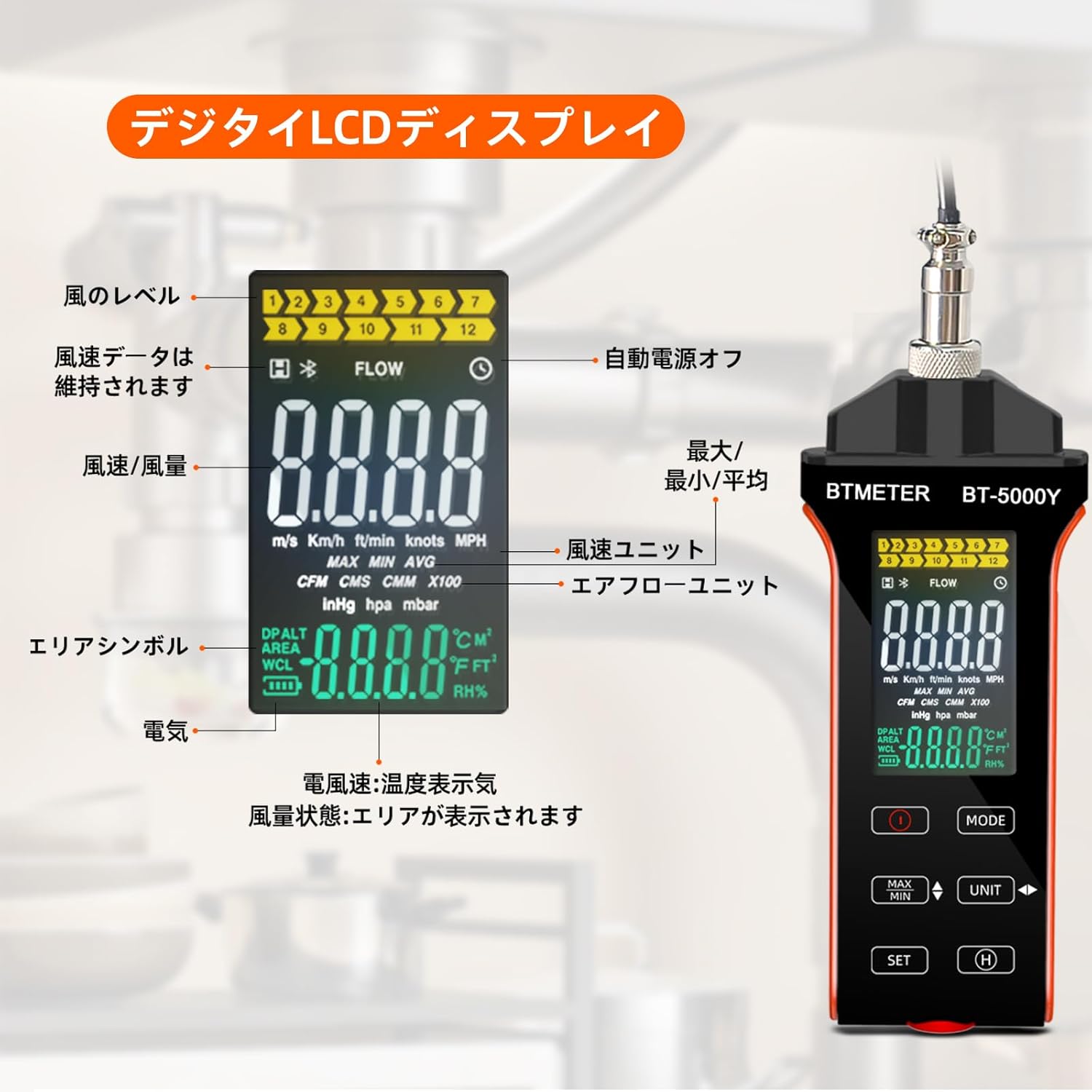
รูปที่ 4.3: รายละเอียดเพิ่มเติมview of the digital LCD display and its indicators.
The large color LCD display provides comprehensive information:
- Wind Level Indicator: Visual representation of wind strength.
- Data Hold Symbol: Indicates when the display is frozen.
- Auto Power Off Indicator: Shows if auto-shutdown is active.
- MAX/MIN/AVG Indicators: Displays the selected measurement mode.
- Wind Speed Units: Current unit (m/s, km/h, ft/min, knots, Mph).
- Airflow Units: Current unit (CMM, CFM).
- Area Symbol: Used for airflow calculations.
- ไฟแสดงสถานะแบตเตอรี่: แสดงอายุการใช้งานแบตเตอรี่ที่เหลืออยู่
- แสดงอุณหภูมิ: Shows air temperature in °C or °F.
5. การบำรุงรักษา
5.1 การทำความสะอาด
Wipe the device and probe with a soft, dry cloth. Do not use abrasive cleaners or solvents. Ensure the hot-wire sensor is clean and free of dust or debris for accurate readings.
5.2 พื้นที่จัดเก็บ
When not in use, retract the sensor probe and store the anemometer in a cool, dry place, away from direct sunlight and extreme temperatures. Use the provided carrying case (if applicable) to protect the device.
5.3 การดูแลแบตเตอรี่
To prolong battery life, avoid fully discharging the battery frequently. Recharge the device when the low battery indicator appears. If storing for an extended period, charge the battery to approximately 50% every few months.
6 การแก้ไขปัญหา
If you encounter issues with your BTMETER BT-5000Y, please refer to the following common problems and solutions:
- อุปกรณ์ไม่เปิดเครื่อง:
- Ensure the battery is sufficiently charged. Connect the device to a power source using the USB Type-C cable and allow it to charge for at least 30 minutes before attempting to power on again.
- ตรวจสอบให้แน่ใจว่าได้กดปุ่มเปิด/ปิดค้างไว้ตามระยะเวลาที่กำหนดแล้ว
- ค่าที่อ่านได้ไม่ถูกต้องหรือไม่แน่นอน:
- Check if the hot-wire sensor is clean and free from dust, lint, or other obstructions. Gently clean it if necessary.
- Ensure the probe is fully extended and properly positioned in the airflow.
- Verify that the probe is securely connected to the main unit.
- Ensure the device is operating within its specified temperature and humidity ranges.
- Digital display is erratic or 'crazy':
- This could indicate a software glitch or a hardware issue. Try turning the device off and on again.
- หากปัญหายังคงอยู่ โปรดติดต่อฝ่ายสนับสนุนลูกค้าเพื่อขอความช่วยเหลือเพิ่มเติม
- Issues with CFM/CMM calculation or unit conversion (e.g., automatically switching units, incorrect conversions):
- อย่างระมัดระวังview the manual's section on unit conversion and area input. Some devices may have specific input methods or default behaviors for area calculations.
- Ensure you are following the correct sequence for entering area values and selecting units.
- If the issue persists and appears to be a fundamental flaw in unit handling, contact customer support.
- Low battery indicator constantly on:
- Recharge the battery fully. If the issue persists after a full charge, the battery may need replacement.
For issues not covered here, please contact BTMETER customer support.
7. ข้อมูลจำเพาะ
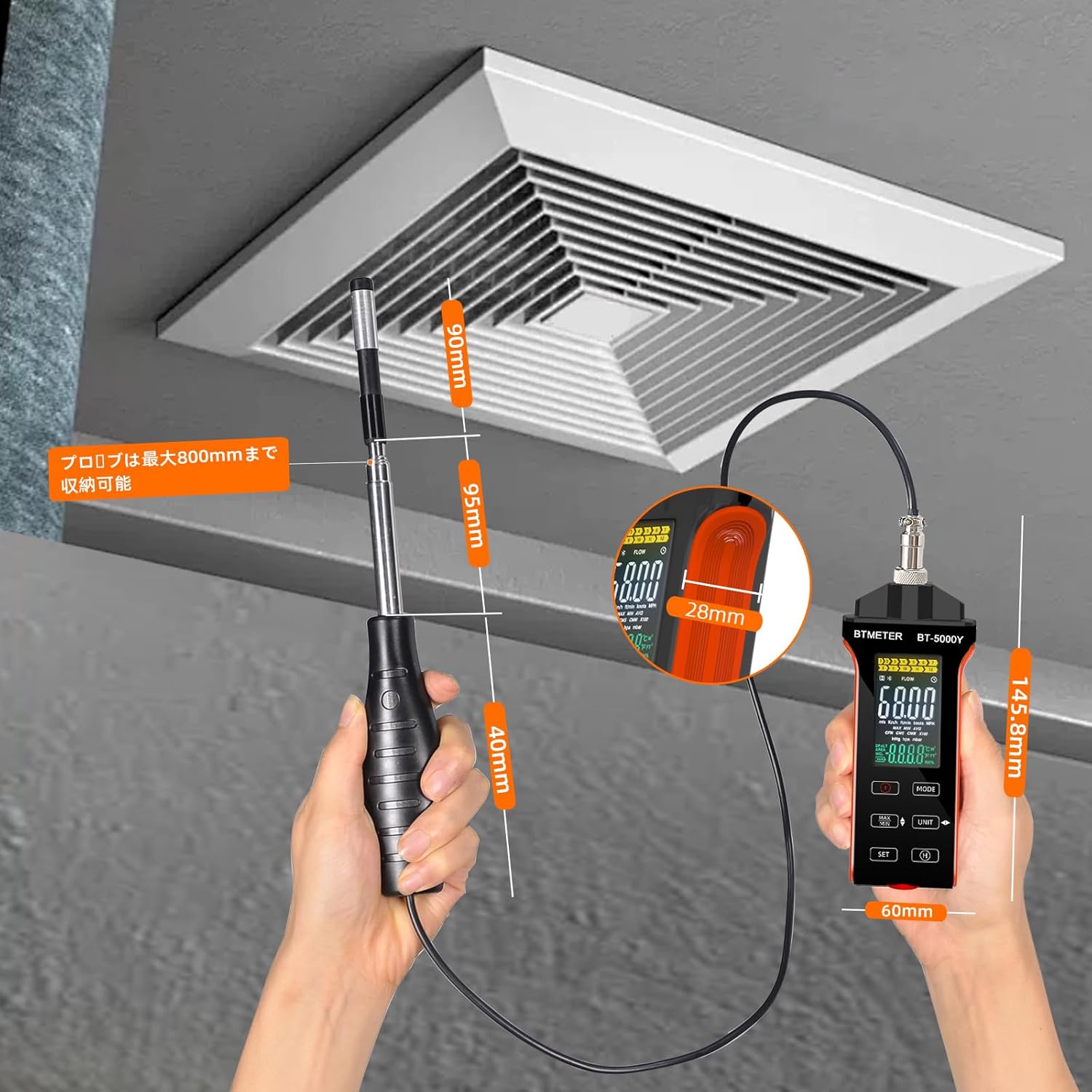
Figure 7.1: Dimensions of the BTMETER BT-5000Y anemometer.
| พารามิเตอร์ | ค่า |
|---|---|
| แบบอย่าง | BT-5000Y |
| ช่วงการวัดความเร็วลม | 0 - 30 ม./วินาที |
| ความแม่นยำของความเร็วลม | ±5% ±0.1 dgt |
| ความละเอียดความเร็วลม | 0.1% |
| Air Temperature Measurement Range | 0.0 - 45.0 องศาเซลเซียส (32.0 - 113.0 องศาฟาเรนไฮต์) |
| ความแม่นยำของอุณหภูมิอากาศ | ±1.0 °C (±1.8 °F) |
| Air Temperature Resolution | 0.1 |
| Air Volume Range (CMM) | 0 - 999900 m³/min |
| Air Volume Range (CFM) | 0 - 999900 ft³/min |
| Air Volume Resolution | 0.001 - 100 |
| แบตเตอรี่ | แบตเตอรี่ลิเธียมในตัว 600mAh |
| อินเตอร์เฟซการชาร์จ | ยูเอสบี ไทป์ ซี |
| น้ำหนักสินค้า | 250 กรัม |
| ขนาดแพ็คเกจ | 14.5 x 6 x 3 ซม. |
| ส่วนประกอบที่รวมอยู่ | 1 * BTMETER BT-5000Y Anemometer |
8. การรับประกันและการสนับสนุน
BTMETER products are designed for reliability and performance. This product comes with a standard manufacturer's warranty. For specific warranty terms and conditions, please refer to the warranty card included with your product or visit the official BTMETER webเว็บไซต์.
If you require technical assistance, troubleshooting, or have questions about your BT-5000Y anemometer, please contact BTMETER customer support through their official channels. When contacting support, please have your product model (BT-5000Y) and purchase information ready.