
1. ข้อมูลด้านความปลอดภัยที่สำคัญ
Please read this entire manual before installation and assembly. If you have any questions regarding any of the instructions or warnings, please contact your local distributor for assistance.
- We accept no responsibility for incorrect or faulty installation.
- Follow the enclosed installation instructions carefully.
- Check the condition and completeness of all items before beginning.
- The fastening materials supplied for wall mounting are intended exclusively for fastening to solid masonry or concrete. For other wall types, such as hollow bricks, plasterboard, or lightweight construction, please contact a specialist retailer for information on suitable fastening elements.
- Under no circumstances should you exceed the limit values specified for the product.
2. เนื้อหาบรรจุภัณฑ์
Verify that all components are present and undamaged before installation. If any parts are missing or damaged, do not attempt to install. Contact customer support for replacement parts.

Figure 2.1: XTRARM TiTon Double TV Wall Mount and included hardware components, including various screws, anchors, washers, and a drilling template.
โดยทั่วไปแพ็คเกจจะประกอบด้วย:
- XTRARM TiTon Double TV Wall Mount assembly
- Standard mounting hardware for TV and wall (various screws, anchors, washers)
- แม่แบบการเจาะ
- Small spirit level
- Multiple hook-and-loop straps for cable management
3. ข้อมูลจำเพาะ
| คุณสมบัติ | ข้อมูลจำเพาะ |
|---|---|
| ประเภทการติดตั้ง | ติดผนัง |
| ประเภทการเคลื่อนไหว | Articulated, Swivel, Tilt, Rotate |
| วัสดุ | โลหะ |
| สี | สีดำ |
| ระยะห่างของผนัง | 12.9 cm (retracted) to 120 cm (extended) |
| การหมุน | Up to 90° (portrait/landscape) |
| หมุน | Up to 180° (90° left/right) |
| การเอียง | -5° ถึง +12° |
| ขนาดทีวีที่แนะนำ | Approximately 52 – 110 inches |
| ความจุน้ำหนัก | สูงสุด 80 กก. |
| ความเข้ากันได้ของ VESA | 100x100mm, 100x200mm, 200x100mm, 200x200mm, 200x300mm, 300x200mm, 300x300mm, 400x200mm, 400x300mm, 400x400mm, 500x300mm, 600x200mm, 600x400mm |

Figure 3.1: VESA compatibility and maximum weight capacity.

Figure 3.2: Key dimensions and movement capabilities of the mount.
Figure 3.3: Comprehensive technical drawing with detailed dimensions and adjustment ranges.
4. การตั้งค่าและการติดตั้ง
Proper installation is crucial for the safety and stability of your TV. Ensure you have the necessary tools and assistance before proceeding.
4.1 เครื่องมือที่จำเป็น (ไม่รวม)
- เจาะ
- เครื่องตรวจหาโครงไม้ (หากติดตั้งกับโครงไม้)
- ดินสอ
- สายวัด
- ประแจซ็อกเก็ตหรือประแจปรับได้
- ไขควงหัวแฉก
4.2 การเลือกตำแหน่งการติดตั้ง
Select a wall location that can safely support the weight of the mount and your TV. For solid concrete or masonry walls, use the provided anchors. For wood stud walls, ensure the mount is centered on a stud. Avoid mounting to drywall alone.
4.3 Attaching the Wall Plate
- Position the drilling template at the desired height on the wall and mark the drill holes with a pencil. Use the included spirit level to ensure it is perfectly horizontal.
- Drill pilot holes at the marked locations. The drill bit size will depend on your wall type and the chosen anchors/screws.
- Insert wall anchors (if required for your wall type) into the pilot holes.
- Align the wall plate with the drilled holes and secure it to the wall using the appropriate screws and washers. Ensure it is firmly attached.
4.4 การติดตั้งขาตั้งทีวีเข้ากับทีวี
- วางทีวีคว่ำหน้าลงบนพื้นผิวที่นุ่มและสะอาดอย่างระมัดระวัง เพื่อป้องกันความเสียหายของหน้าจอ
- ระบุรูยึด VESA ที่ด้านหลังทีวีของคุณ
- Select the correct size screws and spacers (if needed) from the provided hardware that fit your TV's VESA pattern.
- Attach the two vertical TV brackets to the back of your TV, ensuring they are level and securely fastened. Do not overtighten.
4.5 การติดตั้งทีวีเข้ากับแผ่นยึดผนัง
- With assistance, carefully lift the TV and hook the attached TV brackets onto the wall plate.
- ตรวจสอบให้แน่ใจว่าทีวีติดตั้งบนแผ่นยึดผนังอย่างแน่นหนาแล้ว
- ล็อคกลไกความปลอดภัยใดๆ บนตัวยึดเพื่อป้องกันการหลุดออกโดยไม่ตั้งใจ

รูปที่ 4.1: อดีตample of the XTRARM TiTon Double TV Wall Mount installed with a television.
5. คู่มือการใช้งาน
The XTRARM TiTon Double mount offers full motion capabilities for optimal viewมุมการเอียง
5.1 Adjusting Wall Distance
Gently pull or push the TV to extend or retract the mount. The mount allows for a wall distance ranging from 12.9 cm to 120 cm.

Figure 5.1: Adjustable wall distance of the mount.
5.2 การปรับหมุน
The mount can swivel up to 180 degrees (90 degrees left or right) to direct the screen towards different viewพื้นที่ที่กำลังดำเนินงาน

Figure 5.2: Swivel capability of the mount.
5.3 การปรับความเอียง
Adjust the vertical tilt of your TV from -5 degrees to +12 degrees to reduce glare and optimize viewing comfort. Loosen the tilt adjustment knobs, set the desired angle, and then retighten the knobs.
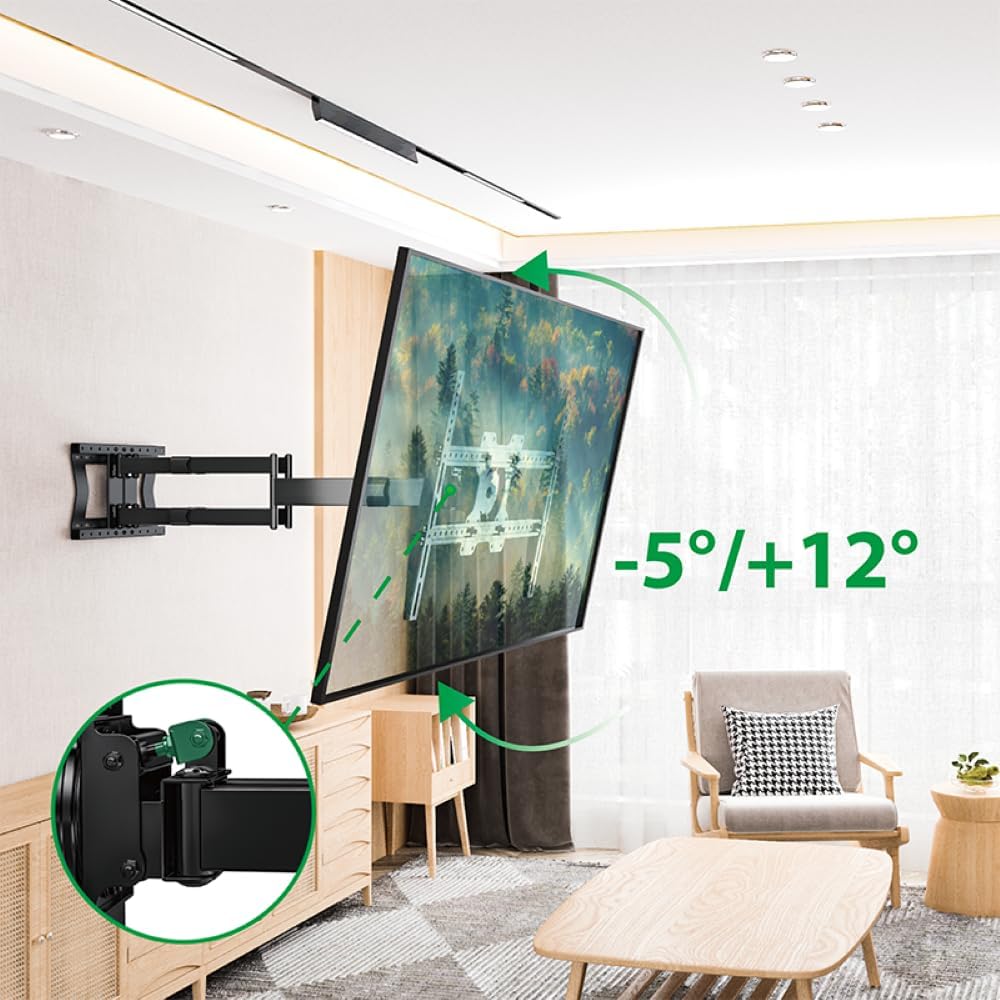
Figure 5.3: Tilt adjustment range and mechanism.
5.4 การปรับการหมุน
The mount allows for a 90-degree rotation, enabling you to switch between landscape and portrait orientation for your TV.

Figure 5.4: 90-degree rotation capability.
5.5 การจัดการสายเคเบิล
Use the provided hook-and-loop straps to bundle and organize cables along the mount arms for a tidy appearance and to prevent snagging during adjustments.
6. การบำรุงรักษา
การบำรุงรักษาอย่างสม่ำเสมอจะช่วยให้ขาตั้งทีวีติดผนังของคุณใช้งานได้ยาวนานและปลอดภัย
- การทำความสะอาด: เช็ดฐานยึดด้วยผ้าแห้งเนื้อนุ่ม หลีกเลี่ยงน้ำยาทำความสะอาดที่มีฤทธิ์กัดกร่อนหรือตัวทำละลายที่อาจทำให้พื้นผิวเสียหายได้
- ตรวจสอบการเชื่อมต่อ: ตรวจสอบสกรูและน็อตทั้งหมดเป็นระยะเพื่อให้แน่ใจว่ายังแน่นอยู่ ขันให้แน่นขึ้นหากจำเป็น แต่ห้ามขันแน่นเกินไป
- ตรวจสอบการสึกหรอ: ตรวจสอบฐานยึดอย่างสม่ำเสมอเพื่อดูว่ามีร่องรอยการสึกหรอ ความเสียหาย หรือการกัดกร่อนหรือไม่ หากพบปัญหาใด ๆ ให้หยุดใช้งานและติดต่อฝ่ายบริการลูกค้า
7 การแก้ไขปัญหา
If you encounter any issues with your XTRARM TiTon Double TV Wall Mount, refer to the following common problems and solutions:
| ปัญหา | สาเหตุที่เป็นไปได้ | สารละลาย |
|---|---|---|
| ทีวีไม่ได้ตั้งตรง | Wall plate or TV brackets not level during installation. | Carefully remove the TV, adjust the wall plate or TV brackets using a spirit level, and re-mount. |
| Difficulty moving the mount | Joints may be too tight or require lubrication. | Check for any overtightened bolts. Apply a small amount of silicone-based lubricant to moving joints if necessary. |
| ภูเขารู้สึกไม่มั่นคง | Loose wall plate, incorrect anchors, or exceeding weight capacity. | Immediately remove the TV. Re-check all wall plate fasteners. Ensure correct anchors were used for your wall type. Verify TV weight does not exceed 80 kg. If issues persist, consult a professional installer. |
8. การรับประกันและการสนับสนุน
For information regarding warranty coverage, technical support, or replacement parts, please refer to the documentation provided at the time of purchase or visit the official XTRARM webไซต์ โปรดเก็บใบเสร็จรับเงินไว้เป็นหลักฐานการซื้อ