

1. สินค้าหมดview
The OWON HDS241 is a versatile 3-in-1 handheld device integrating a single-channel oscilloscope, a 24000-count digital multimeter, and a 100kHz signal generator. Designed for both outdoor and indoor use, it offers a compact form factor with powerful measurement capabilities for various electrical and electronic applications.

Image 1.1: The OWON HDS241 device, highlighting its oscilloscope, multimeter, and signal generator functions.
2. ข้อมูลด้านความปลอดภัย
Before using the OWON HDS241, please read and understand all safety instructions to prevent electric shock, injury, or damage to the device. Keep this manual for future reference.
- ความปลอดภัยทั่วไป: ควรใช้งานอุปกรณ์ภายในระดับเสียงที่กำหนดไว้เสมอtage and current limits. Do not operate the device in wet or damp เงื่อนไข.
- ความปลอดภัยของโพรบ: Ensure probes are correctly connected and rated for the measurement being performed. Avoid touching exposed wiring or components when the device is powered on.
- ความปลอดภัยของแบตเตอรี่: Use only the specified battery type. Do not disassemble, crush, or expose the battery to extreme temperatures.
- การซ่อมบำรุง: Refer all servicing to qualified personnel. Do not attempt to repair the device yourself.
3. คุณสมบัติหลัก
- มัลติมิเตอร์แบบดิจิตอล: 4 1/2 digit True RMS digital multimeter for measuring AC/DC voltage/current, resistance, diode, capacitance, and continuity. Maximum input voltage is AC 750V, DC 1000V.
- Signal Waveform Generator: 1-channel 100 kHz generator supporting sine, square, ramp, and pulse wave outputs. Maximum output amplitude is 2.5 Vpp.
- ออสซิลโลสโคป: Waveform refresh rate up to 10,000 wfms/s, 40MHz bandwidth, and real-time sampling rate up to 250MSa/s. Features auto-setup, multiple measurement functions, 8K record length, cursor measurement, and slow scan mode for long-term signal monitoring.
- การออกแบบที่กะทัดรัด: Portable form factor with a 3.5-inch high-definition color LCD screen, suitable for various environments.
- อายุการใช้งานแบตเตอรี่ยาวนาน: Low-power design with a 2000 mAh high-capacity lithium battery and standard Type-C port for charging and power bank compatibility.
4. เนื้อหาบรรจุภัณฑ์
The standard package for the OWON HDS241 includes:
- OWON HDS241 Handheld Oscilloscope Unit
- สายวัดทดสอบสำหรับมัลติมิเตอร์
- โพรบออสซิลโลสโคป
- สายเคเบิล USB Type-C
- คู่มือการใช้งาน (เอกสารนี้)
Note: Additional accessories such as a BNC-to-alligator clip cable or carrying case may need to be purchased separately.
5. การจัดวางอุปกรณ์และการควบคุม
Familiarize yourself with the physical components and controls of the HDS241.

ภาพที่ 5.1: ด้านหน้าและด้านข้าง view of the OWON HDS241 with key controls and ports labeled. Labels include: signal input connector, display area, multifunction keys, channel key, mode switching key, system settings, save settings, power button, relative value/activation menu key, multimeter input port, horizontal time base setting/signal adjustment, return key, range switch/measurement menu key, arrow keys, auto range/auto setting key, hold value/Stop/Run key, probe compensation output (2.5V/1kHz square wave or signal generator output), USB charging/communication interface, approximate weight (0.6 kg host, excluding battery), gross weight (1.2 kg).
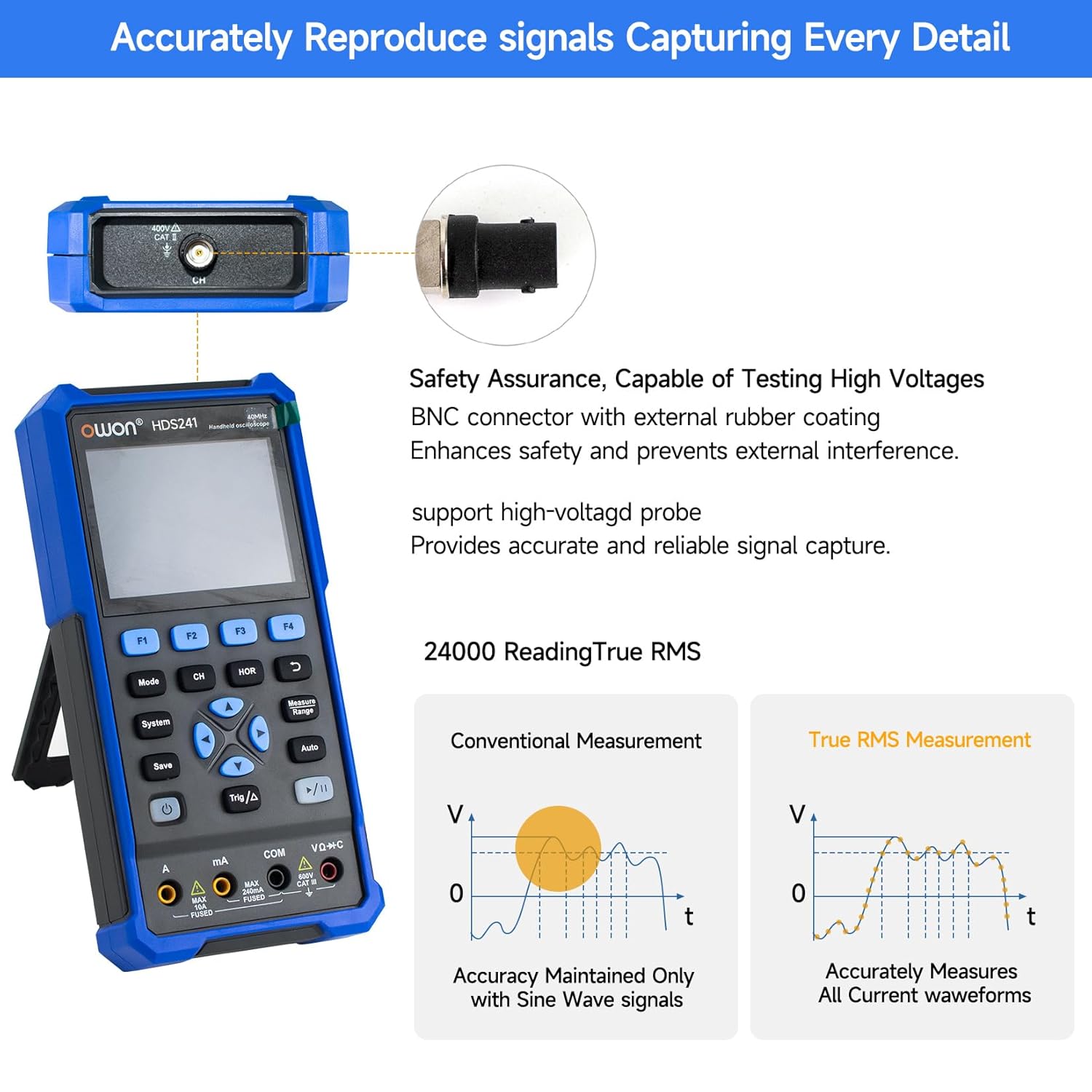
Image 5.2: Detail of the BNC connector, designed for safety and signal integrity, with external rubber coating.
6. การตั้งค่าเริ่มต้น
6.1 การชาร์จอุปกรณ์
The HDS241 is equipped with a built-in 2000 mAh lithium battery. Before first use, fully charge the device using the provided USB Type-C cable and a compatible power adapter (not included) or a computer USB port.
- Connect the USB Type-C cable to the device's Type-C port.
- เชื่อมต่อปลายสายอีกด้านเข้ากับแหล่งจ่ายไฟ USB
- ไฟแสดงการชาร์จจะแสดงสถานะการชาร์จ

Image 6.1: The USB Type-C charging port and internal battery compartment, emphasizing long-lasting performance.
6.2 การเปิด/ปิดเครื่อง
กดปุ่มค้างไว้ พลัง ปุ่มเพื่อเปิดหรือปิดอุปกรณ์
7. โหมดการทำงาน
The HDS241 features three primary operating modes: Oscilloscope, Multimeter, and Signal Generator. Press the โหมด ปุ่มสำหรับสลับระหว่างฟังก์ชันเหล่านี้
7.1 โหมดออสซิลโลสโคป
In Oscilloscope mode, the device displays real-time waveforms, allowing for detailed analysis of electrical signals. Connect the oscilloscope probe to the BNC connector on the top of the device.
- การตั้งค่าอัตโนมัติ: กดปุ่ม ออโต้ ปุ่มสำหรับปรับขนาดและตำแหน่งของรูปคลื่นโดยอัตโนมัติ
- การวัดขนาด: ใช้ วัด menu (accessed via F1) to select automatic measurements like Frequency, Period, Amplitude, Max, Min, Peak-to-Peak, and RMS.
- การวัดเคอร์เซอร์: Activate cursor measurements (accessed via F2) to manually measure voltage (ΔV) and time (ΔT) differences between points on the waveform.
- การตั้งค่าทริกเกอร์: Adjust trigger type, level, and mode using the ตรีโกณมิติ/Δ ปุ่ม.
- Horizontal/Vertical Controls: Use the navigation arrows to adjust time base (horizontal) and voltage scale (vertical).

ภาพที่ 7.1.1: อดีตamples of oscilloscope display features including dual sampling mode, high refresh rate, 8 types of auto-measurements, and cursor measurements.

ภาพที่ 7.1.2: อดีตamples of actual measured waveforms, demonstrating the oscilloscope's signal capture capabilities for different signal types.
7.2 โหมดมัลติมิเตอร์
In Multimeter mode, the HDS241 functions as a digital multimeter. Connect the test leads to the appropriate input ports (VΩ+C, COM, A, mA) at the bottom of the device.
- การเลือกฟังก์ชั่น: ใช้ โหมด button to cycle through measurement types (Voltage, Current, Resistance, Capacitance, Diode, Continuity).
- อัตโนมัติ: The device supports auto-ranging for convenient measurement.
- การเก็บข้อมูล: ใช้ บันทึก button or a dedicated hold function (if available) to freeze the current reading.
7.3 โหมดเครื่องกำเนิดสัญญาณ
The Signal Generator mode allows the device to output various waveforms. Connect the output to the circuit under test using the appropriate cable (e.g., BNC to alligator clips, not included).
- การเลือกรูปคลื่น: Use the F-keys to select sine, square, ramp, or pulse waveforms.
- การปรับพารามิเตอร์: ปรับความถี่และ amplitude using the navigation arrows. The maximum output amplitude is 2.5 Vpp.
8. การจัดการข้อมูล
The HDS241 supports data transfer to a computer via its USB Type-C port for further analysis and record-keeping.
- การเชื่อมต่อกับพีซี: Use the provided USB Type-C cable to connect the device to your computer.
- ซอฟต์แวร์: Refer to the OWON website for any necessary drivers or software to facilitate data transfer and analysis.
- การบันทึกข้อมูล: ใช้ บันทึก button to store waveform images, settings, or measurement data directly on the device.
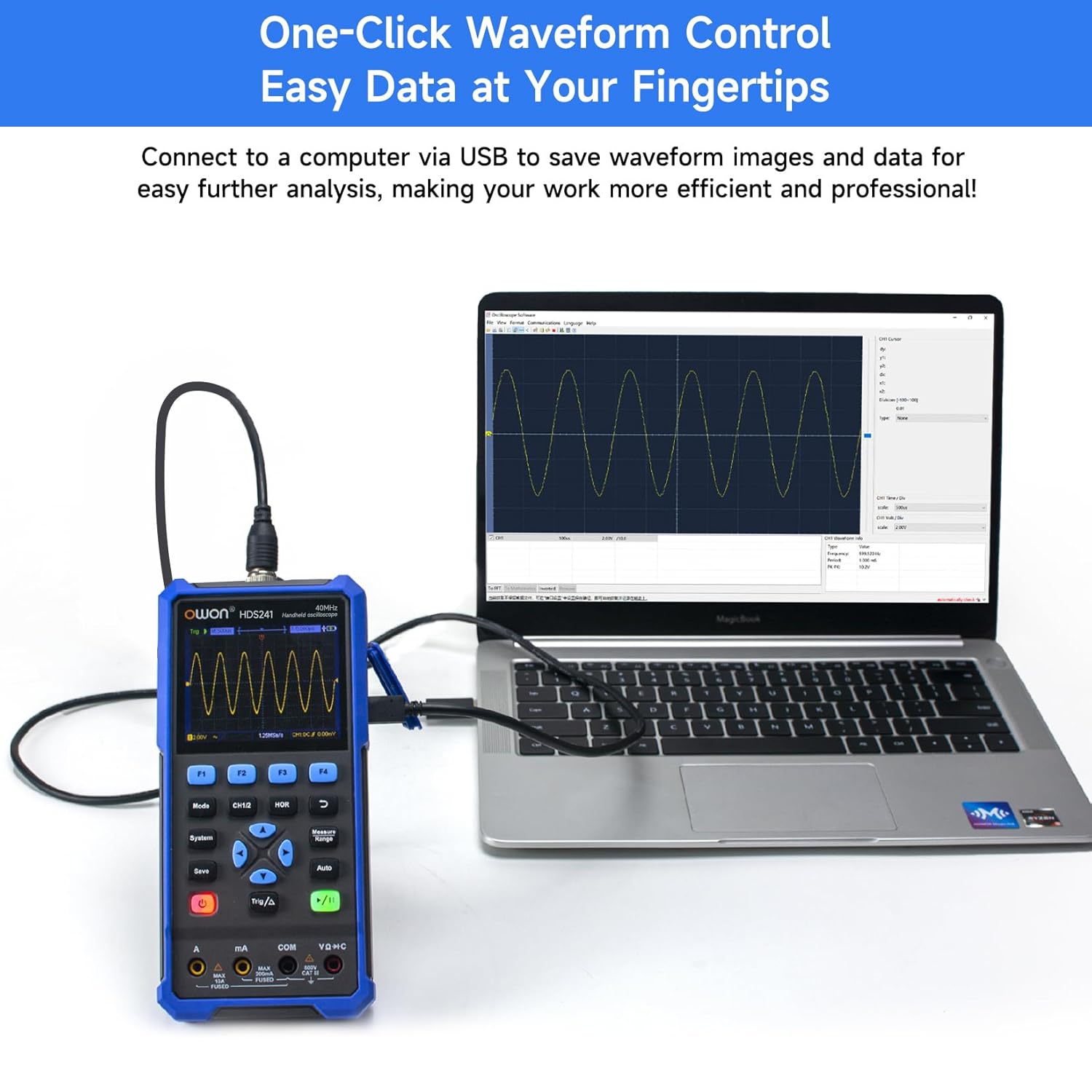
Image 8.1: The OWON HDS241 connected to a computer for data transfer and analysis, enabling easy waveform control.
9. การบำรุงรักษา
- การทำความสะอาด: ทำความสะอาดอุปกรณ์ด้วยผ้านุ่มและแห้ง ห้ามใช้น้ำยาทำความสะอาดหรือสารละลายที่มีฤทธิ์กัดกร่อน
- พื้นที่จัดเก็บ: เก็บอุปกรณ์ไว้ในที่แห้งและเย็น หลีกเลี่ยงแสงแดดโดยตรงและอุณหภูมิที่สูงหรือต่ำเกินไป
- การดูแลแบตเตอรี่ สำหรับการเก็บรักษาในระยะยาว ควรตรวจสอบให้แน่ใจว่าแบตเตอรี่มีประจุอยู่บ้าง (ประมาณ 50%) และชาร์จใหม่ทุกๆ สองสามเดือนเพื่อรักษาประสิทธิภาพของแบตเตอรี่
- การสอบเทียบหัววัด: Periodically calibrate the oscilloscope probe using the dedicated probe compensation output to ensure accurate measurements.
10 การแก้ไขปัญหา
| ปัญหา | สาเหตุที่เป็นไปได้ | สารละลาย |
|---|---|---|
| อุปกรณ์ไม่เปิดเครื่อง | แบตเตอรี่ต่ำหรือหมด | Connect the device to a power source using the USB Type-C cable and allow it to charge. |
| ไม่มีรูปคลื่นแสดงในโหมดออสซิลโลสโคป | Probe not connected correctly; signal too small or too large; incorrect time base or voltagมาตราส่วนอี | Ensure probe is securely connected. Press ออโต้ for automatic setup. Adjust vertical and horizontal scales manually. Check trigger settings. |
| ค่าที่อ่านได้จากมัลติมิเตอร์ไม่แม่นยำ | Test leads not properly connected; incorrect measurement function selected; external interference. | Verify test lead connections. Ensure the correct measurement mode (voltage, current, resistance) is selected. Minimize external electrical noise. |
| Signal generator output is not as expected. | Incorrect waveform type, frequency, or amplitude set. | Check the selected waveform, frequency, and ampการตั้งค่าความสูงในเมนูเครื่องกำเนิดสัญญาณ |
11. ข้อมูลจำเพาะทางเทคนิค
Oscilloscope Specifications:
| พารามิเตอร์ | ค่า |
|---|---|
| แบนด์วิธ | 40เมกะเฮิรตซ์ |
| ช่อง | 1 |
| Sampลิงอัตรา | 250MSa / วินาที |
| โหมดการรับข้อมูล | Sample, Peak Detect |
| ความยาวบันทึก | Max. 8K |
| แสดง | จอ LCD ขนาด 3.5 นิ้ว |
| อัตราการรีเฟรชรูปคลื่น | 10,000 wfms/วินาที |
| อินพุตคัปปลิ้ง | ดีซี, แอกซี, กราวด์ |
| อิมพีแดนซ์อินพุต | 1 MΩ±2%, in parallel with 16 pF±10 pF |
| การลดทอนของโพรบ | 1X, 10X, 100X, 1000X |
| อินพุตสูงสุดVoltage | 400V (DC + AC, PK-PK) |
| Sensitivity Resolution | 10mV/ดิวิชั่น-10V/ดิวิชั่น |
| ความละเอียดแนวตั้ง | 8 บิต |
| เครื่องชั่งแนวนอน | 5ns/div-1000s/div, step 1-2-5 |
| ประเภททริกเกอร์ | ขอบ |
| โหมดทริกเกอร์ | อัตโนมัติ, ปกติ, เดี่ยว |
| การวัดอัตโนมัติ | ช่วงเวลา, ความถี่, ค่าเฉลี่ย, PK-PK, ค่าสูงสุด, ค่าต่ำสุด Ampความกว้าง, ค่า RMS |
| การวัดเคอร์เซอร์ | ΔV, ΔT |

Image 11.1: Detailed oscilloscope specifications.
Digital Multimeter Specifications:
| พารามิเตอร์ | ค่า |
|---|---|
| จำนวนการแสดงผล | 4½ digits (max 24000 counts) |
| โหมดทดสอบ | เล่มที่tage, กระแสไฟฟ้า, ความต้านทาน, ความจุ, ไดโอด, ความต่อเนื่อง |
| อินพุตสูงสุดVoltage | กระแสสลับ 750 โวลต์, กระแสตรง 1000 โวลต์ |
| กระแสไฟเข้าสูงสุด | กระแสสลับ 10A, กระแสตรง 10A |
| ช่วงอัตโนมัติ | ใช่ |
| ค่า RMS ที่แท้จริง | ใช่ |

Image 11.2: Detailed digital multimeter specifications.
Signal Waveform Generator Specifications:
| พารามิเตอร์ | ค่า |
|---|---|
| รูปคลื่น | ไซน์, กำลังสอง, Ramp, ชีพจร |
| ความถี่เอาต์พุต | 10เฮิรตซ์-100กิโลเฮิรตซ์ |
| Ampความสูง | 2Vpp-2.5Vpp |

Image 11.3: Detailed signal waveform generator specifications.
ข้อมูลจำเพาะทั่วไป:
- ขนาด : 9.6 x 3.8 x 19.8 ซม.
- น้ำหนักสินค้า: 1.2 กิโลกรัม
- แหล่งพลังงาน: Battery Powered (2000 mAh Lithium Battery)
- สี: สีฟ้า
- ใบรับรอง: CE, True RMS
12. การรับประกันและการสนับสนุน
OWON products are designed for reliability and performance. For warranty information, technical support, or service inquiries, please refer to the official OWON webไซต์หรือติดต่อตัวแทนจำหน่ายในพื้นที่ของคุณ
- ระยะเวลารับประกัน: Standard manufacturer's warranty applies. Please check your purchase documentation for specific terms and duration.
- การสนับสนุนด้านเทคนิค: Visit the OWON official website for FAQs, software downloads, and contact information for technical assistance.
- การส่งคืน: Refer to the retailer's return policy for details on product returns and exchanges.