
1. บทนำ
The UanTii All-in-One Smart Matter Plug is a versatile smart home device designed to integrate seamlessly with various smart home ecosystems, including Apple HomeKit, Amazon Alexa, Google Home, Samsung SmartThings, and Tuya/Smart Life. This smart plug allows you to control your home appliances remotely, set schedules, and use voice commands for a truly automated experience. Its Matter certification ensures enhanced compatibility and stability within your local network.

Figure 1: UanTii Smart Matter Plug and its multi-platform compatibility.
2. ข้อมูลด้านความปลอดภัย
โปรดอ่านและทำความเข้าใจคำแนะนำด้านความปลอดภัยทั้งหมดก่อนใช้ผลิตภัณฑ์นี้ การไม่ปฏิบัติตามคำแนะนำเหล่านี้อาจส่งผลให้เกิดไฟฟ้าช็อต ไฟไหม้ หรืออันตรายอื่นๆ
- ห้ามถอดประกอบหรือดัดแปลงอุปกรณ์
- อย่าให้เครื่องโดนน้ำหรือความชื้นมากเกินไป
- Do not use the device with appliances that exceed its maximum load capacity (16A, 3680W).
- ตรวจสอบให้แน่ใจว่าเสียบปลั๊กเข้ากับเต้ารับที่ผนังจนสุดแล้ว
- เก็บให้พ้นจากมือเด็ก
- ใช้เฉพาะในสภาพแวดล้อมในร่มที่แห้งเท่านั้น
3. เนื้อหาบรรจุภัณฑ์
Your UanTii Smart Matter Plug package should contain the following:
- 1 x UanTii All-in-One Smart Matter Plug
- 1 x คู่มือการใช้งาน (เอกสารนี้)
4. การตั้งค่า
Before setting up your UanTii Smart Matter Plug, ensure your smartphone's operating system is iOS 16.1 or later, or Android 8.1 or later. The plug requires a 2.4GHz Wi-Fi network for initial setup and operation.
4.1 Matter Hub Requirement
A Matter-enabled hub is required to add Matter devices to Apple HomeKit, Google Home, and Alexa apps. Ensure your hub and the plug are on the same local area network (LAN) and that Bluetooth is enabled on your phone during the initial pairing process.

รูปที่ 2: อดีตamples of Matter-compatible hubs required for integration.
4.2 การเพิ่มอุปกรณ์
- Plug the UanTii Smart Matter Plug into a standard wall outlet.
- ตรวจสอบให้แน่ใจว่าบลูทูธของสมาร์ทโฟนของคุณเปิดอยู่
- Open your preferred smart home app (e.g., Apple Home, Google Home, Alexa, Tuya Smart, or Smart Life).
- Follow the app's instructions to add a new device. You will typically be prompted to scan the QR code located on the device or its packaging.
- Once scanned, the app will guide you through connecting the plug to your 2.4GHz Wi-Fi network.
- For Tuya/Smart Life App, no separate hub is needed, only a 2.4GHz Wi-Fi connection.

Figure 3: Scan the QR code on the device to add it to your smart home system. Example QR code: 0000-123-0000
4.3 Important Notes for Specific Apps:
- HomeKit/Google Home/Alexa APP: Primarily supports voice function and on/off control.
- แอป Tuya: Offers timer function, on/off control, and voice function (when integrated with Alexa and Google Home).
5. การใช้งานปลั๊กอัจฉริยะ
5.1 การควบคุมระยะไกลผ่านแอป
Once connected, you can control the smart plug from anywhere using the Tuya/Smart Life APP. Turn appliances on or off, and manage schedules directly from your smartphone.

Figure 4: Remote control of appliances via the Tuya Smart or Smart Life app.
5.2 การควบคุมด้วยเสียง
The UanTii Smart Matter Plug supports voice commands through Siri, Amazon Alexa, and Google Assistant, providing a hands-free control experience.

Figure 5: Use voice commands with your preferred assistant to control the plug.
5.3 ฟังก์ชันตัวจับเวลาและกำหนดการ
Automate your appliances by setting timers and schedules. This feature is exclusively available through the Tuya/Smart Life APP.

Figure 6: Set daily schedules for your appliances using the Tuya/Smart Life app.
5.4 Network Stability with Matter
Thanks to Matter certification, devices in your local network can operate smoothly even if your internet connection goes offline, ensuring reliable performance.

Figure 7: Enjoy stable control even without an internet connection. Learn more about Matter at 168150
5.5 High Power Capacity
The UanTii Smart Matter Plug supports a maximum current of 16A, making it suitable for a wide range of household appliances.
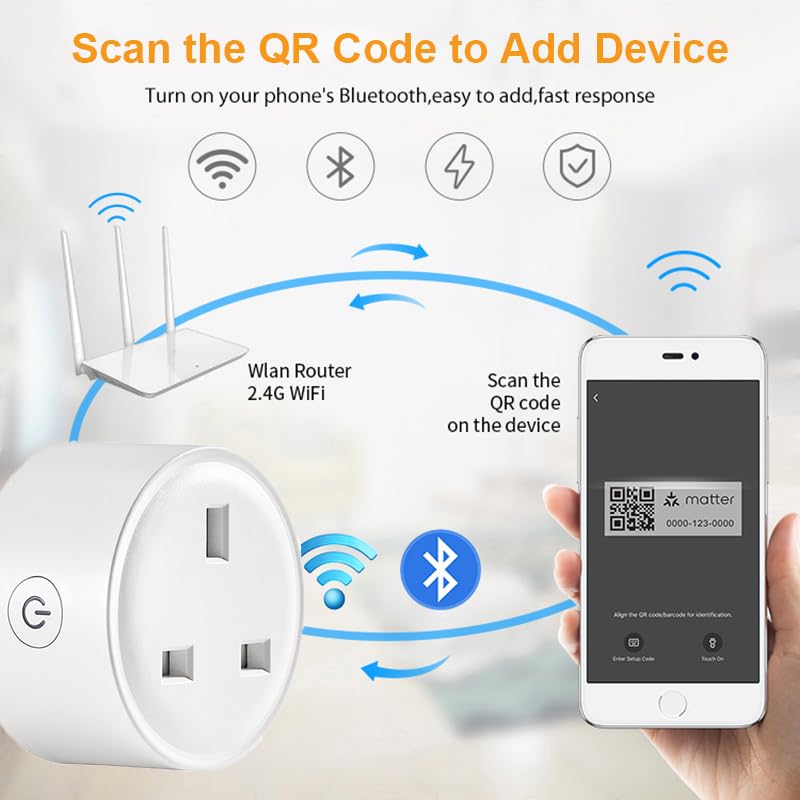
Figure 8: The 16A capacity allows connection to most electrical appliances.
6. การบำรุงรักษา
To ensure the longevity and proper functioning of your UanTii Smart Matter Plug, follow these simple maintenance guidelines:
- ทำความสะอาดอุปกรณ์ด้วยผ้าแห้งนุ่มๆ ห้ามใช้น้ำยาทำความสะอาดหรือสเปรย์กระป๋อง
- หลีกเลี่ยงการวางอุปกรณ์ในที่ที่โดนแสงแดดโดยตรงหรือใกล้แหล่งความร้อน
- อย่าให้อุปกรณ์สัมผัสกับอุณหภูมิหรือความชื้นสูง
- Ensure the plug pins are clean and free from debris before inserting into a socket.
7 การแก้ไขปัญหา
If you encounter issues with your UanTii Smart Matter Plug, refer to the following common solutions:
| ปัญหา | สาเหตุที่เป็นไปได้ / วิธีแก้ไข |
|---|---|
| อุปกรณ์ไม่สามารถเชื่อมต่อกับแอปได้ |
|
| การควบคุมด้วยเสียงไม่ทำงาน |
|
| Timer/Schedule not working. |
|
| ปลั๊กไม่ตอบสนอง |
|
8. ข้อมูลจำเพาะ
| คุณสมบัติ | ข้อมูลจำเพาะ |
|---|---|
| หมายเลขรุ่น | UTMAPS012 |
| กำลังไฟที่กำหนด | ไฟฟ้ากระแสสลับ 100~240V 50/60Hz |
| กระแสไฟฟ้าที่ได้รับการจัดอันดับ | 16เอ |
| ความจุในการรับน้ำหนักสูงสุด | 3680วัตต์ |
| การบริโภคสแตนด์บาย | 0.46วัตต์ |
| ประเภทไวไฟ | 2.4กิกะเฮิรตซ์ |
| บริการ Wi-Fi มาตรฐาน | IEEE802.11b/g/n ไร้สาย |
| ความชื้นในการทำงาน | 0% ~ 85%RH (Non-Condensing) |
| อุณหภูมิในการทำงาน | 0℃ ~ 50℃ (32°F ~ 122°F) |
| วัสดุ | ทองแดง (วัสดุสัมผัส) |
| ขนาด | 7 x 7 x 6 ซม. |
| น้ำหนัก | 80 กรัม |
| ประเทศต้นกำเนิด | จีน |
9. การรับประกันและการสนับสนุน
For warranty information and technical support, please refer to the contact details provided with your purchase or visit the official UanTii webไซต์ โปรดเก็บใบเสร็จรับเงินของคุณไว้เป็นหลักฐานการซื้อสำหรับการเรียกร้องการรับประกันใดๆ