
1. บทนำ
ขอบคุณสำหรับการซื้อasing the XO F41 Mirror Bluetooth Speaker. This device combines a digital clock display with a portable Bluetooth speaker, offering multiple playback options including Bluetooth, TF card, and FM radio. Please read this manual carefully before use to ensure proper operation and to maximize your experience with the product.

Image 1.1: The XO F41 Mirror Bluetooth Speaker in use, showing its digital clock display.
2. คุณสมบัติของผลิตภัณฑ์
- การเชื่อมต่อบลูทูธ 5.3: เพื่อการสตรีมเสียงไร้สายที่เสถียรและมีประสิทธิภาพ
- จอแสดงผลแบบกระจก: Clear digital time display with adjustable brightness.
- โหมดการเล่นหลายโหมด: Supports Bluetooth, TF card, and FM radio.
- ไมโครโฟนในตัว: สำหรับการโทรแบบแฮนด์ฟรี
- เวลาเล่นยาวนาน: Up to 8 hours at 50% volume, 5 hours at 100% volume.
- การออกแบบกะทัดรัดและพกพาสะดวก: Easy to carry and place anywhere.
- การชาร์จ USB-C: ช่องเสียบชาร์จที่ทันสมัยและสะดวกสบาย
3. เนื้อหาบรรจุภัณฑ์
กรุณาตรวจสอบแพ็คเกจสำหรับรายการต่อไปนี้:
- XO F41 Mirror Bluetooth Speaker
- สายชาร์จ USB-C
- คู่มือการใช้งาน

Image 3.1: The XO F41 Mirror Bluetooth Speaker packaging.
4. การจัดวางอุปกรณ์และการควบคุม
ทำความคุ้นเคยกับปุ่มและพอร์ตของลำโพง:
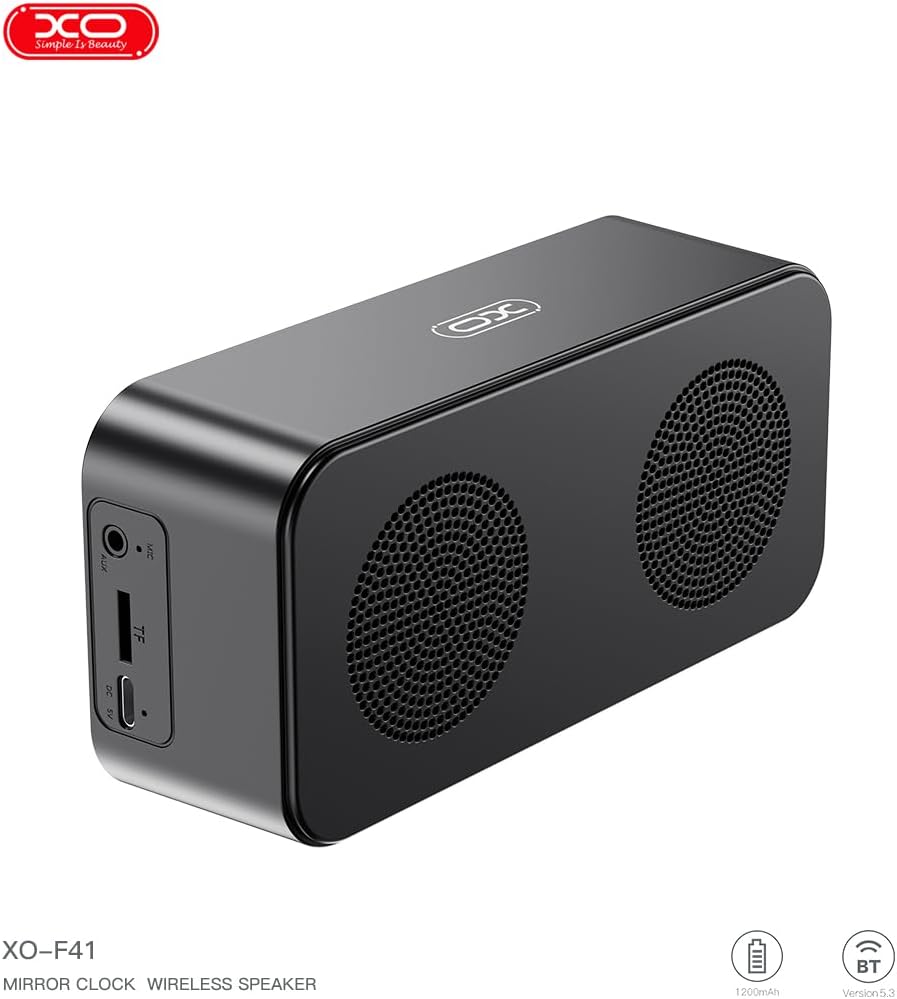
ภาพที่ 4.1: ด้านข้าง view of the XO F41 with ports labeled.
- ปุ่มเปิด/ปิด: กดค้างไว้เพื่อเปิด/ปิดเครื่อง กดสั้นๆ เพื่อเปลี่ยนโหมด
- ปุ่มเล่น/หยุดชั่วคราว: เล่นหรือหยุดเสียงชั่วคราว รับ/วางสาย
- เพิ่มระดับเสียง/เพลงถัดไป: กดสั้นเพื่อเพิ่มระดับเสียง กดยาวเพื่อเล่นเพลงถัดไป
- ลดระดับเสียง/เพลงก่อนหน้า: กดสั้นเพื่อลดระดับเสียง กดยาวเพื่อเล่นเพลงก่อนหน้า
- พอร์ต USB-C: สำหรับการชาร์จอุปกรณ์
- ช่องเสียบการ์ด TF: Insert a TF (MicroSD) card for local music playback.
- พอร์ต AUX: สำหรับอินพุตเสียงแบบใช้สาย
5. การตั้งค่า
5.1 การชาร์จลำโพง
- เชื่อมต่อสาย USB-C ที่ให้มาเข้ากับพอร์ตชาร์จบนลำโพง
- เชื่อมต่อปลายสายอีกด้านหนึ่งเข้ากับอะแดปเตอร์ไฟ USB (ไม่รวมอยู่ด้วย) หรือพอร์ต USB ของคอมพิวเตอร์
- The charging indicator will illuminate. It takes approximately 3 hours for a full charge.
- The indicator will turn off or change color once fully charged.
5.2 เปิด/ปิดเครื่อง
- การเปิดเครื่อง: Press and hold the Power button for approximately 3 seconds. You will hear an audible prompt.
- วิธีปิดเครื่อง: Press and hold the Power button for approximately 3 seconds. You will hear an audible prompt.
6. คู่มือการใช้งาน
6.1 การจับคู่บลูทูธ
- Ensure the speaker is powered on and in Bluetooth mode. If not, short press the Power button to cycle through modes until "BT" or a Bluetooth icon appears on the display.
- บนอุปกรณ์มือถือของคุณ เปิดใช้งาน Bluetooth และค้นหาอุปกรณ์ที่มีอยู่
- Select "XO-F41" from the list of devices.
- Once paired, the speaker will indicate a successful connection, and you can begin playing audio from your device.
6.2 โหมดการ์ด TF
- ใส่การ์ด TF (MicroSD) พร้อมเสียง MP3 fileเข้าไปในช่องเสียบการ์ด TF
- The speaker will automatically switch to TF card mode and begin playing music. If not, short press the Power button to cycle to TF card mode.
- Use the Volume Up/Down buttons for track navigation and the Play/Pause button for playback control.
โหมดวิทยุ FM 6.3
- Short press the Power button to switch to FM radio mode. The display will show the FM frequency.
- กดปุ่มเล่น/หยุดชั่วคราวค้างไว้เพื่อสแกนและบันทึกสถานีวิทยุ FM ที่ใช้งานได้โดยอัตโนมัติ
- กดปุ่มเพิ่ม/ลดเสียงสั้นๆ เพื่อสลับระหว่างสถานีที่บันทึกไว้
6.4 การตั้งค่านาฬิกาและนาฬิกาปลุก
The XO F41 features a digital clock display. Specific instructions for setting the time and alarm are typically found in the detailed manual included with the product. Generally, a dedicated 'M' (Mode) or 'Set' button is used to enter time/alarm setting mode, and volume buttons are used to adjust values.

Image 6.1: The XO F41 speaker functioning as a bedside clock.
6.5 การปรับความสว่างของจอแสดงผล
The display brightness is adjustable. Look for a dedicated button (often labeled with a sun icon or similar) or a combination of button presses (e.g., double-pressing the Power button) to cycle through brightness levels. Refer to the included quick start guide for exact steps.
7. การบำรุงรักษา
- การทำความสะอาด: ใช้ผ้านุ่มและแห้งเช็ดทำความสะอาดพื้นผิวของลำโพง ห้ามใช้น้ำยาทำความสะอาดหรือตัวทำละลายที่มีฤทธิ์กัดกร่อน
- พื้นที่จัดเก็บ: เก็บลำโพงไว้ในที่แห้งและเย็น หลีกเลี่ยงแสงแดดโดยตรงและอุณหภูมิที่สูงหรือต่ำเกินไปเมื่อไม่ได้ใช้งานเป็นเวลานาน
- ความต้านทานน้ำ: อุปกรณ์นี้ไม่กันน้ำ โปรดหลีกเลี่ยงการสัมผัสน้ำหรือความชื้นมากเกินไป
- การดูแลแบตเตอรี่ เพื่อยืดอายุการใช้งานแบตเตอรี่ ควรหลีกเลี่ยงการคายประจุแบตเตอรี่จนหมดบ่อยๆ ควรชาร์จอุปกรณ์เป็นประจำ แม้ว่าจะไม่ได้ใช้งานอย่างต่อเนื่องก็ตาม
8 การแก้ไขปัญหา
| ปัญหา | สาเหตุที่เป็นไปได้ | สารละลาย |
|---|---|---|
| ลำโพงไม่เปิดเครื่อง | แบตเตอรี่อ่อน | ชาร์จลำโพงอย่างน้อย 30 นาที |
| ไม่สามารถจับคู่ผ่านบลูทูธได้ | Speaker not in pairing mode; Bluetooth disabled on device; too far from device. | Ensure speaker is in Bluetooth mode. Enable Bluetooth on your device. Move speaker closer to your device (within 10 meters). |
| No sound from TF card. | ใส่การ์ด TF ไม่ถูกต้อง ไม่รองรับ file รูปแบบ; ไม่มีเสียง files on card. | ใส่การ์ด TF กลับเข้าไปใหม่ ตรวจสอบให้แน่ใจ files are in MP3 format. Verify audio files are present on the card. |
| การรับสัญญาณวิทยุ FM ไม่ดี | สัญญาณอ่อน; มีสัญญาณรบกวนจากสภาพแวดล้อม | ย้ายลำโพงไปยังตำแหน่งอื่น แล้วทำการค้นหาสถานีวิทยุอีกครั้ง |
9. ข้อมูลจำเพาะ
| คุณสมบัติ | รายละเอียด |
|---|---|
| หมายเลขรุ่น | XO-F41 |
| เวอร์ชันบลูทูธ | บลูทูธ V5.3 |
| ความถี่บลูทูธ | 2.402กิกะเฮิร์ตซ์-2.480กิกะเฮิร์ตซ์ |
| ความจุของแบตเตอรี่ | 1200mAh |
| อินพุตการชาร์จ | USB-C, DC5V/0.5A |
| เวลาในการชาร์จ | ประมาณ 3 ชั่วโมง |
| เวลาเล่น | 8H (50% volume); 5H (100% volume) |
| ระยะทางที่มีประสิทธิภาพ | น้อยกว่า 10 เมตร |
| พลังสูงสุด | 5W |
| ชุดลำโพง | 52มม. |
| อัตราส่วนสัญญาณต่อเสียงรบกวน | มากกว่า 80 เดซิเบล |
| ขนาดสินค้า | 15 x 3.81 x 11 ซม. (ประมาณ 150 x 45 x 72 มม.) |
| น้ำหนักผลิตภัณฑ์ | 320 g (approx. 0.28 kg) |
| วัสดุ | พลาสติก |
| คุณสมบัติพิเศษ | ปรับความสว่างได้ |

ภาพที่ 9.1: รายละเอียดพารามิเตอร์ของผลิตภัณฑ์
10. ข้อมูลการรับประกัน
The XO F41 Mirror Bluetooth Speaker comes with a standard manufacturer's warranty. Please refer to the warranty card included in your package for specific terms, conditions, and duration. Keep your purchase receipt as proof of purchase for any warranty claims.
11. การสนับสนุนลูกค้า
For further assistance, technical support, or inquiries regarding your XO F41 Mirror Bluetooth Speaker, please contact the retailer or manufacturer's customer service department. Contact details are typically provided on the product packaging or the official brand webเว็บไซต์.