
TOMLOV DM9B
TOMLOV DM9B 7" Digital Microscope User Manual
Model: DM9B | Brand: TOMLOV
การแนะนำ
The TOMLOV DM9B Digital Microscope is a versatile and powerful tool designed for detailed observation and analysis. Featuring a 7-inch rotatable FHD screen, 12MP ultra-precise focusing camera, and up to 1200X magnification, it is ideal for a wide range of applications including coin collecting, soldering, PCB repair, and general scientific observation. This manual provides comprehensive instructions for setting up, operating, and maintaining your DM9B Digital Microscope.
ข้อมูลด้านความปลอดภัย
- Keep the device away from water and high humidity to prevent electric shock.
- ห้ามถอดประกอบหรือดัดแปลงกล้องจุลทรรศน์ด้วยตนเอง โปรดส่งมอบการซ่อมบำรุงทั้งหมดให้แก่บุคลากรที่มีคุณสมบัติเหมาะสม
- Use only the specified power adapter (5V) to avoid damage.
- Avoid direct exposure of the lens to strong light sources, which may damage the sensor.
- ตรวจสอบให้แน่ใจว่าได้วางกล้องจุลทรรศน์บนพื้นผิวที่มั่นคงและเรียบเสมอกัน เพื่อป้องกันการพลิคว่ำ
- เก็บให้พ้นมือเด็กเล็ก เพื่อป้องกันการกลืนชิ้นส่วนเล็กๆ โดยไม่ตั้งใจ
เนื้อหาแพ็คเกจ
โปรดตรวจสอบว่ารายการทั้งหมดที่ระบุไว้ด้านล่างมีอยู่ในแพ็คเกจของคุณหรือไม่:
- 7-Inch Digital Microscope x1
- ไมโคร SD การ์ด 32GB x1
- Adjustable Aluminum Alloy Stand x1
- สาย USB x1
- Detailed English User Manual x1

Image: All components included in the TOMLOV DM9B Digital Microscope package, including the microscope monitor, base, bracket, remote control, USB cable, 32GB SD card, light barrier, and user manual.
สินค้าเกินview
The TOMLOV DM9B Digital Microscope features a robust design with key components for optimal performance.

Image: The TOMLOV DM9B Digital Microscope fully assembled, showing the 7-inch LCD screen, microscope lens, adjustable stand, base, two gooseneck LED lights, and the wired remote control.
คุณสมบัติหลัก:
- หน้าจอ FHD หมุนได้ขนาด 7 นิ้ว: Provides a clear, high-definition view of magnified objects. The screen can be rotated up to 90 degrees for ergonomic viewการไอเอ็นจี
- 12MP Ultra-Precise Focusing Camera: Captures high-quality images and videos.
- กำลังขยาย 5-1200 เท่า: Allows for detailed observation of microscopic details. Actual magnification varies based on screen size and object distance.
- 8 LED Fill Lights + 2 Gooseneck Lights: Ensures optimal illumination of the specimen.
- โครงสร้างโลหะผสมอลูมิเนียม: Provides durability and stability for various applications.
- PC View ความเข้ากันได้: Connects to Windows and macOS for larger screen viewการรวบรวมและวิเคราะห์ข้อมูล
- การ์ดไมโคร SD ขนาด 32GB: Included for convenient storage of photos and videos.
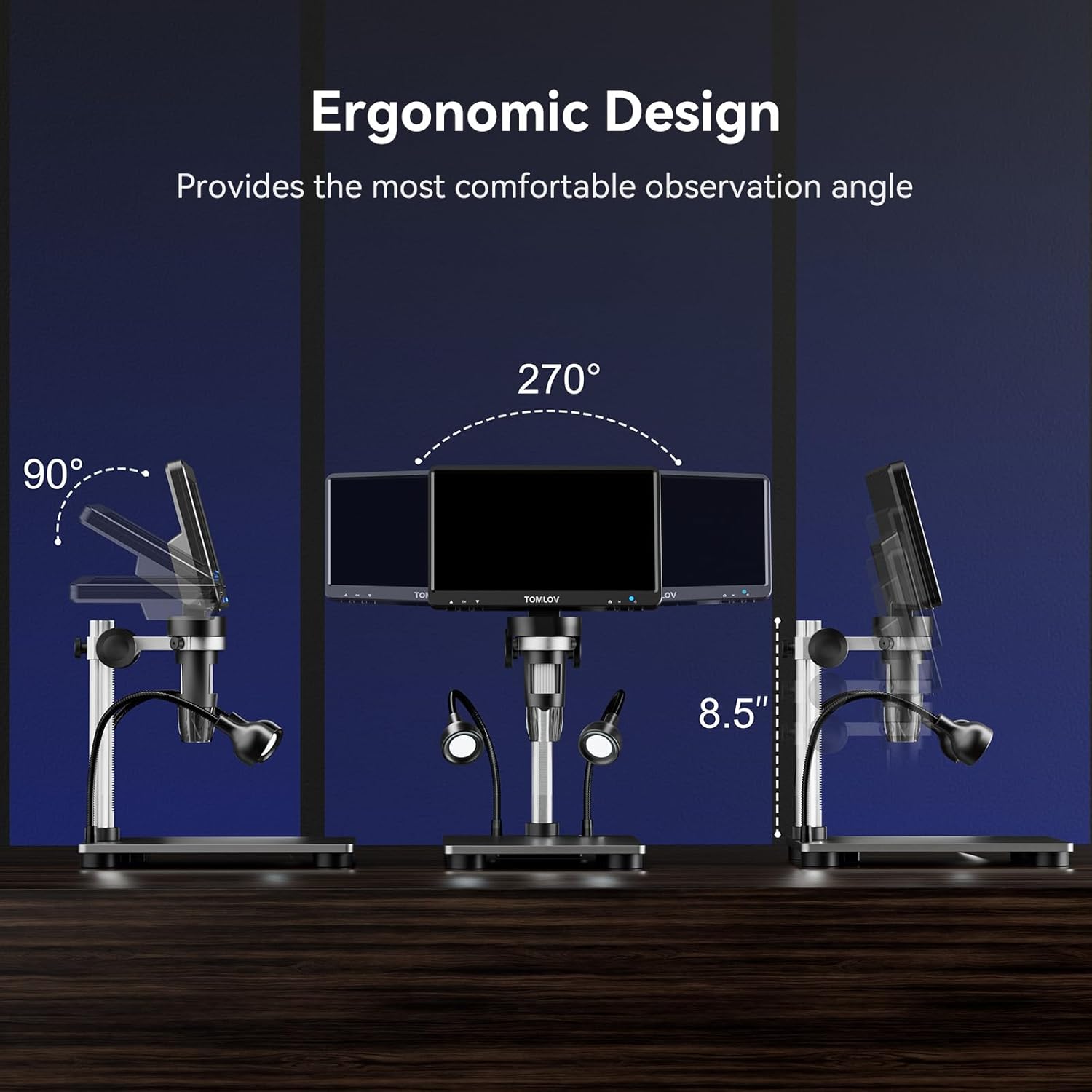
Image: Illustration of the ergonomic design, demonstrating the 90-degree tilt and 270-degree swivel capabilities of the 7-inch LCD screen for comfortable observation angles.
การตั้งค่า
Follow these steps to assemble and prepare your TOMLOV DM9B Digital Microscope for use:
- ประกอบขาตั้ง: Attach the adjustable aluminum alloy stand to the base. Ensure all screws are tightened securely.
- Mount the Microscope Monitor: Slide the microscope monitor unit onto the bracket on the stand. Secure it in place using the locking knob.
- Connect Gooseneck Lights: Insert the two gooseneck LED lights into the designated ports on the base. Adjust their position as needed.
- ใส่การ์ด SD: Locate the TF (Micro SD) card slot on the side of the monitor. Insert the included 32GB Micro SD card until it clicks into place.
- การเชื่อมต่อไฟฟ้า: Connect the USB cable to the DC5V port on the microscope monitor and plug the other end into a suitable 5V USB power adapter (not included) or a computer USB port.
- เปิดเครื่องครั้งแรก: Press and hold the power button on the microscope monitor to turn on the device.

Image: Visual guide showing the four basic steps to operate the microscope: 1. Turn on the microscope, 2. Adjust the distance between the object and the microscope lens, 3. Rotate the focus wheel to focus, 4. Observe object details on the HD screen.
คำแนะนำการใช้งาน
การทำงานพื้นฐาน
- เปิด/ปิดเครื่อง: Press and hold the power button on the monitor for 3 seconds to turn the device on or off.
- การหมุนหน้าจอ: The 7-inch LCD screen can be tilted up to 90 degrees and swiveled for optimal viewความสะดวกสบาย
Magnification and Focusing
To achieve clear images:
- Place the object you wish to observe on the base plate directly under the microscope lens.
- Adjust the height of the microscope unit on the stand to change the initial magnification and bring the object roughly into view.
- Rotate the focusing wheel on the microscope lens until the image on the screen is sharp and clear.

Image: A visual representation demonstrating the varying magnification levels (5X, 500X, 1200X) achievable with the TOMLOV DM9B Digital Microscope, showing increasing detail of a circuit board.
การปรับแสง
The microscope is equipped with 8 adjustable LED fill lights around the lens and 2 flexible gooseneck lights for optimal illumination.
- Use the light adjustment buttons on the monitor or remote control to increase or decrease the brightness of the main LED lights.
- Manually adjust the position of the gooseneck lights to eliminate shadows and provide targeted illumination.
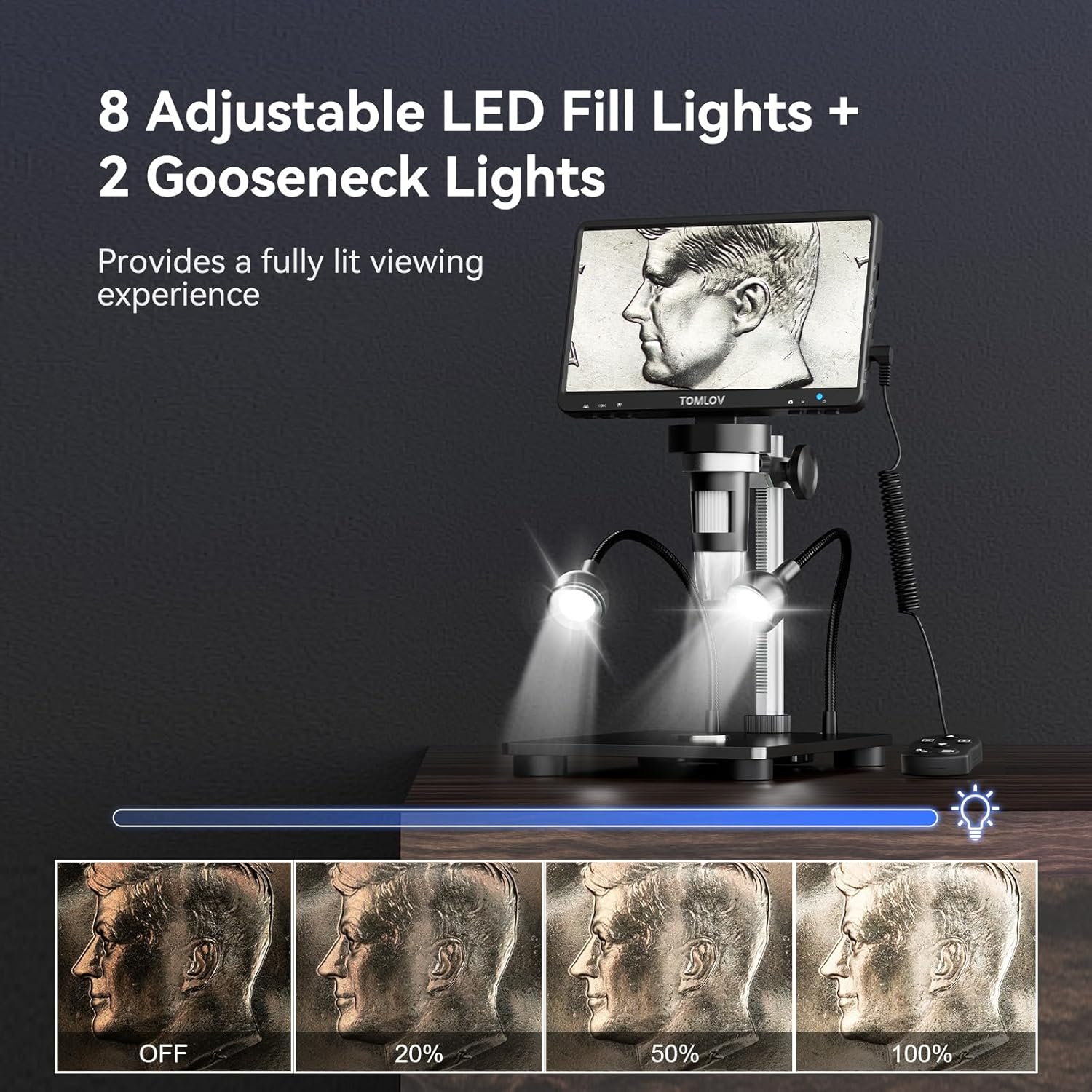
Image: A demonstration of the 8 adjustable LED fill lights and 2 gooseneck lights, showing different brightness levels from off to 100% illumination on a coin.
การถ่ายภาพและวิดีโอ
The DM9B allows you to capture high-resolution photos and videos directly to the included 32GB Micro SD card.
- Press and hold the Menu button for 3 seconds to switch between "Photographing," "Video Recording," and "Playback" modes.
- In Photographing mode, press the OK button to take a photo.
- In Video Recording mode, press the OK button to start/stop recording.
- Use the remote control for convenient capture without disturbing the microscope.

Image: Display illustrating the video recording mode and photo capture mode on the microscope screen, highlighting the inclusion of a 32GB SD card for storage.
Video: An instructional video demonstrating how to use the TOMLOV DM9 Digital Microscope, covering assembly, basic operation, and various applications.
PC Connection (PC View)
สำหรับขนาดที่ใหญ่กว่า viewing experience and easier data sharing, connect your microscope to a PC or laptop.
- เชื่อมต่อกล้องจุลทรรศน์กับคอมพิวเตอร์ของคุณโดยใช้สาย USB ที่ให้มา
- No additional software is required. For Windows, use the default "Windows Camera" app. For macOS, use "Photo Booth."
- The microscope will function as a webกล้อง ช่วยให้คุณสามารถ view the live feed on your computer screen.

Image: The TOMLOV DM9B Digital Microscope connected via USB to a laptop, demonstrating the PC view feature for real-time observation on a larger screen.
การซ่อมบำรุง
- การทำความสะอาดเลนส์และหน้าจอ: Use a soft, lint-free cloth specifically designed for optical surfaces. For stubborn smudges, a small amount of lens cleaning solution can be applied to the cloth (not directly to the lens/screen).
- ทำความสะอาดร่างกาย: Wipe the microscope body with a dry, soft cloth. Avoid using abrasive cleaners or solvents.
- พื้นที่จัดเก็บ: Store the microscope in a cool, dry place, away from direct sunlight and extreme temperatures. If not in use for extended periods, remove the Micro SD card and ensure the device is powered off.
- การดูแลแบตเตอรี่ The microscope contains a rechargeable Lithium Ion battery. For optimal battery life, avoid fully discharging the battery frequently and store the device with a partial charge if not used for a long time.
การแก้ไขปัญหา
| ปัญหา | สาเหตุที่เป็นไปได้ | สารละลาย |
|---|---|---|
| ไม่มีภาพปรากฏบนหน้าจอ | Device not powered on; loose cable connection; screen brightness too low. | Ensure power button is pressed; check USB cable connection; adjust screen brightness. |
| ภาพเบลอ | การโฟกัสไม่ถูกต้อง; วัตถุอยู่ไกล/ใกล้เกินไป; เลนส์สกปรก. | Adjust focusing wheel; adjust microscope height; clean the lens. |
| ไม่สามารถถ่ายภาพ/วิดีโอได้ | SD card not inserted or full; incorrect mode selected. | Ensure SD card is inserted correctly and has free space; switch to Photographing or Video Recording mode. |
| PC view ไม่ทำงาน. | USB cable issue; incorrect software/app used. | Try a different USB port/cable; ensure you are using "Windows Camera" (Windows) or "Photo Booth" (macOS). |
| ไฟไม่ทำงาน | Lights turned off or brightness set to minimum; loose connection. | Adjust light brightness; check gooseneck light connections. |
ข้อมูลจำเพาะ
| คุณสมบัติ | รายละเอียด |
|---|---|
| ชื่อรุ่น | DM9B |
| ขนาดหน้าจอ | จอแอลซีดี FHD ขนาด 7 นิ้ว |
| ความละเอียดของกล้อง | 12MP |
| ช่วงการขยาย | 5X ถึง 1200X |
| แหล่งกำเนิดแสง | 8 Adjustable LED Fill Lights + 2 Gooseneck Lights |
| วัสดุ | Aluminum Alloy (Base, Stand, Holder) |
| พื้นที่จัดเก็บ | การ์ด Micro SD ขนาด 32GB (รวมอยู่ด้วย) |
| ความเข้ากันได้ของพีซี | Windows, macOS (via USB) |
| กำลังไฟเข้า | 5 โวลต์ |
| แบตเตอรี่ | แบตเตอรี่ลิเธียมไอออน 1 ก้อน (รวมอยู่ด้วย) |
| น้ำหนักสินค้า | 2.12 ปอนด์ |
| ขนาดแพ็คเกจ | 9.69 x 8.31 x 3.5 นิ้ว |
การรับประกันและการสนับสนุน
TOMLOV products are designed and manufactured to the highest quality standards. For information regarding warranty coverage, technical support, or service inquiries, please refer to the contact information provided on the official TOMLOV website or the product packaging. Keep your purchase receipt as proof of purchase for warranty claims.
Ask a question about this manual
Ask about setup, troubleshooting, compatibility, parts, safety, or missing instructions. Manuals+ will review the question and use this page’s manual context to help answer it.