
1. บทนำ
The GMKtec EVO-X1 Mini PC is a high-performance, compact computing solution designed for a wide range of applications, from professional tasks to gaming and creative work. It features the next-generation AMD Ryzen AI 9 HX-370 processor, advanced AI NPU capabilities, and robust connectivity options, all within an ultra-small form factor.

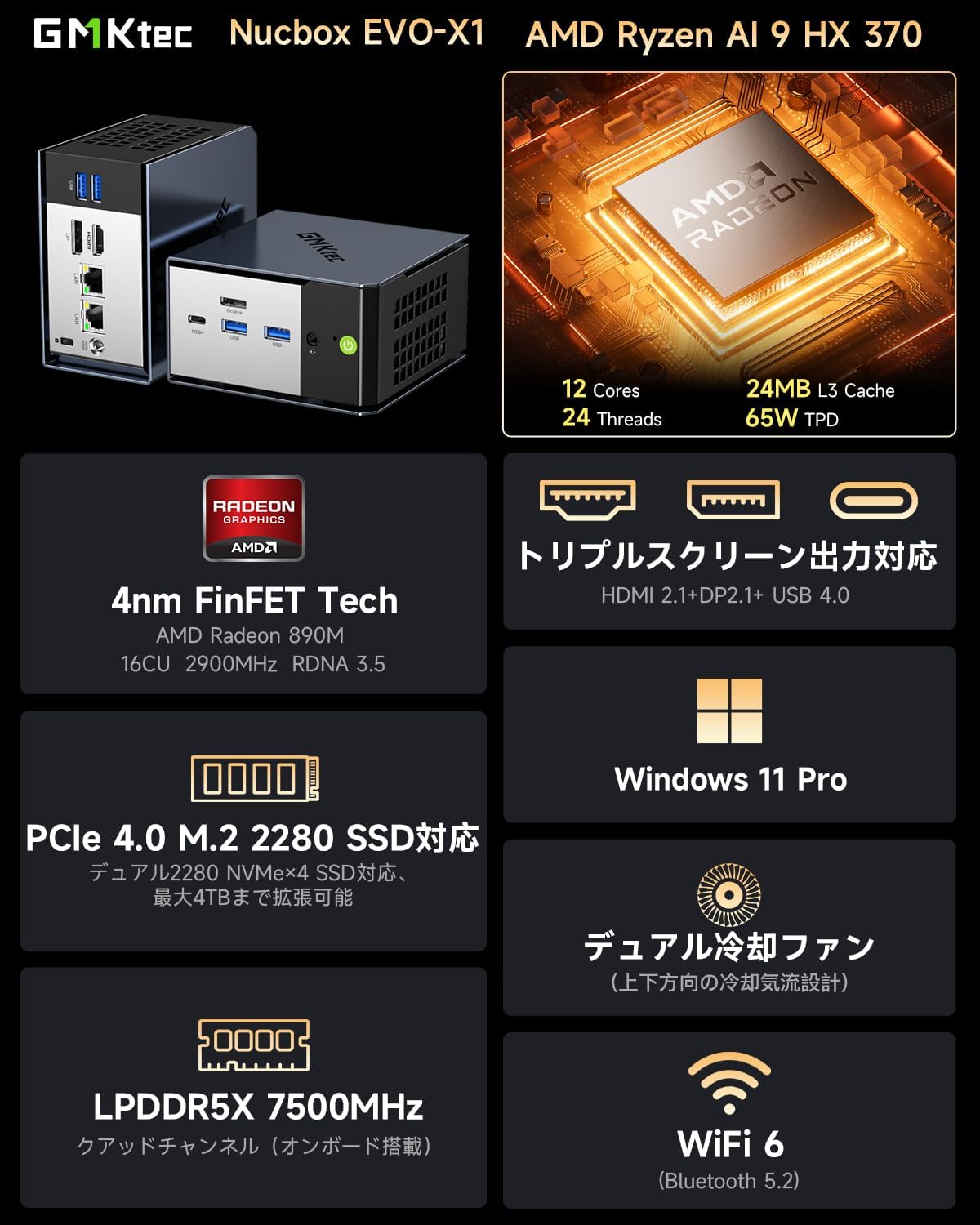
Image: GMKtec EVO-X1 Mini PC highlighting its AMD Ryzen AI 9 HX-370 processor, 12 cores, 24 threads, 24MB L3 cache, and 65W TPD.
2. สินค้าหมดview
The EVO-X1 Mini PC integrates cutting-edge technology to deliver exceptional performance and versatility. Key features include:
- โปรเซสเซอร์: AMD Ryzen AI 9 HX-370 (Zen 5 architecture, up to 5.1GHz, 12 Cores/24 Threads)
- AI NPU: XDNA 2 architecture with up to 50 TOPS AI processing capability
- กราฟิก: Integrated AMD Radeon 890M iGPU (RDNA 3.5)
- หน่วยความจำ: 32GB LPDDR5X 7500MHz (onboard)
- พื้นที่จัดเก็บ: 1TB PCIe 4.0 M.2 2280 SSD, expandable up to 8TB (2x M.2 2280 NVMe SSD slots)
- ระบบปฏิบัติการ: วินโดวส์ 11 โปร
- การแสดงผลเอาท์พุต: Supports up to three 8K displays simultaneously (HDMI 2.1, DisplayPort 2.1, USB4)
- เครือข่าย: Dual Intel NIC 2.5Gbps LAN, WiFi 6, Bluetooth 5.2
- การเชื่อมต่อ: USB4 (40Gbps, PD3.0/DP1.4/Data), Oculink port (PCIe x4, up to 64Gbps for eGPU), multiple USB 3.2 (Gen2) ports
- การระบายความร้อน: Dual cooling fans with optimized airflow design
- ขนาด : Ultra-compact 110 x 107 x 68mm, weighing 591g
พอร์ตและอินเทอร์เฟซ
The EVO-X1 offers a comprehensive set of ports for various connectivity needs:
ภาพ: ด้านหน้าและด้านหลัง views of the EVO-X1 Mini PC, detailing the location of all ports.
- พอร์ตด้านหน้า: Power button, USB 3.2 (Gen2) x2, USB4 Type-C (PD/DP/Data), 3.5mm CTIA audio jack
- พอร์ตด้านหลัง: DC IN (19V 6.32A), Oculink (PCIe Gen4 x4), HDMI 2.1 (8K@60Hz), DisplayPort 2.1 (8K@60Hz), 2.5G LAN (RJ45) x2, USB 3.2 (Gen2) x2, Kensington Lock

รูปภาพ: แผนภาพรายละเอียดแสดงasing the rich interfaces of the EVO-X1, including USB 4, 2.5G LAN, HDMI 2.1, DP 2.1, USB 3.2, CTIA, and Oculink.
3. การตั้งค่า
ทำตามขั้นตอนต่อไปนี้เพื่อตั้งค่า GMKtec EVO-X1 Mini PC ของคุณ:
- แกะเนื้อหาออก: Carefully remove all items from the packaging. Verify that you have the EVO-X1 Mini PC, power adapter and cable, HDMI cable, vertical stand, and user manual.
- เชื่อมต่ออุปกรณ์ต่อพ่วง: Connect your monitor(s) to the HDMI 2.1, DisplayPort 2.1, or USB4 Type-C ports. Connect your keyboard and mouse to the available USB ports.
- การเชื่อมต่อเครือข่าย: For a wired connection, connect an Ethernet cable to one of the 2.5G LAN ports. For wireless, ensure your WiFi network is available during initial setup.
- การเชื่อมต่อไฟฟ้า: Connect the power adapter to the DC IN port on the Mini PC, then plug the power cable into an electrical outlet.
- เปิดเครื่อง: กดปุ่มเปิด/ปิดที่ด้านหน้าของมินิพีซี ระบบจะเริ่มทำงาน
- การตั้งค่า Windows เริ่มต้น: Follow the on-screen instructions to complete the Windows 11 Pro setup, including language, region, network, and user account creation.

Image: The package contents laid out, including the EVO-X1 Mini PC, power adapter, HDMI cable, vertical stand, and user manual.
4. คู่มือการใช้งาน
Multi-Display Setup
The EVO-X1 supports up to three independent displays with 8K resolution. Connect your monitors to the HDMI 2.1, DisplayPort 2.1, and USB4 Type-C ports. Windows will automatically detect the displays. You can configure display settings (e.g., extend, duplicate) via the Display Settings in Windows.

Image: The EVO-X1 Mini PC demonstrating its capability for triple screen output, supporting up to 8K resolution.
การเชื่อมต่อเครือข่าย
Utilize the dual 2.5Gbps LAN ports for high-speed wired network connections, ideal for demanding applications like file servers or routing. For wireless connectivity, the integrated WiFi 6 module provides fast and stable internet access.

Image: The EVO-X1 Mini PC showcasing its dual 2.5G high-speed Ethernet ports, illustrating fast data transfer rates.
External GPU (eGPU) via Oculink
The Oculink port provides a high-speed PCIe x4 interface, allowing you to connect an external graphics card (eGPU) for enhanced gaming or professional graphics workloads. This significantly boosts graphical performance beyond the integrated GPU.

Image: The EVO-X1 Mini PC connected to an external GPU via its high-speed Oculink port, demonstrating external GPU support.
การขยายพื้นที่เก็บข้อมูล
The EVO-X1 supports up to two M.2 2280 NVMe SSDs (PCIe Gen4 x4), allowing for a total storage capacity of up to 8TB. To expand storage, open the chassis, locate the M.2 slots, and install compatible SSDs. Refer to the internal structure diagram for guidance.

Image: An illustration of the high-speed memory and large capacity SSD slots within the Mini PC, indicating support for PCIe 4.0 M.2 2280 NVMe SSDs up to 8TB.
5. การบำรุงรักษา
การบำรุงรักษาอย่างถูกวิธีจะช่วยให้มินิพีซีของคุณมีอายุการใช้งานยาวนานและทำงานได้อย่างมีประสิทธิภาพสูงสุด
- การทำความสะอาด: ทำความสะอาดภายนอกของมินิพีซีเป็นประจำด้วยผ้านุ่มและแห้ง ใช้ลมอัดเป่าฝุ่นออกจากช่องระบายอากาศอย่างเบามือเพื่อรักษาการไหลเวียนของอากาศที่เหมาะสม อย่าใช้น้ำยาทำความสะอาดโดยตรงกับอุปกรณ์
- การอัปเดตซอฟต์แวร์: Keep your Windows operating system and drivers updated to ensure system stability, security, and performance. Check for updates regularly through Windows Update and the GMKtec support webเว็บไซต์.
- ระบบระบายความร้อน : The EVO-X1 features dual cooling fans. Ensure that the air vents are not obstructed to allow for efficient heat dissipation. If you notice increased fan noise or overheating, ensure the vents are clear.

ภาพ: ระเบิด view highlighting the upgraded twin cooling fans and their intelligent system design for efficient heat management of SSD/DDR.

Image: Internal structure display of the EVO-X1, showing components like the removable cover, top cooling fan, M.2 2280 PCIe 4.0 slots, and air cooling vents.
6 การแก้ไขปัญหา
If you encounter issues with your EVO-X1 Mini PC, refer to the following common problems and solutions:
| ปัญหา | สาเหตุที่เป็นไปได้ | สารละลาย |
|---|---|---|
| ไม่มีการแสดงผลบนจอภาพ | สายเคเบิลเชื่อมต่อหลวม แหล่งจ่ายไฟไม่ถูกต้อง ปัญหาเกี่ยวกับไฟเลี้ยง | Ensure monitor cables (HDMI/DP/USB4) are securely connected. Check monitor's input source. Verify power adapter is connected and the PC is powered on. Try a different monitor or cable. |
| PC does not power on or boots to a black screen | Power supply issue, hardware malfunction, corrupted boot. | Ensure power adapter is working. Disconnect all peripherals and try booting. If the issue persists, contact customer support. (Note: Some users have reported intermittent boot issues where the screen remains black; a forced shutdown and restart may resolve this temporarily, but persistent issues require support.) |
| ไม่มีการเชื่อมต่อเครือข่าย | Loose Ethernet cable, incorrect WiFi password, driver issue. | Check Ethernet cable connection. Re-enter WiFi password. Ensure network drivers are installed and updated. Restart router/modem. |
| ประสิทธิภาพการทำงานช้า | Too many background applications, insufficient storage, overheating. | Close unnecessary applications. Check available storage space. Ensure proper ventilation and clean dust from vents. Update drivers. |
| Oculink eGPU not detected | Incorrect connection, driver issue, eGPU enclosure power. | Ensure Oculink cable is securely connected. Verify eGPU enclosure is powered on. Install the latest graphics drivers for the external GPU. |
If the problem persists after attempting these solutions, please contact GMKtec customer support for further assistance.
7. ข้อมูลจำเพาะ
| คุณสมบัติ | รายละเอียด |
|---|---|
| ยี่ห้อ | จีเอ็มเคเทค |
| แบบอย่าง | อีโว-เอ็กซ์1 |
| ระบบปฏิบัติการ | วินโดวส์ 11 โปร |
| รุ่นซีพียู | AMD Ryzen AI 9 HX-370 |
| ความเร็วซีพียู | สูงสุด 5.1 GHz |
| คอร์โปรเซสเซอร์ | 12 คอร์ |
| ซ็อกเก็ตโปรเซสเซอร์ | ชิป TSMC 4nm FinFET |
| หน่วยประมวลผลกราฟิก | การ์ดจอ AMD Radeon 890M (แบบรวมในตัว) |
| หน่วยความจำ (RAM) | 32 GB LPDDR5X 7500 MHz |
| ที่เก็บข้อมูล (SSD) | 1 TB PCIe 4.0 M.2 2280 SSD |
| การขยายพื้นที่เก็บข้อมูล | 2x M.2 2280 NVMe SSD slots (PCIe Gen4 x4), up to 8TB total |
| อินเทอร์เฟซเอาต์พุตวิดีโอ | HDMI 2.1, DisplayPort 2.1, USB4 Type-C |
| ความละเอียดการแสดงผลสูงสุด | 7680x4320 pixels (8K) |
| พอร์ต USB | 1x USB4 Type-C, 4x USB 3.2 (Gen2) |
| Oculink Port | 1x Oculink (PCIe Gen4 x4) |
| พอร์ตแลน | 2x 2.5Gbps Intel NIC RJ45 |
| การเชื่อมต่อแบบไร้สาย | ไวไฟ 6, บลูทูธ 5.2 |
| เอาท์พุตเสียง | แจ็คเสียง CTIA 3.5 มม. |
| ขนาด | 110 x 107 x 68 มม. |
| น้ำหนัก | 591กรัม |
| อุปกรณ์เสริมที่รวมอยู่ด้วย | Mini PC unit, Power Adapter, HDMI Cable, Vertical Stand, User Manual |
8. การรับประกันและการสนับสนุน
The GMKtec EVO-X1 Mini PC comes with a การรับประกันจากผู้ผลิต 1 ปี. For any technical issues, questions, or support needs, please contact GMKtec customer service. Our support team is available to assist you within 24 hours.
For the latest drivers, FAQs, and support resources, please visit the official GMKtec webไซต์หรือดูข้อมูลการติดต่อที่ระบุไว้ในบรรจุภัณฑ์ผลิตภัณฑ์ของคุณ