
1. บทนำ
This manual provides comprehensive instructions for the installation, operation, and maintenance of the DS-K1T342DWX Value Series MinMoe Facial Recognition Terminal. This device utilizes advanced deep learning algorithms to ensure high-speed and accurate facial recognition. It supports multiple authentication methods, including face and card recognition, making it suitable for various access control and time attendance applications in diverse environments such as offices, financial institutions, and other secure areas.
2. ข้อมูลด้านความปลอดภัย
Please read these safety instructions carefully before operating the device to prevent injury to yourself or others and to avoid damage to the device. Keep this manual for future reference.
- Ensure the device is installed by qualified personnel in accordance with all local electrical codes and regulations.
- Use only the power adapter specified for this device. Incorrect voltagอาจทำให้เกิดความเสียหายหรือเกิดไฟไหม้ได้
- อย่าให้เครื่องสัมผัสกับน้ำ ความชื้น หรืออุณหภูมิที่สูงหรือต่ำเกินไป
- หลีกเลี่ยงการวางอุปกรณ์ในที่ที่โดนแสงแดดโดยตรงหรือใกล้แหล่งความร้อน
- อย่าพยายามถอดประกอบหรือซ่อมแซมอุปกรณ์ด้วยตนเอง ส่งต่อบริการทั้งหมดไปยังช่างบริการที่มีคุณสมบัติเหมาะสม
- Clean the screen and lens with a soft, dry cloth. Avoid using abrasive cleaners or solvents.
3. เนื้อหาบรรจุภัณฑ์
Verify that all items are present and in good condition upon unpacking. If any items are missing or damaged, contact your supplier immediately.
- DS-K1T342DWX Facial Recognition Terminal with LCD Touch Screen
- อุปกรณ์ติดตั้ง (สกรู, ปลั๊กผนัง)
- Power Adapter (specific to region)
- คู่มือเริ่มต้นอย่างรวดเร็ว
4. สินค้าหมดview
The DS-K1T342DWX terminal features a compact design with a high-resolution display and advanced recognition capabilities.
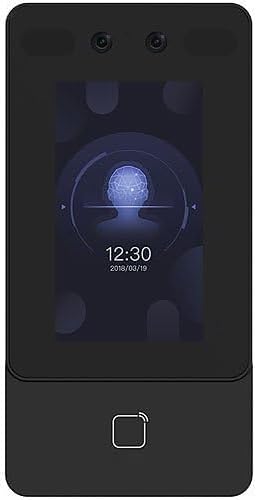
รูปที่ 4.1 : ด้านหน้า view of the DS-K1T342DWX terminal, showing the LCD touch screen, 2MP wide-angle lens, and fingerprint sensor area.

รูปที่ 4.2: มุม view of the DS-K1T342DWX terminal, highlighting its slim profile and side ports.
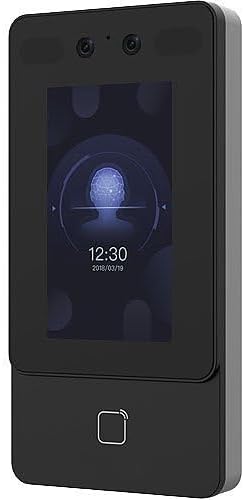
รูปที่ 4.3: ด้านหน้าทางเลือก view of the DS-K1T342DWX terminal, providing a clear look at the display interface.
ส่วนประกอบหลัก:
- หน้าจอสัมผัส LCD ขนาด 4.3 นิ้ว: For user interaction, displaying recognition status, time, and configuration menus.
- 2-Megapixel Wide-Angle Lens: Captures facial images for recognition.
- Built-in Card Reading Module: Supports various card types for authentication.
- ไมโครโฟนและลำโพง: สำหรับการสื่อสารด้วยเสียงสองทาง
- พอร์ตการเชื่อมต่อ: For power, network (TCP/IP, Wi-Fi), and external device connections.
5. การตั้งค่าและการติดตั้ง
Proper installation is crucial for optimal performance and security. It is recommended that installation be performed by a professional.
5.1 การติดตั้งอุปกรณ์
- Choose a suitable mounting location, typically at eye level for facial recognition, ensuring the face recognition distance of 0.3 m to 1.5 m is achievable.
- ใช้เทมเพลตการติดตั้งที่ให้มา (ถ้ามี) เพื่อทำเครื่องหมายจุดเจาะบนผนัง
- เจาะรูและใส่ปลั๊กผนัง
- ยึดขายึด (หากแยกชิ้น) เข้ากับผนังโดยใช้สกรู
- Attach the terminal to the mounting bracket or directly to the wall, ensuring it is firmly secured.
5.2 การเดินสายและการเชื่อมต่อ
- การเชื่อมต่อไฟฟ้า: Connect the power adapter to the device and a suitable power outlet.
- การเชื่อมต่อเครือข่าย:
- Wired (TCP/IP): Connect an Ethernet cable from the device's LAN port to your network switch or router.
- ไร้สาย (Wi-Fi): Configure Wi-Fi settings via the device's touch screen or web client after initial power-up.
- อุปกรณ์ภายนอก: Connect any required external devices such as door locks, exit buttons, or alarm systems according to the wiring diagram in the detailed installation guide (not provided in this summary).
6. คู่มือการใช้งาน
This section outlines the basic operation of the facial recognition terminal.
6.1 การลงทะเบียนผู้ใช้
Before users can be authenticated, their facial data and/or card information must be enrolled into the system. The device has a capacity for up to 1500 faces and 3000 cards.
- Access the device's menu (requires administrator credentials).
- Navigate to "User Management" or "Enrollment".
- Select "Add User" and input required user details.
- For facial enrollment, instruct the user to stand within the recognition distance (0.3 m to 1.5 m) and face the camera. The device will capture the facial image.
- For card enrollment, present the card to the built-in card reader.
- บันทึกข้อมูลของผู้ใช้
6.2 วิธีการรับรองความถูกต้อง
- การจดจำใบหน้า:
Stand directly in front of the terminal within the specified recognition distance. The device will automatically detect and recognize your face. Recognition duration is less than 0.2 seconds per user, with an accuracy rate of 99% or higher. The device also supports mask recognition for enhanced security.
- Card Authentication:
Present your registered card to the card reading area on the terminal. The device will verify the card and grant access if authorized.
- Combined Authentication:
The terminal can be configured to require both facial recognition and card authentication for increased security.
6.3 เสียงสองทาง
The device supports two-way audio functionality, allowing communication with client software, indoor stations, and main stations. This feature enhances communication capabilities for access control scenarios.
7. การกำหนดค่า
The terminal's settings and advanced features can be configured via a web client or compatible software.
- Web ลูกค้า: Access the device's IP address through a web browser to manage users, configure network settings, set up access rules, and view บันทึก
- ความเข้ากันได้ของโปรโตคอล: The device is compatible with ISAPI and ISUP 5.0 protocols, allowing integration with various security and management platforms.
8. การบำรุงรักษา
Regular maintenance ensures the longevity and optimal performance of your facial recognition terminal.
- การทำความสะอาด: Gently wipe the LCD touch screen and camera lens with a soft, lint-free cloth. Do not use liquid cleaners or aerosols directly on the device.
- การอัปเดตซอฟต์แวร์: Periodically check for firmware updates from the manufacturer to ensure the device has the latest features and security enhancements.
- การสำรองข้อมูล: Regularly back up user data and configuration settings to prevent data loss.
9 การแก้ไขปัญหา
ส่วนนี้จะกล่าวถึงปัญหาทั่วไปที่คุณอาจพบ สำหรับปัญหาที่ซับซ้อนมากขึ้น โปรดติดต่อฝ่ายสนับสนุนด้านเทคนิค
| ปัญหา | สาเหตุที่เป็นไปได้ | สารละลาย |
|---|---|---|
| อุปกรณ์ไม่เปิดเครื่อง | ไม่มีแหล่งจ่ายไฟหรืออะแดปเตอร์ชำรุด | Check power connection and adapter. Ensure the outlet is functional. |
| Facial recognition fails or is slow. | Incorrect distance, poor lighting, or un-enrolled user. | Ensure user is within 0.3m-1.5m. Improve lighting. Verify user is enrolled. Clean camera lens. |
| Card authentication not working. | Card not enrolled or incorrect card type. | Ensure card is enrolled and compatible with the built-in reader. |
| ไม่สามารถเชื่อมต่อกับเครือข่ายได้ | Incorrect network settings or cable issue. | Verify Ethernet cable connection or Wi-Fi settings. Check IP address configuration. |
10. ข้อมูลจำเพาะ
Technical specifications for the DS-K1T342DWX Facial Recognition Terminal.
- แบบอย่าง: DS-K1T342DWX
- แสดง: 4.3" LCD Touch Screen
- กล้อง: 2-Megapixel Wide-Angle Lens
- Face Capacity: Up to 1500 faces
- ความจุการ์ด: สูงสุด 3000 ใบ
- Face Recognition Distance: 0.3 ม. ถึง 1.5 ม.
- Face Recognition Accuracy: 99% ขึ้นไป
- Face Recognition Speed: Less than 0.2 seconds per user
- โหมดการรับรองความถูกต้อง: Face, Card, Face + Card
- คุณสมบัติพิเศษ: Mask recognition, Two-way audio
- การเชื่อมต่อ: TCP/IP, Wi-Fi
- โพรโทคอ: ISAPI, ISUP 5.0
- การกำหนดค่า: Web ลูกค้า
- สี: สีดำ
- ผู้ผลิต: Hikvision (as per product specifications)
11. การรับประกันและการสนับสนุน
For warranty information and technical support, please refer to the documentation provided with your purchase or contact your vendor. For purchases made through Amazon, you may contact the seller, NATO Security, for assistance with product-related inquiries and support.
For general inquiries or to find more resources, you can visit the manufacturer's official website (Hikvision).