
1. บทนำ
Thank you for choosing the eppfun AKC Air Conduction Bluetooth Headset. This manual provides essential information for setting up, operating, and maintaining your device. Please read it carefully before use.
คุณสมบัติหลัก
- การออกแบบแบบเปิดหู: Enjoy comfortable listening without blocking your ear canal, reducing the risk of inner ear hearing issues and maintaining awareness of your surroundings for enhanced safety during activities like running or driving.
- คุณภาพเสียงที่ได้รับการปรับปรุง: Equipped with APTX/APTX LL/APTX HD Audio decoding for powerful bass and rich sound, allowing you to enjoy music with added impact and punch.
- การยกเลิกเสียงรบกวนขั้นสูง: Features cutemeet 350 noise-canceling technology, effectively reducing echo and external environmental noise by up to 60dB for clear calls.
- Reduced Sound Leakage: Concentrated low-frequency vibration reduces sound leakage by up to 90% compared to other open-ear headphones, ensuring privacy.
- อายุการใช้งานแบตเตอรี่ยาวนาน: Up to 10 hours of music playback and calls on a single 2-hour charge.
- กันน้ำ IP67: Fully sweatproof and waterproof, ideal for workouts, fitness, running, cycling, gym, and meetings (not suitable for swimming).

The eppfun AKC headset is designed for active lifestyles, allowing you to enjoy audio while remaining aware of your surroundings.
2. เนื้อหาบรรจุภัณฑ์
กรุณาตรวจสอบว่ามีรายการทั้งหมดอยู่ในแพ็คเกจของคุณ:
- eppfun AKC Air Conduction Bluetooth Headset
- สายชาร์จ USB
- คู่มือการใช้งาน
3. การตั้งค่า
3.1 การชาร์จชุดหูฟัง
- เสียบสายชาร์จ USB เข้ากับพอร์ตชาร์จบนหูฟัง
- เชื่อมต่อปลายสายอีกด้านหนึ่งเข้ากับอะแดปเตอร์ไฟ USB (ไม่รวมอยู่ด้วย) หรือพอร์ต USB ของคอมพิวเตอร์
- ไฟ LED จะแสดงสถานะการชาร์จ การชาร์จเต็มใช้เวลาประมาณ 2 ชั่วโมง
- Once fully charged, the LED indicator will change (refer to LED indicator section for details) and you can disconnect the cable.
3.2 การจับคู่บลูทูธ
- ตรวจสอบให้แน่ใจว่าชุดหูฟังปิดอยู่
- กดปุ่มเปิด/ปิดค้างไว้จนกว่าไฟ LED จะกะพริบสลับสีแดงและสีน้ำเงิน ซึ่งแสดงว่าเข้าสู่โหมดจับคู่แล้ว
- บนอุปกรณ์ของคุณ (สมาร์ทโฟน แท็บเล็ต คอมพิวเตอร์) เปิดใช้งาน Bluetooth และค้นหาอุปกรณ์ที่มีอยู่
- Select "eppfun AKC" from the list of found devices.
- เมื่อเชื่อมต่อเสร็จแล้ว ไฟ LED จะกะพริบเป็นสีน้ำเงินช้าๆ และคุณจะได้ยินเสียงยืนยัน
- If pairing fails, turn off the headset and repeat the steps.
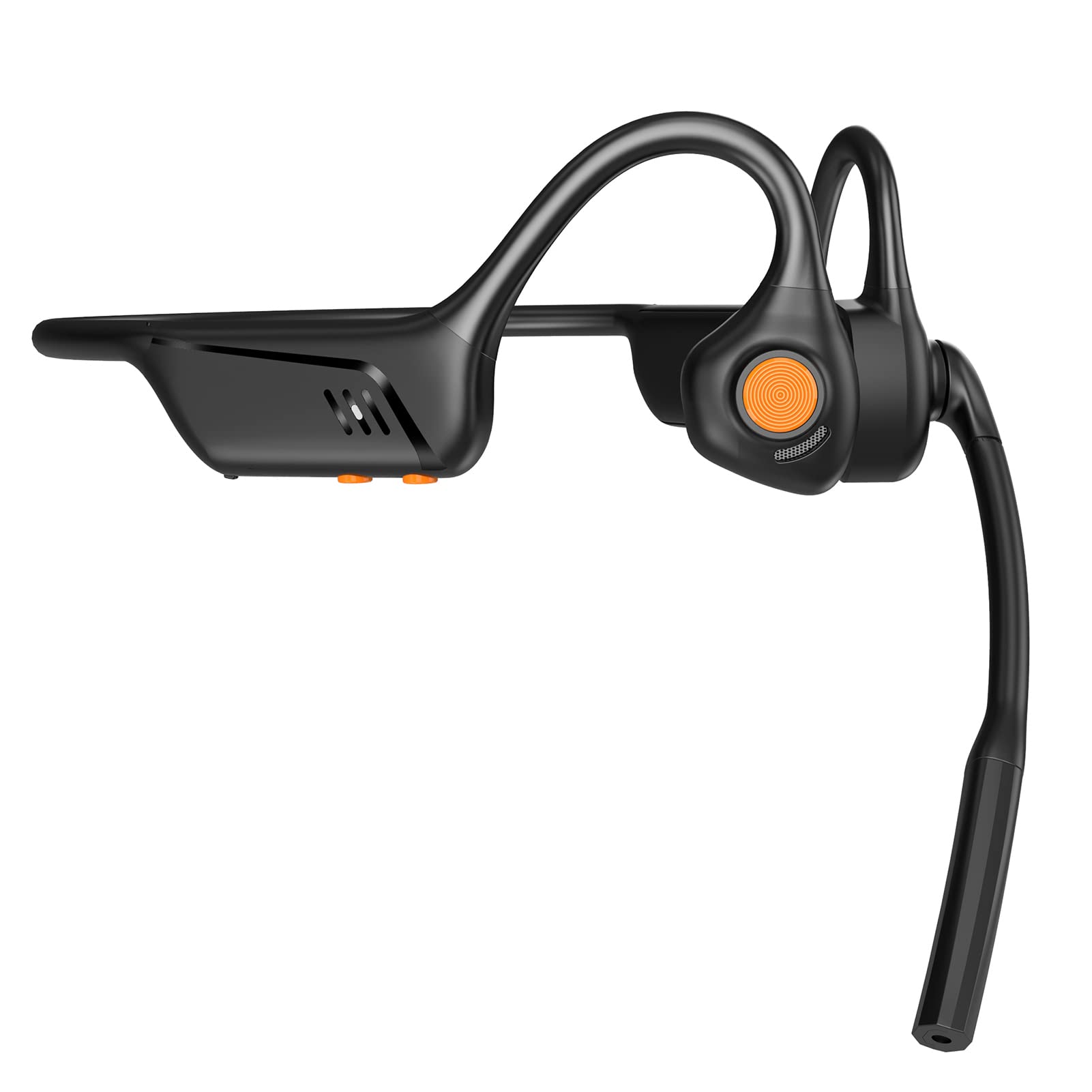
ด้านหน้า view of the eppfun AKC headset, showing its ergonomic design.
4. คู่มือการใช้งาน
4.1 เปิด/ปิดเครื่อง
- เปิดเครื่อง: Press and hold the Power/Multi-function button for 2 seconds until the LED indicator flashes blue.
- หมดแรง: Press and hold the Power/Multi-function button for 3 seconds until the LED indicator flashes red and then turns off.
4.2 การเล่นเพลง
- เล่น/หยุดชั่วคราว: กดปุ่มเปิด/ปิด/ปุ่มมัลติฟังก์ชั่นหนึ่งครั้ง
- เพลงถัดไป: กดปุ่มเพิ่มระดับเสียงค้างไว้ 2 วินาที
- แทร็กก่อนหน้า: กดปุ่มลดระดับเสียงค้างไว้ 2 วินาที
4.3 การจัดการการโทร
- รับสาย: กดปุ่มเปิด/ปิด/ปุ่มมัลติฟังก์ชั่นหนึ่งครั้ง
- วางสาย: กดปุ่มเปิด/ปิด/ปุ่มมัลติฟังก์ชั่นหนึ่งครั้งระหว่างการโทร
- ปฏิเสธสาย: Press and hold the Power/Multi-function button for 2 seconds when an incoming call rings.
- เปิดใช้งาน Voice Assistant: กดปุ่มเปิด/ปิดเครื่องสองครั้งติดกัน
4.4 การควบคุมระดับเสียง
- ปรับระดับเสียงขึ้น: กดปุ่มเพิ่มระดับเสียง
- ลดเสียงลง: กดปุ่มลดระดับเสียง
4.5 การใช้งานไมโครโฟน
The integrated microphone with CVC 8.0 noise cancellation ensures clear communication during calls and online meetings.

The headset features CVC 8.0 Call Noise Cancelling for clear conversations.

Ideal for remote meetings and telework, compatible with iPhone and Android devices.
5. การบำรุงรักษา
5.1 การทำความสะอาด
- เช็ดชุดหูฟังด้วยผ้าแห้งนุ่มๆ
- ห้ามใช้น้ำยาทำความสะอาดที่มีฤทธิ์กัดกร่อน ตัวทำละลาย หรือสเปรย์เคมี
5.2 พื้นที่จัดเก็บ
- เก็บหูฟังไว้ในที่แห้งและเย็น หลีกเลี่ยงแสงแดดโดยตรงและอุณหภูมิที่สูงหรือต่ำเกินไป
- หลีกเลี่ยงการวางสิ่งของหนักๆ บนชุดหูฟัง
5.3 ความต้านทานต่อน้ำ
The eppfun AKC headset has an IP67 waterproof rating, meaning it is protected against dust and can withstand immersion in water up to 1 meter for 30 minutes. It is sweatproof and suitable for various sports activities. However, it is not suitable for swimming or prolonged submersion in water.
6 การแก้ไขปัญหา
If you encounter issues with your headset, please refer to the following common problems and solutions:
| ปัญหา | สารละลาย |
|---|---|
| ชุดหูฟังไม่เปิดขึ้นมา | Ensure the headset is fully charged. Press and hold the Power button for a longer duration. |
| ไม่สามารถจับคู่กับอุปกรณ์ได้ | Ensure the headset is in pairing mode (LED flashing red and blue). Turn off and on your device's Bluetooth. Move the headset closer to your device. |
| ไม่มีเสียงหรือเสียงเบา | Check the volume levels on both the headset and your connected device. Ensure the headset is properly connected. |
| ปัญหาคุณภาพการโทร | ตรวจสอบให้แน่ใจว่าไม่มีสิ่งใดกีดขวางไมโครโฟน ย้ายไปยังบริเวณที่มีเสียงรบกวนรอบข้างน้อยลง ตรวจสอบการเชื่อมต่อเครือข่ายของอุปกรณ์ของคุณ |
| หูฟังไม่ชาร์จ | Verify the charging cable is securely connected to both the headset and the power source. Try a different USB port or power adapter. |
7. ข้อมูลจำเพาะ
| คุณสมบัติ | รายละเอียด |
|---|---|
| ยี่ห้อ | เอ็ปฟัน |
| หมายเลขรุ่น | AKC |
| สี | สีดำ |
| ประเภทหูฟัง | Truly Wireless, Open-Ear |
| เวอร์ชันบลูทูธ | 5.1 |
| อิมพีแดนซ์ | 32 โอห์ม |
| ระดับการกันน้ำ | IP67 (Sweatproof, not for swimming) |
| อุปกรณ์ที่รองรับ | Game Consoles, Laptops, Mobile Phones |
| คุณสมบัติพิเศษ | Microphone, Lightweight, Sweatproof, Volume Control, Fast Charging |
| วัสดุ | อะคริโลไนไตรล์ บิวทาไดอีน สไตรีน (ABS) โลหะ |
| GTIN | 710421188002 |

The headset supports aptX Low Latency for minimal audio delay, ideal for video and gaming.
8. การรับประกันและการสนับสนุน
eppfun provides professional after-sales service for your product.
- ระยะเวลารับประกัน: Your eppfun AKC headset comes with a 1-year warranty from the date of purchase.
- นโยบายการคืนเงิน: A 90-day refund policy is available.
- การสนับสนุนตลอดอายุการใช้งาน: เราให้การสนับสนุนทางเทคนิคตลอดอายุการใช้งานสำหรับผลิตภัณฑ์ของเรา
- ติดต่อเรา: For any questions, concerns, or technical assistance, please do not hesitate to contact our customer support team. We commit to responding and resolving all issues within 12 hours.
Please refer to the contact information provided with your purchase or visit the official eppfun webเว็บไซต์สำหรับรายละเอียดการสนับสนุน