
1. บทนำ
Thank you for choosing the Home Pilot Pure Connected Thermostat with Receiver. This device is designed to provide precise and efficient control over your home's heating or cooling system, enhancing comfort while helping to reduce energy consumption. By integrating with the Home Pilot smart home box, you can unlock advanced features such as remote control, voice commands, and personalized programming.
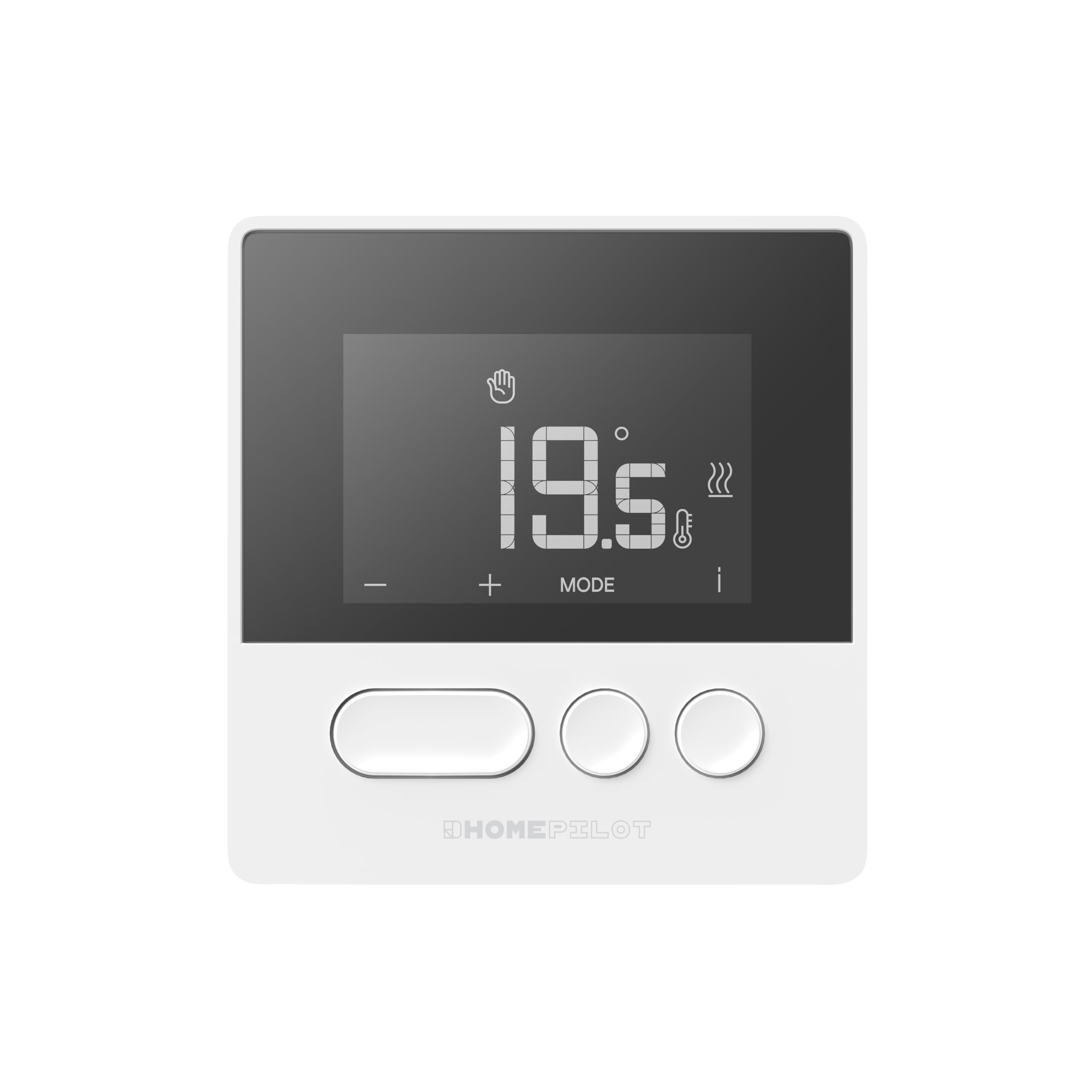
Figure 1: Home Pilot Pure Connected Thermostat. The display shows a temperature of 19.5 degrees Celsius, with control buttons for adjustment and mode selection below.
2. การตั้งค่า
2.1. สิ่งที่รวมอยู่
Your Home Pilot Pure Connected Thermostat package includes:
- Home Pilot Pure Thermostat
- Receiver (pre-associated)
- อุปกรณ์ติดตั้ง (สกรู, ปลั๊กผนัง)
- คู่มือการใช้งาน (เอกสารนี้)

Figure 2: The Home Pilot Pure Thermostat and its accompanying receiver unit, displayed on a coffee table alongside a smartphone, illustrating the complete system.
2.2. การติดตั้งเทอร์โมสตัท
For accurate temperature readings and optimal performance, place the thermostat in a central location within the room you wish to control. Avoid areas:
- Near direct sunlight or heat sources (e.g., radiators, lampส).
- Near drafts (e.g., windows, doors).
- On exterior walls.
- หลังผ้าม่านหรือเฟอร์นิเจอร์
The wireless design allows flexible placement on a piece of furniture or wall mounting. Ensure it is at a height that represents the average room temperature, typically 1.5 meters (5 feet) from the floor.

Figure 3: The Home Pilot Pure Thermostat discreetly mounted on a wall in a contemporary living space, demonstrating a typical installation scenario.
2.3. การเดินสายเครื่องรับสัญญาณ
The receiver unit must be wired to your heating system. It is compatible with various systems, including boilers, heat pumps, and electric radiators. It is highly recommended to have a qualified electrician perform the wiring to ensure safety and correct functionality.
Refer to the detailed wiring diagram provided in the separate installation guide for your specific heating system type. Ensure the main power supply to your heating system is turned off before attempting any wiring.
2.4. Connecting to a Smart Home Box
To access advanced features such as remote control, programming, and voice commands, the thermostat needs to be connected to a Home Pilot Premium smart home box or a compatible Delta Dore box (e.g., Tydom / Tywell). Follow the instructions provided with your smart home box for the pairing process. The thermostat and receiver are pre-associated with each other.
3. คู่มือการใช้งาน
3.1. การควบคุมพื้นฐาน
The thermostat features an intuitive screen and three main buttons:
- ปุ่ม '+': Increases the set temperature or navigates menu options.
- '-' ปุ่ม: Decreases the set temperature or navigates menu options.
- 'MODE' Button: Cycles through operating modes or confirms selections.
- 'i' (Information) Icon: Provides additional status or error information on the display.
3.2. การปรับอุณหภูมิ
To manually adjust the temperature:
- กดปุ่ม - or - button. The current set temperature will flash.
- ใช้ - or - ปุ่มเพื่อตั้งอุณหภูมิที่คุณต้องการ
- The new temperature will be applied automatically after a few seconds, or you can press 'โหมด' to confirm immediately.
3.3. โหมดการทำงาน
กดปุ่ม 'โหมด' button to cycle through available operating modes. Common modes may include:
- โหมดแมนนวล: รักษาอุณหภูมิคงที่ตามที่ผู้ใช้งานกำหนด
- โหมดโปรแกรม: Follows a pre-set schedule (requires smart home box).
- โหมดไม่อยู่: Sets a lower, energy-saving temperature when the home is unoccupied.
- โหมดป้องกันฟรอสต์: รักษาระดับอุณหภูมิต่ำสุดเพื่อป้องกันการแข็งตัว
3.4. Programming Schedules (via Home Pilot App)
For weekly programming and advanced scheduling, use the Home Pilot mobile application after connecting your thermostat to a compatible smart home box. The app allows you to:
- Create custom heating/cooling schedules for different days and times.
- Adjust schedules remotely.
- ตรวจสอบการใช้พลังงาน
3.5. การควบคุมระยะไกลและการควบคุมด้วยเสียง
Once connected to a Home Pilot smart home box, you can control your thermostat remotely via the Home Pilot mobile application. Additionally, the system supports voice control through compatible voice assistants, allowing you to adjust settings with simple commands.
4. การบำรุงรักษา
4.1. การทำความสะอาด
เพื่อรักษารูปลักษณ์และฟังก์ชันการทำงานของเทอร์โมสตัทของคุณ:
- เช็ดภายนอกด้วยผ้านุ่มแห้ง
- ห้ามใช้น้ำยาทำความสะอาดที่มีฤทธิ์กัดกร่อน ตัวทำละลาย หรือสเปรย์เคมี เนื่องจากอาจทำให้พื้นผิวหรือชิ้นส่วนภายในเสียหายได้
4.2. การเปลี่ยนแบตเตอรี่
The Home Pilot Pure Thermostat is typically powered by batteries. When the battery level is low, an indicator will appear on the display. To replace the batteries:
- Gently remove the thermostat from its mounting plate or open the battery compartment.
- Replace the old batteries with new ones of the specified type (refer to the device's back cover or a more detailed guide for battery type).
- ตรวจสอบขั้วที่ถูกต้อง (+/-)
- Reattach the thermostat or close the compartment.
5 การแก้ไขปัญหา
If you encounter issues with your Home Pilot Pure Thermostat, refer to the following common problems and solutions:
| ปัญหา | สาเหตุที่เป็นไปได้ | สารละลาย |
|---|---|---|
| จอแสดงผลเทอร์โมสตัทว่างเปล่า | ไม่มีไฟหรือแบตเตอรี่หมด | Check battery installation and replace if necessary. Ensure the receiver has power. |
| ระบบทำความร้อน/ทำความเย็นไม่ตอบสนอง | No communication between thermostat and receiver, or receiver not wired correctly. | Ensure the receiver is powered. Check the wireless connection. Verify receiver wiring (consult an electrician if unsure). |
| การอ่านอุณหภูมิไม่ถูกต้อง | Thermostat placed in an unsuitable location (drafts, direct sun). | Relocate the thermostat to a more central and stable environment. |
| Cannot connect to Home Pilot App. | Thermostat not paired with the smart home box, or network issues. | Ensure your Home Pilot smart home box is online. Re-attempt the pairing process as per the smart home box instructions. Check your home Wi-Fi connection. |
If the problem persists, please contact Home Pilot customer support or refer to the online resources available on the Home Pilot webเว็บไซต์.
6. ข้อมูลจำเพาะ
| ยี่ห้อ | โฮมไพลอต |
| หมายเลขรุ่น | 8130000 |
| สี | สีขาว |
| Product Dimensions (Thermostat) | (Not explicitly stated for thermostat only, using package dimensions as reference for overall size) ขนาดโดยประมาณ 27.3 x 15.7 x 5 ซม. (บรรจุภัณฑ์) |
| น้ำหนักสินค้า | 536 กรัม |
| คุณสมบัติพิเศษ | Voice control, Programmable, Energy saving |
| รวมส่วนประกอบ | Thermostat, Receiver |
| Compatible Heating Systems | Boiler, Heat pump, Electric radiators |
| ประเทศต้นกำเนิด | ฝรั่งเศส |
7. การรับประกันและการสนับสนุน
7.1. ข้อมูลการรับประกัน
The Home Pilot Pure Connected Thermostat is manufactured by Delta Dore, a reputable French group known for reliable smart home solutions. For specific warranty terms and conditions, please refer to the documentation provided with your purchase or visit the official Home Pilot / Delta Dore webไซต์นี้ โปรดเก็บหลักฐานการซื้อไว้เพื่อใช้ยืนยันการรับประกัน
7.2. การสนับสนุนลูกค้า
For technical assistance, product inquiries, or further support, please visit the official Home Pilot website or contact their customer service department. Online resources, FAQs, and detailed guides may be available to help you with installation and operation.
