
THINKYA Y19
THINKYA Portable CD Player User Manual
Model: Y19 | Brand: THINKYA
1. บทนำ
Thank you for choosing the THINKYA Portable CD Player Y19. This multi-functional device combines classic CD playback with modern connectivity options, including Bluetooth, USB, AUX, and Optical modes. Featuring built-in HiFi stereo speakers and a convenient remote control, it offers a versatile audio experience for your home or on the go. Please read this manual thoroughly before use to ensure proper operation and longevity of your device.
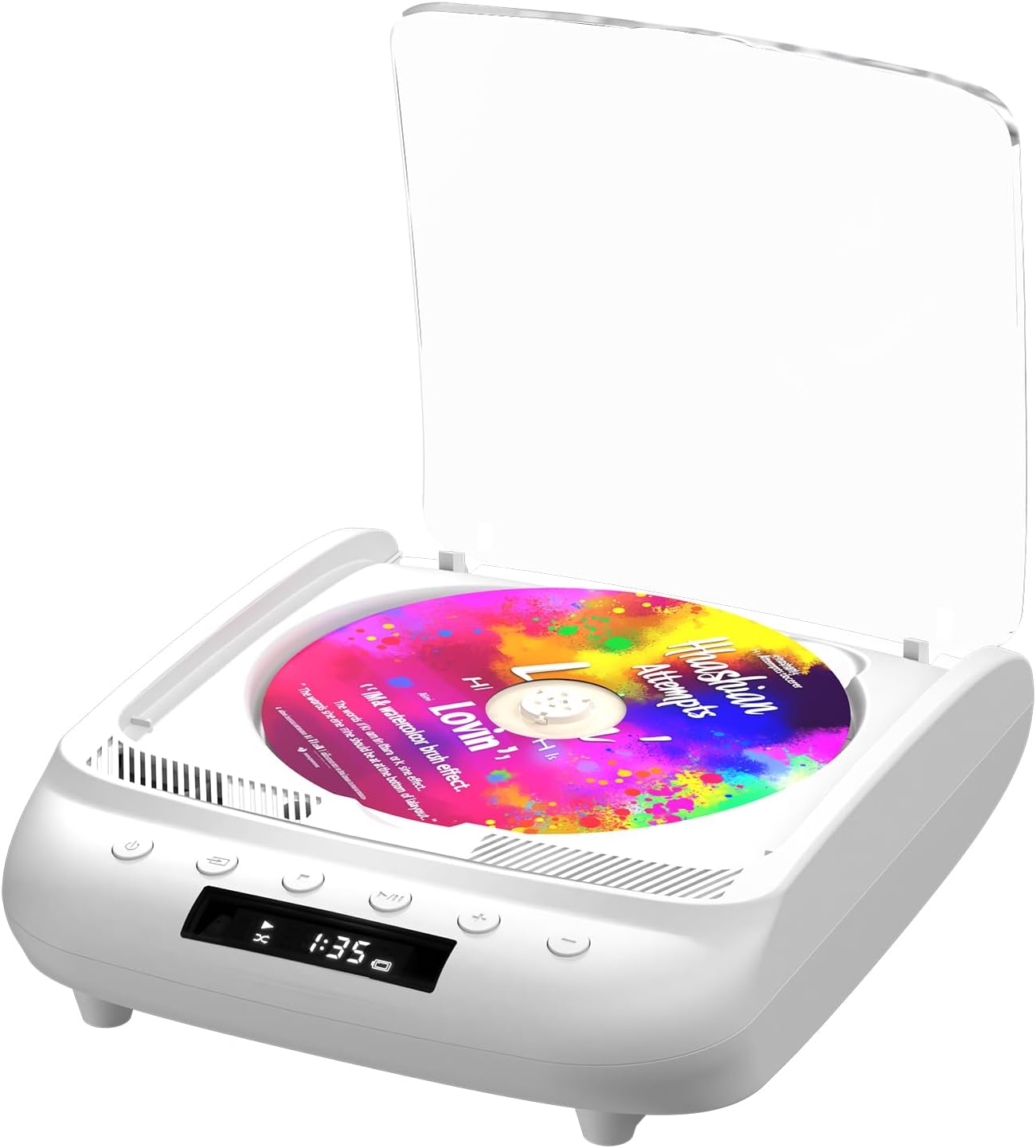
Figure 1.1: THINKYA Portable CD Player Y19
2. เนื้อหาบรรจุภัณฑ์
ตรวจสอบให้แน่ใจว่าสินค้าทุกชิ้นครบถ้วนและอยู่ในสภาพดีก่อนแกะกล่อง:
- Portable CD Player x 1
- รีโมทคอนโทรล x 1
- สาย USB-C x 1
- สาย AUX 3.5 มม. x 1
- คู่มือการใช้งาน x 1
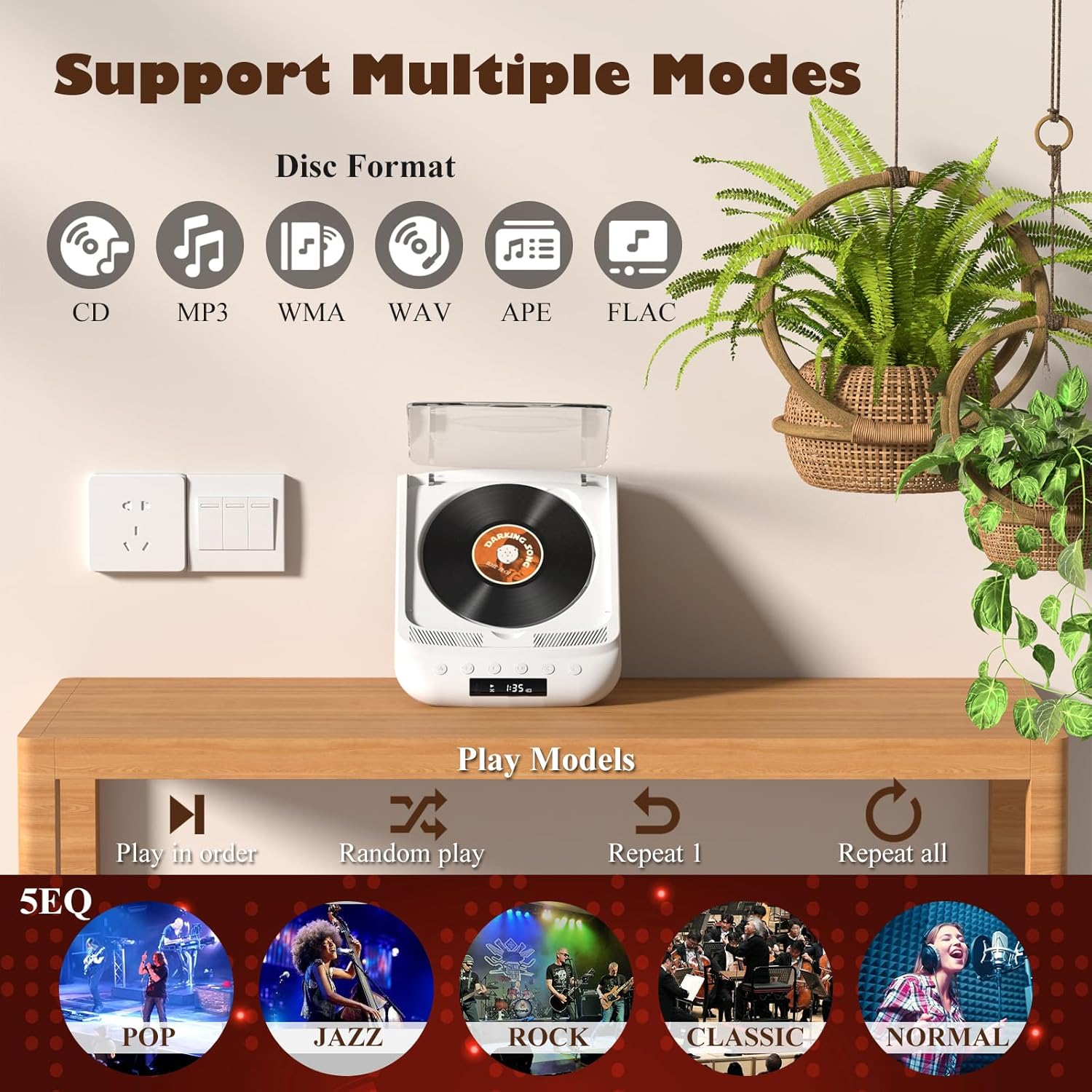
Figure 2.1: All items included in the package.
3. สินค้าหมดview & การควบคุม
Familiarize yourself with the player's layout and functions:

Figure 3.1: Front panel controls and rear ports. (1) Optical, (2) Headphone, (3) AUX, (4) USB, (5) DCIN 5V, (6) On/Off switch.
ปุ่มที่แผงด้านหน้า:
- ปุ่มเปิด/ปิด: เปิด/ปิดอุปกรณ์
- ปุ่มโหมด: Cycles through playback modes (CD, USB, Bluetooth, AUX, Optical).
- ปุ่มหยุด: หยุดการเล่น
- ปุ่มเล่น/หยุดชั่วคราว: เริ่มหรือหยุดเล่นชั่วคราว
- ระดับเสียง - / เพลงก่อนหน้า: ลดระดับเสียงหรือข้ามไปยังแทร็กก่อนหน้า
- ระดับเสียง + / แทร็กถัดไป: เพิ่มระดับเสียงหรือข้ามไปยังแทร็กถัดไป
พอร์ตแผงด้านหลัง:
- SPDIF (Optical) Output: สำหรับเชื่อมต่อกับระบบเสียงภายนอกผ่านสายออปติคอล
- แจ็คหูฟัง (3.5 มม.): สำหรับการฟังส่วนตัวโดยใช้หูฟัง
- ช่องต่อ AUX (3.5 มม.): สำหรับเชื่อมต่ออุปกรณ์เสียงภายนอกผ่านสาย AUX
- พอร์ต USB: สำหรับการเล่นเสียง fileจากไดรฟ์ USB
- DCIN 5V (USB-C): Power input for charging and continuous operation.
- สวิตช์เปิด/ปิด: สวิตช์เปิด/ปิดหลักของอุปกรณ์

รูปที่ 3.2: รายละเอียด view of 3.5mm Earphone Jack and USB Playback port.

Figure 3.3: Enjoying purer singing with Optical Mode connection to external speakers.
4. การตั้งค่าเริ่มต้น
4.1 การชาร์จอุปกรณ์
The THINKYA CD Player has a built-in 2600mAh rechargeable battery. Before first use, fully charge the device.
- Connect the provided USB-C cable to the DCIN 5V port on the rear of the player.
- Connect the other end of the USB-C cable to a compatible 5V/2A USB power adapter (not included), power bank, or computer USB port.
- The LED screen will indicate charging status. A full charge takes approximately 3 hours and provides 4-8 hours of playback time.

Figure 4.1: Flexible charging options for the built-in rechargeable battery.
4.2 การใส่แผ่นซีดี
To insert a CD:
- Gently lift the transparent lid of the CD player.
- If present, remove the protective cardboard from the CD compartment.
- Place the CD onto the spindle with the label side facing up. Ensure it clicks securely into place.
- ปิดฝาใสให้สนิท
Figure 4.2: Correct placement of a CD in the player.
5. คู่มือการใช้งาน
The THINKYA CD Player supports multiple playback modes. Press the ปุ่มโหมด on the front panel or remote control to switch between them.
5.1 CD Playback Mode
After inserting a CD and powering on the device, it will automatically enter CD mode and begin playback. The LED screen will display the track number and playback time.
- เล่น/หยุดชั่วคราว: กดปุ่มเล่น/หยุดชั่วคราว
- เพลงถัดไป / ก่อนหน้า: Use the Volume +/- buttons (short press) to skip tracks.
- หยุด: กดปุ่มหยุด

Figure 5.1: Dual HiFi Stereo Speakers and CD playback options (Repeat All, Random, In Order, Repeat 1).
5.2 Bluetooth Mode (Input & Output)
The player can act as both a Bluetooth transmitter and receiver.
Bluetooth Receiver (Connect your phone/tablet to the CD Player):
- Switch the CD player to Bluetooth mode (BT will flash on the LED screen).
- On your mobile device, search for "THINKYA Y19" in the Bluetooth settings.
- Select to pair. Once connected, the BT indicator will stop flashing. You can now play audio from your device through the CD player's speakers.
Bluetooth Transmitter (Connect the CD Player to Bluetooth headphones/speakers):
- Ensure the CD player is in CD, USB, or AUX mode.
- เปิดใช้งานโหมดจับคู่บนหูฟังบลูทู ธ หรือลำโพงของคุณ
- The CD player will automatically search for and connect to nearby Bluetooth audio devices. Once connected, audio will be transmitted to your external Bluetooth device.

Figure 5.2: Bluetooth 5.0 connectivity for both transmitting and receiving audio.
Video 5.1: Demonstration of THINKYA Portable CD Player's Bluetooth functionality, including pairing with external speakers.
5.3 โหมดการเล่นผ่าน USB
Insert a USB flash drive into the USB port on the rear panel. The player supports MP3/WMA/WAV/APE/FLAC formats. Switch to USB mode using the Mode button.
5.4 โหมด AUX
Connect an external audio device (e.g., smartphone, MP3 player) to the AUX input port using the provided 3.5mm AUX cable. Switch to AUX mode using the Mode button.
5.5 Optical Mode
Connect the SPDIF (Optical) output port to an external audio system with an optical input. This mode is for digital audio output from the CD player to a compatible receiver or soundbar.
6. การใช้รีโมทคอนโทรล
The included remote control allows for convenient operation from a distance (up to 15ft). It requires 2 AAA batteries (not included).
รูปที่ 6.1: รีโมทคอนโทรลเพื่อการใช้งานที่สะดวก
ฟังก์ชั่นการควบคุมระยะไกล:
- พลัง: เปิด/ปิด.
- ฉบับ+/-: ปรับระดับเสียง
- ก่อนหน้าถัดไป: Skips tracks.
- เล่น/หยุดชั่วคราว: เริ่มหรือหยุดเล่นชั่วคราว
- หยุด: หยุดการเล่น
- EQ: Cycles through equalizer presets (POP, JAZZ, ROCK, CLASSIC, NORMAL).
- บีที: สลับไปเป็นโหมดบลูทูธ
- ปุ่มอื่นๆ: May include Bass, Treble adjustments depending on the remote version.
7. ข้อมูลจำเพาะทางเทคนิค
| คุณสมบัติ | ข้อมูลจำเพาะ |
|---|---|
| แบบอย่าง | Y19 |
| อินพุต Voltage | 5V-2A |
| ความจุของแบตเตอรี่ | 2600 mAh ลิเธียมไอออน |
| เวลาในการชาร์จ | ประมาณ 3 ชั่วโมง |
| เวลาการเล่น | ประมาณ 4-8 ชั่วโมง |
| ขนาดพกพา | 8.27 x 6.69 x 3.03 นิ้ว |
| น้ำหนัก | 2.2 lb (1.72 pounds listed in specs, using A+ content for consistency) |
| ลำโพง | 4Ω-2*2W (Independent Sound Cavity) |
| CD Format Support | CD-DA, CD-R, MP3 |
| USB Format Support | MP3 / WMA / WAV / APE / FLAC |
| อินเทอร์เฟซ | 3.5mm Audio, USB, Optical, Headphone, USB-C Charge |
| โหมดผู้เล่น | CD Play, Bluetooth, USB, AUX, Optical |
8. การดูแลรักษา
- การทำความสะอาด: ใช้ผ้าแห้งเนื้อนุ่มเช็ดทำความสะอาดภายนอกเครื่องเล่น สำหรับเลนส์ซีดี ให้ใช้ผลิตภัณฑ์ทำความสะอาดเลนส์ซีดีโดยเฉพาะ ห้ามใช้สารทำความสะอาดที่มีฤทธิ์กัดกร่อนหรือตัวทำละลาย
- การจัดการแผ่นซีดี: ควรจับแผ่นซีดีที่ขอบเสมอ หลีกเลี่ยงการสัมผัสพื้นผิวที่ใช้เล่น เก็บแผ่นซีดีไว้ในกล่องเพื่อป้องกันรอยขีดข่วนและฝุ่นละออง
- พื้นที่จัดเก็บ: เมื่อไม่ได้ใช้งานเป็นเวลานาน ควรเก็บเครื่องเล่นไว้ในที่แห้งและเย็น หลีกเลี่ยงแสงแดดโดยตรงและอุณหภูมิที่สูงหรือต่ำเกินไป
- การดูแลแบตเตอรี่ เพื่อยืดอายุการใช้งานแบตเตอรี่ ควรหลีกเลี่ยงการคายประจุแบตเตอรี่จนหมดบ่อยๆ ควรชาร์จอุปกรณ์เป็นประจำ แม้ว่าจะไม่ได้ใช้งานอยู่ก็ตาม
9. คำแนะนำการแก้ไขปัญหา
If you encounter issues with your THINKYA CD Player, refer to the common problems and solutions below:
9.1 ไม่มีพลังงาน / อุปกรณ์ไม่เปิด
- Ensure the main On/Off switch on the rear panel is in the 'On' position.
- Check if the device is properly charged. Connect the USB-C cable and verify the charging indicator.
- ลองใช้สาย USB-C หรืออะแดปเตอร์ไฟอื่น
9.2 CD Not Playing / Disc Error
- Ensure the CD is clean and free of scratches or smudges. Clean with a soft, lint-free cloth from the center outwards.
- Verify the CD is inserted correctly with the label side facing up and securely on the spindle.
- Make sure the player is in CD mode.
- ลองใช้ซีดีแผ่นอื่นเพื่อตรวจสอบว่าแผ่นมีปัญหาหรือไม่
9.3 ไม่มีเสียง
- Adjust the volume using the buttons on the player or the remote control.
- If using headphones or external speakers, ensure they are properly connected and functional.
- If in Bluetooth mode, ensure the player is correctly paired with your external device and the volume on both devices is adjusted.
- If in AUX mode, check the AUX cable connection and ensure the external device's volume is up.
- Ensure the correct playback mode is selected (CD, USB, BT, AUX, Optical).
9.4 ปัญหาการเชื่อมต่อบลูทูธ
- Ensure the player is in Bluetooth mode (BT flashing).
- Keep the player and the Bluetooth device within the effective range (typically 10 meters/33 feet).
- Turn off and on the Bluetooth function on both the player and your external device, then try pairing again.
- Clear previous Bluetooth pairings on your external device and try to connect again.
10. การรับประกันและการสนับสนุนลูกค้า
10.1 ข้อมูลการรับประกัน
THINKYA products are manufactured to the highest quality standards. For specific warranty details, please refer to the warranty card included in your product packaging or contact THINKYA customer support. Keep your purchase receipt as proof of purchase.
10.2 การสนับสนุนลูกค้า
หากคุณต้องการความช่วยเหลือเพิ่มเติมหรือมีคำถามที่ไม่ได้กล่าวถึงในคู่มือนี้ โปรดติดต่อทีมสนับสนุนลูกค้าของเรา:
- อีเมล: support@thinkya.com
- Webเว็บไซต์: www.thinkya.com
Ask a question about this manual
Ask about setup, troubleshooting, compatibility, parts, safety, or missing instructions. Manuals+ will review the question and use this page’s manual context to help answer it.