
1. บทนำ
คู่มือนี้ให้ข้อมูลสำคัญสำหรับการติดตั้ง การใช้งาน และการบำรุงรักษาไฟสัญญาณแบบหอคอย Banner Engineering TL70ALQ อย่างปลอดภัยและมีประสิทธิภาพ TL70ALQ ออกแบบมาเพื่อใช้เป็นสัญญาณเตือนด้วยเสียงสำหรับการใช้งานในอุตสาหกรรม มีตัวเรือนสีดำที่แข็งแรงทนทานระดับ IP65 และอินพุตแบบสองโหมดเพื่อการควบคุมที่หลากหลาย
2. ข้อมูลด้านความปลอดภัย
- โปรดอ่านคำแนะนำทั้งหมดอย่างละเอียดก่อนการติดตั้งและการใช้งาน
- โปรดตรวจสอบให้แน่ใจว่าได้ตัดกระแสไฟออกจากวงจรแล้วก่อนทำการเดินสายไฟหรือซ่อมบำรุงใดๆ
- การติดตั้งควรดำเนินการโดยบุคลากรที่มีคุณสมบัติเหมาะสม โดยเป็นไปตามข้อกำหนดและระเบียบข้อบังคับด้านไฟฟ้าในท้องถิ่น
- ไม่เกินปริมาตรที่กำหนดtagพิกัด e (12-30 VDC)
- อุปกรณ์นี้สร้างสัญญาณเสียงที่ดังมาก (92 เดซิเบล ที่ระยะ 1 เมตร) โปรดใช้อุปกรณ์ป้องกันหูที่เหมาะสมหากต้องทำงานใกล้กับอุปกรณ์ในระหว่างการใช้งาน
3. สินค้าหมดview
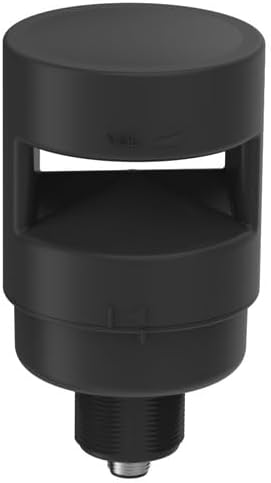
ภาพนี้แสดงไฟสัญญาณแบบตั้งพื้นรุ่น TL70ALQ จาก Banner Engineering ตัวเรือนเป็นทรงกระบอกสีดำ มีช่องสำหรับส่งเสียงเตือนจากไฟแสดงสถานะ ฐานมีส่วนที่เป็นเกลียวสำหรับติดตั้ง และมีขั้วต่อแบบถอดเร็ว 5 ขา M12 ในตัว
TL70ALQ เป็นไฟสัญญาณทรงหอคอยขนาดเส้นผ่านศูนย์กลาง 70 มม. ออกแบบมาสำหรับการส่งสัญญาณในอุตสาหกรรม หน้าที่หลักคือการให้สัญญาณเสียงที่ดังชัดเจน คุณสมบัติที่สำคัญได้แก่:
- ตัวเรือนทำจากโพลีคาร์บอเนต (PC) สีดำ
- สัญญาณเตือนเสียงดัง (92 เดซิเบล ที่ระยะ 1 เมตร)
- เล่มที่tagอี: 12-30 VDC
- ระดับสิ่งแวดล้อม: IP65
- อินพุต: ไบโมดอล
- ขั้วต่อ: ขั้วต่อแบบปลดเร็ว M12 5 ขา
- การติดตั้ง: ติดตั้งบนตัวถัง
4. การตั้งค่า
4.1 การแกะกล่อง
นำไฟตั้งพื้นรุ่น TL70ALQ ออกจากบรรจุภัณฑ์อย่างระมัดระวัง ตรวจสอบให้แน่ใจว่าตัวเครื่องไม่มีความเสียหาย
4.2 การติดตั้ง
TL70ALQ ออกแบบมาสำหรับการติดตั้งบนเคส ยึดฐานเกลียวของตัวเครื่องเข้ากับช่องที่เหมาะสมบนเคส ตรวจสอบให้แน่ใจว่าแน่นและมั่นคงเพื่อรักษามาตรฐานการป้องกันน้ำและฝุ่นระดับ IP65 และป้องกันการสั่นสะเทือน
4.3 การเดินสายไฟ
อุปกรณ์นี้ใช้ขั้วต่อแบบถอดเร็ว 5 ขา M12 ในตัวสำหรับการเชื่อมต่อทางไฟฟ้า โปรดปฏิบัติตามคำแนะนำต่อไปนี้สำหรับการเดินสายไฟ:
- แหล่งจ่ายไฟ: เชื่อมต่อแหล่งจ่ายไฟ 12-30 VDC เข้ากับขาที่เหมาะสมบนขั้วต่อ M12 ตรวจสอบให้แน่ใจว่าขั้วถูกต้อง
- อินพุตแบบสองโหมด: TL70ALQ มีอินพุตแบบไบโมดอล หมายความว่าสามารถรับสัญญาณควบคุมได้ทั้งแบบ NPN (sinking) และ PNP (sourcing) เชื่อมต่อสัญญาณควบคุมของคุณเข้ากับขาอินพุตที่กำหนด อุปกรณ์จะทำงานเมื่อมีสัญญาณอินพุตเข้ามา
- โปรดดูแผนผังการเดินสายไฟเฉพาะที่ให้มาพร้อมกับสายเคเบิล M12 ของคุณ หรือศึกษาเอกสารของ Banner Engineering เพื่อดูการกำหนดตำแหน่งขาเชื่อมต่อ
5. ปฏิบัติการ
TL70ALQ ทำหน้าที่เป็นตัวบ่งชี้ด้วยเสียง เมื่อมีสัญญาณควบคุมที่ถูกต้องป้อนเข้าสู่ช่องรับสัญญาณแบบสองโหมด อุปกรณ์จะส่งเสียงดังออกมา โดยระดับเสียงที่ได้ยินจะอยู่ที่ 92 เดซิเบล ที่ระยะ 1 เมตร
อินพุตแบบสองโหมดช่วยให้สามารถบูรณาการอย่างยืดหยุ่นกับระบบควบคุมอุตสาหกรรมต่างๆ โดยรับสัญญาณขาเข้า (NPN) หรือสัญญาณขาออก (PNP) เพื่อเปิดใช้งานสัญญาณเตือนด้วยเสียง
6. การบำรุงรักษา
6.1 การทำความสะอาด
ควรทำความสะอาดภายนอกของ TL70ALQ เป็นระยะด้วยผ้าเนื้อนุ่มและแห้งamp ใช้ผ้าเช็ดทำความสะอาด ห้ามใช้สารทำความสะอาดที่มีฤทธิ์กัดกร่อน ตัวทำละลาย หรือสารเคมีรุนแรง เพราะอาจทำให้ตัวเรือนโพลีคาร์บอเนตเสียหายได้ แม้ว่ามาตรฐาน IP65 จะป้องกันฝุ่นและน้ำแรงดันต่ำได้ แต่ควรหลีกเลี่ยงการล้างด้วยแรงดันสูงโดยตรง
6.2 การตรวจสอบ
ตรวจสอบข้อต่อแบบถอดเร็ว M12 เป็นประจำ เพื่อให้แน่ใจว่าเชื่อมต่อแน่นหนาและไม่มีร่องรอยการสึกหรอหรือความเสียหาย ตรวจสอบความมั่นคงของจุดยึด และตรวจสอบให้แน่ใจว่าการเชื่อมต่อทั้งหมดแน่นหนาดีแล้ว
7 การแก้ไขปัญหา
7.1 ไม่มีเสียงออก
- ตรวจสอบให้แน่ใจว่าได้ต่อแหล่งจ่ายไฟ (12-30 VDC) และใช้งานได้แล้ว
- ตรวจสอบขั้วต่อ M12 ว่าแน่นหนาและต่อสายถูกต้องหรือไม่ โดยตรวจสอบให้แน่ใจว่าขั้วถูกต้องด้วย
- ตรวจสอบให้แน่ใจว่าสัญญาณควบคุมถูกส่งไปยังอินพุตแบบไบโมดอลอย่างถูกต้องและอยู่ในช่วงระดับเสียงที่กำหนดtagช่วงอี
- ตรวจสอบให้แน่ใจว่าระบบควบคุมทำงานและส่งสัญญาณที่เหมาะสมไปยัง TL70ALQ แล้ว
7.2 การส่งสัญญาณเสียงเป็นช่วงๆ
- ตรวจสอบการเชื่อมต่อสายไฟที่หลวมบริเวณขั้วต่อแบบถอดเร็ว M12 หรือแหล่งจ่ายไฟ
- ตรวจสอบสัญญาณควบคุมว่ามีความเสถียรและมีระดับเสียงที่เหมาะสมหรือไม่tagระดับ e ความผันผวนของสัญญาณควบคุมอาจทำให้การทำงานไม่ต่อเนื่อง
8. ข้อมูลจำเพาะ
| ยี่ห้อ | วิศวกรรมแบนเนอร์ |
| หมายเลขรุ่น | TL70ALQ |
| รูปแบบการติดตั้ง | การติดตั้งแชสซี |
| รูปแบบการสิ้นสุด | ขั้วต่อแบบปลดเร็ว M12 5 ขา |
| ประเภทอินพุต | ไบโมดัล |
| เล่มที่tage เรตติ้ง | 12 VDC ถึง 30 VDC |
| ระดับการป้องกันน้ำและฝุ่น (IP) | IP65 |
| เอาต์พุตเสียง | 92 dB ที่ 1 m |
| สีตัวเรือน | สีดำ |
| วัสดุที่ใช้ทำตัวเรือน | โพลีคาร์บอเนต (พีซี) |
| เส้นผ่านศูนย์กลาง | 70 มม. |
9. ข้อมูลการรับประกัน
ผลิตภัณฑ์นี้อยู่ภายใต้การรับประกันมาตรฐานของผู้ผลิต สำหรับข้อกำหนดและเงื่อนไขการรับประกันเฉพาะ โปรดดูเอกสารที่แนบมากับการซื้อของคุณ หรือติดต่อ Banner Engineering โดยตรง โปรดเก็บหลักฐานการซื้อไว้เพื่อใช้ในการเรียกร้องการรับประกัน
10. การสนับสนุน
หากต้องการความช่วยเหลือด้านเทคนิค การแก้ไขปัญหา หรือสอบถามข้อมูลผลิตภัณฑ์ โปรดติดต่อฝ่ายบริการลูกค้าของ Banner Engineering หรือเยี่ยมชมเว็บไซต์อย่างเป็นทางการของ Banner Engineering webเว็บไซต์นี้มีข้อมูลเพิ่มเติม ข้อมูลติดต่อ และเอกสารผลิตภัณฑ์ล่าสุด