
การแนะนำ
This manual provides detailed instructions for the safe and efficient operation of your Phomemo M836-B Portable Thermal Printer. The M836-B is an inkless, wireless thermal printer designed for portability and convenience, supporting various paper sizes including US Letter and A4. Please read this manual thoroughly before using the printer to ensure optimal performance and longevity.
สินค้าเกินview
คุณสมบัติหลัก
- การพิมพ์ความร้อนแบบไม่ใช้หมึก: Utilizes thermal technology, eliminating the need for ink cartridges or ribbons.
- การเชื่อมต่อไร้สาย: Supports Bluetooth for seamless connection with iOS and Android devices.
- การเชื่อมต่อ USB: Compatible with Windows, macOS, ChromeOS, and Linux via USB Type-C.
- ความละเอียดสูง: Offers a print resolution of 300 DPI for clear text and graphics.
- การออกแบบพกพา: Compact and lightweight, ideal for travel and on-the-go printing.
- รองรับกระดาษหลายขนาด: Accommodates various thermal paper sizes, including US Letter (8.5'' x 11'') and A4.
- เอาต์พุตขาวดำ: Prints in black and white.

Image: The Phomemo M836-B printer demonstrating its inkless thermal printing capability, highlighting no mess from ink.

ภาพ: โอเวอร์view of the Phomemo M836-B's key features, including wireless connectivity, inkless operation, 2600mAh battery capacity, and 300 DPI resolution.
เนื้อหาแพ็คเกจ
ตรวจสอบว่ามีรายการทั้งหมดอยู่ในแพ็คเกจ:
- Phomemo M836-B Portable Thermal Printer
- Thermal Paper (as specified in the box)
- สายเคเบิล USB Type-C
- คู่มือการใช้งาน (เอกสารนี้)
คู่มือการติดตั้ง
1. การชาร์จเครื่องพิมพ์
- เชื่อมต่อสาย USB Type-C ที่ให้มากับพอร์ตชาร์จของเครื่องพิมพ์
- เชื่อมต่อปลายอีกด้านหนึ่งของสาย USB เข้ากับอะแดปเตอร์ไฟ USB ที่ใช้งานร่วมกันได้ (ไม่รวมอยู่ด้วย) หรือพอร์ต USB ของคอมพิวเตอร์
- The indicator light will show charging status. Charge the printer fully before first use.
2. การใส่กระดาษ
The Phomemo M836-B supports both thermal paper rolls and sheet-fed thermal paper.
- เปิดฝาครอบช่องใส่กระดาษ
- For roll paper: Insert the thermal paper roll into the designated slot, ensuring the printing side faces upwards. Gently pull a small length of paper out.
- For sheet-fed paper: Insert the thermal paper sheet into the input slot, ensuring it is straight and aligned.
- ปิดฝาช่องใส่กระดาษให้สนิท

Image: Illustration of how to load different types of thermal paper (roll and sheet) into the Phomemo M836-B printer, showing the paper selection mechanism.
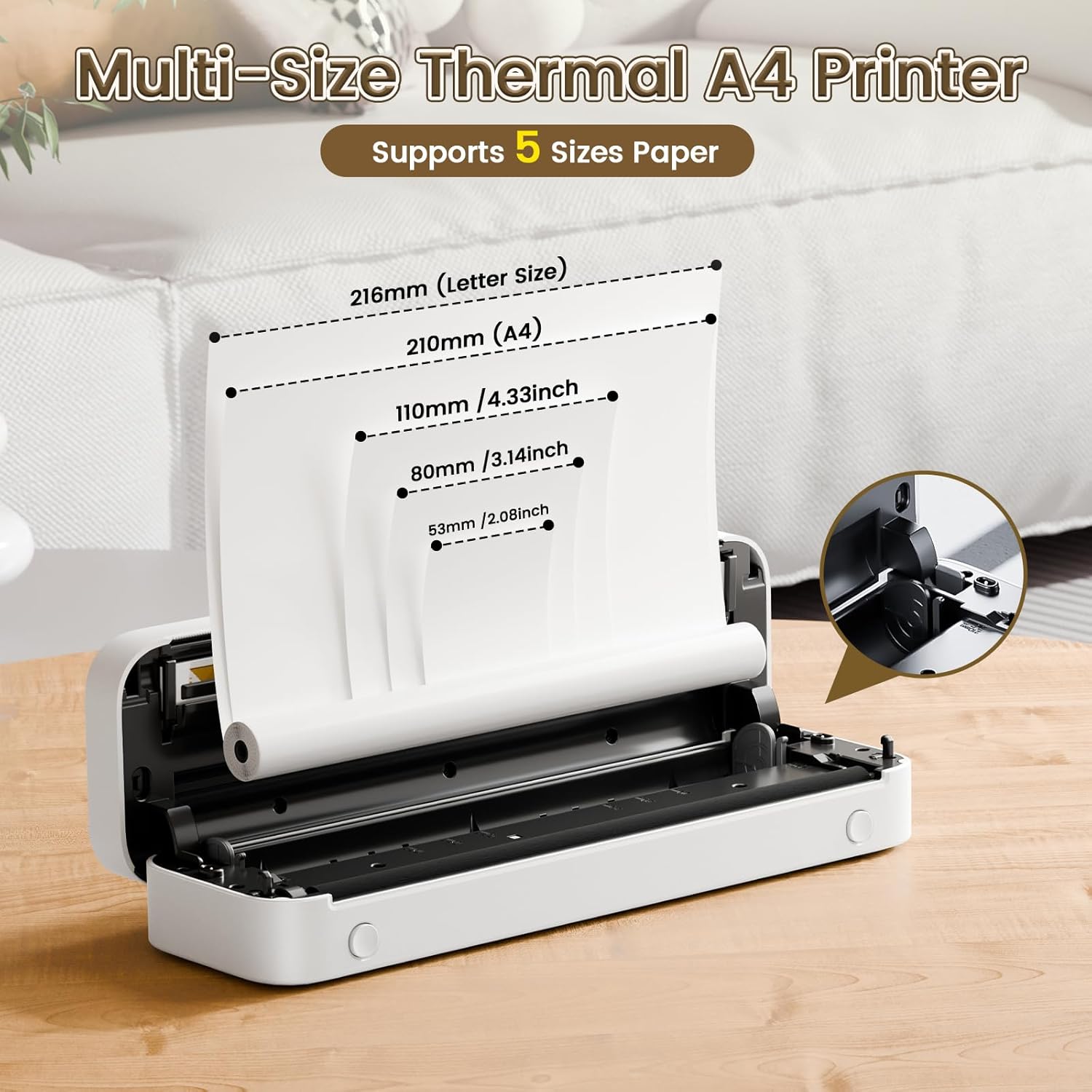
Image: The Phomemo M836-B printer demonstrating support for multiple paper sizes, including US Letter (216mm) and A4 (210mm).
3. การเชื่อมต่อกับอุปกรณ์
The printer supports both Bluetooth and USB connections.
Bluetooth Connection (for iOS/Android)
- ดาวน์โหลดแอป Phomemo อย่างเป็นทางการจาก App Store ของอุปกรณ์ของคุณ
- Turn on the printer by pressing and holding the power button.
- เปิดใช้งานบลูทูธบนอุปกรณ์เคลื่อนที่ของคุณ
- Open the Phomemo app, search for the printer (M836-B), and pair with it.
- ปฏิบัติตามคำแนะนำบนหน้าจอเพื่อดำเนินการจับคู่ให้เสร็จสมบูรณ์
USB Connection (for Windows/macOS/ChromeOS/Linux)
- ตรวจสอบให้แน่ใจว่าเครื่องพิมพ์เปิดอยู่
- เชื่อมต่อเครื่องพิมพ์เข้ากับคอมพิวเตอร์ของคุณโดยใช้สาย USB Type-C ที่ให้มา
- เยี่ยมชมเว็บไซต์ทางการของ Phomemo webงาน (www.phoemo.com) to download and install the appropriate drivers for your operating system.
- Once drivers are installed, the printer should be recognized by your computer.

Image: Diagram illustrating the two types of connections supported by the Phomemo M836-B: Bluetooth for Android, iOS, and iPad, and USB for Windows, macOS, ChromeOS, and Linux.
คำแนะนำการใช้งาน
Printing from Mobile Devices
- Ensure your printer is charged, loaded with paper, and connected via Bluetooth to your mobile device.
- เปิดแอป Phomemo
- Select the document or image you wish to print from within the app.
- Adjust print settings (e.g., paper size, density) as needed.
- แตะปุ่มพิมพ์เพื่อเริ่มการพิมพ์
Printing from Computers
- Ensure your printer is charged, loaded with paper, and connected via USB to your computer with drivers installed.
- เปิดเอกสารหรือ file คุณต้องการพิมพ์จากคอมพิวเตอร์ของคุณ
- ไปที่ "File" > "พิมพ์" (หรือใช้ทางลัด Ctrl+P/Cmd+P)
- Select the Phomemo M836-B from the list of available printers.
- ปรับการตั้งค่าการพิมพ์ (เช่น ขนาดกระดาษ การวางแนว) ตามต้องการ
- คลิก "พิมพ์"
Paper Handling Tips
- Always use high-quality thermal paper for best results.
- Ensure the paper is loaded correctly with the printable side facing the print head.
- Avoid exposing thermal paper to direct sunlight or high temperatures, as this can degrade print quality over time.
- Manually tear off printed documents carefully after printing, as the printer does not have an automatic cutter.
การซ่อมบำรุง
การทำความสะอาดเครื่องพิมพ์
- ปิดเครื่องพิมพ์และปลดการเชื่อมต่อจากแหล่งจ่ายไฟ
- ใช้ผ้านุ่มไม่เป็นขุยเช็ดเล็กน้อยampชุบด้วยไอโซโพรพิลแอลกอฮอล์แล้วเช็ดหัวพิมพ์เบา ๆ ทิ้งไว้ให้แห้งสนิทก่อนใช้งาน
- Clean the exterior of the printer with a soft, dry cloth. Do not use abrasive cleaners or solvents.
พื้นที่จัดเก็บ
- เก็บเครื่องพิมพ์ไว้ในที่แห้งและเย็น หลีกเลี่ยงแสงแดดโดยตรงและอุณหภูมิที่สูงหรือต่ำเกินไป
- If storing for an extended period, ensure the printer is fully charged to maintain battery health.
- Keep thermal paper in its original packaging in a dark, cool place to prevent premature fading.
การแก้ไขปัญหา
If you encounter issues with your Phomemo M836-B printer, refer to the following common problems and solutions:
เครื่องพิมพ์ไม่เปิด
- ตรวจสอบแบตเตอรี่: Ensure the printer is sufficiently charged. Connect it to a power source and try again.
- ปุ่มเปิด/ปิด: Press and hold the power button for a few seconds to ensure it's properly activated.
Connectivity Issues (Bluetooth/USB)
- บลูทูธ:
- Ensure Bluetooth is enabled on your device and the printer is within range.
- Unpair and re-pair the printer in your device's Bluetooth settings.
- โปรดรีสตาร์ททั้งเครื่องพิมพ์และอุปกรณ์มือถือของคุณ
- ยูเอสบี:
- ตรวจสอบให้แน่ใจว่าสาย USB เชื่อมต่อกับเครื่องพิมพ์และคอมพิวเตอร์อย่างแน่นหนาแล้ว
- Ensure the correct printer drivers are installed on your computer. Reinstall if necessary.
- ลองใช้พอร์ต USB หรือสายเคเบิลอื่น
Poor Print Quality (Blurry, Faded, Streaks)
- ทำความสะอาดหัวพิมพ์: โปรดปฏิบัติตามคำแนะนำในการทำความสะอาดในส่วนการบำรุงรักษา
- Paper Quality/Type: Ensure you are using high-quality thermal paper and that it is loaded correctly.
- ความหนาแน่นของการพิมพ์: Adjust print density settings in the Phomemo app or printer driver.
- ที่เก็บเอกสาร: Thermal paper exposed to heat or light can degrade. Try a fresh roll of paper.
กระดาษติด
- Turn Off Printer: Immediately turn off the printer.
- ถอดกระดาษออก: Gently pull out any jammed paper. Do not force it, as this can damage the printer.
- โหลดซ้ำ: Ensure paper is loaded correctly and not wrinkled or bent before restarting.
ข้อมูลจำเพาะทางเทคนิค
| คุณสมบัติ | ข้อมูลจำเพาะ |
|---|---|
| ยี่ห้อ | โฟเมโม |
| ชื่อรุ่น | เอ็ม836-บี |
| เทคโนโลยีการเชื่อมต่อ | บลูทูธ, พอร์ต USB Type C |
| เทคโนโลยีการพิมพ์ | เทอร์มอล |
| เอาท์พุตเครื่องพิมพ์ | เอกรงค์ |
| ความละเอียดการพิมพ์สูงสุด | 300 จุดต่อนิ้ว |
| ความเร็วในการพิมพ์สูงสุด (ขาวดำ) | 1.5 หน้าต่อนาที |
| อุปกรณ์ที่รองรับ | Android Devices, Mac, Windows, iPhone, iPad |
| ขนาดสื่อสูงสุด | 8.5 x 11 นิ้ว (ขนาดกระดาษ US Letter) |
| การรองรับขนาดกระดาษ | US Letter, A4 |
| Printing Media Type | กระดาษเทอร์มอล |
| น้ำหนักสินค้า | 1.53 ปอนด์ (ประมาณ 694 กรัม) |
| ขนาดสินค้า (ลึก x กว้าง x สูง) | 7.8D x 26.4W x 4.5H เซนติเมตร |
| วิธีการควบคุม | แอป |
| ประเทศต้นกำเนิด | จีน |
การรับประกันและการสนับสนุน
Specific warranty details for the Phomemo M836-B Portable Thermal Printer are not provided within this document. For information regarding warranty coverage, technical support, or service, please refer to the warranty card included with your product or contact Phomemo customer service directly through their official webไซต์หรือข้อมูลการติดต่อที่ให้ไว้ในบรรจุภัณฑ์ผลิตภัณฑ์ของคุณ
โฟโมอย่างเป็นทางการ Webเว็บไซต์: www.phoemo.com