
1. บทนำ
The UGREEN 100W GaN Desktop Charger (Model X765) is a high-performance charging solution designed for efficiency and convenience. It features four USB-C ports and two USB-A ports, allowing you to charge up to six devices simultaneously with a total power output of 100W. Utilizing advanced GaN technology, this charger offers a compact design without compromising on power. It supports various fast charging protocols, ensuring optimal charging for a wide range of electronic devices.
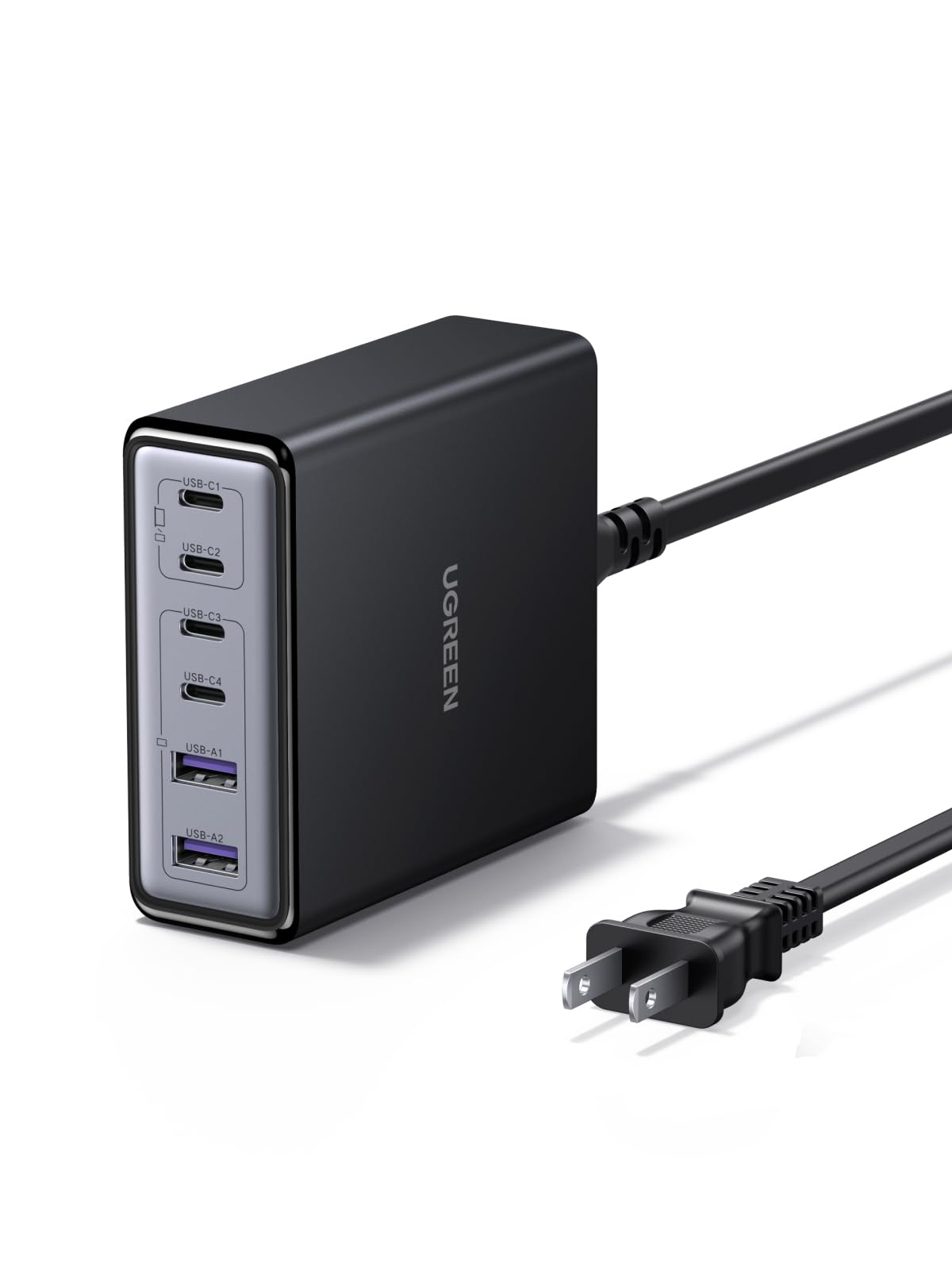
Image 1.1: UGREEN 100W GaN Desktop Charger, showcasing its compact design and multiple charging ports.
2. คุณสมบัติของผลิตภัณฑ์
- การชาร์จแบบ 6 พอร์ต: Equipped with 4 USB-C ports and 2 USB-A ports to charge multiple devices simultaneously.
- กำลังขับรวม 100W: Delivers a combined maximum output of 100W across all ports, intelligently distributing power.
- 65W Single Port Output: USB-C ports can deliver up to 65W individually, suitable for fast-charging laptops.
- เทคโนโลยี GaN: Utilizes Gallium Nitride (GaN) technology for a compact and efficient design.
- การออกแบบที่กะทัดรัด: Measures approximately 8.0 x 8.6 x 3.0 cm, saving desk space.
- การป้องกันความปลอดภัยหลายอย่าง: รวมกระแสเกิน, โวลท์เกินtage, short-circuit, overheating, overpower, dry-heat prevention, and undervoltagการป้องกันอี
- Thermal Guard (TG) Technology: Features real-time temperature monitoring for enhanced safety and longevity.
- ความเข้ากันได้กว้าง: Supports various fast charging protocols like PD3.0, QC4.0, PPS, AFC, SCP, UFCS, and FCP.
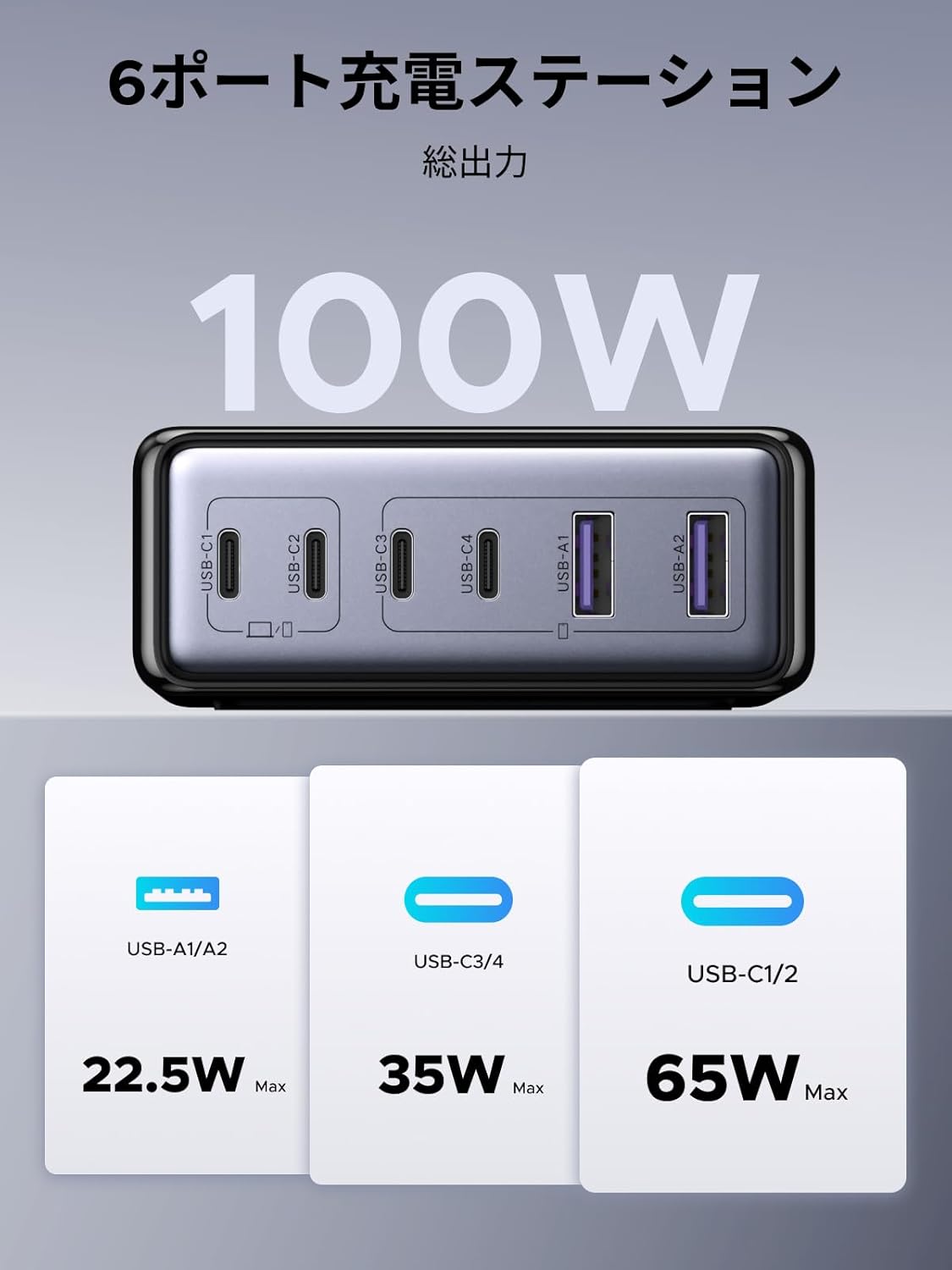
ภาพที่ 2.1: จบแล้วview of the 6-port charging station, illustrating the 100W total output and maximum power delivery for each port type (USB-A/A2: 22.5W Max, USB-C3/C4: 35W Max, USB-C1/C2: 65W Max).

Image 2.2: Depiction of the internal GaN chip and Thermal Guard technology, highlighting safety features such as overvoltage, overheating, overcurrent, and overcharge protection.
3. คำแนะนำในการตั้งค่า
- เชื่อมต่อกับพลังงาน: Plug the included AC power cable into the charger's power input port, then connect the other end to a wall outlet.
- เชื่อมต่ออุปกรณ์: ใช้สายชาร์จที่เหมาะสมเพื่อเชื่อมต่ออุปกรณ์ของคุณกับพอร์ต USB-C หรือ USB-A ที่มีอยู่บนเครื่องชาร์จ
- ตรวจสอบการชาร์จ: Ensure your devices display a charging indicator to confirm proper connection.

Image 3.1: The charger in use, demonstrating its ability to charge various devices simultaneously, such as a laptop, smartphone, smartwatch, and Nintendo Switch.
4. คู่มือการใช้งาน
The UGREEN 100W GaN Desktop Charger intelligently distributes power based on the connected devices' requirements. For optimal performance, consider the following:
- การชาร์จอุปกรณ์เดียว: When charging a single device, a USB-C port can deliver up to 65W, providing rapid charging for compatible laptops and other high-power devices.
- การชาร์จอุปกรณ์หลายเครื่อง: When multiple devices are connected, the charger's intelligent power management system dynamically allocates the total 100W output to each port. This ensures efficient charging for all connected devices.
- การกำหนดลำดับความสำคัญของพอร์ต: While the charger manages power automatically, connecting high-power devices (e.g., laptops) to USB-C1 or USB-C2 ports first may optimize their charging speed.
การจ่ายพลังงานไฟฟ้า Exampเลส:

ภาพที่ 4.1: อดีตamples of power distribution when one, two, or three ports are in use. For instance, with two USB-C ports, power might be split as 45W/20W or 20W/45W, or one port might receive 65W while another receives 35W.

ภาพที่ 4.2: ตัวอย่างเพิ่มเติมamples of power distribution when four, five, or all six ports are utilized. For example, with six ports, power might be distributed as 45W/20W, 20W/45W, 10W, 10W, 5W, 5W across the various USB-C and USB-A ports.
5. การบำรุงรักษา
- การทำความสะอาด: ถอดปลั๊กที่ชาร์จออกจากเต้าเสียบและอุปกรณ์ทั้งหมดก่อนทำความสะอาด ใช้ผ้านุ่มและแห้งเช็ดพื้นผิว ห้ามใช้น้ำยาทำความสะอาดหรือสเปรย์
- พื้นที่จัดเก็บ: เก็บที่ชาร์จไว้ในที่เย็นและแห้ง ห่างจากแสงแดดโดยตรงและอุณหภูมิที่สูงหรือต่ำเกินไป
- การจัดการ: หลีกเลี่ยงการทำตกหรือกระแทกที่ชาร์จอย่างแรง ห้ามถอดประกอบหรือดัดแปลงที่ชาร์จด้วยตนเอง
6 การแก้ไขปัญหา
- อุปกรณ์ไม่ชาร์จ:
- Ensure the charger is properly plugged into a working wall outlet.
- ตรวจสอบว่าสายชาร์จเชื่อมต่อกับเครื่องชาร์จและอุปกรณ์อย่างแน่นหนาหรือไม่
- ลองใช้สายชาร์จหรือพอร์ตชาร์จอื่นดู เพื่อตรวจสอบว่าปัญหาไม่ได้อยู่ที่สายชาร์จหรือพอร์ตชาร์จ
- ตรวจสอบให้แน่ใจว่าอุปกรณ์ของคุณใช้งานร่วมกับข้อกำหนดด้านกำลังไฟขาออกของที่ชาร์จได้
- การชาร์จช้า:
- ตรวจสอบให้แน่ใจว่าคุณใช้สายเคเบิลคุณภาพสูงที่รองรับการชาร์จด่วน
- ตรวจสอบข้อกำหนดด้านพลังงานของอุปกรณ์ของคุณ อุปกรณ์บางชนิดต้องการพลังงานสูงกว่าtage for optimal speed.
- If multiple devices are connected, the total 100W output is shared. Disconnecting some devices may increase charging speed for others.
- ชาร์จเจอร์รู้สึกอบอุ่น:
- It is normal for the charger to become warm during operation, especially when charging multiple devices or high-power devices.
- ตรวจสอบให้แน่ใจว่าได้วางเครื่องชาร์จไว้ในบริเวณที่มีอากาศถ่ายเทสะดวกและไม่ควรถูกคลุมไว้
- If the charger becomes excessively hot or emits smoke/unusual odors, immediately unplug it and contact support.
7. ข้อมูลจำเพาะ
| ยี่ห้อ | ยูกรีน |
| หมายเลขรุ่น | เอ็กซ์765 |
| ประเภทขั้วต่อ | USB ประเภท C, USB ประเภท A |
| อุปกรณ์ที่รองรับ | Laptops, iPhone 17-8 series, Galaxy S25-S10 series, Xperia, Pixel Pro, MacBook, iPad, Smartwatches, Gaming Consoles |
| อินพุต Voltage | 100V (ไฟฟ้ากระแสสลับ) |
| กระแสไฟขาออก | 5 Amps (สูงสุด) |
| ปริมาณการส่งออกtage | 20.0 โวลต์ (สูงสุด) |
| กำลังขับรวม | 100วัตต์ |
| จำนวนพอร์ต | 6 (4x USB-C, 2x USB-A) |
| ส่วนประกอบที่รวมอยู่ | คู่มือการใช้งาน |
| ต้นทาง | จีน |

Image 7.1: The charger's wide compatibility with devices such as MacBook Pro/Air, iPad Air/Mini/Pro, Dell, Galaxybook, Microsoft Surface, Google Pixel series, iPhone series, Galaxy series, AirPods/Pro, cameras, and gaming consoles.
8. การรับประกันและการสนับสนุน
ผลิตภัณฑ์ UGREEN ชิ้นนี้มาพร้อมกับ การรับประกันจากผู้ผลิต 24 เดือน ตั้งแต่วันที่ซื้อ การรับประกันนี้ครอบคลุมถึงข้อบกพร่องในวัสดุและฝีมือการผลิตภายใต้การใช้งานปกติ
ข้อยกเว้นการรับประกัน: The warranty does not cover damages caused by intentional misuse, unauthorized modifications, accidents, or improper handling by the customer or third parties.
For warranty claims, technical support, or any inquiries regarding your UGREEN 100W GaN Desktop Charger, please contact the seller or UGREEN customer service through their official website or the platform where the product was purchased. Please retain your proof of purchase for warranty validation.