
การแนะนำ
Thank you for choosing the Irfora Multifunction Bamboo 12-Digit Calculator. This eco-friendly calculator combines classic design with modern functionality, featuring a durable bamboo casing and dual power source. This manual provides essential information for setting up, operating, and maintaining your calculator to ensure optimal performance.

รูปที่ 1 : ด้านหน้า view of the Irfora Bamboo Calculator, showcasing its natural bamboo finish and large LCD display.
1. การตั้งค่า
1.1 การแกะกล่อง
Carefully remove the calculator from its packaging. Inspect the device for any signs of damage. Retain the packaging for future storage or transport.
1.2 การเปิดเครื่อง
The calculator features a dual power system: solar and button battery. It automatically switches between power sources for efficient operation.
- พลังงานแสงอาทิตย์: Place the calculator in a well-lit area. The solar panel will convert light into energy, powering the device.
- พลังงานแบตเตอรี่: In low-light conditions, the calculator will automatically switch to button battery power.
- หากต้องการเปิดเครื่องคิดเลข ให้กดปุ่ม ON/C/CE or AC สำคัญ.

รูปที่ 2: มุม view of the Irfora Bamboo Calculator, showing the solar panel and LCD display.
2. คู่มือการใช้งาน
The calculator features 29 large, comfortable keys with carved numbers that are designed not to fade over time.
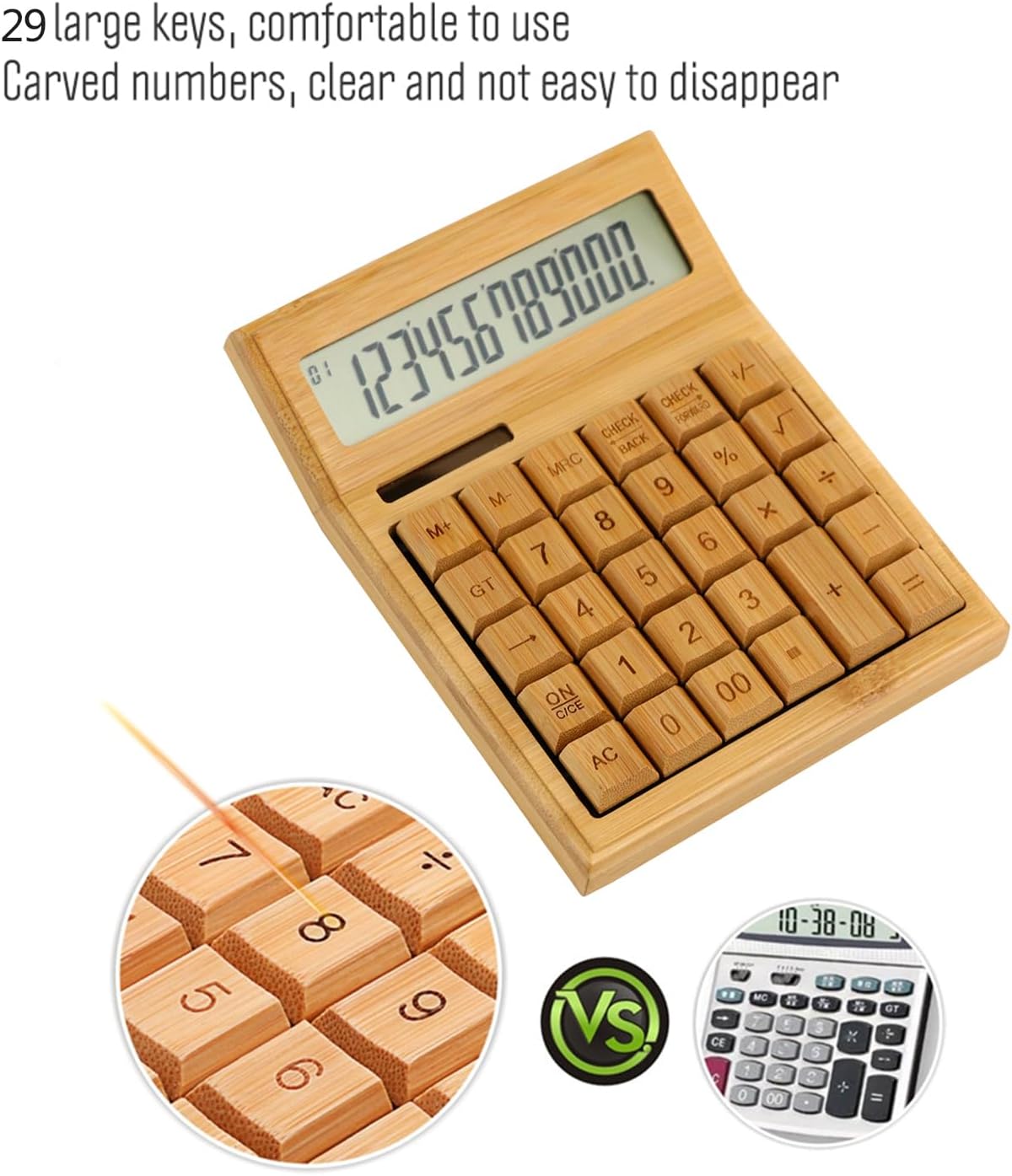
รูปที่ 3: ระยะใกล้ view highlighting the large, carved bamboo keys for comfortable and durable use.
2.1 การดำเนินการทางคณิตศาสตร์พื้นฐาน
Perform standard calculations using the following keys:
- + (ส่วนที่เพิ่มเข้าไป)
- - (การลบ)
- × (การคูณ)
- ÷ (แผนก)
- = (เท่ากับ)
2.2 ฟังก์ชันหน่วยความจำ
The calculator includes memory functions for complex calculations:
- M+: เพิ่มค่าที่แสดงลงในหน่วยความจำ
- M-: ลบค่าที่แสดงออกจากหน่วยความจำ
- เอ็มอาร์ซี: Recalls the memory value. Pressing twice clears the memory.
2.3 ฟังก์ชั่นพิเศษ
- % (เปอร์เซ็นtage): Calculates percentagใช่
- √ (Square Root): Calculates the square root of the displayed number.
- - (Sign Change): Changes the sign of the displayed number (positive to negative, or vice versa).
- AC (All Clear): Clears all entries and memory.
- ON/C/CE (On/Clear Entry): Turns on the calculator. When on, clears the last entry. Pressing twice clears all entries.

Figure 4: A hand demonstrating the use of the calculator for daily tasks.
2.4 การปิดเครื่องอัตโนมัติ
To conserve energy, the calculator will automatically power off after approximately 12 minutes of inactivity. Press ON/C/CE or AC เพื่อเปิดใช้งานอีกครั้ง
3. การบำรุงรักษา
3.1 การทำความสะอาด
To clean the calculator, gently wipe the surface with a soft, dry cloth. For stubborn dirt, a slightly damp สามารถใช้ผ้าเช็ดทำความสะอาดได้ แต่ต้องระวังอย่าให้ความชื้นเข้าไปในตัวเครื่อง หลีกเลี่ยงการใช้สารเคมีรุนแรงหรือน้ำยาทำความสะอาดที่มีฤทธิ์กัดกร่อน
3.2 พื้นที่จัดเก็บ
Store the calculator in a cool, dry place away from direct sunlight and extreme temperatures. Prolonged exposure to direct sunlight can affect the bamboo finish.
3.3 การเปลี่ยนแบตเตอรี่
The calculator uses a button battery (type not specified, typically AG10 or LR1130). If the display becomes dim or unresponsive in low light, the battery may need replacement. Consult a qualified technician or refer to the product packaging for specific battery type and replacement instructions. Improper battery replacement can damage the device.
4 การแก้ไขปัญหา
| ปัญหา | สาเหตุที่เป็นไปได้ | สารละลาย |
|---|---|---|
| จอแสดงผลว่างเปล่าหรือมืดลง | แสงสว่างไม่เพียงพอสำหรับการใช้พลังงานแสงอาทิตย์ หรือแบตเตอรี่เหลือน้อย | Move the calculator to a brighter area. If the problem persists, the button battery may need replacement. |
| เครื่องคิดเลขไม่เปิดใช้งาน | No power, or device is in auto-off mode. | Ensure adequate light for solar power. Press ON/C/CE or AC. If still unresponsive, replace the button battery. |
| ผลการคำนวณไม่ถูกต้อง | Incorrect key input, or temporary internal error. | กด AC to clear all entries and restart the calculation. Double-check your input. |
5. ข้อมูลจำเพาะ
- ยี่ห้อ: อิรฟอร่า
- แบบอย่าง: LAKJPOS0867
- แสดง: จอ LCD ขนาดใหญ่ 12 หลัก
- แหล่งพลังงาน: Dual Power (Solar & Button Battery)
- คีย์: 29 Bamboo Keys with Carved Numbers
- ฟังก์ชั่น: Basic Arithmetic, Square Root, Percentage, Memory (M+, M-, MRC), Sign Change
- ปิดเครื่องอัตโนมัติ: Approximately 12 minutes of inactivity
- ขนาดสินค้า : 19 x 14 x 4 ซม. (ประมาณ 7.5 x 5.5 x 1.6 นิ้ว)
- น้ำหนักผลิตภัณฑ์: 295 กรัม (ประมาณ 0.65 ปอนด์)
6. การรับประกันและการสนับสนุน
For warranty information and customer support, please refer to the documentation included with your purchase or contact your retailer. Keep your proof of purchase for any warranty claims.
หากต้องการความช่วยเหลือเพิ่มเติม โปรดไปที่ Irfora brand page on Amazon.co.jp.