
1. สินค้าหมดview
The ORIA Bluetooth 5.3 Adapter (Model CP326) is a versatile 2-in-1 device functioning as both a Bluetooth transmitter and receiver. It enables wireless audio streaming for a wide range of devices, from traditional wired systems to modern Bluetooth headphones and speakers. Featuring Bluetooth 5.3 technology and aptX Low Latency support, it ensures stable, high-quality audio with minimal delay.
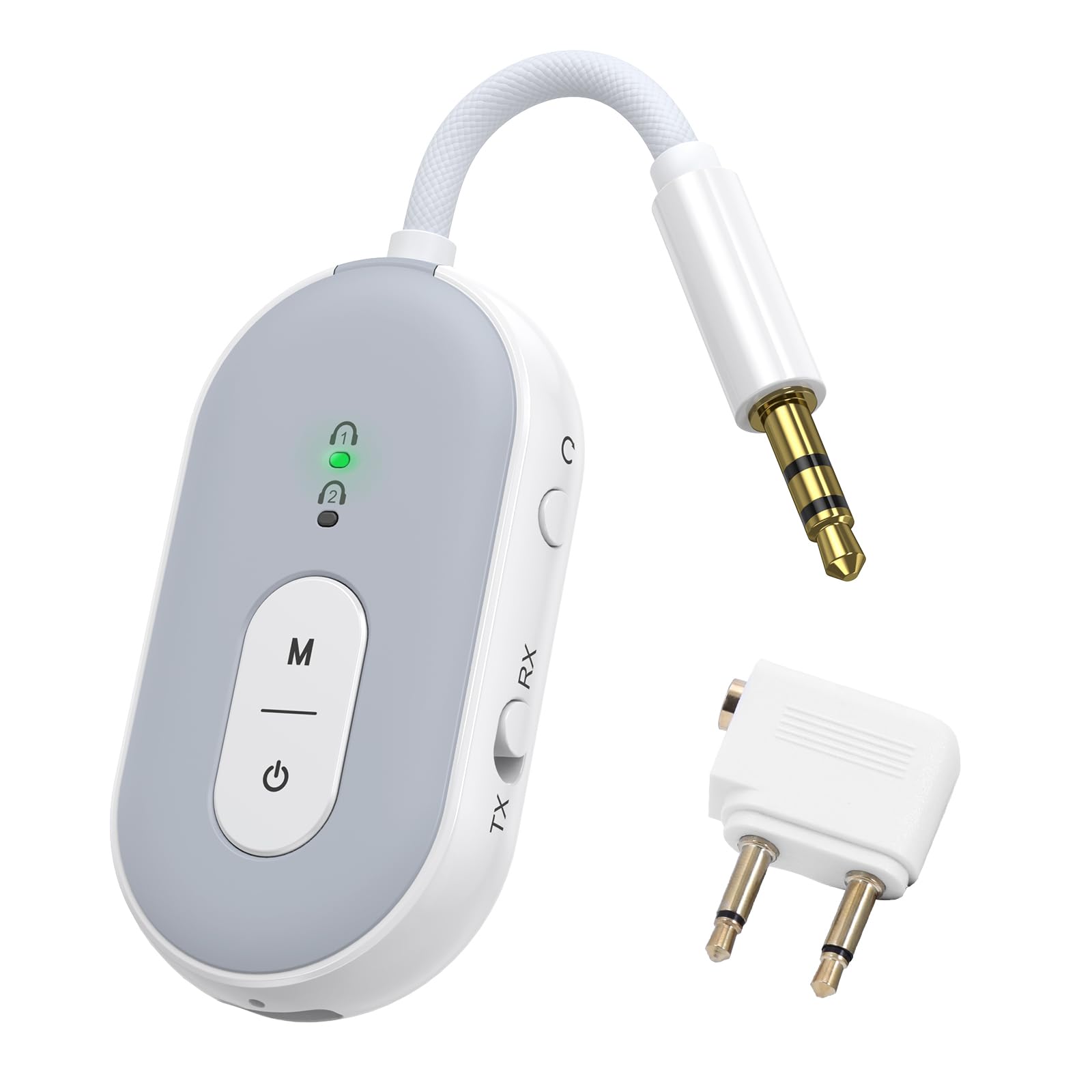
Image: The ORIA Bluetooth 5.3 Adapter, a compact and versatile audio device.
เนื้อหาแพ็คเกจ
เมื่อแกะกล่อง โปรดตรวจสอบให้แน่ใจว่าสินค้าครบถ้วน:
- ORIA Bluetooth Adapter (Model CP326)
- คู่มือการใช้งาน (เอกสารนี้)
- สายชาร์จ Type-C
- Airplane Headphone Adapter (dual-pin)
- 3.5mm Female Coupler
- RCA Cable (Red/White to 3.5mm)

Image: The ORIA Bluetooth 5.3 Adapter and its included accessories, such as the Type-C charging cable, airplane adapter, 3.5mm female coupler, and RCA cable.
วิดีโอ: จบแล้วview of the ORIA Bluetooth 5.3 Adapter and its accessories, demonstrating its compact design and included cables for various connections.
2. การจัดวางอุปกรณ์และการควบคุม
Familiarize yourself with the adapter's components and controls:

Image: Labeled diagram showing the TX/RX mode select button, reset button, audio cable, charging indicator, Type-C charging interface, connection lights (1 and 2), function button (M), and power button.
- TX/RX Mode Select Button: Slide to switch between Transmitter (TX) and Receiver (RX) modes.
- ปุ่มเปิด/ปิด: กดค้างไว้ 4 วินาทีเพื่อเปิด/ปิด
- ปุ่มฟังก์ชัน (M): Used for dual pairing in TX mode.
- Connection Lights (1 & 2): Indicate pairing status and connected devices.
- ไฟแสดงสถานะการชาร์จ: แสดงสถานะการชาร์จ
- อินเทอร์เฟซการชาร์จ Type-C: สำหรับเชื่อมต่อสายชาร์จ Type-C
- สายสัญญาณเสียง: Integrated 3.5mm audio jack for connecting to audio sources/receivers.
- ปุ่มรีเซ็ต: ปุ่มรูเล็กๆ สำหรับรีเซ็ตอุปกรณ์
3. การชาร์จอุปกรณ์
Before initial use, fully charge the ORIA Bluetooth Adapter.
- Connect the provided Type-C charging cable to the adapter's Type-C charging interface.
- เชื่อมต่อปลายสายอีกด้านหนึ่งเข้ากับแหล่งพลังงาน USB (เช่น พอร์ต USB ของคอมพิวเตอร์ อะแดปเตอร์ติดผนัง USB)
- The charging indicator light will illuminate during charging. It will turn off or change color (depending on model) once fully charged.
A full charge takes approximately 2 hours and provides up to 16 hours of use in TX mode or 18 hours in RX mode.

Image: Diagram illustrating the battery life (16 hours TX, 18 hours RX) and charging time (2 hours for 300mAh battery).
4. Operating Modes and Connection
4.1 โหมดส่งสัญญาณ (TX)
In TX mode, the adapter transmits audio from a non-Bluetooth device (e.g., TV, computer, airplane entertainment system) to Bluetooth headphones or speakers.
- สลับไปที่โหมด TX: Slide the TX/RX switch to the "TX" position.
- เปิดเครื่อง: Press and hold the power button for 4 seconds to turn on the adapter. The indicator light will flash green, indicating pairing mode.
- เชื่อมต่อกับแหล่งเสียง: Plug the adapter's 3.5mm audio jack into the audio output port of your non-Bluetooth device. For airplane entertainment systems, use the provided airplane headphone adapter if necessary.
- เชื่อมต่อกับหูฟัง/ลำโพงบลูทูธ: ใส่หูฟังหรือลำโพง Bluetooth ของคุณเข้าสู่โหมดจับคู่
- เชื่อมต่อ: The adapter will automatically search for and connect to nearby Bluetooth audio devices. Once connected, the indicator light 1 will stay green.
- Dual Pairing (Optional): To connect a second pair of Bluetooth headphones/speakers, press the "M" (Function) button after the first device is connected. Put the second device into pairing mode. Both indicator lights will stay green when two devices are paired.

Image: Visual guide demonstrating the steps to connect the ORIA adapter in Transmitter (TX) mode, including switching the mode, powering on, and pairing with Bluetooth headphones for in-flight entertainment.
Note: Turn off other Bluetooth devices nearby to avoid interference during pairing.

Image: Illustration of the dual pairing capability, allowing two sets of Bluetooth headphones to connect simultaneously to a single audio source via the adapter.

Image: The ORIA Bluetooth 5.3 Adapter connected to an airplane's in-flight entertainment system, enabling wireless audio streaming to personal Bluetooth earbuds.
4.2 โหมดรับสัญญาณ (RX)
In RX mode, the adapter receives audio from a Bluetooth-enabled device (e.g., smartphone, tablet) and outputs it to a non-Bluetooth audio system (e.g., wired speakers, car stereo, HiFi system).
- สลับไปที่โหมด RX: Slide the TX/RX switch to the "RX" position.
- เปิดเครื่อง: Press and hold the power button for 4 seconds to turn on the adapter. The indicator light will flash green, indicating pairing mode.
- Connect to Audio Receiver: Plug the adapter's 3.5mm audio jack into the AUX input of your wired speakers, car stereo, or HiFi system. Use the provided RCA cable if your audio system requires RCA inputs.
- จับคู่กับอุปกรณ์บลูทูธ: On your smartphone, tablet, or other Bluetooth-enabled device, go to Bluetooth settings and search for "BT-20" (or similar device name). Select it to connect.
- เชื่อมต่อ: Once connected, the indicator light 1 will stay green.

Image: Visual guide demonstrating the steps to connect the ORIA adapter in Receiver (RX) mode, including switching the mode, powering on, and pairing with a smartphone to stream audio to a wired speaker or car stereo.

Image: The ORIA Bluetooth 5.3 Adapter connected to a wired speaker, receiving audio wirelessly from a smartphone, demonstrating its use in RX mode for home audio or car stereos.

Image: The ORIA Bluetooth 5.3 Adapter connected to wired headphones via a 3.5mm female coupler, allowing a smartphone to stream audio wirelessly to the wired headphones.
5. คุณสมบัติขั้นสูง
5.1 aptX Low Latency Technology
The ORIA Bluetooth 5.3 Adapter supports aptX-Adaptive and aptX Low Latency codecs. When paired with aptX-enabled Bluetooth headphones or speakers, it significantly reduces audio delay, providing synchronized sound for video and gaming. This ensures a smooth and immersive experience.

Image: Diagram illustrating the supported audio codecs (SBC, aptX, aptX-LL, aptX-HD, aptX Adaptive) for both TX and RX modes, highlighting low latency and high-fidelity audio transmission.
Note: Both the adapter and your Bluetooth audio device must support aptX for optimal low latency performance. Not compatible with S-O-N-Y series devices (LDAC).
5.2 การเชื่อมต่อที่เสถียร
Equipped with a Bluetooth 5.3 chip, the adapter offers faster pairing and stronger interference resistance. It maintains a stable Bluetooth connection up to 100 meters (328 feet) in open environments, ensuring consistent audio whether you are across a room or on the go.

Image: Visual representation of Bluetooth 5.3 technology, emphasizing faster connection and more stable transmission compared to older Bluetooth versions.
6. การบำรุงรักษาและการดูแล
- เก็บอุปกรณ์ให้แห้ง หลีกเลี่ยงการสัมผัสกับความชื้นหรือของเหลว
- ทำความสะอาดอุปกรณ์ด้วยผ้านุ่มและแห้ง ห้ามใช้สารเคมีรุนแรงหรือน้ำยาทำความสะอาดที่มีฤทธิ์กัดกร่อน
- เก็บอุปกรณ์ไว้ในที่แห้งและเย็นเมื่อไม่ใช้งาน
- หลีกเลี่ยงอุณหภูมิที่สูงหรือต่ำเกินไป
- ห้ามถอดประกอบหรือซ่อมแซมอุปกรณ์ด้วยตนเอง การกระทำดังกล่าวจะทำให้การรับประกันเป็นโมฆะ
- Always follow battery handling and disposal guidelines for lithium-ion batteries.
7 การแก้ไขปัญหา
| ปัญหา | สาเหตุที่เป็นไปได้ | สารละลาย |
|---|---|---|
| อุปกรณ์ไม่เปิดเครื่อง | แบตเตอรี่อ่อน | Charge the device for at least 2 hours using the provided Type-C cable. |
| ไม่สามารถจับคู่กับอุปกรณ์บลูทูธได้ |
|
|
| Audio quality is poor or delayed. |
|
|
| ไม่มีเสียง. |
|
|
| Not compatible with S-O-N-Y devices (LDAC). | Inherent compatibility limitation. | The adapter does not support LDAC codec used by some S-O-N-Y devices. No workaround available. |
8. ข้อมูลจำเพาะ
| คุณสมบัติ | รายละเอียด |
|---|---|
| ชื่อรุ่น | ซีพี326 |
| เวอร์ชันบลูทูธ | บลูทูธ 5.3 |
| มาตรฐานที่รองรับ | aptX-Adaptive, aptX-Low Latency |
| เทคโนโลยีการเชื่อมต่อ | อ๊อกซ์ |
| โหมดการทำงาน | เครื่องส่ง (TX), เครื่องรับ (RX) |
| การเชื่อมต่อคู่ | Yes (2 Bluetooth headphones/speakers simultaneously) |
| อายุการใช้งานแบตเตอรี่ (โหมดส่งสัญญาณ) | นานถึง 16 ชั่วโมง |
| อายุการใช้งานแบตเตอรี่ (โหมดรับสัญญาณ) | นานถึง 18 ชั่วโมง |
| เวลาในการชาร์จ | ประมาณ 2 ชั่วโมง (Type-C) |
| ช่วงสาย | สูงถึง 100 เมตร (สภาพแวดล้อมแบบเปิด) |
| น้ำหนักสินค้า | 0.08 กิโลกรัม |
| อุปกรณ์ที่รองรับ | Car Radios, Cell Phones, Headphones, Home Stereo Systems, Television, Bluetooth-enabled devices |
| อินพุตเสียง | อ๊อกซ์ 3.5มม. |
| โหมดเอาต์พุตเสียง | สเตอริโอ |
| วิธีการควบคุม | ปุ่มกด |
9. การรับประกันและการสนับสนุน
The ORIA Bluetooth 5.3 Adapter (Model CP326) comes with a รับประกัน 1 ปี ตั้งแต่วันที่ซื้อสินค้า
For technical support, warranty claims, or further assistance, please contact ORIA customer service through the retailer where the product was purchased or visit the official ORIA webเว็บไซต์.
โปรดเก็บหลักฐานการซื้อไว้เพื่อใช้ยืนยันการรับประกัน