
1. บทนำ
The TELE System TS4020 PRO is an advanced and versatile digital decoder designed for receiving both terrestrial and satellite television broadcasts. It features dual DVB-T/T2 and DVB-S/S2 tuners, supporting HEVC HD, HDR10, and HLG for high-quality video. This device allows access to a wide range of free-to-air TV and radio channels without a subscription. Additionally, its USB port enables media playback of music, photos, and videos, transforming the decoder into a home entertainment hub.
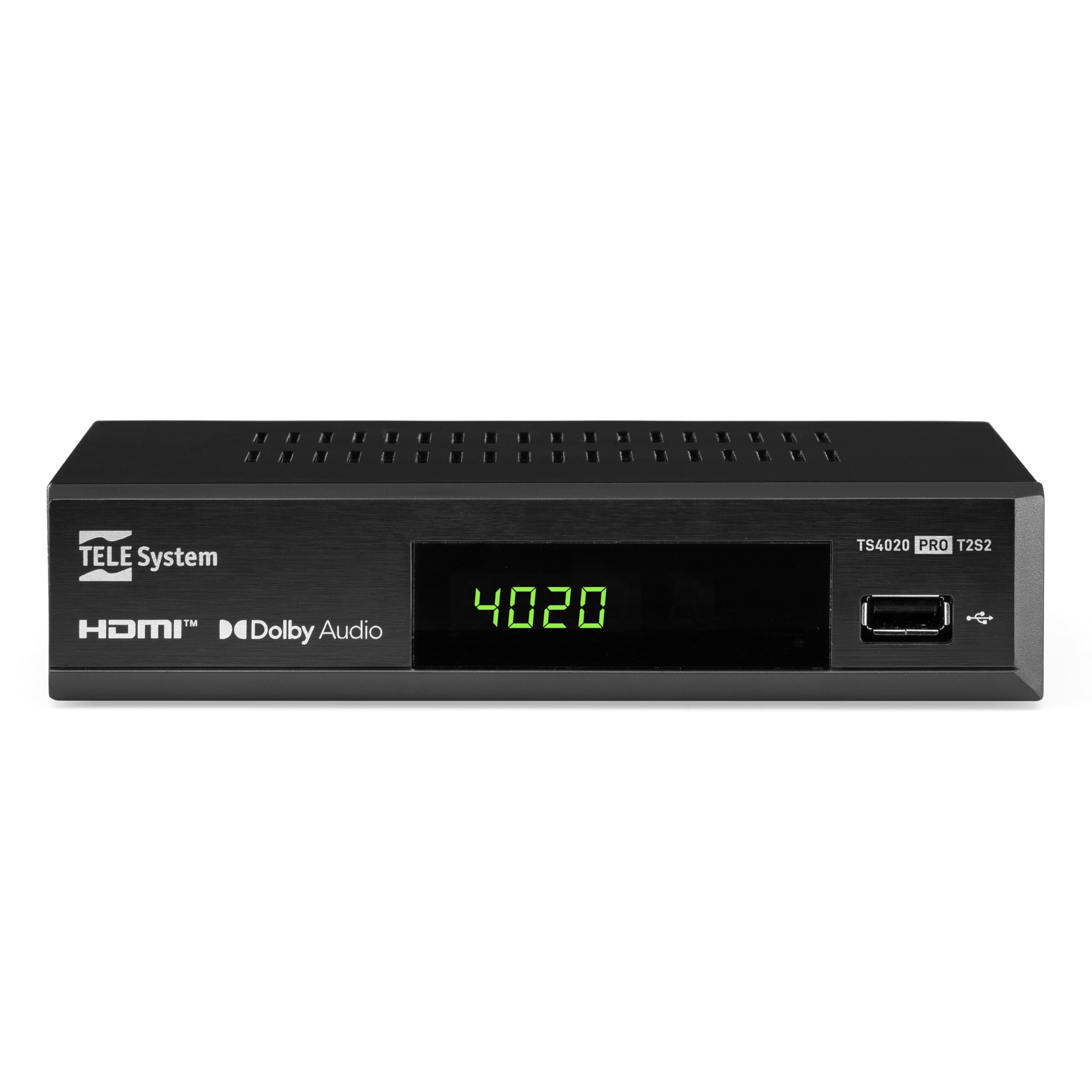
Figure 1: Tele System TS4020 PRO Decoder and included remote control.
2. การตั้งค่า
2.1 การแกะกล่องและส่วนประกอบ
แกะสิ่งของทั้งหมดออกจากกล่องอย่างระมัดระวัง ตรวจสอบให้แน่ใจว่ามีส่วนประกอบต่อไปนี้ครบถ้วน:
- Tele System TS4020 PRO Decoder
- รีโมทคอนโทรล
- อะแดปเตอร์ไฟภายนอก
- คู่มือการใช้งาน (เอกสารนี้)
2.2 การเชื่อมต่อตัวถอดรหัส
Follow these steps to connect your decoder to your television and antenna/satellite dish.
- การเชื่อมต่อไฟฟ้า: Connect the external power adapter to the DC 12V input on the back of the decoder, then plug it into a power outlet.
- การเชื่อมต่อ HDMI: Use an HDMI cable to connect the HDMI OUT port on the decoder to an available HDMI input on your television.
- Antenna Connection (for DVB-T/T2): เชื่อมต่อสายเคเบิลเสาอากาศภาคพื้นดินของคุณเข้ากับ... RF ใน port on the back of the decoder.
- Satellite Connection (for DVB-S/S2): Connect your satellite dish cable to the นั่งใน port on the back of the decoder.
- การเชื่อมต่อเสริม:
- สการ์ต: For older televisions, connect a SCART cable from the TV SCART port on the decoder to your TV. Note that 4K resolution is not supported via SCART.
- เสียงโคแอกเซียล: For digital audio output, connect a coaxial audio cable from the COAXIAL port to your audio receiver.
- ยูเอสบี: For media playback, insert a USB drive into the USB port on the front or back of the decoder.

Figure 2: Rear panel connections of the TS4020 PRO decoder, including SAT IN, RF IN, Coaxial, HDMI, and TV SCART ports.
2.3 การตั้งค่าเริ่มต้นและการสแกนช่องสัญญาณ
After connecting the decoder, turn on your television and select the correct HDMI input. The decoder should power on automatically or can be turned on using the remote control.
- ทำตามคำแนะนำบนหน้าจอสำหรับการตั้งค่าเริ่มต้น
- เลือกภาษาและภูมิภาคที่คุณต้องการ
- The decoder features an ออโต้สแกน function for quick and easy automatic channel searching and sorting for both terrestrial and satellite channels. Initiate the scan when prompted.
- Once the scan is complete, your decoder is ready for use.
3. คู่มือการใช้งาน
3.1 ฟังก์ชั่นการควบคุมระยะไกล
The TELE System TS4020 PRO comes with a unique remote control designed to manage both the decoder and your television. It features programmable keys for added convenience.

Figure 3: Layout of the TS4020 PRO remote control.
- ปุ่มเปิด/ปิด: เปิด/ปิดตัวถอดรหัส
- AV/TV: สลับแหล่งสัญญาณเข้าของทีวี
- ฉบับ+/ฉบับ-: ปรับระดับเสียง
- PROG+/PROG-: เปลี่ยนช่อง
- DTT/SAT: Switches between terrestrial and satellite modes.
- เมนู: เข้าสู่เมนูหลัก
- ตกลง: ยืนยันการเลือก
- ปุ่มลูกศร: Navigates menus and EPG.
- ข้อมูล: แสดงข้อมูลโปรแกรม
- อีพีจี: คู่มือโปรแกรมอิเล็กทรอนิกส์
- การควบคุมเครื่องเล่นสื่อ: เล่น, หยุดชั่วคราว, หยุด, กรอไปข้างหน้า, กรอถอยหลัง
- Programmable TV Control Keys: These keys (usually at the top) can be programmed to control basic TV functions like power, volume, and input. Refer to the remote control section in the full manual for programming instructions.
3.2 ช่อง Viewing and Selection
ใช้ โปรแกรม+ และ โปรเกร- buttons to navigate through channels. Press OK ถึง view the channel list and select a channel directly. Use the DTT/SAT button to switch between terrestrial (DVB-T/T2) and satellite (DVB-S/S2) channel lists.
3.3 การเล่นสื่อผ่าน USB
The decoder supports media playback from a USB storage device.
- Insert a USB flash drive or external hard drive into the USB port.
- Access the Media Player function from the main menu.
- นำทางผ่านของคุณ files to play music, view photos, or watch videos.
3.4 HDR Quality
The TS4020 PRO is compatible with HDR10 and HLG standards, providing enhanced image quality with improved color rendering and visual depth, especially for content with high dynamic range. Ensure your television also supports HDR10 or HLG for the best viewการสร้างประสบการณ์
4. การบำรุงรักษา
- การทำความสะอาด: Use a soft, dry cloth to clean the decoder's exterior. Do not use liquid cleaners or abrasive materials.
- การระบายอากาศ : Ensure the decoder has adequate ventilation. Do not block the ventilation openings.
- การอัปเดตซอฟต์แวร์: Periodically check for available software updates through the decoder's menu (if supported). Software updates can improve performance and add new features. Information regarding guaranteed software updates is not available.
- พื้นที่จัดเก็บ: หากต้องเก็บรักษาอุปกรณ์เป็นเวลานาน ควรตัดการเชื่อมต่อจากแหล่งจ่ายไฟและเก็บไว้ในที่แห้งและเย็น
5 การแก้ไขปัญหา
If you encounter issues with your Tele System TS4020 PRO, refer to the following common problems and solutions:
| ปัญหา | สาเหตุที่เป็นไปได้ | สารละลาย |
|---|---|---|
| ไม่มีไฟฟ้า | ไม่ได้เชื่อมต่ออะแดปเตอร์ไฟหรือเต้ารับไฟฟ้าชำรุด | Ensure the power adapter is securely connected to the decoder and a working power outlet. |
| ไม่มีภาพ/เสียงบนทีวี | Incorrect TV input selected, loose HDMI/SCART cable. | Select the correct HDMI/AV input on your TV. Check that the HDMI or SCART cable is securely connected at both ends. |
| No channels found or poor signal | Antenna/satellite dish not connected, misaligned, or damaged. | Check antenna/satellite cable connections. Ensure your antenna/dish is properly aligned. Perform an AUTOSCAN again. |
| รีโมตคอนโทรลไม่ทำงาน | แบตเตอรี่หมด, สิ่งกีดขวาง หรือรีโมทอยู่นอกระยะ | Replace batteries. Ensure no obstructions between the remote and the decoder. Point the remote directly at the decoder. |
| HDMI output not compatible with TV | Specific TV model incompatibility. | If available, try using the SCART connection for video output. Note that 4K resolution is not supported via SCART. |
| Date resets to 1970 after reset | Internal clock issue or software bug. | Check for available software updates. If the issue persists, contact customer support. |
6. ข้อมูลจำเพาะ
| หมายเลขรุ่น | 21005355 |
| ยี่ห้อ | ระบบเทเล |
| เทคโนโลยีการเชื่อมต่อ | USB, Power, HDMI, SCART, RF IN, SAT IN, Coaxial |
| โหมดเอาต์พุตเสียง | ล้อมรอบ |
| พอร์ต HDMI ทั้งหมด | 1 |
| อุปกรณ์ที่รองรับ | โทรทัศน์ |
| รูปแบบเสียงที่รองรับ | ดอลบี ดิจิตอล, ดีทีเอส, เอเอซี, MP3, พีซีเอ็ม |
| เล่มที่tage | 12 โวลต์ (กระแสตรง) |
| ความละเอียดเอาท์พุทวิดีโอ | 1080p |
| มาตรฐานที่รองรับ | DVB-T2, DVB-S2, H.265, HDR10, HLG, MP3, AAC |
| อัตราส่วนภาพ | 16:9 น. |
| สี | สีดำ |
| ประเทศต้นกำเนิด | จีน |
7. ข้อมูลการรับประกัน
The Tele System TS4020 PRO decoder comes with a การรับประกันจากผู้ผลิต 2 ปี. Please retain your proof of purchase for warranty claims. For specific terms and conditions, refer to the warranty card included with your product or contact Tele System customer support.
8. การสนับสนุนลูกค้า
For further assistance, technical support, or inquiries regarding your Tele System TS4020 PRO decoder, please visit the official Tele System webเว็บไซต์หรือติดต่อฝ่ายบริการลูกค้าของพวกเขา
Note: Information regarding the availability of spare parts for this product is currently unavailable.