
1. บทนำ
This manual provides essential instructions for the safe and efficient operation of your Hepway Alpha 2000 Portable Power Station. Please read this manual thoroughly before using the product and retain it for future reference. The Hepway Alpha 2000 is designed for standalone use and does not support external extension batteries.

Image 1.1: Hepway Alpha 2000 Portable Power Station. This image displays the main unit of the power station, showcasing its compact design and front panel with display and ports.
2. คำแนะนำด้านความปลอดภัย
เพื่อให้การใช้งานปลอดภัย โปรดปฏิบัติตามข้อควรระวังพื้นฐานเหล่านี้เสมอ:
- อย่าถอดประกอบซ่อมแซมหรือดัดแปลงเครื่อง
- อย่าวางเครื่องไว้ใกล้แหล่งความร้อนหรือในที่ที่มีแสงแดดส่องโดยตรง
- Do not operate the unit in wet conditions or immerse it in water.
- ใช้เฉพาะอุปกรณ์เสริมและที่ชาร์จที่ผ่านการรับรองเท่านั้น
- เก็บเครื่องให้ห่างจากเด็กและสัตว์เลี้ยง
- ตรวจสอบให้แน่ใจว่ามีการระบายอากาศที่เหมาะสมระหว่างการใช้งานเพื่อป้องกันความร้อนสูงเกินไป
- หลีกเลี่ยงการทำตกหรือให้เครื่องได้รับแรงกระแทกรุนแรง
- ในกรณีเกิดเพลิงไหม้ ให้ใช้ถังดับเพลิงชนิดผงแห้ง
- This product is for standalone use only and does not support connection to external extension batteries.
3. เนื้อหาบรรจุภัณฑ์
ตรวจสอบว่ามีรายการทั้งหมดรวมอยู่ในแพ็คเกจของคุณ:
- Hepway Alpha 2000 Portable Power Station
- สายชาร์จ AC
- Car Charger to XT60 Cable
- MC4 to XT60 Cable (for solar charging)
- คู่มือการใช้งาน (เอกสารนี้)
4. คุณสมบัติและส่วนประกอบของผลิตภัณฑ์
The Hepway Alpha 2000 is equipped with various ports and features for versatile power delivery.

Image 4.1: Detailed Port Diagram. This diagram labels the various input and output ports on the Hepway Alpha 2000, including AC input, XT60 solar input, car charging input, AC outlets, USB-A ports, USB-C ports, wireless charging pads, and car power output. It also indicates the charging speed switch, overload protection switch, LED light, and reset button.
4.1 คุณสมบัติที่สำคัญ:
- E-Stream Fast Charging: Recharges the unit in approximately 1.3 hours via AC or 2.5 hours via 800W solar input.
- การควบคุมแอพอัจฉริยะ: Monitor and manage the power station via Wi-Fi or Bluetooth using the Cozylife app.
- 13 Versatile Outputs: Includes 4 AC outlets, 4 USB-A ports, 2 100W USB-C ports, 2 wireless charging pads, and 1 car power output.
- แบตเตอรี่ LiFePO4: Offers over 3000 charge cycles for extended lifespan.
- ฟังก์ชั่น UPS: Provides uninterruptible power to connected appliances within 30ms during grid failures.
5. การตั้งค่า
5.1 ค่าบริการเริ่มต้น
Before first use, fully charge the Hepway Alpha 2000. Connect the AC charging cable to the AC Input Port on the unit and then to a standard wall outlet. The display will indicate charging status. A full charge takes approximately 1.3 hours.

Image 5.1: AC Fast Charging. This image demonstrates the power station being charged via an AC wall outlet, highlighting the rapid charging capability.
5.2 การติดตั้งแอป (ทางเลือก)
For remote monitoring and control, download the Cozylife app from your smartphone's app store. Follow the in-app instructions to connect your Hepway Alpha 2000 via Wi-Fi or Bluetooth.

Image 5.2: App Control Interface. This image shows the Hepway Alpha 2000 next to a smartphone displaying the Cozylife app interface, illustrating remote monitoring and control capabilities.
6. คู่มือการใช้งาน
6.1 การเปิด/ปิดเครื่อง
- ในการเปิดเครื่อง ให้กดปุ่มเปิด/ปิดหลักค้างไว้จนกว่าหน้าจอจะสว่างขึ้น
- หากต้องการปิดเครื่อง ให้กดปุ่มเปิด/ปิดหลักค้างไว้จนกว่าหน้าจอจะดับลง
6.2 การชาร์จสถานีไฟฟ้า
The Alpha 2000 can be recharged using three methods:
- การชาร์จไฟ AC: Connect the AC charging cable to the AC Input Port and a wall outlet. Max 1800W.
- การชาร์จพลังงานแสงอาทิตย์: Connect compatible solar panels (10V-100V, 8A, 800W Max) to the XT60 Input Port using the MC4 to XT60 cable.
- การชาร์จไฟรถยนต์: Connect the car charger to XT60 cable to the XT60 Input Port and your vehicle's 12V/24V car outlet.
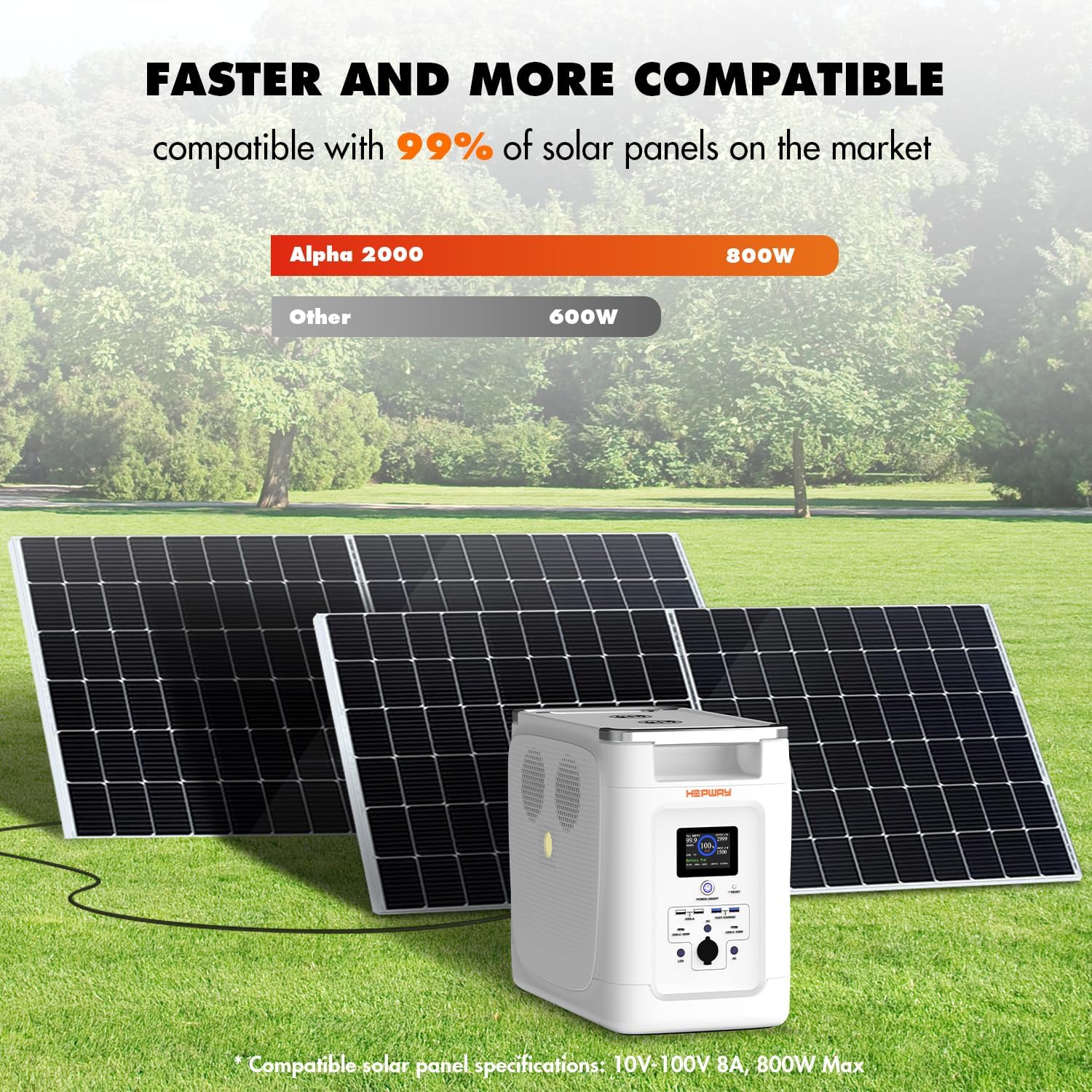
Image 6.1: Solar Panel Charging Setup. This image illustrates the Hepway Alpha 2000 connected to solar panels for recharging, demonstrating its compatibility with various solar inputs.
6.3 Using the Outputs
- เต้ารับไฟฟ้ากระแสสลับ: Press the AC power button to enable the 120V AC outlets. Connect your devices.
- พอร์ต USB: USB-A and USB-C ports are typically active when the unit is on. Connect your USB-powered devices.
- การชาร์จแบบไร้สาย: Place compatible devices on the wireless charging pads.
- กำลังขับรถยนต์: Connect 12V devices to the car power output port.

Image 6.2: Powering Various Appliances. This image illustrates the Hepway Alpha 2000 powering common household appliances like a microwave, coffee maker, and refrigerator, demonstrating its capacity for daily use.
6.4 ฟังก์ชันแหล่งจ่ายไฟสำรอง (UPS)
When the Alpha 2000 is connected to an AC wall outlet and has devices plugged into its AC outputs, it can function as an Uninterruptible Power Supply. In the event of a power outage, the unit will automatically switch to battery power within 30 milliseconds, providing continuous power to connected devices.

Image 6.3: UPS Functionality. This image depicts the power station connected to a wall outlet and powering a refrigerator and an aquarium, illustrating its role in providing backup power during an outage.
7. การบำรุงรักษา
- พื้นที่จัดเก็บ: เก็บอุปกรณ์ไว้ในที่แห้งและเย็น หลีกเลี่ยงแสงแดดโดยตรงและอุณหภูมิที่สูงหรือต่ำเกินไป
- ความถี่ในการชาร์จ: For optimal battery health, fully charge the unit every 3-6 months if not in regular use.
- การทำความสะอาด: ใช้ผ้าแห้งนุ่มๆ เช็ดทำความสะอาดภายนอกตัวเครื่อง ห้ามใช้น้ำยาทำความสะอาดหรือสารละลายที่มีฤทธิ์กัดกร่อน
- อายุการใช้งานแบตเตอรี่: The integrated LiFePO4 battery is designed for over 3000 charge cycles, providing a long operational life.

Image 7.1: LiFePO4 Battery Structure. This image provides an exploded view of the power station, highlighting the internal LiFePO4 battery components and emphasizing its durability and long lifespan.
8 การแก้ไขปัญหา
| ปัญหา | สาเหตุที่เป็นไปได้ | สารละลาย |
|---|---|---|
| เครื่องไม่เปิด | แบตเตอรี่หมด; ไม่ได้กดปุ่มเปิด/ปิดอย่างถูกต้อง | ชาร์จเครื่อง; กดปุ่มเปิด/ปิดค้างไว้ 3 วินาที |
| ปลั๊กไฟ AC ไม่ทำงาน | AC output not enabled; Overload protection activated | Press the AC power button; Reduce load, then press the reset button |
| ชาร์จช้า | Charging speed switch set to low; Incompatible solar panel | Adjust charging speed switch; Ensure solar panel meets specifications (10V-100V, 8A, 800W Max) |
| ปัญหาการเชื่อมต่อแอพ | ปิดบลูทูธ/ไวไฟ; อุปกรณ์อยู่ห่างจากตัวเครื่องมากเกินไป | Ensure Bluetooth/Wi-Fi is enabled; Move closer to the unit; Restart app and unit |
9. ข้อมูลจำเพาะ
| คุณสมบัติ | รายละเอียด |
|---|---|
| ชื่อรุ่น | อัลฟา 2000 |
| ประเภทแบตเตอรี่ | ลิเธียมไอออนฟอสเฟต |
| ความจุ | 2048 วัตต์ชั่วโมง |
| เอาท์พุตไฟฟ้ากระแสสลับ | 2000W (Rated), 4500W (Peak), 120V, 60Hz |
| เอาต์พุต USB-A | 4 ports, 5V/2.4A/12W (standard), 5V/9V/12V/2.4A/18W (fast charge) |
| เอาท์พุต USB-C | 2 ports, 5V/9V/12V/15V/20V, 5A Max, 100W |
| การชาร์จแบบไร้สาย | แผ่น 2 แผ่น |
| กำลังขับรถยนต์ | 12.6V,10A,120W |
| อินพุตไฟฟ้ากระแสสลับ | 100-120V, 1500W/1800W Max |
| Solar Input (XT60) | 10-100V, 8A, 800W สูงสุด |
| อินพุตการชาร์จรถยนต์ | 12 โวลต์ / 24 โวลต์ 8A |
| ขนาด (กว้าง x ยาว x สูง) | 17.8" x 10.31" x 14.65" |
| น้ำหนัก | 56.4 ปอนด์ |
| คุณสมบัติพิเศษ | Short Circuit Protection, Overload Protection, BMS |
10. การรับประกันและการสนับสนุน
The Hepway Alpha 2000 Portable Power Station comes with a การรับประกันจากผู้ผลิต 2 ปี. For warranty claims, technical support, or any inquiries, please contact Hepway customer service through the official webไซต์หรือแพลตฟอร์มการซื้อของคุณ
Please have your model number (Alpha 2000) and proof of purchase ready when contacting support.