
1. บทนำ
Thank you for choosing the MAXSafes Model 10002V Drop Down Biometric Handgun Safe. This safe is designed to provide secure storage and quick access to your firearm using advanced finger vein recognition, a digital keypad, or a mechanical key. Please read this manual thoroughly before installation and operation to ensure proper use and maximum security.

Figure 1: MAXSafes Model 10002V Drop Down Biometric Handgun Safe
2. ข้อมูลด้านความปลอดภัย
คำเตือน: Always store firearms unloaded and separate from ammunition. Keep the safe locked and out of reach of children and unauthorized individuals. Never store the mechanical override keys inside the safe. Familiarize yourself with all local and federal laws regarding firearm storage.
- ตรวจสอบให้แน่ใจว่าได้ติดตั้งตู้เซฟอย่างแน่นหนาเพื่อป้องกันการถอดออกโดยไม่ได้รับอนุญาต
- Do not leave the safe open or unattended.
- Test all access methods periodically to ensure proper function.
- ควรเปลี่ยนแบตเตอรี่ทันทีเมื่อไฟแสดงสถานะแบตเตอรี่ต่ำปรากฏขึ้น
3. เนื้อหาบรรจุภัณฑ์
ตรวจสอบว่ามีรายการทั้งหมดอยู่ในแพ็คเกจ:
- MAXSafes Model 10002V Handgun Safe
- Mechanical Override Keys (2)
- ฮาร์ดแวร์สำหรับติดตั้ง (สกรู, พุก)
- คู่มือการใช้งาน (เอกสารนี้)
4. สินค้าหมดview
The MAXSafes 10002V features a robust design with multiple access options for enhanced security and convenience.

Figure 2: Key Features of the MAXSafes 10002V
ส่วนประกอบ:
- Finger Vein Scanner: For advanced biometric access.
- แป้นพิมพ์ดิจิตอล: For 4-6 digit combination code entry.
- รูกุญแจ: For mechanical override key access.
- ช่องใส่แบตเตอรี่: Located on the underside or rear of the unit.
- ไฟ LED ภายใน: Illuminates the safe's interior upon opening.
- จุดยึด: For securing the safe to a wall or desk.

Figure 3: Access Methods - Vein Recognition, Digital Keypad, Mechanical Key
5. การตั้งค่า
5.1 การติดตั้งแบตเตอรี่
- หาช่องใส่แบตเตอรี่ ซึ่งโดยทั่วไปจะอยู่ด้านล่างหรือด้านหลังของตู้เซฟ
- เปิดฝาครอบช่อง
- ใส่แบตเตอรี่ AA 4 ก้อน (ไม่รวมอยู่ในชุด) โดยตรวจสอบให้แน่ใจว่าขั้วบวก/ลบถูกต้อง
- ปิดฝาช่องใส่แบตเตอรี่ให้แน่น
- ตู้เซฟจะส่งเสียงบี๊บเพื่อแสดงว่าเปิดใช้งานสำเร็จแล้ว
5.2 Initial Access and Programming
Upon first use, access the safe using the mechanical override key.
- Insert the mechanical key into the keyhole and turn it to unlock the safe.
- เปิดประตูตู้นิรภัย
5.2.1 Setting a Digital Combination Code
- With the safe door open, locate the internal programming button (usually a small red or green button).
- Press the programming button. The indicator light on the keypad will illuminate.
- ป้อนรหัส 4-6 หลักที่คุณต้องการบนปุ่มกด
- Press the programming button again to confirm. The safe will beep to confirm the new code.
- ทดสอบโค้ดใหม่ด้วยการเปิดประตูก่อนจะปิด
5.2.2 Registering Finger Vein IDs
The safe can store up to 50 finger vein IDs.
- With the safe door open, press the programming button. The indicator light will illuminate.
- Place your finger firmly on the vein scanner. The scanner will light up and beep.
- Lift and reposition your finger slightly, then place it on the scanner again. Repeat this process 3-5 times from different angles to ensure a comprehensive scan.
- A successful registration will be indicated by a series of beeps.
- Repeat for additional fingers or users (up to 50).
- Test registered finger veins with the door open before closing it.

Figure 4: Finger Vein Recognition Technology
5.3 การติดตั้งตู้เซฟ
The safe can be mounted to a wall or desk. Choose a secure location that is out of sight and reach of unauthorized persons.
- Select a suitable mounting location (e.g., under a desk, inside a cabinet, on a wall stud).
- Position the safe in the desired location and mark the mounting points through the pre-drilled holes on the safe's back or bottom.
- Drill pilot holes into the mounting surface using an appropriate drill bit size for the provided hardware.
- Align the safe with the drilled holes and secure it using the provided screws and anchors. Ensure the safe is firmly attached and does not wobble.

รูปที่ 5: อดีตamples of Wall and Desk Mounting Options
6. คู่มือการใช้งาน
6.1 Opening with Finger Vein Recognition
- Place a registered finger firmly on the vein scanner.
- The scanner will light up, and the safe will emit a confirmation beep if the vein pattern is recognized.
- The safe door will automatically drop down, providing quick access.
6.2 การเปิดด้วยแป้นพิมพ์ดิจิทัล
- Enter your programmed 4-6 digit combination code on the keypad.
- The safe will emit a confirmation beep if the code is correct.
- The safe door will automatically drop down.
6.3 Opening with Mechanical Key
Use the mechanical key as a backup in case of battery failure or forgotten codes.
- Locate the keyhole cover (if present) and remove it.
- Insert the mechanical key into the keyhole and turn it to unlock the safe.
- The safe door will open.
6.4 โหมดเงียบ
The safe features a silent mode for discreet access. Refer to the safe's specific button layout for activating/deactivating silent mode (often a dedicated button or a combination press).
6.5 โหมดปลุก
The safe is equipped with an audible alarm. This alarm may activate if multiple incorrect access attempts are made or if the safe is tampered with. Consult the safe's interface for specific alarm settings or deactivation procedures.
6.6 ไฟ LED ภายใน
The interior LED light automatically illuminates when the safe door opens, providing visibility in low-light conditions.
7. การบำรุงรักษา
7.1 การเปลี่ยนแบตเตอรี่
When the low battery indicator (usually a flashing light or specific beep pattern) appears, replace all 4 AA batteries promptly. Use high-quality alkaline batteries for optimal performance.
7.2 การทำความสะอาด
เช็ดภายนอกตู้เซฟด้วยผ้านุ่มๆamp cloth. Avoid using abrasive cleaners or solvents that could damage the finish or electronic components. Keep the finger vein scanner clean and free of debris.
7.3 Regular Function Check
Periodically test all access methods (finger vein, keypad, mechanical key) to ensure they are functioning correctly. This helps identify potential issues before they become critical.
8 การแก้ไขปัญหา
If you encounter issues with your MAXSafes 10002V, refer to the following common problems and solutions:
| ปัญหา | สาเหตุที่เป็นไปได้ | สารละลาย |
|---|---|---|
| Finger vein not recognized | Improper finger placement, unregistered finger, dirty scanner, skin conditions (e.g., very dry, damaged). | Ensure firm and consistent finger placement. Re-register the finger, trying different angles. Clean the scanner. Try another registered finger or access method. |
| แป้นพิมพ์ไม่ตอบสนอง | แบตเตอรี่เหลือน้อย รหัสไม่ถูกต้อง แป้นพิมพ์ทำงานผิดปกติ | Replace batteries. Re-enter code carefully. Use mechanical key if necessary. |
| เซฟไม่เปิด | Low batteries, incorrect access, mechanical obstruction. | Replace batteries. Try all access methods. Check for any obstructions preventing the door from dropping. |
| ไฟแสดงสถานะแบตเตอรี่ต่ำ | แบตเตอรี่เหลือน้อย | เปลี่ยนแบตเตอรี่ AA ทั้ง 4 ก้อนทันที |
9. ข้อมูลจำเพาะ
Detailed specifications for the MAXSafes Model 10002V:
- ยี่ห้อ: แม็กซ์เซฟ
- หมายเลขรุ่น: 10002โวลต์
- ขนาดสินค้า : ลึก 11.1 นิ้ว x กว้าง 3.8 นิ้ว x สูง 13.8 นิ้ว
- น้ำหนักสินค้า: 9.55 ปอนด์
- ชนิดล็อค : Biometric (Finger Vein), Electronic Combination Lock, Key
- สี: สีดำ
- ความจุ: 8.7 ปอนด์
- วัสดุ: Carbon Steel (16 gauge)
- คุณสมบัติพิเศษ: Sensor Light, Audible Alarm
- ประเภทการติดตั้ง: ติดผนัง, ติดโต๊ะ
- ยูพีซี: 762736839353
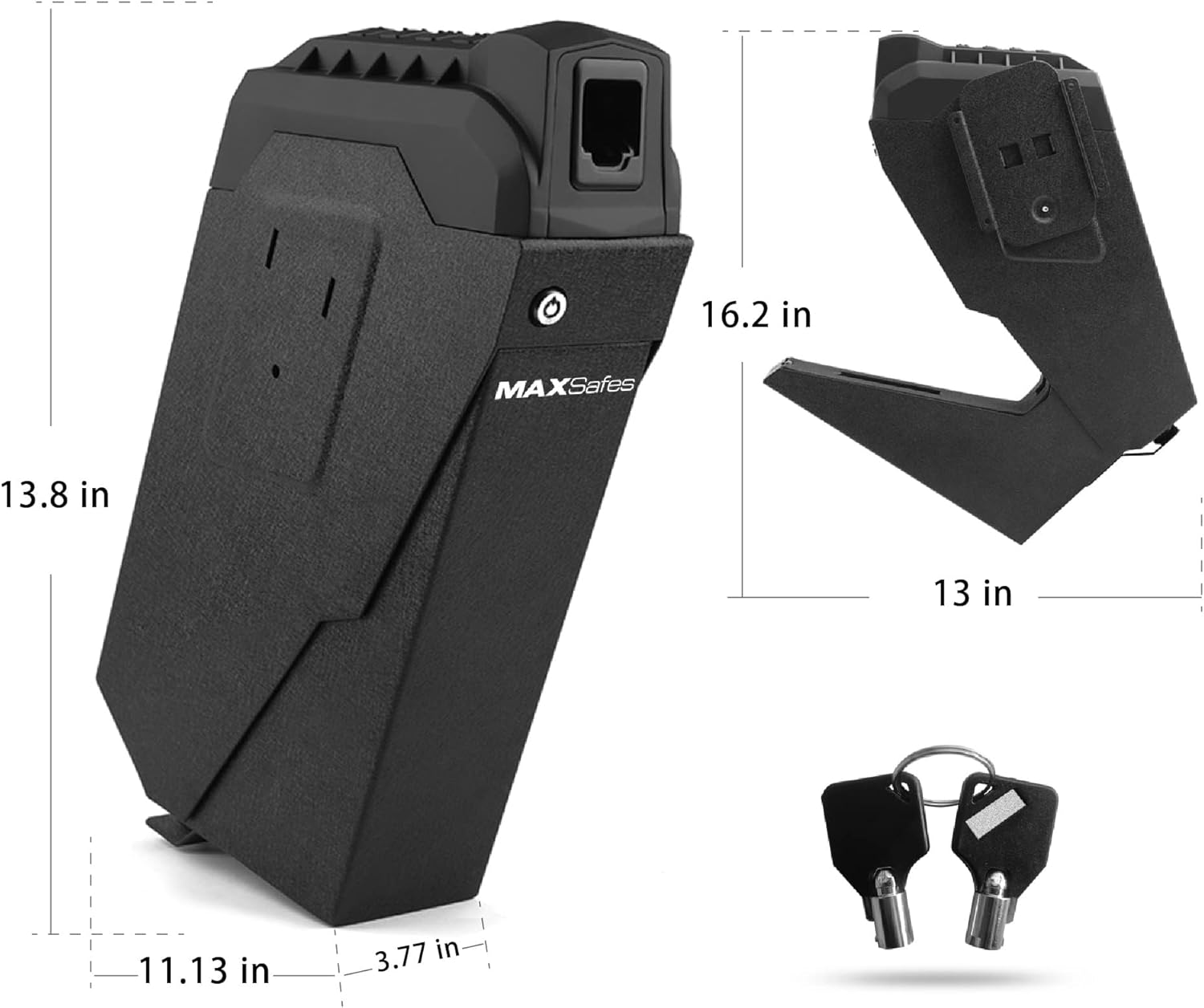
Figure 6: Product Dimensions and Included Keys
10. การรับประกันและการสนับสนุน
MAXSafes products are manufactured to high-quality standards. For warranty information or technical support, please refer to the contact details provided with your purchase documentation or visit the official MAXSafes webไซต์ โปรดเก็บใบเสร็จรับเงินของคุณไว้เป็นหลักฐานการซื้อสำหรับการเรียกร้องการรับประกันใดๆ