
สินค้าเกินview
The ATTACK SHARK X98PRO is a versatile wireless mechanical keyboard designed for both gaming and productivity. It features a compact 98-key layout, a customizable TFT screen, a multi-functional CNC metal knob, and tri-mode connectivity for seamless use across various devices and operating systems.

The ATTACK SHARK X98PRO keyboard in Starry Black with its distinctive yellow keycaps and coiled USB-C cable.
คุณสมบัติหลัก
- Fully Customizable Smart Screen: A 1.14-inch TFT screen capable of displaying custom GIFs, system status, battery life, time, and connection mode.
- Multi-Functional CNC Metal Knob: Precision control for volume, brightness, RGB effects, and connection modes.
- การเชื่อมต่อสามโหมด: Supports Bluetooth 5.0, 2.4G wireless, and USB-C wired connections.
- สวิตช์แบบ Hot-Swappable: Compatible with 3-pin and 5-pin mechanical switches for personalized typing feel.
- Premium Gasket Mount: Features a 20-point cross-beam gasket mount with 5 layers of sound-dampening materials for a satisfying and quiet keystroke.
- ไฟแบ็คไลท์ RGB: Offers multiple lighting effects and customization options.
- แบตเตอรี่ความจุสูง 4000mAh: Ensures extended wireless usage.
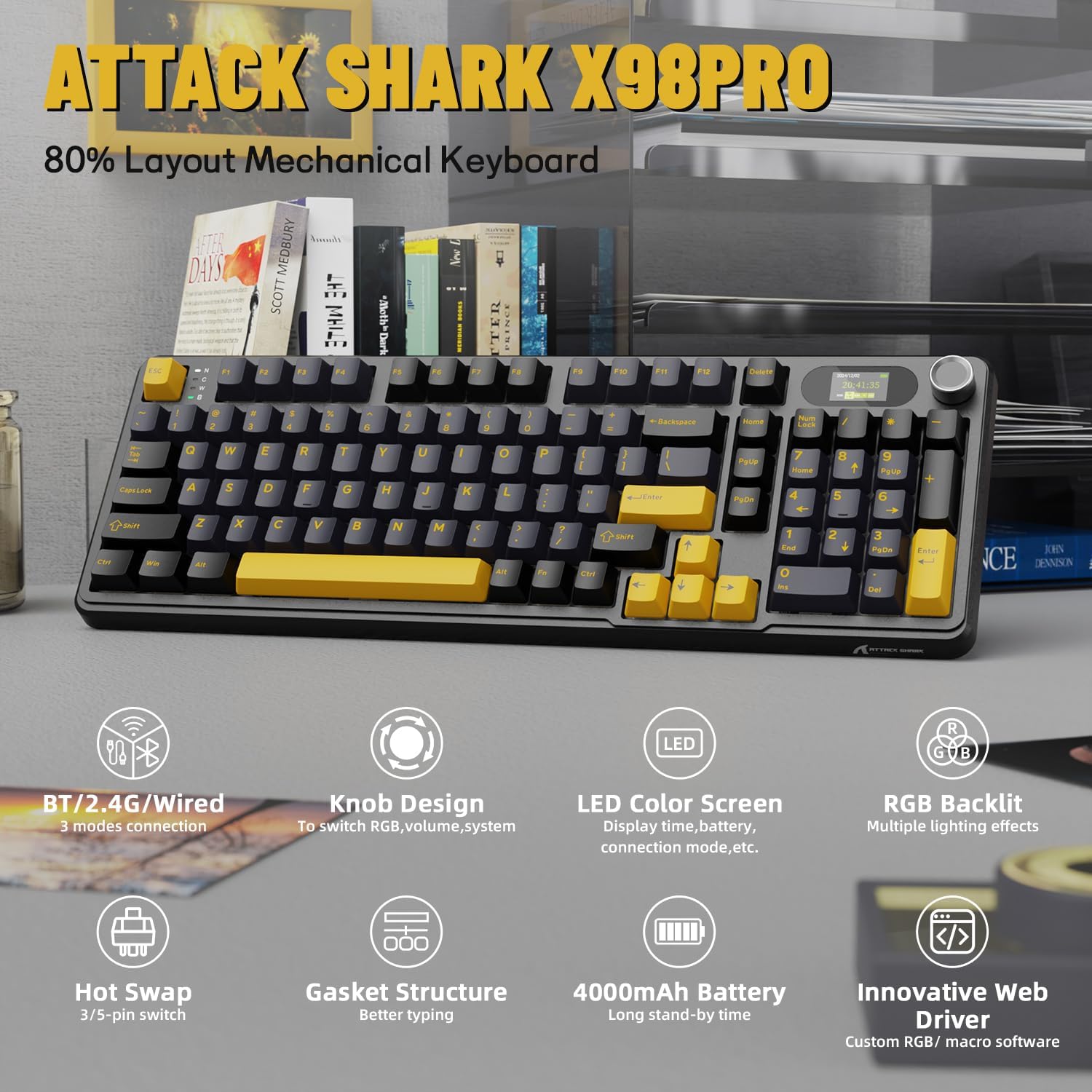
โอเวอร์view of the ATTACK SHARK X98PRO's main features, including its tri-mode connection, knob design, LED color screen, RGB backlighting, hot-swappable switches, gasket structure, 4000mAh battery, and innovative web คนขับรถ
วิดีโอแสดงผลิตภัณฑ์อย่างเป็นทางการasing the ATTACK SHARK X98PRO 98-key mechanical keyboard, highlighting its design and TFT display capabilities.
การตั้งค่า
เนื้อหาแพ็คเกจ
ก่อนที่คุณจะเริ่มต้น โปรดตรวจสอบให้แน่ใจว่ามีรายการทั้งหมดอยู่ในแพ็คเกจ:
- คีย์บอร์ด ATTACK SHARK X98PRO
- สายเคเบิลถัก USB-C ถึง USB-A
การชาร์จเบื้องต้น
For optimal performance, fully charge the keyboard before its first use. Connect the provided USB-C cable to the keyboard's USB-C port and the other end to a powered USB-A port on your computer or a wall adapter. The 4000mAh battery ensures extended usage.
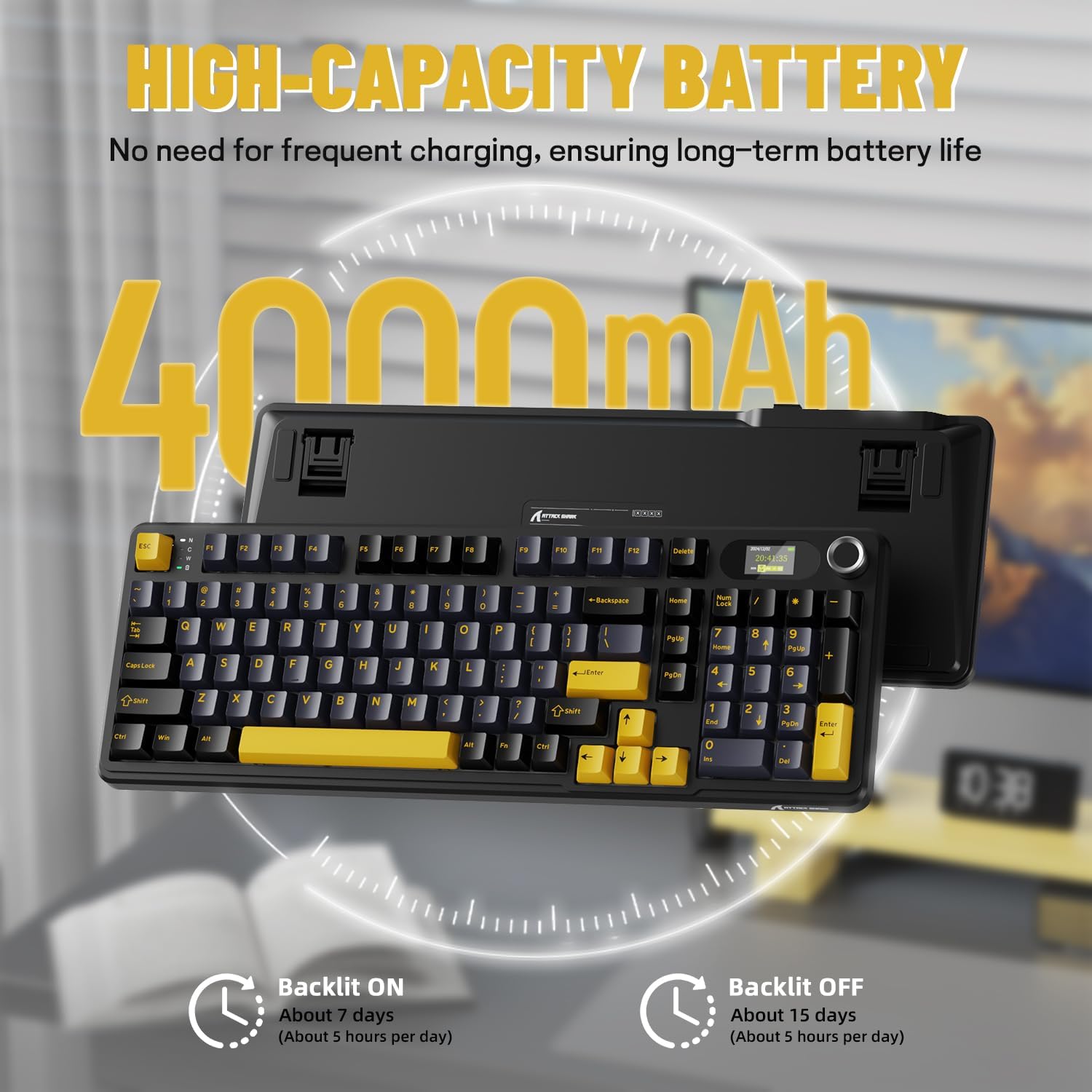
Details on the keyboard's high-capacity 4000mAh battery, indicating approximately 7 days of use with backlight on (5 hours/day) and 15 days with backlight off (5 hours/day).
ตัวเลือกการเชื่อมต่อ
The X98PRO keyboard offers three connection modes:
- โหมดสาย USB-C: Connect the keyboard directly to your device using the provided USB-C cable. This mode offers the most stable connection and charges the keyboard simultaneously.
- โหมดไร้สาย 2.4G: Insert the 2.4G USB dongle (usually found in a compartment on the keyboard) into your device's USB port. The keyboard will automatically connect.
- โหมดบลูทูธ 5.0: Enable Bluetooth on your device and put the keyboard into Bluetooth pairing mode (refer to operating instructions for specific key combinations). Select the keyboard from your device's Bluetooth list to connect. The keyboard can store up to three Bluetooth connections.

The keyboard supports tri-mode connection: USB-C wired, 2.4GHz wireless, and Bluetooth 5.0, allowing connection to multiple devices like PCs, laptops, and tablets.
Official product video demonstrating the ATTACK SHARK X98PRO Wireless Keyboard in use, highlighting its wireless capabilities.
คำแนะนำการใช้งาน
Multi-Function Knob and TFT Screen
The CNC metal knob provides intuitive control over various keyboard functions. Rotate the knob to adjust settings such as light intensity, light speed, and light color. Press the knob to confirm selections or switch between different menu options on the TFT screen.
The 1.14-inch TFT smart screen displays essential information including the current time, battery level, connection mode, and system status. It can also be customized to show personalized GIFs or animations.
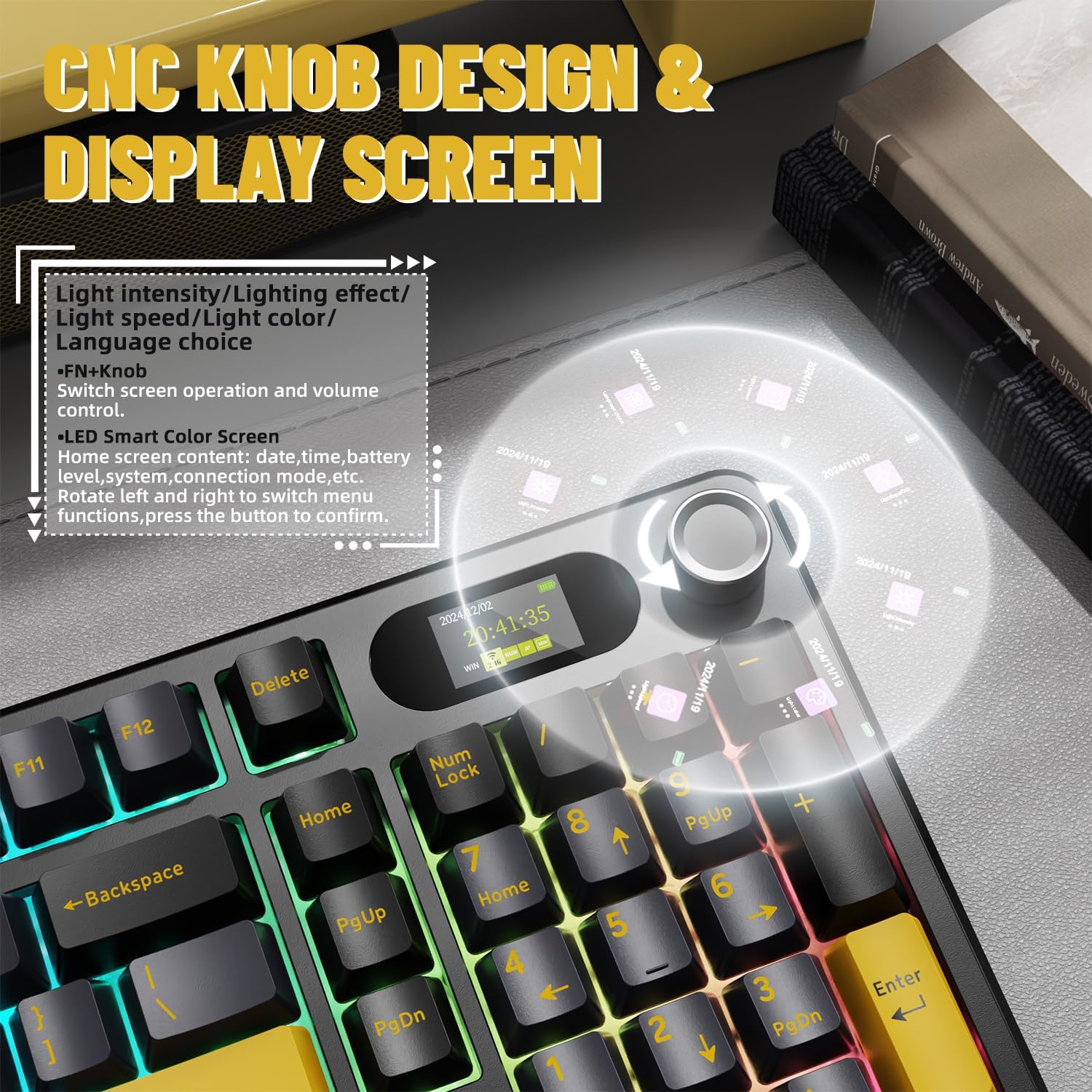
รายละเอียด view of the CNC knob and TFT display, explaining how to navigate menus, adjust light settings, and control volume. The screen can show time, battery, and connection mode.
การควบคุมไฟแบ็คไลท์ RGB
The keyboard features full RGB backlighting with over 16 million colors and various dynamic effects. You can switch light effects, change light colors, and adjust backlight brightness and speed directly from the keyboard using key combinations, typically involving the Fn key and other designated keys.

The keyboard supports music rhythm synchronization and allows customization of various lighting effects through its driver. Key combinations for switching light effects, color, brightness, and speed are also shown.
การปรับแต่ง
สวิตช์แบบ Hot-Swappable
The X98PRO keyboard is equipped with a hot-swappable PCB, allowing you to easily change mechanical switches without soldering. It supports both 3-pin and 5-pin switches, providing flexibility to customize your typing experience with different switch types (e.g., linear, tactile, clicky).
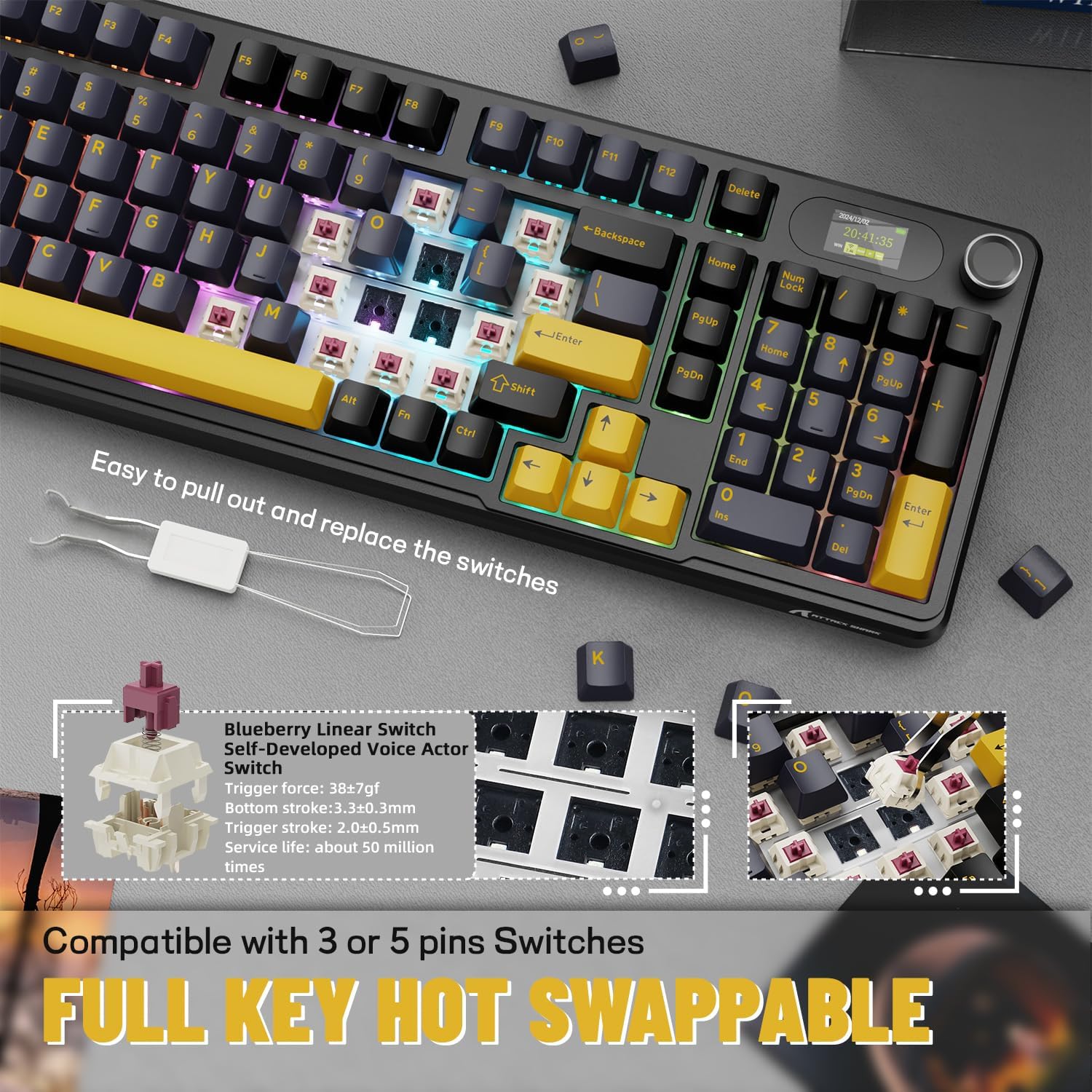
Demonstration of the hot-swappable feature, allowing users to easily replace switches. The keyboard is compatible with both 3-pin and 5-pin mechanical switches.
Web-ไดรเวอร์พื้นฐาน
The keyboard utilizes an intuitive web-based driver for advanced customization. This driver allows you to:
- Edit and upload custom GIFs to the TFT screen.
- ปรับแต่งเอฟเฟกต์แสงและสี RGB
- Remap keys and create custom key combinations.
- Set up programmable macros for enhanced productivity or gaming.
No software installation is needed; simply access the driver through your web เบราว์เซอร์

นวัตกรรมใหม่ web driver allows for full programmability, customization of backlight colors and effects, creation of custom key combinations, and setting screen animations, including GIF images.
การซ่อมบำรุง
Proper maintenance ensures the longevity and performance of your ATTACK SHARK X98PRO keyboard.
การทำความสะอาดทั่วไป
- Regularly dust the keyboard using compressed air to remove debris from between the keycaps.
- เช็ดปุ่มและพื้นผิวแป้นพิมพ์ด้วยผ้านุ่มๆ เช็ดเบาๆampใช้ผ้าที่ไม่เป็นขุย หลีกเลี่ยงสารเคมีรุนแรงหรือวัสดุที่มีฤทธิ์กัดกร่อน
- สำหรับการทำความสะอาดอย่างละเอียด สามารถถอดคีย์แคปออกอย่างระมัดระวังโดยใช้เครื่องมือถอดคีย์แคป
การดูแลสวิตช์
As the switches are hot-swappable, ensure they are seated correctly after any replacement. Avoid excessive force when inserting or removing switches to prevent damage to the PCB or switch pins.
การดูแลแบตเตอรี่
- หลีกเลี่ยงการปล่อยแบตเตอรี่จนหมดบ่อยครั้ง
- เก็บแป้นพิมพ์ไว้ในที่แห้งและเย็นเมื่อไม่ได้ใช้งานเป็นเวลานาน
- ใช้เฉพาะสาย USB-C ที่ให้มาหรือสาย USB-C ที่ได้รับการรับรองสำหรับการชาร์จเท่านั้น
การแก้ไขปัญหา
ปัญหาทั่วไปและแนวทางแก้ไข
- ปัญหาการเชื่อมต่อ:
- Ensure the keyboard is in the correct mode (BT, 2.4G, or Wired).
- For 2.4G, ensure the dongle is securely inserted and try a different USB port.
- For Bluetooth, ensure the keyboard is in pairing mode and your device's Bluetooth is enabled. Try re-pairing.
- ตรวจสอบให้แน่ใจว่าแป้นพิมพ์มีประจุไฟแล้ว
- TFT Screen Not Displaying Correctly:
- ตรวจสอบระดับแบตเตอรี่ของแป้นพิมพ์
- เข้าถึง web-based driver to reconfigure or update the screen content.
- ตรวจสอบให้แน่ใจว่าเฟิร์มแวร์ของคีย์บอร์ดเป็นเวอร์ชันล่าสุด (หากมี ให้ตรวจสอบกับผู้ผลิต) webเว็บไซต์).
- Unexpected Key Presses (Miss-clicks):
- This can sometimes occur with sensitive switches. Ensure your typing posture does not put unintended pressure on keys.
- Consider if different switch types might be more suitable for your typing style (leveraging the hot-swap feature).
- อายุการใช้งานแบตเตอรี่สั้น:
- ตรวจสอบให้แน่ใจว่าแป้นพิมพ์มีประจุไฟเต็มก่อนใช้งาน
- Reduce RGB backlight brightness or turn it off when not needed to conserve battery.
- Ensure the keyboard is not constantly searching for a connection in wireless modes.
For more detailed troubleshooting or advanced issues, refer to the official ATTACK SHARK website and its web-based driver for specific diagnostic tools or firmware updates.
ข้อมูลจำเพาะ
| คุณสมบัติ | รายละเอียด |
|---|---|
| ยี่ห้อ | โจมตีฉลาม |
| แบบอย่าง | เอ็กซ์ทูโปร |
| เทคโนโลยีการเชื่อมต่อ | 2.4GHz, บลูทูธ, USB-C |
| คำอธิบายแป้นพิมพ์ | เครื่องจักรกล |
| จำนวนคีย์ | 98 |
| คุณสมบัติพิเศษ | Customizable Display Keys (TFT Screen) |
| แหล่งพลังงาน | ใช้พลังงานจากแบตเตอรี่ |
| ความจุของแบตเตอรี่ | 4000mAh |
| อุปกรณ์ที่รองรับ | แล็ปท็อป, พีซี, แท็บเล็ต |
| น้ำหนักสินค้า | 2.86 ปอนด์ |
| ขนาดแพ็คเกจ | 17.4 x 7.72 x 2.09 นิ้ว |
| ประเทศต้นกำเนิด | จีน |
| วันที่พร้อมใช้งานครั้งแรก | 19 พฤศจิกายน 2024 |
การรับประกันและการสนับสนุน
The ATTACK SHARK X98PRO Wireless Mechanical Keyboard comes with a standard manufacturer's warranty. For specific details regarding warranty coverage, duration, and terms, please refer to the warranty card included with your product or visit the official ATTACK SHARK webเว็บไซต์.
For technical support, product inquiries, or assistance with any issues not covered in this manual, please contact ATTACK SHARK customer service through their official website or designated support channels. Keep your purchase receipt or proof of purchase handy for warranty claims.
ร้านค้าอย่างเป็นทางการของแบรนด์: ร้าน ATTACK SHARK บน Amazon