
1. บทนำ
Thank you for choosing the GENBOLT 2K Wireless Outdoor Solar Security Camera. This advanced security solution features a dual-lens system, 360° pan-tilt-zoom (PTZ) functionality, and is powered by an integrated 8W solar panel and a 15600mAh rechargeable battery. Designed for outdoor use, it offers comprehensive surveillance with PIR motion detection, automatic tracking, color night vision, and two-way audio communication. This manual provides essential information for proper installation, operation, and maintenance to ensure optimal performance and longevity of your device.
2. สินค้าหมดview
2.1 คุณสมบัติหลัก
- ความละเอียด 2K (4MP): นำเสนอภาพวิดีโอที่ชัดเจนและละเอียดtage.
- ระบบเลนส์คู่: Combines a fixed lens and a PTZ lens for broader coverage.
- ฟังก์ชันการหมุน 360° PTZ: Offers 355° horizontal pan and 90° vertical tilt for comprehensive area monitoring.
- พลังงานแสงอาทิตย์: Equipped with an 8W solar panel for continuous charging, reducing the need for manual recharging.
- แบตเตอรี่ความจุสูง: Built-in 15600mAh rechargeable battery ensures extended operation.
- PIR Motion Detection & Auto Tracking: Detects human movement and automatically tracks the subject.
- การมองเห็นสีกลางคืน: ให้ภาพวิดีโอสีสันสดใสแม้ในสภาพแสงน้อย
- เสียงสองทาง: มีไมโครโฟนและลำโพงในตัวสำหรับการสื่อสารแบบเรียลไทม์
- Enhanced WiFi Connectivity: Features 5dBi dual antennas for stable 2.4GHz WiFi signal.
- การจัดเก็บข้อมูลบนคลาวด์และการ์ด SD: Supports cloud storage (7-day free trial available) and local storage via TF card.
- การเข้าถึงผ่านหลายแพลตฟอร์ม: View and control via iOS/Android app, macOS, and Windows software.
2.2 ส่วนประกอบผลิตภัณฑ์

ภาพ: รายละเอียด view of the camera components.
- เสาอากาศคู่: For improved WiFi signal reception.
- เซ็นเซอร์ PIR: เซ็นเซอร์อินฟราเรดแบบพาสซีฟสำหรับตรวจจับการเคลื่อนไหว
- เลนส์ HD: High-definition optical lens for clear imaging.
- 8 IR/White LEDs: Infrared LEDs for black and white night vision, white LEDs for color night vision and spotlight.
- ผู้บรรยาย: สำหรับการสื่อสารด้วยเสียงสองทางและเสียงเตือนภัย
- ช่องเสียบการ์ด TF: สำหรับการจัดเก็บวิดีโอในเครื่อง (รองรับสูงสุด 128GB ไม่รวมการ์ด)
- ปุ่มรีเซ็ต: เพื่อคืนค่าการตั้งค่าจากโรงงาน
- Type-C Slot & Power ON/OFF: For charging and power control.
- Infrared LED (4pcs): เพิ่มระบบไฟส่องสว่างอินฟราเรด
- ตัวบ่งชี้ Lamp: แสดงสถานะอุปกรณ์
2.3 เนื้อหาบรรจุภัณฑ์
- GENBOLT 2K Wireless Outdoor Solar Security Camera
- 8W Solar Panel (integrated)
- สาย USB Type-C (0.7 เมตร)
- Network Cable (1m)
- สกรูยึดและปลั๊กผนัง
- คู่มือการใช้งาน
3. การตั้งค่า
3.1 การชาร์จแบตเตอรี่
Before initial use, fully charge the camera's built-in 15600mAh battery using the provided USB Type-C cable and a 5V/2A power adapter (not included). The solar panel will maintain the charge once installed, but a full initial charge is recommended.
3.2 การติดตั้งการ์ด TF (ทางเลือก)
If you plan to use local storage, insert a TF (microSD) card (up to 128GB, Class 10 or higher recommended) into the TF card slot. Ensure the camera is powered off before inserting or removing the card.
3.3 การติดตั้งกล้อง
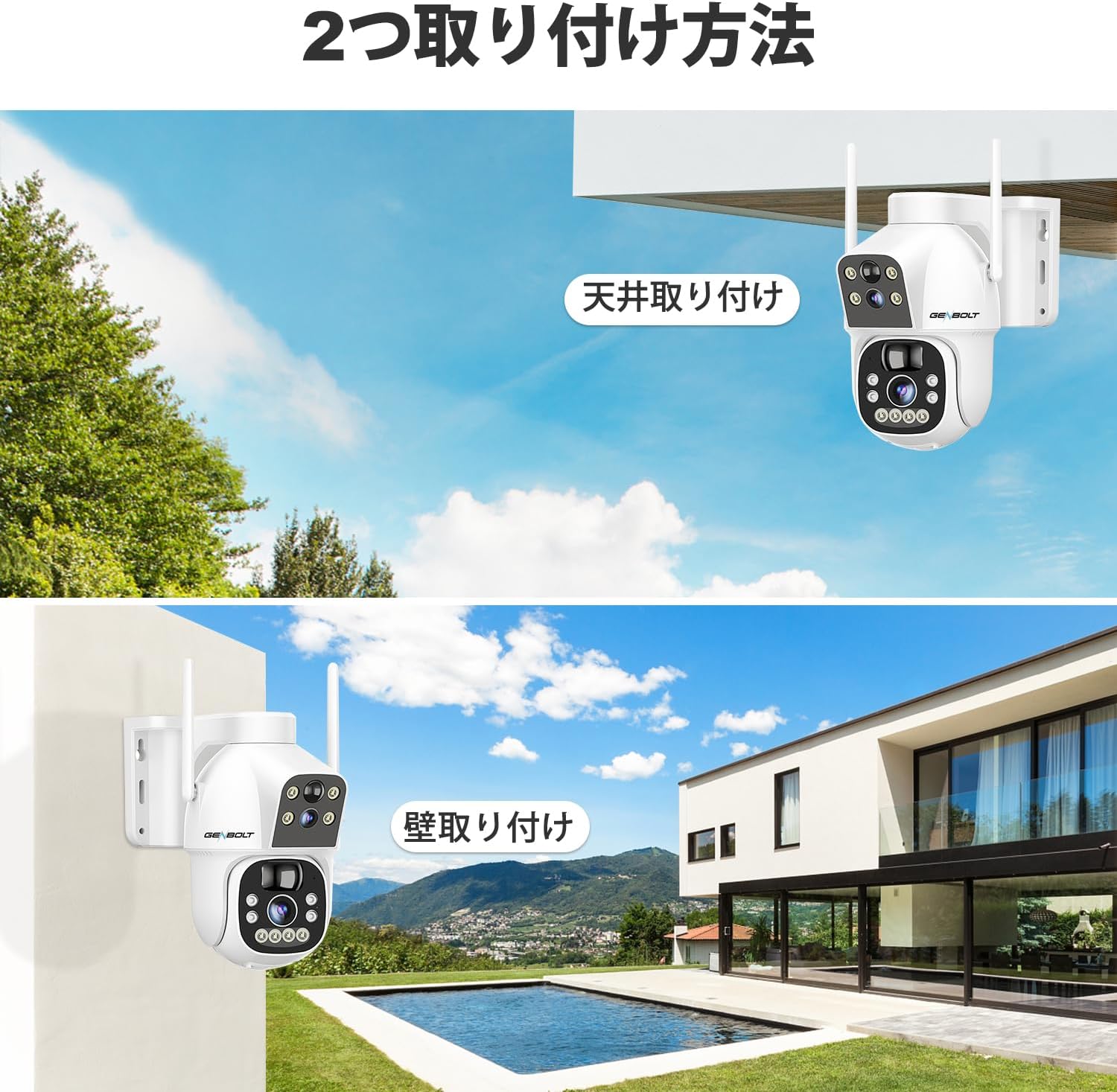
ภาพ: Two common installation methods: wall mounting and ceiling mounting.
The camera supports both wall and ceiling mounting. Choose a location with optimal sunlight exposure for the solar panel and a strong 2.4GHz WiFi signal. Use the provided screws and wall plugs to securely attach the camera bracket. Adjust the camera angle for the desired viewพื้นที่ที่กำลังก่อสร้าง
3.4 การติดตั้งแอปและการเชื่อมต่อ WiFi

ภาพ: Step-by-step guide for connecting the camera to WiFi via the mobile app.
- Download the official GENBOLT app from the iOS App Store or Google Play Store.
- ลงทะเบียนบัญชีและเข้าสู่ระบบ
- Tap 'Add Device' or the '+' icon and select your camera model.
- Follow the on-screen instructions to connect the camera to your 2.4GHz WiFi network. This typically involves scanning a QR code displayed on your phone with the camera lens.
- Ensure your phone's location services are enabled during setup for proper network detection.
บันทึก: The camera does not support 5GHz WiFi networks. If you encounter issues, ensure your router is broadcasting a 2.4GHz signal and that your phone is connected to it during the setup process. Some users have reported difficulties with initial wired LAN connection instructions in the manual; this camera primarily uses wireless setup.
4. คู่มือการใช้งาน
4.1 สด View และการควบคุม PTZ

ภาพ: The camera's pan and tilt range for flexible monitoring.
เมื่อเชื่อมต่อเสร็จแล้ว ให้เปิดแอปเพื่อ... view the live feed. Use the on-screen controls to pan (355° horizontally) and tilt (90° vertically) the camera. The dual-lens system allows you to switch between a fixed wide-angle view and a movable PTZ view.
4.2 การตรวจจับการเคลื่อนไหวและการติดตามอัตโนมัติ

ภาพ: PIR motion detection in action, highlighting the detection area.
Enable PIR motion detection in the app settings. When motion is detected, the camera will automatically begin recording and can track the moving object. You will receive instant alerts on your mobile device. Adjust sensitivity settings to minimize false alarms.
4.3 การบันทึกและการเล่น

ภาพ: The app interface for accessing recorded footagจากพื้นที่จัดเก็บข้อมูลบนคลาวด์
Recordings are triggered by motion detection or can be scheduled. Access recorded footage through the app's playback feature. Videos are stored either on the inserted TF card or in the cloud (subscription may apply after the initial free trial). The app allows you to review past events by date and time.
4.4 โหมดการมองเห็นตอนกลางคืน

ภาพ: Visual comparison between color night vision and standard infrared night vision.
The camera supports multiple night vision modes: infrared (black and white), full-color (using white LEDs), and smart mode (switches between IR and color based on detected motion). Configure your preferred mode in the app settings.
4.5 เสียงสองทาง
Use the microphone and speaker functions in the app to communicate with visitors or deter intruders in real-time.
4.6 การแบ่งปันผู้ใช้หลายคน

ภาพ: App interface demonstrating the multi-user sharing feature.
You can share access to your camera's live feed and recordings with family members or trusted individuals through the app. Each user can have different permission levels.
5. การบำรุงรักษา
- การทำความสะอาดแผงโซลาร์เซลล์: เช็ดแผงโซล่าเซลล์ด้วยผ้านุ่มๆ เป็นประจำamp ผ้าสำหรับเช็ดทำความสะอาดฝุ่นละออง สิ่งสกปรก หรือเศษผงต่างๆ ที่อาจลดประสิทธิภาพการชาร์จ
- การทำความสะอาดเลนส์: เช็ดเลนส์กล้องอย่างเบามือด้วยผ้าไมโครไฟเบอร์เพื่อให้ได้ภาพที่คมชัด หลีกเลี่ยงการใช้วัสดุที่มีฤทธิ์กัดกร่อน
- อัพเดตเฟิร์มแวร์: ตรวจสอบแอปเป็นระยะเพื่อดูการอัปเดตเฟิร์มแวร์ เพื่อให้แน่ใจว่ากล้องของคุณมีคุณสมบัติและระบบรักษาความปลอดภัยล่าสุด
- สุขภาพแบตเตอรี่: While the solar panel helps maintain charge, prolonged periods of low sunlight may require occasional manual charging via the Type-C port to preserve battery health.
6 การแก้ไขปัญหา
| ปัญหา | สาเหตุที่เป็นไปได้ / วิธีแก้ไข |
|---|---|
| Camera fails to connect to WiFi |
|
| Poor image quality or blurry video |
|
| Motion detection alerts are delayed or missed |
|
| แบตเตอรี่หมดเร็ว |
|
| Cloud storage issues or plan changes |
|
| SD card recording not working |
|
| No response from camera |
|
7. ข้อมูลจำเพาะ
| คุณสมบัติ | รายละเอียด |
|---|---|
| ยี่ห้อ | เจนโบลท์ |
| แบบอย่าง | B0DNFMMMQN |
| ปณิธาน | 2K (4 ล้านพิกเซล) |
| ทุ่งแห่ง View | Dual Lens (Fixed & PTZ) |
| ช่วงแพน/เอียง | แนวนอน 355°, แนวตั้ง 90° |
| แหล่งพลังงาน | 8W Solar Panel, 15600mAh Rechargeable Battery |
| การเชื่อมต่อ | Wi-Fi 2.4GHz (IEEE 802.11b/g/n) |
| การมองเห็นตอนกลางคืน | Infrared, Full-Color, Smart Mode |
| การตรวจจับการเคลื่อนไหว | PIR Human Motion Detection, Auto Tracking |
| เสียง | เสียงสองทาง (ไมโครโฟนและลำโพงในตัว) |
| พื้นที่จัดเก็บ | การ์ด TF (สูงสุด 128GB), ที่เก็บข้อมูลบนคลาวด์ |
| การรองรับระบบปฏิบัติการ | iOS, Android, macOS, Windows |
| คุณสมบัติด้านความปลอดภัย | RSA Encryption, SSL Data Transmission |
| ขนาด | 26.4 x 21.7 x 18.1 ซม. |
| น้ำหนัก | 1.96 กก. |
8. การรับประกันและการสนับสนุน
8.1 ข้อมูลการรับประกัน
- รับประกัน 1 ปี: Your GENBOLT camera is covered by a 1-year warranty from the date of purchase, protecting against manufacturing defects.
- 30-Day Return/Exchange: You are eligible for a return or exchange within 30 days of purchase, subject to the retailer's policy.
โปรดเก็บหลักฐานการซื้อของคุณไว้เพื่อเรียกร้องการรับประกัน
8.2 การสนับสนุนลูกค้า
For technical assistance, troubleshooting, or warranty inquiries, please contact GENBOLT customer support. We offer 24/7 technical support to ensure your satisfaction.
- การสนับสนุนทางออนไลน์: Visit the official GENBOLT webไซต์สำหรับคำถามที่พบบ่อย บทความสนับสนุน และแบบฟอร์มติดต่อ
- การสนับสนุนทางอีเมล์: Reach out via email for detailed assistance.
We are committed to providing reliable home security solutions and excellent customer service.