
1. คำแนะนำด้านความปลอดภัยที่สำคัญ
อ่านคำเตือน คำแนะนำ ภาพประกอบ และข้อกำหนดด้านความปลอดภัยทั้งหมดที่มาพร้อมกับเครื่องมือไฟฟ้านี้ การไม่ปฏิบัติตามคำแนะนำทั้งหมดด้านล่างอาจส่งผลให้เกิดไฟฟ้าช็อต ไฟไหม้ และ/หรือการบาดเจ็บสาหัส บันทึกคำเตือนและคำแนะนำทั้งหมดเพื่อใช้อ้างอิงในอนาคต
- ความปลอดภัยในพื้นที่ทำงาน: รักษาพื้นที่ทำงานของคุณให้สะอาดและมีแสงสว่างเพียงพอ พื้นที่รกหรือมืดชวนให้เกิดอุบัติเหตุ
- ความปลอดภัยทางไฟฟ้า: ปลั๊กไฟของเครื่องมือไฟฟ้าต้องตรงกับเต้ารับ ห้ามดัดแปลงปลั๊กไฟโดยเด็ดขาด ห้ามใช้สายไฟอย่างผิดวิธี เก็บสายไฟให้ห่างจากความร้อน น้ำมัน ขอบคม หรือชิ้นส่วนที่เคลื่อนไหว
- ความปลอดภัยส่วนบุคคล: Always wear eye protection. Use appropriate dust masks when operating in dusty conditions. Stay alert, watch what you are doing, and use common sense when operating a power tool.
- การใช้และการดูแลเครื่องมือ: อย่าฝืนใช้เครื่องมือไฟฟ้า ใช้เครื่องมือไฟฟ้าที่ถูกต้องตามการใช้งาน ถอดปลั๊กออกจากแหล่งจ่ายไฟก่อนทำการปรับแต่ง เปลี่ยนอุปกรณ์เสริม หรือจัดเก็บเครื่องมือไฟฟ้า
2. สินค้าหมดview
The Total TB2086 is a versatile 800W electric tool designed for both blowing and vacuuming tasks. It is ideal for clearing dust, debris, and leaves from various surfaces.
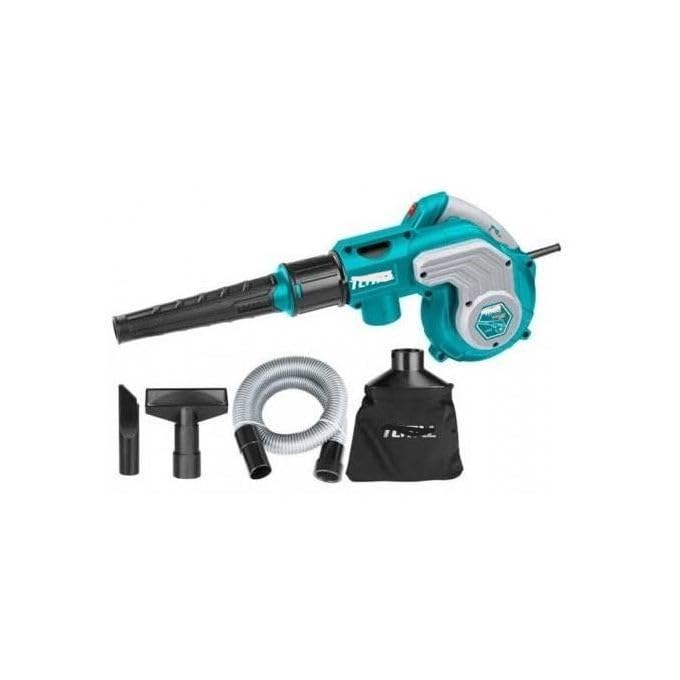
รูปที่ 2.1: Total TB2086 Electric Blower and Vacuum Cleaner shown with its main components and accessories, including the main unit, blowing nozzle, vacuum hose, and dust collection bag.
ส่วนประกอบ:
- ส่วนประกอบหลัก (ตัวเรือนมอเตอร์และด้ามจับ)
- หัวฉีดเป่า
- ท่อสูญญากาศ
- ถุงเก็บฝุ่น
- สายไฟ
3. การตั้งค่า
Before operating the tool, ensure all components are correctly assembled.
3.1 Attaching the Blowing Nozzle
- ตรวจสอบให้แน่ใจว่าเครื่องมือถูกถอดปลั๊กออกจากแหล่งจ่ายไฟ
- Align the blowing nozzle with the air outlet port on the front of the main unit.
- Push and twist the nozzle until it locks securely into place.
3.2 Attaching for Vacuuming (Dust Collection)
- ตรวจสอบให้แน่ใจว่าเครื่องมือถูกถอดปลั๊กออกจากแหล่งจ่ายไฟ
- Attach the vacuum hose to the air inlet port (usually on the side or bottom of the main unit). Secure it firmly.
- Attach the dust collection bag to the air outlet port (where the blowing nozzle would attach). Ensure it is securely fastened to prevent dust leakage.

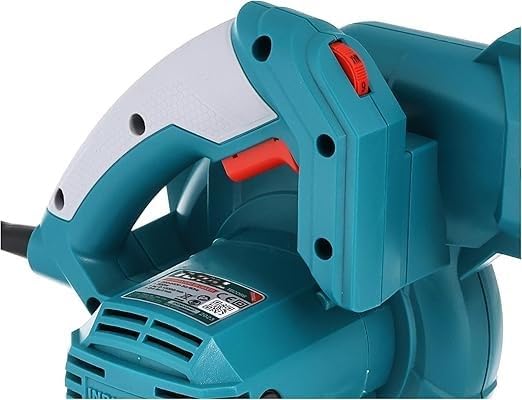
รูปที่ 3.1: ภาพระยะใกล้ view of the main unit's handle, showing the trigger switch and the red lock-on button for continuous operation.
4. คู่มือการใช้งาน
Always wear appropriate personal protective equipment (PPE) such as safety glasses and a dust mask during operation.
4.1 โหมดเป่าลม
- Ensure the blowing nozzle is securely attached.
- เสียบสายไฟเข้ากับเต้ารับไฟฟ้าที่เหมาะสม
- Hold the tool firmly by the handle.
- Press the trigger switch to start the motor. For continuous operation, press the lock-on button while the trigger is pressed, then release the trigger.
- Direct the nozzle towards the area to be cleared. Move the blower in a sweeping motion to effectively clear debris.
- To stop, release the trigger switch. If locked on, press the trigger again to release the lock-on button, then release the trigger.
4.2 Vacuum Mode (Dust Collector)
- Ensure the vacuum hose and dust collection bag are securely attached.
- เสียบสายไฟเข้ากับเต้ารับไฟฟ้าที่เหมาะสม
- Hold the tool firmly by the handle.
- Press the trigger switch to start the motor.
- Direct the end of the vacuum hose towards the debris to be collected. The tool will draw air and debris into the dust collection bag.
- Monitor the dust bag and empty it when it is approximately two-thirds full to maintain optimal suction.
- หากต้องการหยุด ให้ปล่อยสวิตช์ทริกเกอร์
รูปที่ 4.1: ด้านข้าง view of the Total TB2086, illustrating the air intake area for vacuuming operations.
5. การบำรุงรักษา
Regular maintenance ensures the longevity and optimal performance of your tool. Always unplug the tool before performing any maintenance.
5.1 การทำความสะอาด
- เช็ดภายนอกเครื่องมือด้วยผ้านุ่มๆamp ผ้า. อย่าใช้สารเคมีที่รุนแรงหรือน้ำยาทำความสะอาดที่มีฤทธิ์กัดกร่อน
- Periodically clean the air vents to prevent overheating. Use a soft brush or compressed air.
- Empty and clean the dust collection bag regularly. Wash if necessary and ensure it is completely dry before reattaching.
5.2 พื้นที่จัดเก็บ
- เก็บเครื่องมือไว้ในที่สะอาดและแห้ง ให้พ้นมือเด็ก
- ควรหลีกเลี่ยงการเก็บรักษาในที่ที่มีแสงแดดส่องโดยตรง หรือบริเวณที่มีอุณหภูมิสูงหรือต่ำเกินไป
- ม้วนสายไฟให้เรียบร้อยเพื่อป้องกันความเสียหาย
6 การแก้ไขปัญหา
If you encounter issues with your Total TB2086, refer to the following common problems and solutions:
| ปัญหา | สาเหตุที่เป็นไปได้ | สารละลาย |
|---|---|---|
| เครื่องมือไม่เริ่มทำงาน | ไม่มีแหล่งจ่ายไฟ สายไฟ/ปลั๊กชำรุด ความผิดพลาดภายใน | ตรวจสอบเต้ารับไฟฟ้าและเบรกเกอร์ ตรวจสอบสายไฟว่าชำรุดหรือไม่ เปลี่ยนใหม่หากจำเป็น ติดต่อฝ่ายสนับสนุนลูกค้า |
| แรงเป่า/แรงดูดต่ำ | Blocked nozzle/hose Full dust bag ช่องระบายอากาศถูกปิดกั้น | ขจัดสิ่งกีดขวาง Empty and clean dust bag ช่องระบายอากาศที่สะอาด |
| การสั่นสะเทือน/เสียงรบกวนมากเกินไป | ส่วนประกอบหลวม Debris in fan/motor | Check all attachments are secure Unplug and carefully inspect for debris; remove if safe to do so. If problem persists, contact support. |
| ความร้อนสูงเกินไป | ช่องระบายอากาศอุดตัน การใช้งานหนักเป็นเวลานาน | ช่องระบายอากาศที่สะอาด Allow tool to cool down; reduce load or operating time |
7. ข้อมูลจำเพาะ
Detailed technical specifications for the Total TB2086 Electric Blower and Vacuum Cleaner:
- หมายเลขรุ่น: ทีบี2086
- ยี่ห้อ: ทั้งหมด
- พลัง: 800วัตต์
- ปริมาณอากาศ: 0-4.5 ม. / นาที
- แหล่งพลังงาน: สายไฟ
- ฟอร์มแฟกเตอร์: แบบถือด้วยมือ
- น้ำหนักสินค้า: 300 กรัม
- ขนาดสินค้า : 25 x 17 x 10 ซม.
- คุณสมบัติพิเศษ: Switchable nozzle connection
- แบตเตอรี่ที่ต้องการ: เลขที่
- วันที่เข้าใช้งานครั้งแรก: 18 พฤศจิกายน 2024
8. การรับประกันและการสนับสนุน
For warranty information or technical support, please refer to the documentation included with your purchase or contact Total customer service. Keep your proof of purchase for any warranty claims.