
เพครอน E2400LFP
คู่มือผู้ใช้ pecron E2400LFP Portable Power Station
Comprehensive guide for setup, operation, and maintenance of your pecron E2400LFP Portable Power Station.
1. สินค้าหมดview
The pecron E2400LFP is a high-capacity portable power station designed to provide reliable power for various applications, including home backup, outdoor activities, camping, and emergencies. It features a LiFePO4 battery, fast charging capabilities, and multiple output ports.
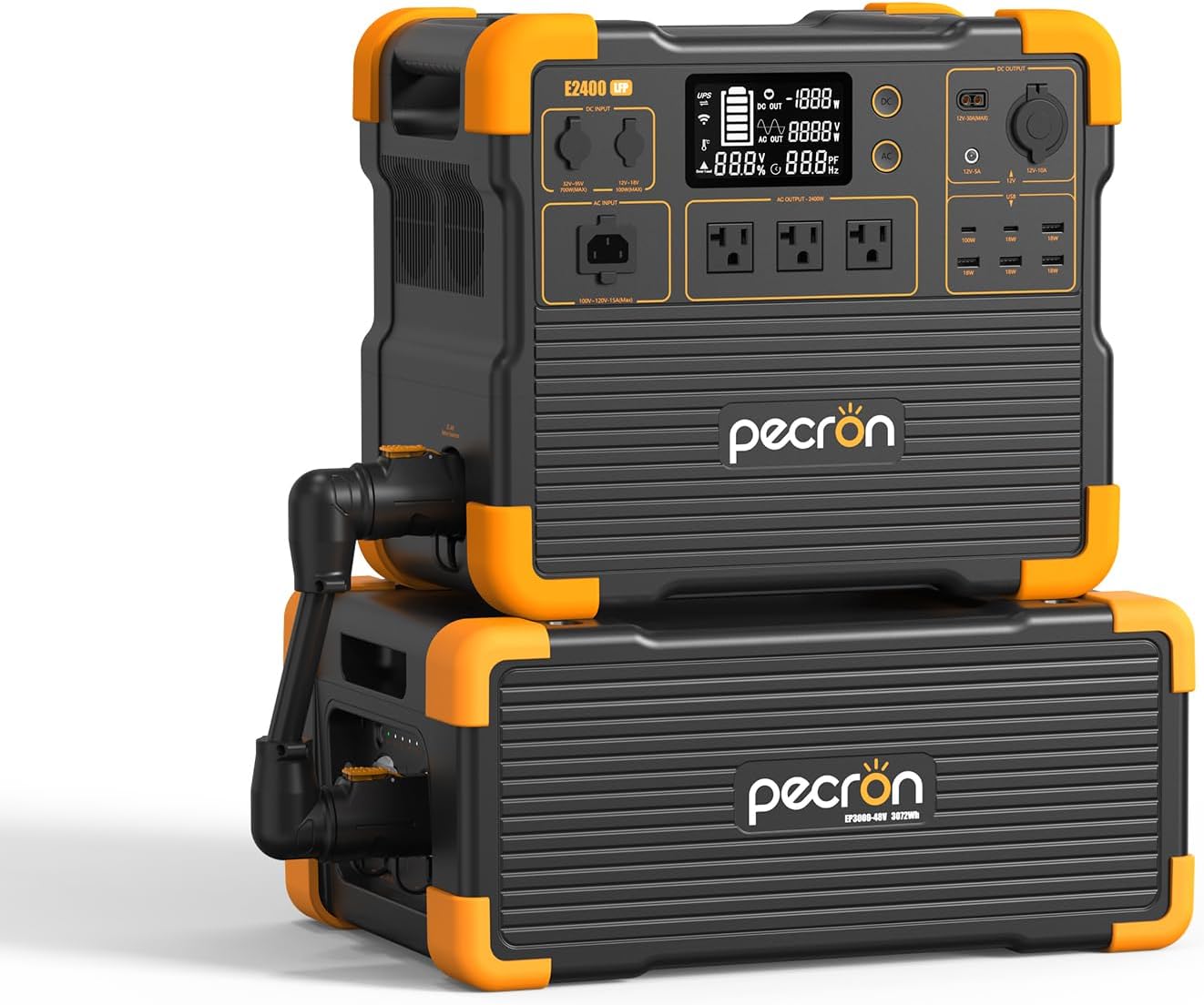
Image: The pecron E2400LFP Portable Power Station shown with its expandable extra battery unit. The main unit features a display screen and various output ports.
คุณสมบัติหลัก:
- High Capacity & Expansion: 2048Wh capacity, expandable up to 8192Wh with two EP3000-48V extra batteries.
- ประสิทธิภาพอันทรงพลัง: 2400W continuous power output, capable of running multiple devices simultaneously.
- ชาร์จเร็ว: Recharges fully in approximately 90 minutes.
- พอร์ตเอาต์พุตหลายพอร์ต: 12 output ports including 3 AC, 2 USB-C, 4 USB-A, 1 XT60-F, 1 Cigar Port, and 1 DC 5525.
- แบตเตอรี่ LiFePO4: Durable and long-lasting with 3500 complete charge cycles.
- App Smart Control: Monitor status, view power levels, and customize charging via a mobile application.
- ฟังก์ชั่นยูพีเอส: Provides fast and seamless switch supply power within 8-20ms.
2. สิ่งที่รวมอยู่
Upon unboxing your pecron E2400LFP Portable Power Station, please verify that all the following components are present:
- pecron E2400 LFP Power Station (x1)
- EP3000-48V Extra Battery (x1)
- สายชาร์จ AC (1 เส้น)
- สายชาร์จพลังงานแสงอาทิตย์ (x1)
- สายชาร์จในรถยนต์ (1 เส้น)
- 12V Alligator Clips (x1)
- Accessory Pouch (x1)
- คู่มือผู้ใช้ (x1)
3. คู่มือการติดตั้ง
3.1 ค่าบริการเริ่มต้น
Before first use, it is recommended to fully charge the pecron E2400LFP. Connect the provided AC charging cable to the AC input port on the power station and plug it into a standard wall outlet. The display will indicate charging status. A full charge takes approximately 90 minutes.

Image: The pecron E2400LFP connected to a wall outlet for fast charging, illustrating the 1.5-hour full charge time.
3.2 Connecting the Extra Battery (Optional)
To expand the capacity of your E2400LFP, connect the EP3000-48V extra battery. Ensure both units are powered off before connecting. Use the dedicated cable to link the main unit and the extra battery. Refer to the diagram below for proper connection.

Image: The pecron E2400LFP and its extra battery unit set up in an outdoor environment, demonstrating its scalable power solution.
4. คู่มือการใช้งาน
4.1 การเปิด/ปิดเครื่อง
To power on the unit, press and hold the main power button until the display illuminates. To power off, press and hold the same button until the display turns off.
4.2 การใช้พอร์ตเอาท์พุต
The E2400LFP offers 12 output ports for various devices:
- เอาท์พุต AC (x3): สำหรับเครื่องใช้ไฟฟ้าในครัวเรือนทั่วไป
- พอร์ต USB-C (x2): For fast charging compatible smartphones, tablets, and laptops.
- USB-A (x4): สำหรับชาร์จอุปกรณ์ต่างๆ ที่ใช้พลังงานจาก USB
- XT60-F Output (x1): For specific DC devices.
- Cigar Port (x1): For 12V car appliances.
- เอาต์พุต DC 5525 (x1): For general DC devices.
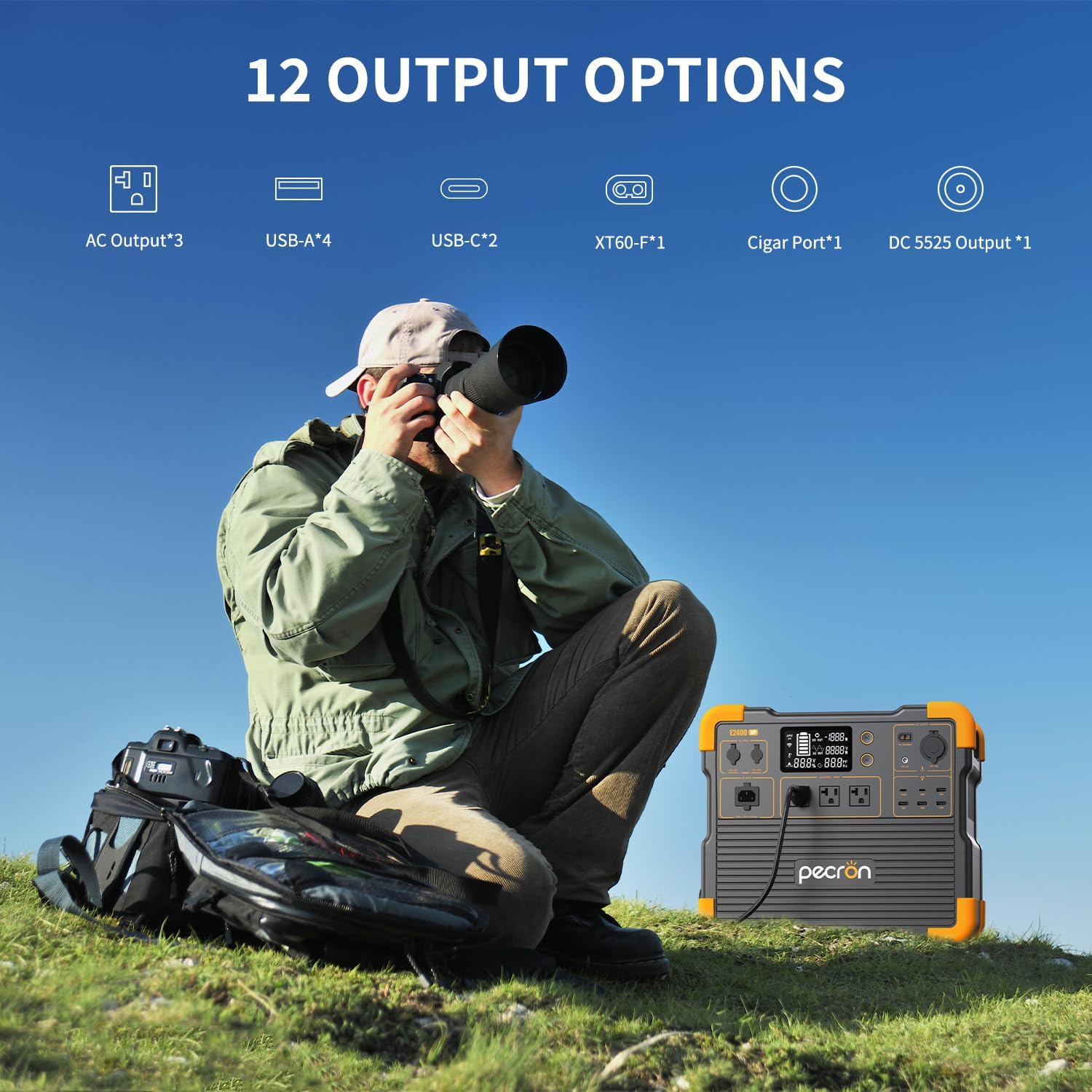
Image: A visual representation of the 12 distinct output options available on the pecron E2400LFP, including AC, USB-A, USB-C, XT60-F, Cigar Port, and DC 5525 outputs.
4.3 การชาร์จสถานีไฟฟ้า
แบตเตอรี่ E2400LFP สามารถชาร์จได้หลายวิธี:
- การชาร์จผนัง: Connect the AC charging cable to a standard wall outlet. Full charge in approximately 1.5 hours.
- การชาร์จแผงโซลาร์เซลล์: Connect compatible solar panels (not included) to the solar input port. Charging time varies based on solar intensity and panel wattage.
- การชาร์จรถยนต์: Use the provided car charging cable to recharge from your vehicle's 12V cigarette lighter port.

Image: Three scenarios demonstrating how the pecron E2400LFP can be recharged: from a wall outlet, using solar panels outdoors, and via a car charger inside a vehicle.
4.4 App Smart Control
Download the pecron mobile application to remotely monitor and control your E2400LFP. The app allows you to:
- Check machine status.
- View current power levels.
- Customize charging power settings.
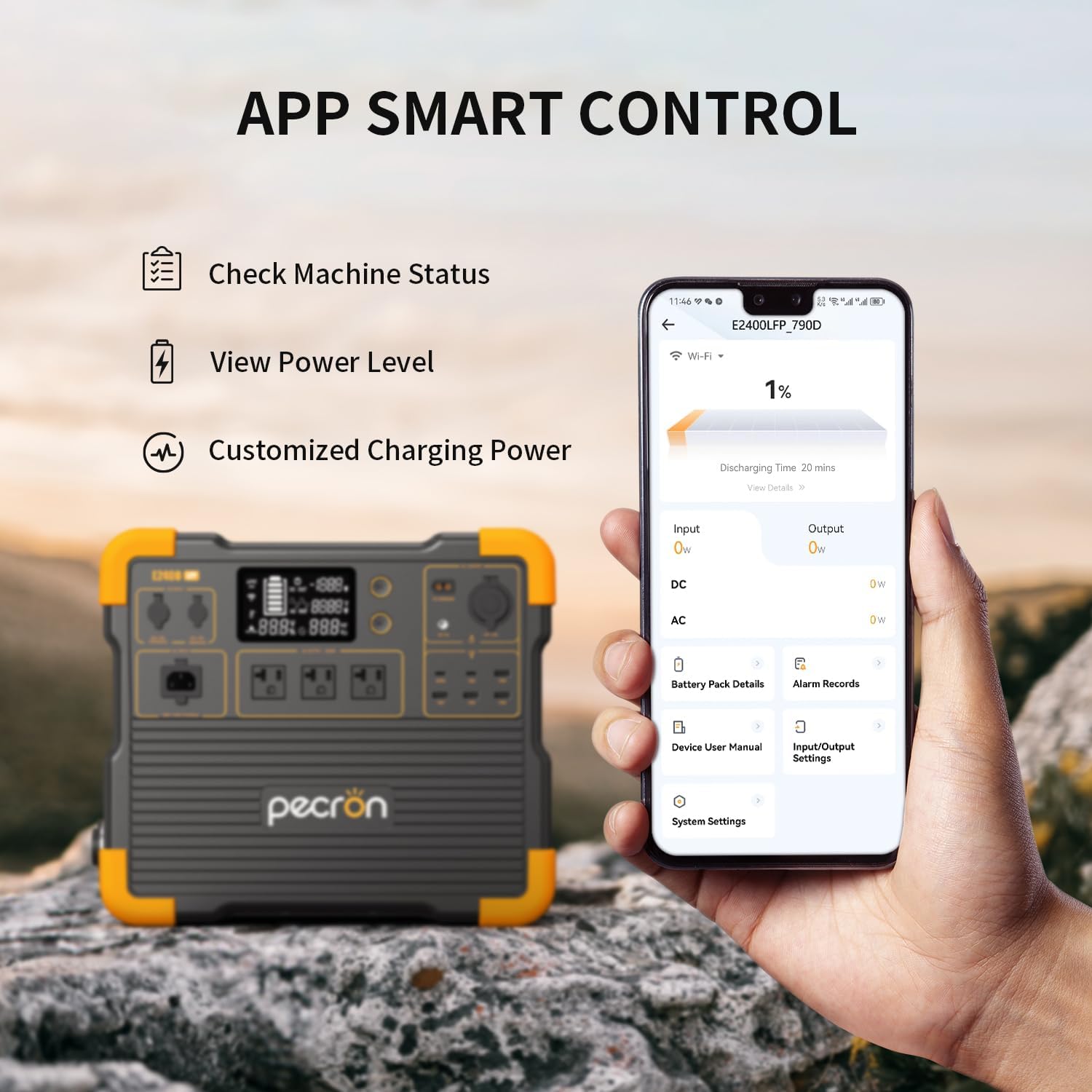
Image: A hand holding a smartphone displaying the pecron application interface, showing options to check machine status, view power level, and customize charging power, with the E2400LFP unit in the background.
5. การบำรุงรักษา
5.1 การดูแลแบตเตอรี่
The E2400LFP uses a durable LiFePO4 battery designed for 3500 complete charge cycles while retaining 80% of its original capacity. To maximize battery lifespan:
- เก็บอุปกรณ์ไว้ในที่แห้งและเย็น ห่างจากแสงแดดโดยตรง
- หลีกเลี่ยงการปล่อยแบตเตอรี่จนหมดบ่อยครั้ง
- ชาร์จอุปกรณ์อย่างน้อยทุกๆ 3-6 เดือน หากไม่ได้ใช้งานเป็นประจำ

ภาพ: ระเบิด view of the pecron E2400LFP, highlighting the internal LiFePO4 battery cells and emphasizing their 3500 complete charge cycles for long-term durability.
5.2 การทำความสะอาด
เช็ดทำความสะอาดภายนอกของสถานีจ่ายไฟด้วยผ้าแห้งเนื้อนุ่ม ห้ามใช้สารทำความสะอาดที่มีฤทธิ์กัดกร่อนหรือจุ่มเครื่องลงในน้ำ
6 การแก้ไขปัญหา
| ปัญหา | สาเหตุที่เป็นไปได้ | สารละลาย |
|---|---|---|
| หน่วยไม่เปิดเครื่อง | แบตเตอรี่หมด | Connect to AC power and charge for at least 30 minutes before attempting to power on. |
| เอาต์พุต AC ไม่ทำงาน | AC output is not enabled; device draws too much power. | Ensure AC output button is pressed. Check if the device's wattage exceeds 2400W. |
| การชาร์จช้าด้วยพลังงานแสงอาทิตย์ | Insufficient sunlight; solar panels not optimally positioned. | Ensure panels are in direct sunlight and angled correctly. Check cable connections. |
| ปัญหาการเชื่อมต่อแอพ | Bluetooth/Wi-Fi disabled; app not updated. | Ensure Bluetooth/Wi-Fi is enabled on your device. Update the pecron app to the latest version. |
7. ข้อมูลจำเพาะ
| คุณลักษณะ | ค่า |
|---|---|
| ชื่อรุ่น | E2400LFP |
| ความจุ | 2048Wh (expandable to 8192Wh) |
| เอาท์พุตไฟฟ้ากระแสสลับ | 2400W (ต่อเนื่อง) |
| ประเภทแบตเตอรี่ | ลิเธียมไอออนฟอสเฟต |
| รอบการชาร์จ | 3500+ รอบถึง 80% ของความจุ |
| เวลาชาร์จเร็ว | Approx. 90 minutes (AC Wall) |
| อินพุต Voltage | 120 โวลต์ |
| น้ำหนักสินค้า | 45 ปอนด์ |
| ขนาดสินค้า | ยาว 14.8 นิ้ว x กว้าง 9.3 นิ้ว x สูง 13 นิ้ว |
| คุณสมบัติพิเศษ | Portable, Fast Charging, Large Capacity, Long Last, Safety, Smart Control, UPS |
8. การรับประกันและการสนับสนุน
The pecron E2400LFP Portable Power Station comes with a 2+1 years worry-free warranty. This includes a standard 2-year warranty, with an additional 1 year upon product registration or specific conditions.
For technical support, warranty claims, or any inquiries, please contact pecron customer service. They are available ตลอด 24 ชม. 7 วันต่อสัปดาห์.
For more information, visit the official pecron store: ร้านค้าอย่างเป็นทางการของ pecron
เอกสารที่เกี่ยวข้อง - E2400LFP
 |
Pecron F3000 LFP Portable Power Station User Manual Comprehensive user manual for the Pecron F3000 LFP portable power station, covering specifications, operation, settings, charging, and troubleshooting. |
 |
คู่มือผู้ใช้สถานีพลังงานพกพา PECRON F3000 LFP Comprehensive user manual for the PECRON F3000 LFP portable power station, covering specifications, operating instructions, safety guidelines, and troubleshooting. |
 |
คู่มือผู้ใช้ PECRON E3600 LFP - คู่มือการใช้งานเครื่องจ่ายไฟแบบพกพา คู่มือผู้ใช้ฉบับนี้ให้ข้อมูลโดยละเอียดเกี่ยวกับเครื่องจ่ายไฟแบบพกพา PECRON E3600 LFP ครอบคลุมคุณสมบัติ ข้อมูลจำเพาะ การใช้งาน วิธีการชาร์จ ฟังก์ชัน UPS และแนวทางด้านความปลอดภัยที่สำคัญสำหรับอุปกรณ์ขนาด 3600W, 3072Wh นี้ |
 |
คู่มือผู้ใช้สถานีพลังงานพกพา PECRON E2400 LFP คู่มือผู้ใช้ที่ครอบคลุมสำหรับสถานีพลังงานพกพา PECRON E2400 LFP ซึ่งมีรายละเอียดคุณลักษณะ ข้อมูลจำเพาะ การทำงาน ความสามารถในการชาร์จพลังงานแสงอาทิตย์ คำถามที่พบบ่อย และแนวทางด้านความปลอดภัยที่สำคัญ |
 |
คู่มือผู้ใช้ PECRON EP3000-48V - สถานีพลังงานพกพา คู่มือผู้ใช้ฉบับสมบูรณ์สำหรับเครื่องจ่ายไฟฟ้าแบบพกพา PECRON EP3000-48V เรียนรู้เกี่ยวกับข้อมูลจำเพาะ ฟังก์ชัน การชาร์จ การต่อพ่วง ความปลอดภัย และการกำจัด |
 |
คู่มือผู้ใช้สถานีพลังงานพกพา PECRON F3000 LFP คู่มือการใช้งานฉบับสมบูรณ์สำหรับเครื่องสำรองไฟแบบพกพา PECRON F3000 LFP ซึ่งประกอบด้วยรายละเอียดเกี่ยวกับคุณสมบัติ วิธีการใช้งาน วิธีการชาร์จ ฟังก์ชัน UPS การเชื่อมต่อกับแอปพลิเคชัน การบำรุงรักษา การแก้ไขปัญหา และคำเตือนด้านความปลอดภัย |
Ask a question about this manual
Ask about setup, troubleshooting, compatibility, parts, safety, or missing instructions. Manuals+ will review the question and use this page’s manual context to help answer it.